1. ആമുഖം
This manual provides comprehensive instructions for the proper setup, operation, and maintenance of your Datalogic BC9030-BT Base/Charger. Please read this manual thoroughly before using the device to ensure optimal performance and safety.
2. ഉൽപ്പന്നം കഴിഞ്ഞുview
The Datalogic BC9030-BT is a multi-interface base and charging unit designed for Datalogic PowerScan devices. It facilitates communication via Bluetooth, RS-232, USB, and Keyboard Wedge (KBW) interfaces, while also providing charging capabilities for compatible devices.
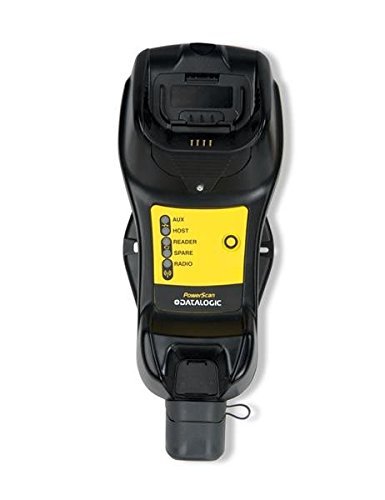
ചിത്രം 1: ഫ്രണ്ട് view of the Datalogic BC9030-BT Base/Charger. The unit features a device cradle at the top, a yellow panel with indicator lights (AUX, HOST, READER, SPARE, RADIO), and Datalogic branding. A protective cap is visible at the bottom.
2.1 പ്രധാന സവിശേഷതകൾ
- Multi-interface connectivity: RS-232, USB, Keyboard Wedge (KBW).
- Bluetooth (BT) wireless communication support.
- Integrated charging cradle for compatible Datalogic devices.
- Status indicator lights for various functions.
3. സജ്ജീകരണം
3.1 അൺപാക്ക് ചെയ്യുന്നു
Carefully remove all components from the packaging. Verify that all items are present and undamaged. Retain the packaging for future storage or shipping.
3.2. പവർ കണക്ഷൻ
- Connect the power adapter cable to the power input port on the base/charger.
- പവർ അഡാപ്റ്റർ ഒരു സാധാരണ ഇലക്ട്രിക്കൽ ഔട്ട്ലെറ്റിലേക്ക് പ്ലഗ് ചെയ്യുക.
- Confirm that the power indicator light (if present, or a general power-on indication) illuminates.
3.3. Host Interface Connection
The BC9030-BT supports multiple host interfaces. Select the appropriate cable and port for your system.
- USB കണക്ഷൻ: Connect a USB cable from the base/charger's USB port to an available USB port on your host computer.
- RS-232 കണക്ഷൻ: Connect an RS-232 serial cable from the base/charger's serial port to the serial port on your host computer.
- Keyboard Wedge (KBW) Connection: Connect the KBW cable from the base/charger to the keyboard port on your host computer, ensuring the keyboard is then connected to the KBW cable.
3.4. Bluetooth Pairing (for compatible devices)
Refer to the specific Datalogic device manual for detailed Bluetooth pairing instructions. Generally, the process involves:
- Ensure the base/charger is powered on.
- Place the compatible Datalogic device into the cradle.
- Initiate the pairing process on the Datalogic device. The base/charger will typically enter a discoverable mode automatically.
- Confirm successful pairing via the device's display or indicator lights.
4. പ്രവർത്തന നിർദ്ദേശങ്ങൾ
4.1. Charging a Device
To charge a compatible Datalogic device, simply place it securely into the charging cradle at the top of the BC9030-BT base/charger. Ensure proper alignment for the charging contacts. The device's charging indicator will typically illuminate to confirm charging is in progress.
4.2. ഡാറ്റ ട്രാൻസ്മിഷൻ
Once a compatible Datalogic device is connected (either physically in the cradle or via Bluetooth), data scanned by the device will be transmitted through the base/charger to the connected host system (via USB, RS-232, or KBW).
4.3. ഇൻഡിക്കേറ്റർ ലൈറ്റുകൾ
The yellow panel on the base/charger features several indicator lights:
- ഓക്സ്: Auxiliary function indicator.
- ഹോസ്റ്റ്: Indicates connection status with the host system.
- READER: Indicates status of the connected Datalogic reader/scanner.
- സ്പെയർ: Reserved for future use or specific configurations.
- റേഡിയോ: Indicates Bluetooth or wireless communication status.
Refer to the specific Datalogic device manual for detailed interpretations of these indicator lights in conjunction with your scanner.
5. പരിപാലനം
5.1. വൃത്തിയാക്കൽ
To clean the base/charger, disconnect it from power and use a soft, damp cloth. Do not use abrasive cleaners, solvents, or immerse the unit in water. Ensure all ports are dry before reconnecting power.
5.2. സംഭരണം
When not in use for extended periods, store the base/charger in a cool, dry environment, away from direct sunlight and extreme temperatures. Disconnect all cables before storage.
6. പ്രശ്നപരിഹാരം
If you encounter issues with your BC9030-BT Base/Charger, refer to the following common problems and solutions:
- ശക്തിയില്ല:
- Ensure the power adapter is securely connected to both the base/charger and a working electrical outlet.
- പവർ ഔട്ട്ലെറ്റ് പ്രവർത്തനക്ഷമമാണോയെന്ന് പരിശോധിക്കുക.
- ഉപകരണം ചാർജ് ചെയ്യുന്നില്ല:
- Ensure the device is correctly seated in the charging cradle and making proper contact with the charging pins.
- Check for any debris obstructing the charging contacts on both the base and the device.
- ഡാറ്റാ ട്രാൻസ്മിഷൻ ഇല്ല:
- Verify that the host interface cable (USB, RS-232, KBW) is securely connected to both the base/charger and the host computer.
- Check the HOST indicator light for connection status.
- For Bluetooth connections, ensure the device is properly paired and within range.
- Confirm that the correct drivers are installed on the host computer for USB or RS-232 interfaces.
- ബ്ലൂടൂത്ത് കണക്ഷൻ പ്രശ്നങ്ങൾ:
- Ensure the RADIO indicator light is active.
- Re-attempt the Bluetooth pairing process as described in Section 3.4.
- മറ്റ് ഉപകരണങ്ങളൊന്നും ബ്ലൂടൂത്ത് സിഗ്നലിനെ തടസ്സപ്പെടുത്തുന്നില്ലെന്ന് ഉറപ്പാക്കുക.
If problems persist, contact Datalogic technical support for further assistance.
7 സ്പെസിഫിക്കേഷനുകൾ
| ഫീച്ചർ | വിശദാംശങ്ങൾ |
|---|---|
| മോഡൽ നമ്പർ | BC9030-BT |
| ബ്രാൻഡ് | ഡാറ്റാലോഗിക് |
| കണക്റ്റിവിറ്റി ടെക്നോളജി | Bluetooth, USB, RS-232, Keyboard Wedge (KBW) |
| പവർ ഉറവിടം | Corded Electric (for base operation and charging) |
| പാക്കേജ് അളവുകൾ | 11.73 x 6.73 x 5.24 ഇഞ്ച് |
| ഭാരം | 2.01 പൗണ്ട് (ഏകദേശം) |
| നിർമ്മാതാവ് | BlueStar Inc. |
| ആദ്യ തീയതി ലഭ്യമാണ് | മെയ് 9, 2014 |
8. വാറൻ്റിയും പിന്തുണയും
For information regarding product warranty, please refer to the warranty card included with your product or visit the official Datalogic website. For technical support, service, or replacement parts, please contact Datalogic customer service or your authorized Datalogic reseller.
Datalogic Official Webസൈറ്റ്: www.datalogic.com


