1. ആമുഖം
This manual provides essential instructions for the safe and efficient operation of your QFX PBX-412200BTD Battery Powered Bluetooth Karaoke PA Speaker. This speaker system is designed to deliver powerful sound with wireless Bluetooth streaming, featuring dual 12-inch woofers, two 1-inch tweeters, and a 9-inch LCD screen. It includes a microphone for karaoke functions and is equipped with a built-in 12V 12Ah rechargeable battery for portable use. Please read this manual thoroughly before using the product and retain it for future reference.
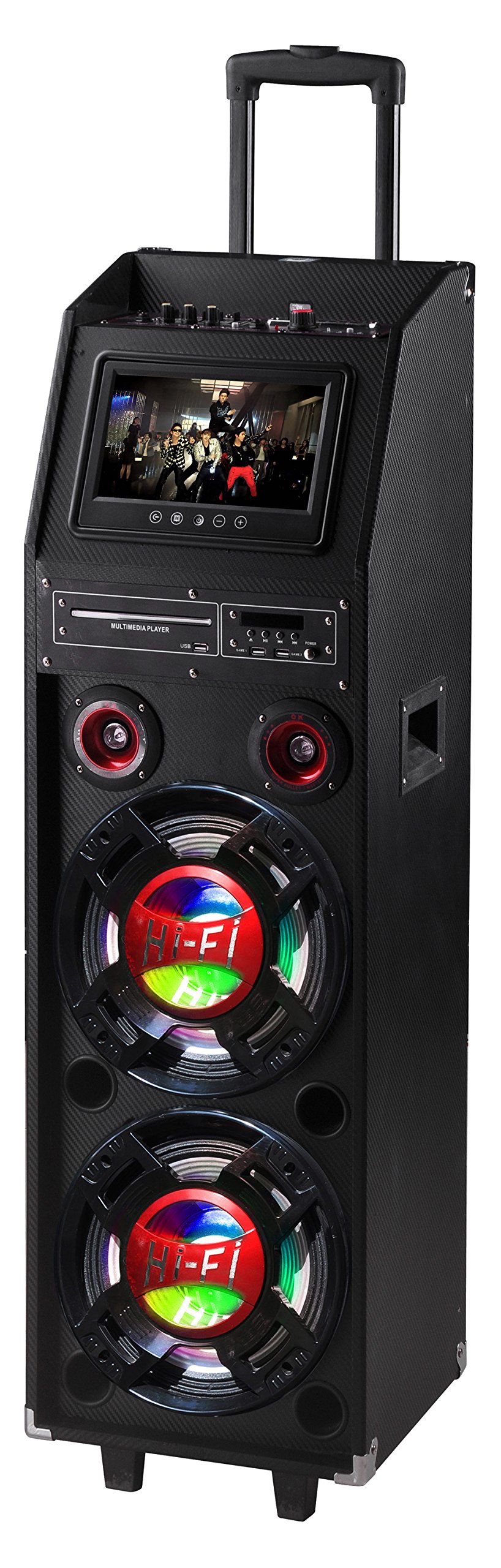
Figure 1: QFX PBX-412200BTD-R Speaker (Red model shown)
2 സുരക്ഷാ വിവരങ്ങൾ
Please observe the following safety precautions to prevent electric shock, fire, or injury.
- ഈ ഉപകരണം മഴയിലോ ഈർപ്പത്തിലോ തുറന്നുകാട്ടരുത്.
- Do not remove the cover or back of the unit. There are no user-serviceable parts inside. Refer all servicing to qualified service personnel.
- യൂണിറ്റിന് ചുറ്റും ശരിയായ വായുസഞ്ചാരം ഉറപ്പാക്കുക. വെന്റിലേഷൻ ദ്വാരങ്ങൾ തടയരുത്.
- പവർ കോർഡ് നടക്കാനോ നുള്ളിയെടുക്കാനോ സംരക്ഷിക്കുക, പ്രത്യേകിച്ചും പ്ലഗുകൾ, സ re കര്യപ്രദമായ റെസപ്റ്റാക്കലുകൾ, അവർ ഉപകരണത്തിൽ നിന്ന് പുറത്തുകടക്കുന്ന സ്ഥലം.
- മിന്നൽ കൊടുങ്കാറ്റുകളുടെ സമയത്തോ ദീർഘനേരം ഉപയോഗിക്കാത്ത സമയത്തോ ഈ ഉപകരണം അൺപ്ലഗ് ചെയ്യുക.
- ഉണങ്ങിയ തുണി ഉപയോഗിച്ച് മാത്രം വൃത്തിയാക്കുക.
- മുന്നറിയിപ്പ്: അർബുദവും പ്രത്യുത്പാദന ദോഷവും - www.P65Warnings.ca.gov. This warning is provided in compliance with California Proposition 65.
3. പാക്കേജ് ഉള്ളടക്കം
Carefully unpack your QFX PBX-412200BTD speaker and ensure all items listed below are present and in good condition.
- QFX PBX-412200BTD Speaker with Built-In Handle and Wheels
- Game Joysticks (2)
- മൈക്രോഫോൺ
- റിമോട്ട് കൺട്രോൾ
- റീചാർജ് ചെയ്യാവുന്ന ബാറ്ററി (മുൻകൂട്ടി ഇൻസ്റ്റാൾ ചെയ്തത്)
4. ഉൽപ്പന്ന സവിശേഷതകൾ
The QFX PBX-412200BTD offers a range of features for an enhanced audio experience:
- Integrated Disco Lights for party ambiance.
- Built-in FM Radio tuner.
- USB and SD card player for direct media playback.
- Dual 12-inch Woofers and two 1-inch Tweeters for powerful sound output.
- RCA input/output and Video output for versatile connectivity.
- Convenient Handle and Caster Wheels for easy transport.
- Includes Microphone, 2 Game Joysticks, and Remote Control.
- 9 ഇഞ്ച് എൽസിഡി സ്ക്രീൻ.
- Built-in 12V 12Ah rechargeable battery providing 2-3 hours playing time at 50% volume.
5. നിയന്ത്രണങ്ങളും കണക്ഷനുകളും
Familiarize yourself with the control panel and connection ports of your speaker.
5.1. Top Panel Controls (Exampലെ)
(Image of top panel controls would be placed here, showing volume knobs, mode buttons, etc.)
Description: This image would display the main control panel located on the top of the speaker, highlighting buttons for Power, Mode selection (Bluetooth, FM, USB/SD, AUX), Play/Pause, Track Skip, Master Volume, Microphone Volume, Echo, and Bass/Treble controls.
- പവർ ബട്ടൺ: യൂണിറ്റ് ഓൺ/ഓഫ് ചെയ്യുന്നു.
- മോഡ് ബട്ടൺ: Switches between Bluetooth, FM Radio, USB/SD, and AUX input modes.
- പ്ലേ/താൽക്കാലികമായി നിർത്തുക ബട്ടൺ: Starts or pauses playback in Bluetooth, USB, or SD modes.
- മുമ്പത്തെ/അടുത്ത ബട്ടണുകൾ: Skips to the previous or next track/station.
- മാസ്റ്റർ വോളിയം നോബ്: മൊത്തത്തിലുള്ള ശബ്ദ ഔട്ട്പുട്ട് നില ക്രമീകരിക്കുന്നു.
- മൈക്ക് വോളിയം നോബ്: മൈക്രോഫോൺ ഇൻപുട്ട് വോളിയം ക്രമീകരിക്കുന്നു.
- എക്കോ നോബ്: മൈക്രോഫോണിനുള്ള എക്കോ ഇഫക്റ്റ് നിയന്ത്രിക്കുന്നു.
- ബാസ്/ട്രെബിൾ നോബുകൾ: Adjusts the low and high frequency response.
5.2. Rear Panel Connections (Exampലെ)
(Image of rear panel connections would be placed here, showing input/output ports.)
Description: This image would illustrate the rear panel of the speaker, indicating ports such as USB, SD card slot, Microphone Input (6.3mm), AUX Input (RCA), RCA Audio Output, Video Output, and DC Power Input.
- USB പോർട്ട്: യുഎസ്ബി ഫ്ലാഷ് ഡ്രൈവുകൾ ബന്ധിപ്പിക്കുന്നതിന്.
- SD കാർഡ് സ്ലോട്ട്: SD മെമ്മറി കാർഡുകൾ ചേർക്കുന്നതിന്.
- MIC ഇൻപുട്ട്: ഉൾപ്പെടുത്തിയിരിക്കുന്ന മൈക്രോഫോൺ ബന്ധിപ്പിക്കുന്നതിന് 6.3mm ജാക്ക്.
- AUX ഇൻപുട്ട് (RCA): For connecting external audio devices via RCA cables.
- ആർസിഎ ഓഡിയോ ഔട്ട്പുട്ട്: For connecting to another audio system.
- വീഡിയോ ഔട്ട്പുട്ട്: For connecting to an external display to show video content from USB/SD or karaoke lyrics.
- ഡിസി പവർ ഇൻപുട്ട്: For connecting the power adapter to charge the battery or operate the unit.
6. സജ്ജീകരണം
6.1. പ്രാരംഭ ചാർജിംഗ്
Before first use, fully charge the speaker's built-in battery.
- Connect the provided power adapter to the DC Power Input port on the rear panel of the speaker.
- ഒരു സാധാരണ എസി പവർ ഔട്ട്ലെറ്റിലേക്ക് അഡാപ്റ്റർ പ്ലഗ് ചെയ്യുക.
- The charging indicator light (if present) will illuminate. Allow several hours for a full charge.
- Once fully charged, the indicator light may change color or turn off. Disconnect the power adapter.
6.2. സ്പീക്കറെ സ്ഥാനപ്പെടുത്തൽ
Place the speaker on a stable, flat surface. Utilize the built-in handle and caster wheels for easy relocation. Ensure adequate space around the speaker for ventilation.
7. പ്രവർത്തന നിർദ്ദേശങ്ങൾ
7.1. പവർ ഓൺ/ഓഫ്
അമർത്തിപ്പിടിക്കുക പവർ ബട്ടൺ on the top panel to turn the speaker ON or OFF.
7.2. ബ്ലൂടൂത്ത് മോഡ്
- Turn on the speaker. The default mode is usually Bluetooth. If not, press the മോഡ് ബട്ടൺ until "Bluetooth" appears on the LCD screen.
- നിങ്ങളുടെ മൊബൈൽ ഉപകരണത്തിൽ (സ്മാർട്ട്ഫോൺ, ടാബ്ലെറ്റ് മുതലായവ), ബ്ലൂടൂത്ത് പ്രവർത്തനക്ഷമമാക്കി ലഭ്യമായ ഉപകരണങ്ങൾക്കായി തിരയുക.
- Select "QFX PBX-412200BTD" (or similar name) from the list of devices.
- Once paired, the speaker will emit an audible confirmation. You can now stream audio from your device.
- ഉപയോഗിക്കുക പ്ലേ/താൽക്കാലികമായി നിർത്തുക ഒപ്പം മുമ്പത്തേത്/അടുത്തത് buttons on the speaker or your device to control playback.
7.3. എഫ്എം റേഡിയോ മോഡ്
- അമർത്തുക മോഡ് ബട്ടൺ until "FM" appears on the LCD screen.
- അമർത്തുക പ്ലേ ചെയ്യുക/താൽക്കാലികമായി നിർത്തുക ബട്ടൺ once to initiate an automatic scan for FM stations. The speaker will save all found stations.
- ഉപയോഗിക്കുക മുമ്പത്തെ/അടുത്ത ബട്ടണുകൾ to navigate through the saved stations.
7.4. യുഎസ്ബി/എസ്ഡി കാർഡ് പ്ലേബാക്ക്
- ഇതിലേക്ക് ഒരു USB ഫ്ലാഷ് ഡ്രൈവ് ചേർക്കുക USB പോർട്ട് അല്ലെങ്കിൽ ഒരു SD കാർഡ് SD കാർഡ് സ്ലോട്ട്.
- The speaker should automatically switch to USB or SD mode and begin playing compatible audio files. ഇല്ലെങ്കിൽ, അമർത്തുക മോഡ് ബട്ടൺ ശരിയായ ഉറവിടം തിരഞ്ഞെടുക്കാൻ.
- ഉപയോഗിക്കുക പ്ലേ/താൽക്കാലികമായി നിർത്തുക ഒപ്പം മുമ്പത്തേത്/അടുത്തത് പ്ലേബാക്ക് നിയന്ത്രിക്കുന്നതിനുള്ള ബട്ടണുകൾ.
- For video playback from USB/SD, connect the വീഡിയോ ഔട്ട്പുട്ട് ഒരു ബാഹ്യ ഡിസ്പ്ലേയിലേക്ക്.
7.5. AUX ഇൻപുട്ട്
- ഒരു ബാഹ്യ ഓഡിയോ ഉപകരണം (ഉദാ: MP3 പ്ലെയർ, ലാപ്ടോപ്പ്) ഇതിലേക്ക് ബന്ധിപ്പിക്കുക RCA AUX ഇൻപുട്ട് using appropriate RCA cables.
- അമർത്തുക മോഡ് ബട്ടൺ until "AUX" appears on the LCD screen.
- നിങ്ങളുടെ ബാഹ്യ ഉപകരണത്തിൽ നിന്ന് പ്ലേബാക്കും ശബ്ദവും നിയന്ത്രിക്കുക.
7.6. കരോക്കെ ഫംഗ്ഷൻ
- ഉൾപ്പെടുത്തിയിരിക്കുന്ന മൈക്രോഫോൺ ഇതിലേക്ക് ബന്ധിപ്പിക്കുക MIC ഇൻപുട്ട് ജാക്ക്.
- Play your desired karaoke track via Bluetooth, USB/SD, or AUX input.
- ഉപയോഗിച്ച് മൈക്രോഫോൺ വോളിയം ക്രമീകരിക്കുക മൈക്ക് വോളിയം നോബ്.
- ഉപയോഗിച്ച് എക്കോ ഇഫക്റ്റ് ക്രമീകരിക്കുക എക്കോ നോബ് for desired vocal enhancement.
- For displaying lyrics, connect the വീഡിയോ ഔട്ട്പുട്ട് to a compatible external display.
8. പരിപാലനം
8.1. വൃത്തിയാക്കൽ
- വൃത്തിയാക്കുന്നതിന് മുമ്പ് എപ്പോഴും പവർ ഔട്ട്ലെറ്റിൽ നിന്ന് സ്പീക്കർ അൺപ്ലഗ് ചെയ്യുക.
- സ്പീക്കറിന്റെ പുറംഭാഗങ്ങൾ തുടയ്ക്കാൻ മൃദുവായതും ഉണങ്ങിയതുമായ തുണി ഉപയോഗിക്കുക.
- Do not use liquid cleaners, aerosol sprays, or abrasive chemicals, as these may damage the finish or internal components.
8.2. ബാറ്ററി പരിചരണം
- ബാറ്ററി ലൈഫ് വർദ്ധിപ്പിക്കാൻ, ബാറ്ററി ഇടയ്ക്കിടെ പൂർണ്ണമായും ഡിസ്ചാർജ് ചെയ്യുന്നത് ഒഴിവാക്കുക.
- Recharge the battery regularly, even if the speaker is not in use for extended periods (e.g., once every 3 months).
- ഉപയോഗിക്കാത്തപ്പോൾ തണുത്തതും വരണ്ടതുമായ സ്ഥലത്ത് സ്പീക്കർ സൂക്ഷിക്കുക.
9. പ്രശ്നപരിഹാരം
| പ്രശ്നം | സാധ്യമായ കാരണം | പരിഹാരം |
|---|---|---|
| ശക്തിയില്ല | ബാറ്ററി ഡിസ്ചാർജ് ചെയ്തു; പവർ കേബിൾ ബന്ധിപ്പിച്ചിട്ടില്ല. | ബാറ്ററി ചാർജ് ചെയ്യുക; പവർ കേബിൾ സുരക്ഷിതമായി ബന്ധിപ്പിച്ചിട്ടുണ്ടെന്ന് ഉറപ്പാക്കുക. |
| ശബ്ദമില്ല | Volume too low; Incorrect mode selected; Device not paired (Bluetooth). | Increase master volume; Press Mode button to select correct input; Re-pair Bluetooth device. |
| ബ്ലൂടൂത്ത് കണക്റ്റ് ചെയ്യുന്നില്ല | Speaker not in Bluetooth mode; Device too far; Interference. | സ്പീക്കർ ബ്ലൂടൂത്ത് മോഡിലാണെന്ന് ഉറപ്പാക്കുക; ഉപകരണം അടുത്തേക്ക് നീക്കുക; മറ്റ് ബ്ലൂടൂത്ത് ഉപകരണങ്ങൾ ഓഫാക്കുക. |
| മൈക്രോഫോൺ പ്രവർത്തിക്കുന്നില്ല | മൈക്രോഫോൺ കണക്റ്റ് ചെയ്തിട്ടില്ല; മൈക്കിന്റെ ശബ്ദം വളരെ കുറവാണ്. | Ensure microphone is securely plugged in; Increase Mic Volume knob. |
| USB/SD പ്ലേബാക്ക് പ്രശ്നങ്ങൾ | പൊരുത്തമില്ലാത്തത് file ഫോർമാറ്റ്; കേടായ മീഡിയ; തെറ്റായ മോഡ്. | ഉറപ്പാക്കുക files are in supported format (e.g., MP3); Try a different USB/SD card; Select correct mode. |
10 സ്പെസിഫിക്കേഷനുകൾ
- മോഡൽ: PBX-412200BTD
- ഉൽപ്പന്ന അളവുകൾ: 16.5 x 14.75 x 49.6 ഇഞ്ച് (41.9 x 37.5 x 126 സെ.മീ)
- ഇനത്തിൻ്റെ ഭാരം: 69 പൗണ്ട് (31.3 കി.ഗ്രാം)
- സ്പീക്കർ കോൺഫിഗറേഷൻ: Two 12-inch Woofers, Two 1-inch Tweeters
- ഊർജ്ജ സ്രോതസ്സ്: ബാറ്ററി പവർ (ബിൽറ്റ്-ഇൻ 12V 12Ah റീചാർജ് ചെയ്യാവുന്ന ബാറ്ററി)
- ബാറ്ററി ലൈഫ്: 2% വോളിയത്തിൽ ഏകദേശം 3-50 മണിക്കൂർ
- കണക്റ്റിവിറ്റി: Bluetooth, USB, SD, FM Radio, RCA AUX Input, RCA Audio Output, Video Output, Microphone Input
- ഉൾപ്പെടുത്തിയ ഘടകങ്ങൾ: Speaker, 2 Game Joysticks, Microphone, Remote Control, Rechargeable Battery
- നിർമ്മാതാവ്: QFX USA
- ആദ്യം ലഭ്യമായ തീയതി: ജൂലൈ 29, 2016
11. വാറൻ്റിയും പിന്തുണയും
For warranty information and technical support, please refer to the warranty card included with your product or visit the official QFX webസൈറ്റ്. ഏതെങ്കിലും വാറന്റി ക്ലെയിമുകൾക്ക് വാങ്ങിയതിന്റെ തെളിവായി നിങ്ങളുടെ വാങ്ങൽ രസീത് സൂക്ഷിക്കുക.
QFX Official Webസൈറ്റ്: While a direct link is not provided in this manual, you can typically find support information by searching for "QFX Electronics" online.


