ആമുഖം
The TC Electronic SUB 'N' UP OCTAVER is an advanced effects pedal designed to enrich your guitar tone with octave effects. It offers versatile control over upper and lower octaves, along with innovative TonePrint technology for custom sound creation and access to a library of artist presets. This manual provides comprehensive instructions for setting up, operating, and maintaining your SUB 'N' UP OCTAVER pedal.

ചിത്രം 1: മുകളിൽ view of the TC Electronic SUB 'N' UP OCTAVER pedal, highlighting the control knobs and footswitch.
സജ്ജമാക്കുക
പവർ കണക്ഷൻ
The SUB 'N' UP OCTAVER requires a 9V DC 100mA power supply (center negative). Connect the power adapter to the DC IN jack on the pedal. Ensure the power supply meets the specified requirements to prevent damage.
ഓഡിയോ കണക്ഷനുകൾ
- ഇതിലേക്ക് നിങ്ങളുടെ ഗിറ്റാർ ബന്ധിപ്പിക്കുക ഇൻപുട്ട് jack on the right side of the pedal using a standard 1/4 inch instrument cable.
- ബന്ധിപ്പിക്കുക ഔട്ട്പുട്ട് പെഡലിന്റെ ഇടതുവശത്തുള്ള ജാക്ക് നിങ്ങളുടെ നേരെ amplifier or the next pedal in your signal chain using another 1/4 inch instrument cable.
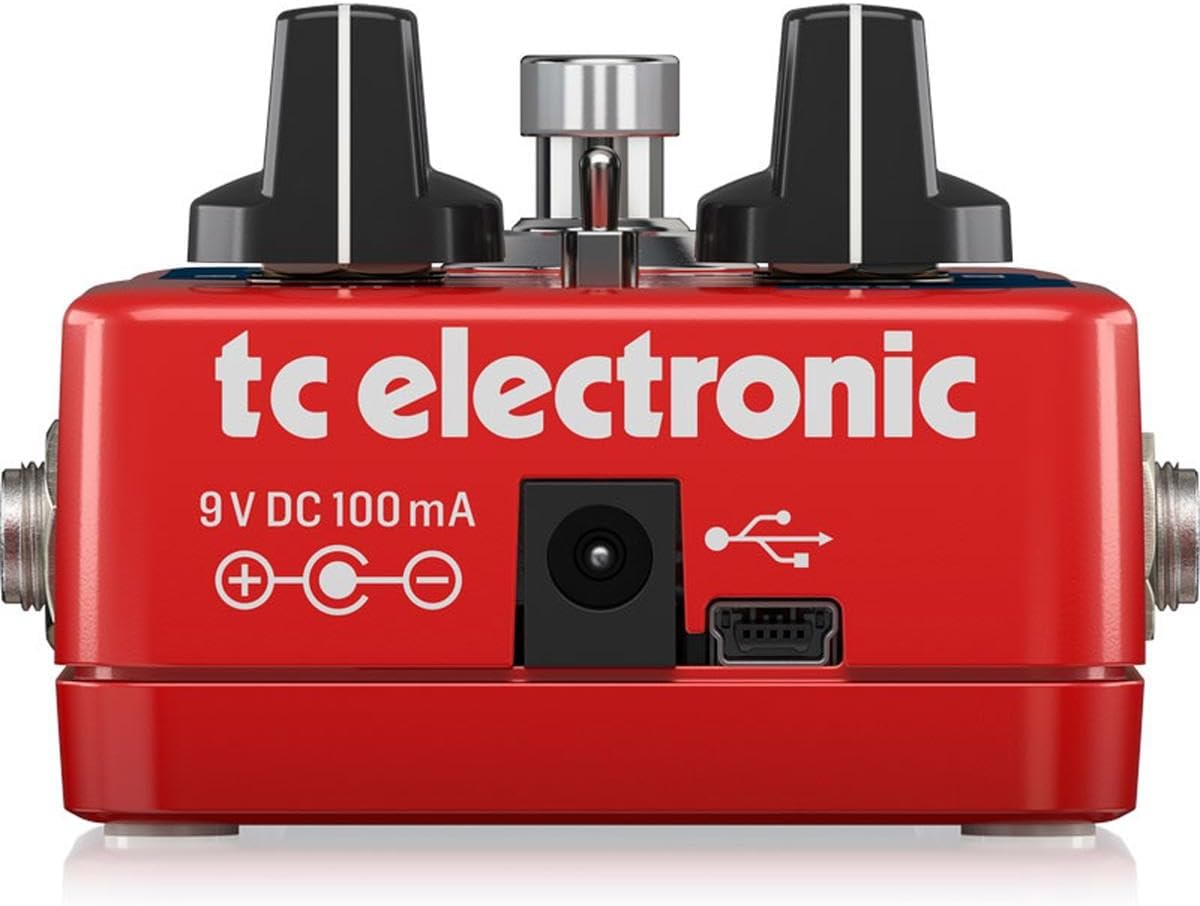
ചിത്രം 2: പിൻഭാഗം view of the pedal, illustrating the 9V DC power input and USB port for connectivity.
പ്രവർത്തന നിയന്ത്രണങ്ങൾ
The SUB 'N' UP OCTAVER features intuitive controls for shaping your octave sound:
- ഡ്രൈ നോബ്: Controls the level of your original, unprocessed guitar signal.
- UP Knob: Adjusts the level of the octave-up effect.
- SUB Knob: Controls the level of the first octave-down effect.
- SUB 2 Knob: Adjusts the level of the second octave-down effect.
- Mode Switch (POLY/TONEPRINT/CLASSIC): Selects between different octave modes:
- പോളി: Polyphonic mode, suitable for chords and complex passages.
- ടോൺപ്രിന്റ്: Activates a custom TonePrint preset loaded via the TonePrint app.
- ക്ലാസിക്: Monophonic mode, ideal for single-note lines and a vintage octave sound.
- കാൽ സ്വിച്ച്: Engages or bypasses the effect. The pedal features True Bypass for signal integrity when off.

ചിത്രം 3: കോണാകൃതിയിലുള്ളത് view of the pedal's controls, including the DRY, UP, SUB, SUB 2 knobs, and the mode switch.
TonePrint Technology
TonePrint allows you to customize your octave sounds or load presets created by renowned artists. This feature significantly expands the pedal's sonic capabilities.
Using TonePrint
- Download the free TC Electronic TonePrint App for your smartphone or computer.
- Connect your SUB 'N' UP OCTAVER pedal to your device via the USB port (for computer) or by holding your phone's speaker to your guitar pickup (for smartphone beaming).
- Browse the extensive library of artist TonePrints or create your own custom settings.
- Upload your chosen TonePrint to the pedal. Once uploaded, select the TONEPRINT mode on the pedal's switch to activate your custom sound.

Figure 4: The TonePrint app interface on a smartphone, used for customizing pedal settings.
ഉൽപ്പന്ന വീഡിയോകൾ
Electro-Harmonix Pico POG Poly Octave Generator Pedal Overview
ഈ വീഡിയോ ഒരു ഓവർ നൽകുന്നുview of the Electro-Harmonix Pico POG Poly Octave Generator Pedal, demonstrating its features and sound capabilities. While not the exact model, it showcases similar octave pedal functionalities.
JOYO XVI Octave Effect Pedal (R13) Demonstration
A demonstration of the JOYO XVI Octave Effect Pedal, highlighting its octave effects and controls. This video offers insights into the general operation and sound of octave pedals.
JOYO Voodoo Octave Pedal (JF-12) Overview
This video presents the JOYO Voodoo Octave Pedal, showcasing its features and the octave effects it produces. It serves as a reference for understanding octave pedal functionalities.
Electro-Harmonix/JHS Lizard Queen Octave Fuzz Pedal Demonstration
A demonstration of the Electro-Harmonix/JHS Lizard Queen Octave Fuzz Pedal, illustrating its unique blend of octave and fuzz effects. This video provides context for combined octave and distortion sounds.
സ്പെസിഫിക്കേഷനുകൾ
| ഫീച്ചർ | വിശദാംശങ്ങൾ |
|---|---|
| ഇനത്തിൻ്റെ ഭാരം | 9.2 ഔൺസ് (0.26 കിലോഗ്രാം) |
| ഉൽപ്പന്ന അളവുകൾ | 4.8 x 1.97 x 2.87 ഇഞ്ച് |
| ബോഡി മെറ്റീരിയൽ | പ്ലാസ്റ്റിക് |
| കണക്റ്റർ തരം | 1/4 ഇഞ്ച് ഓഡിയോ ജാക്ക് |
| ഹാർഡ്വെയർ ഇന്റർഫേസ് | 1/4-ഇഞ്ച് ഓഡിയോ |
| സിഗ്നൽ ഫോർമാറ്റ് | അനലോഗ് |
| പവർ ഉറവിടം | കോർഡഡ് ഇലക്ട്രിക് |
| വാല്യംtage | 9V |
| Ampഉന്മേഷം | 0.1 മില്ലിamps |
| ഇനം മോഡൽ നമ്പർ | Subnup |
മെയിൻ്റനൻസ്
To ensure the longevity and optimal performance of your SUB 'N' UP OCTAVER pedal, follow these maintenance guidelines:
- മൃദുവായതും ഉണങ്ങിയതുമായ തുണി ഉപയോഗിച്ച് തുടച്ച് പെഡൽ വൃത്തിയായി സൂക്ഷിക്കുക. അബ്രാസീവ് ക്ലീനറുകളോ ലായകങ്ങളോ ഉപയോഗിക്കുന്നത് ഒഴിവാക്കുക.
- തീവ്രമായ താപനില, ഈർപ്പം, നേരിട്ടുള്ള സൂര്യപ്രകാശം എന്നിവയിൽ നിന്ന് പെഡലിനെ സംരക്ഷിക്കുക.
- പെഡൽ ദീർഘനേരം ഉപയോഗത്തിലില്ലാത്തപ്പോൾ വൈദ്യുതി വിതരണം വിച്ഛേദിക്കുക.
- Handle the footswitch and knobs gently to prevent mechanical damage.
ട്രബിൾഷൂട്ടിംഗ്
If you encounter issues with your SUB 'N' UP OCTAVER, refer to the following common troubleshooting steps:
- ശബ്ദമില്ല:
- പവർ സപ്ലൈ ശരിയായി ബന്ധിപ്പിച്ചിട്ടുണ്ടെന്നും പ്രവർത്തിക്കുന്നുണ്ടെന്നും ഉറപ്പാക്കുക.
- Check all audio cables for secure connections and proper functionality.
- Verify that the pedal is engaged (footswitch LED is on).
- Adjust the DRY, UP, SUB, and SUB 2 knobs to ensure they are not set to minimum.
- മോശം ശബ്ദ നിലവാരം/ശബ്ദം:
- Check for faulty cables or power supply.
- Ensure proper impedance matching with other pedals and your ampജീവൻ.
- Reduce the gain on your amplifier or preceding pedals if distortion is unwanted.
- TonePrint Issues:
- Ensure the pedal is in TONEPRINT mode.
- Verify that the TonePrint App is updated and the pedal is correctly connected for beaming/uploading.
വാറൻ്റിയും പിന്തുണയും
TC Electronic products are designed for reliability and performance. For detailed warranty information and technical support, please refer to the official TC Electronic webസൈറ്റിൽ ബന്ധപ്പെടുക അല്ലെങ്കിൽ അവരുടെ ഉപഭോക്തൃ സേവനവുമായി ബന്ധപ്പെടുക. ഏതെങ്കിലും വാറന്റി ക്ലെയിമുകൾക്കായി നിങ്ങളുടെ വാങ്ങലിന്റെ തെളിവ് സൂക്ഷിക്കുക.


