ആമുഖം
This manual provides detailed instructions for the proper setup, operation, and maintenance of your Gembird Desktop Microphone MIC-205. Please read this manual thoroughly before using the product to ensure optimal performance and longevity. The Gembird MIC-205 is designed for various applications including gaming, streaming, video conferencing, and voice recording on personal computers.
പാക്കേജ് ഉള്ളടക്കം
പാക്കേജിൽ എല്ലാ ഇനങ്ങളും ഉണ്ടെന്ന് ഉറപ്പാക്കുക:
- Gembird Desktop Microphone MIC-205 (with integrated 3.5 mm jack cable)

Image: The Gembird Desktop Microphone MIC-205 shown in its retail blister packaging, highlighting the product's appearance and branding.
സജ്ജമാക്കുക
- മൈക്രോഫോൺ അൺപാക്ക് ചെയ്യുക: Carefully remove the Gembird MIC-205 microphone from its packaging.
- മൈക്രോഫോൺ സ്ഥാപിക്കുക: Place the microphone on a stable, flat surface such as your desktop. Ensure it is positioned optimally for your voice input, typically 15-30 cm (6-12 inches) from your mouth. The flexible gooseneck allows for easy adjustment of the microphone's angle and height.
- കമ്പ്യൂട്ടറുമായി ബന്ധിപ്പിക്കുക: Locate the 3.5 mm audio input jack (often colored pink or marked with a microphone icon) on your personal computer. Insert the 3.5 mm connector from the microphone cable firmly into this port.
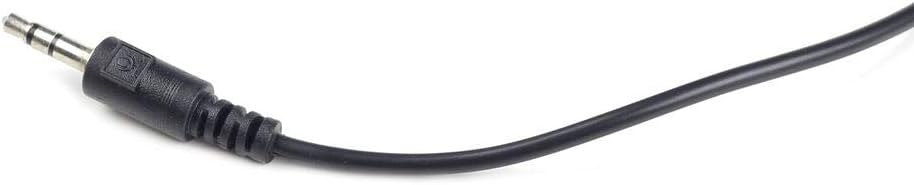
ചിത്രം: ഒരു ക്ലോസ്-അപ്പ് view of the 3.5 mm jack connector, which is used to connect the microphone to a computer's audio input port.
- Configure Audio Settings (PC):
- വിൻഡോസ്: Right-click the speaker icon in the system tray, select "Sound settings" or "Recording devices." Ensure the Gembird MIC-205 (or "Microphone" / "Line In") is selected as the default recording device. Adjust input volume as needed.
- മാകോസ്: Go to "System Preferences" > "Sound" > "Input." Select the connected microphone and adjust the input volume.
പ്രവർത്തന നിർദ്ദേശങ്ങൾ
The Gembird MIC-205 is a plug-and-play device. Once connected and configured, it is ready for use.
- പവർ ഓൺ/ഓഫ്: The microphone typically draws power directly from the computer's audio port. Some models may feature an on/off switch on the base; ensure it is in the "On" position if present.
- സ്ഥാനം ക്രമീകരിക്കുക: Use the flexible gooseneck to adjust the microphone head for optimal sound capture. For best results, speak directly towards the microphone.
- ഏകദിശ പോളാർ പാറ്റേൺ: The MIC-205 features a unidirectional polar pattern, meaning it primarily picks up sound from the front, reducing background noise from other directions. Position the microphone so the front faces the sound source (your mouth).
- സോഫ്റ്റ്വെയർ ഉപയോഗം: Open your desired application (e.g., voice chat, recording software, streaming software) and ensure the Gembird MIC-205 is selected as the input device within that application's settings.

Image: The Gembird Desktop Microphone MIC-205, showcasing its flexible gooseneck and stable base, ready for desktop use.
മെയിൻ്റനൻസ്
- വൃത്തിയാക്കൽ: Use a soft, dry cloth to wipe the microphone's exterior. Do not use liquid cleaners or abrasive materials, as these can damage the device.
- സംഭരണം: When not in use, store the microphone in a clean, dry place away from extreme temperatures and direct sunlight. Avoid bending the gooseneck excessively or repeatedly.
- കേബിൾ കെയർ: Do not pull the cable forcefully or bend it sharply, as this can damage the internal wiring or the connector.
ട്രബിൾഷൂട്ടിംഗ്
| പ്രശ്നം | സാധ്യമായ പരിഹാരം |
|---|---|
| No sound or very low sound output. |
|
| Poor sound quality (e.g., static, muffled, too quiet). |
|
| കമ്പ്യൂട്ടർ മൈക്രോഫോൺ തിരിച്ചറിഞ്ഞില്ല. |
|
സ്പെസിഫിക്കേഷനുകൾ
| ഫീച്ചർ | വിശദാംശങ്ങൾ |
|---|---|
| ബ്രാൻഡ് | ജെംബേർഡ് |
| മോഡൽ | MIC-205 |
| മൈക്രോഫോൺ ഫോം ഫാക്ടർ | അതിർത്തി |
| കണക്റ്റിവിറ്റി ടെക്നോളജി | സഹായക |
| കണക്റ്റർ തരം | 3.5 mm ജാക്ക് |
| അനുയോജ്യമായ ഉപകരണങ്ങൾ | പേഴ്സണൽ കമ്പ്യൂട്ടർ |
| നിറം | കറുപ്പ് |
| ഉൾപ്പെടുത്തിയ ഘടകങ്ങൾ | മൈക്രോഫോൺ |
| പോളാർ പാറ്റേൺ | ഏകദിശ |
| ഇനത്തിൻ്റെ ഭാരം | 0.14 കിലോഗ്രാം (140 ഗ്രാം) |
| പ്രതിരോധം | 250 ഓം |
| ഉൽപ്പന്ന അളവുകൾ (L x W x H) | 34.5 x 20 x 10 സെ.മീ |
| പവർ ഉറവിടം | കോർഡഡ് ഇലക്ട്രിക് |
| ഹാർഡ്വെയർ പ്ലാറ്റ്ഫോം | PC |
| ചാനലുകളുടെ എണ്ണം | 1 |
| ശുപാർശ ചെയ്യുന്ന ഉപയോഗങ്ങൾ | Gaming, Streaming, Video Conference, Voice Recording |
വാറൻ്റി വിവരങ്ങൾ
For specific warranty terms and conditions, please refer to the warranty card included with your product or contact your retailer. Gembird products typically come with a manufacturer's warranty against defects in materials and workmanship. Keep your proof of purchase for warranty claims.
പിന്തുണ
If you require further assistance or have questions not covered in this manual, please visit the official Gembird website for support resources, FAQs, and contact information. You may also contact your point of purchase for customer service.
ജെംബേർഡ് ഒഫീഷ്യൽ Webസൈറ്റ്: www.gembird.com (www.gembird.com) എന്ന വെബ്സൈറ്റ് സന്ദർശിക്കുക.


