1. ആമുഖം
വാങ്ങിയതിന് നന്ദി.asing the Sony Signature Series Audio Component Amplifier TA-ZH1ES. This high-resolution headphone amplifier is designed to deliver exceptional audio quality, featuring advanced technologies such as Sony's enhanced S-Master HX digital amplifier and DSD Remastering Engine. This manual provides essential information for the proper setup, operation, and maintenance of your device.
2 സുരക്ഷാ വിവരങ്ങൾ
Please read all safety instructions carefully before using the ampലൈഫയർ. ഭാവി റഫറൻസിനായി ഈ മാനുവൽ സൂക്ഷിക്കുക.
- ഊർജ്ജ സ്രോതസ്സ്: Connect the unit only to the AC power outlet specified in the specifications.
- വെൻ്റിലേഷൻ: അമിതമായി ചൂടാകുന്നത് തടയാൻ യൂണിറ്റിന് ചുറ്റും മതിയായ വായുസഞ്ചാരം ഉറപ്പാക്കുക. വെന്റിലേഷൻ ദ്വാരങ്ങൾ തടയരുത്.
- ഈർപ്പം: തീ അല്ലെങ്കിൽ വൈദ്യുത ആഘാതം കുറയ്ക്കുന്നതിന് യൂണിറ്റിനെ മഴയിലേക്കോ ഈർപ്പത്തിലേക്കോ തുറന്നുകാണിക്കരുത്.
- വിദേശ വസ്തുക്കൾ: യൂണിറ്റിന്റെ തുറസ്സുകളിൽ ഒരു വസ്തുക്കളും തിരുകരുത്.
- സേവനം: എല്ലാ സേവനങ്ങളും യോഗ്യതയുള്ള സേവന ഉദ്യോഗസ്ഥരെ ഏൽപ്പിക്കുക. യൂണിറ്റ് സ്വയം തുറക്കാനോ നന്നാക്കാനോ ശ്രമിക്കരുത്.
- പ്ലേസ്മെൻ്റ്: നേരിട്ടുള്ള സൂര്യപ്രകാശം, താപ സ്രോതസ്സുകൾ, അമിതമായ പൊടി അല്ലെങ്കിൽ വൈബ്രേഷനുകൾ എന്നിവയിൽ നിന്ന് അകലെ സ്ഥിരതയുള്ളതും നിരപ്പായതുമായ ഒരു പ്രതലത്തിൽ യൂണിറ്റ് സ്ഥാപിക്കുക.
3. ഉൽപ്പന്നം കഴിഞ്ഞുview
3.1 ഫ്രണ്ട് പാനൽ
The front panel provides various headphone output connections and essential controls for operation.

ചിത്രം 3.1: ഫ്രണ്ട് പാനൽ ലേഔട്ട്
This image displays the front panel of the TA-ZH1ES amplifier, highlighting the various headphone output jacks and the volume control knob. From left to right, you can see the XLR4 balanced output, multiple 4.4mm and 3.5mm balanced outputs, and 6.3mm and 3.5mm unbalanced outputs. The large rotary knob on the right is for volume control, and a Walkman/Xperia USB input is also visible.
- പവർ ബട്ടൺ: യൂണിറ്റ് ഓണാക്കുകയോ ഓഫാക്കുകയോ ചെയ്യുന്നു.
- ഇൻപുട്ട് സെലക്ടർ: ലഭ്യമായ ഇൻപുട്ട് ഉറവിടങ്ങളിലൂടെ സൈക്കിൾ ചെയ്യുന്നു.
- Output Selector: Selects the desired output mode.
- ഡിസ്പ്ലേ: നിലവിലെ ക്രമീകരണങ്ങളും സ്റ്റാറ്റസും കാണിക്കുന്നു.
- മെനു/ബാക്ക് ബട്ടൺ: Navigates menu options or returns to the previous screen.
- ബട്ടൺ നൽകുക: തിരഞ്ഞെടുക്കലുകൾ സ്ഥിരീകരിക്കുന്നു.
- Gain Button: Adjusts the output gain for different headphone impedances.
- വോളിയം നോബ്: ഔട്ട്പുട്ട് വോളിയം നിയന്ത്രിക്കുന്നു.
- ഹെഡ്ഫോൺ ഔട്ട്പുട്ടുകൾ:
- Balanced Connections: 4.4mm, 3.5mm x 2, XLR4
- Unbalanced Connections: 6.3mm, 3.5mm
- Walkman/Xperia USB Input: For connecting compatible portable devices.
3.2 പിൻ പാനൽ
The rear panel houses various input and output terminals for connecting to other audio components and the power supply.
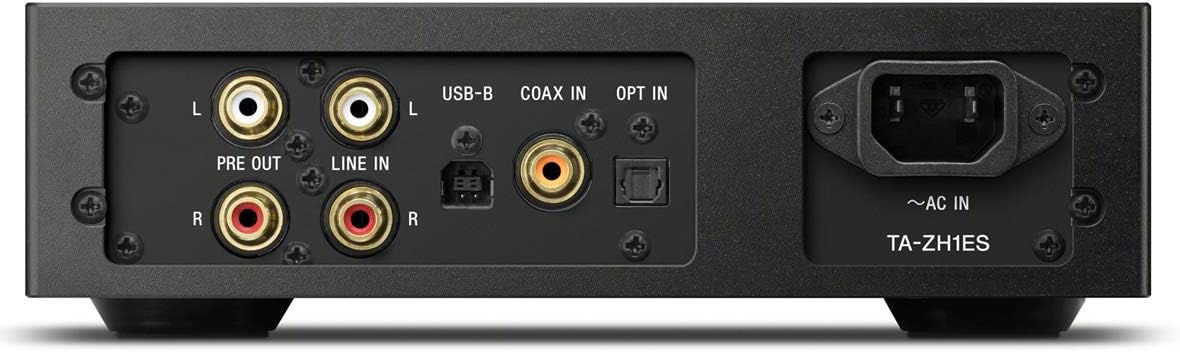
ചിത്രം 3.2: പിൻ പാനൽ ലേayട്ട്
This image illustrates the rear panel of the TA-ZH1ES amplifier, detailing the various connectivity options. Visible ports include RCA Line In (L/R), RCA Pre Out (L/R), USB-B input, Coaxial input, Optical input, and the AC power inlet. Each port is clearly labeled for easy identification.
- LINE IN (RCA L/R): Analog audio input for connecting external devices.
- PRE OUT (RCA L/R): Analog audio output for connecting to a power ampലൈഫയർ അല്ലെങ്കിൽ സജീവ സ്പീക്കറുകൾ.
- USB-B Input: For connecting to a computer or other digital audio sources.
- COAX IN: കോക്സിയൽ ഡിജിറ്റൽ ഓഡിയോ ഇൻപുട്ട്.
- ഓപ്റ്റ് ഇൻ: ഒപ്റ്റിക്കൽ ഡിജിറ്റൽ ഓഡിയോ ഇൻപുട്ട്.
- ~AC IN: Power input for the AC power cord.
4. സജ്ജീകരണം
Follow these steps to set up your TA-ZH1ES ampജീവൻ.
4.1 പ്ലേസ്മെൻ്റ്
സ്ഥാപിക്കുക amplifier on a flat, stable surface with adequate space for ventilation. Avoid placing it near heat sources or in direct sunlight.

ചിത്രം 4.1: Ampലൈഫയർ പ്ലേസ്മെന്റ്
This image shows the Sony TA-ZH1ES amplifier positioned on a flat surface, demonstrating a typical setup environment. Ensure the unit has sufficient space around it for proper airflow.
4.2 ഓഡിയോ ഉറവിടങ്ങൾ ബന്ധിപ്പിക്കുന്നു
Connect your audio sources to the appropriate input terminals on the rear panel.
- Digital Sources (Computer, CD Player, etc.):
- For a computer, connect a USB-B cable from your computer to the USB-B ഇൻപുട്ട്.
- For a CD player or other digital audio device, use a coaxial cable for the COAX IN or an optical cable for the ഓപ്റ്റ് ഇൻ.
- Analog Sources (Turntable with pre-amp, etc.): Connect RCA cables from your analog source to the LINE IN (RCA L/R) ടെർമിനലുകൾ.
- Portable Devices (Walkman/Xperia): Connect compatible portable devices to the Walkman/Xperia USB Input on the front panel. This input also supports charging for Walkman devices.
4.3 Connecting Headphones or External Ampജീവപര്യന്തം
- ഹെഡ്ഫോണുകൾ: Connect your headphones to the appropriate balanced (4.4mm, 3.5mm x 2, XLR4) or unbalanced (6.3mm, 3.5mm) output jacks on the front panel.
- ബാഹ്യ ശക്തി Amplifier/Active Speakers: If using the TA-ZH1ES as a DAC or pre-amplifier, connect RCA cables from the PRE OUT (RCA L/R) terminals on the rear panel to your power ampലൈഫയർ അല്ലെങ്കിൽ സജീവ സ്പീക്കറുകൾ.
4.4 പവർ കണക്ഷൻ
വിതരണം ചെയ്ത എസി പവർ കോർഡ് ഇതിലേക്ക് ബന്ധിപ്പിക്കുക ~എസി ഇൻ terminal on the rear panel, then plug the other end into a wall outlet.
5. പ്രവർത്തന നിർദ്ദേശങ്ങൾ
5.1 അടിസ്ഥാന പ്രവർത്തനം
- പവർ ഓൺ: Press the Power button on the front panel.
- ഇൻപുട്ട് തിരഞ്ഞെടുക്കുക: Use the Input Selector button to choose the desired audio source (e.g., USB-B, COAX, OPT, LINE IN).
- ഹെഡ്ഫോണുകൾ ബന്ധിപ്പിക്കുക: Plug your headphones into the appropriate jack.
- വോളിയം ക്രമീകരിക്കുക: Slowly turn the Volume knob clockwise to increase the volume to a comfortable listening level.

ചിത്രം 5.1: മുകളിലെ പാനൽ നിയന്ത്രണങ്ങൾ
ഈ ചിത്രം മുകളിൽ നിന്ന് താഴേക്ക് നൽകുന്നു view of the TA-ZH1ES amplifier, clearly showing the power button, input/output selectors, display screen, menu navigation buttons (Menu/Back, Enter), and the Gain button. These controls are used for basic operation and feature adjustments.
5.2 DSD Remastering Engine
The DSD Remastering Engine converts all PCM audio sources to DSD 11.2MHz, aiming to provide a more natural and analog-like sound experience. This feature can be enabled or disabled through the unit's menu settings.
5.3 DSEE HX
DSEE HX (Digital Sound Enhancement Engine HX) upscales compressed audio files to near high-resolution quality. This feature is particularly effective for improving the sound of lower-resolution files, such as those from streaming services or older recordings. Access DSEE HX settings via the unit's menu.
5.4 Gain Settings
ദി amplifier features adjustable gain settings to optimize performance with various headphone impedances. Press the നേട്ടം button on the front panel to cycle through available gain levels (e.g., Low, Mid, High). Select the setting that provides sufficient volume without distortion for your specific headphones.
6. പരിപാലനം
ശരിയായ പരിചരണം നിങ്ങളുടെ മൃഗത്തിന്റെ ദീർഘായുസ്സും മികച്ച പ്രകടനവും ഉറപ്പാക്കുന്നു ampജീവൻ.
- വൃത്തിയാക്കൽ: മൃദുവായതും ഉണങ്ങിയതുമായ തുണി ഉപയോഗിച്ച് യൂണിറ്റ് തുടയ്ക്കുക. അബ്രാസീവ് പാഡുകൾ, സ്കോറിംഗ് പൗഡർ, ആൽക്കഹോൾ അല്ലെങ്കിൽ ബെൻസീൻ പോലുള്ള ലായകങ്ങൾ എന്നിവ ഉപയോഗിക്കരുത്.
- വെൻ്റിലേഷൻ: Periodically check that the ventilation openings are free from dust and obstructions.
- സംഭരണം: If storing the unit for an extended period, disconnect it from the power outlet and store it in a clean, dry place.
7. പ്രശ്നപരിഹാരം
നിങ്ങളുടെ ഉപകരണത്തിൽ പ്രശ്നങ്ങൾ അനുഭവപ്പെടുകയാണെങ്കിൽ ampലിഫയർ, താഴെ പറയുന്ന പൊതുവായ പ്രശ്നങ്ങളും പരിഹാരങ്ങളും കാണുക.
| പ്രശ്നം | സാധ്യമായ കാരണം / പരിഹാരം |
|---|---|
| ശക്തിയില്ല | Ensure the AC power cord is securely connected to both the unit and the wall outlet. Check if the power outlet is functional. |
| ശബ്ദമില്ല |
|
| വികലമായ ശബ്ദം |
|
| Unit becomes hot | Ensure adequate ventilation around the unit. Do not block the ventilation openings. If overheating persists, discontinue use and contact service. |
ഈ പരിഹാരങ്ങൾ പരീക്ഷിച്ചതിന് ശേഷവും പ്രശ്നം നിലനിൽക്കുകയാണെങ്കിൽ, ദയവായി സോണി ഉപഭോക്തൃ പിന്തുണയുമായി ബന്ധപ്പെടുക.
8 സ്പെസിഫിക്കേഷനുകൾ
| ഫീച്ചർ | വിശദാംശങ്ങൾ |
|---|---|
| മോഡൽ നമ്പർ | TA-ZH1ES |
| ഉൽപ്പന്ന അളവുകൾ (W x H x D) | 2.56 x 12.36 x 8.27 ഇഞ്ച് (ഏകദേശം 65 x 314 x 210 മിമി) |
| ഇനത്തിൻ്റെ ഭാരം | 1 പൗണ്ട് (ഏകദേശം 0.45 കിലോഗ്രാം) |
| ഹെഡ്ഫോൺ ഇംപെഡൻസ് | 12-600 ഓം |
| ഹെഡ്ഫോൺ ഔട്ട്പുട്ടുകൾ | Balanced: 4.4mm, 3.5mm x 2, XLR4 Unbalanced: 6.3mm, 3.5mm |
| ഡിജിറ്റൽ ഇൻപുട്ടുകൾ | USB-B, Coaxial, Optical, Walkman/Xperia USB |
| അനലോഗ് ഇൻപുട്ടുകൾ | RCA Line In (L/R) |
| അനലോഗ് ഔട്ട്പുട്ടുകൾ | RCA Pre Out (L/R) |
| നിർമ്മാതാവ് | സോണി |
| ആദ്യ തീയതി ലഭ്യമാണ് | സെപ്റ്റംബർ 1, 2016 |
കുറിപ്പ്: അറിയിപ്പുകൾ കൂടാതെ സവിശേഷതകൾ മാറ്റത്തിന് വിധേയമാണ്.
9. വാറൻ്റിയും പിന്തുണയും
വിശദമായ വാറന്റി വിവരങ്ങൾക്ക്, ദയവായി നിങ്ങളുടെ ഉൽപ്പന്നത്തിനൊപ്പം ഉൾപ്പെടുത്തിയിരിക്കുന്ന വാറന്റി കാർഡ് പരിശോധിക്കുക അല്ലെങ്കിൽ ഔദ്യോഗിക സോണി പിന്തുണ സന്ദർശിക്കുക. website for your region. For technical assistance, product registration, or service inquiries, please contact Sony customer support.
സോണി പിന്തുണ Webസൈറ്റ്: https://www.sony.com/electronics/support


