ആമുഖം
Thank you for choosing the MARATHON ST083013 Adanac Digital Glow Stopwatch Timer. This manual provides essential information for the proper setup, operation, and maintenance of your device. Please read it thoroughly to ensure optimal performance and longevity of your stopwatch.

ഫ്രണ്ട് view of the MARATHON ST083013 Adanac Digital Glow Stopwatch Timer, displaying time and mode indicators.
ഉൽപ്പന്ന സവിശേഷതകൾ
- Jumbo LCD Display: Features a super-glow backlight for excellent visibility in various lighting conditions.
- Time and Calendar Function: Displays hour, minute, seconds, month, date, and day.
- അലാറം ക്ലോക്ക്: Integrated alarm function.
- സ്റ്റോപ്പ് വാച്ച് മോഡുകൾ: Supports single event timing, split event timing, and time-out mode timing.
- കൃത്യത: Laser-tuned for 1/100th second accuracy.
- ഈട്: Water, dust, and shock resistant design.
- ഉപയോക്തൃ സൗഹൃദ ബട്ടണുകൾ: Conveniently located start-stop and reset buttons for easy navigation.
- ലാനിയാർഡ് ഉൾപ്പെടുന്നു: Comes with a 46-inch neckband for portability and security.
- ബാറ്ററി: Powered by one CR2032 battery (included).
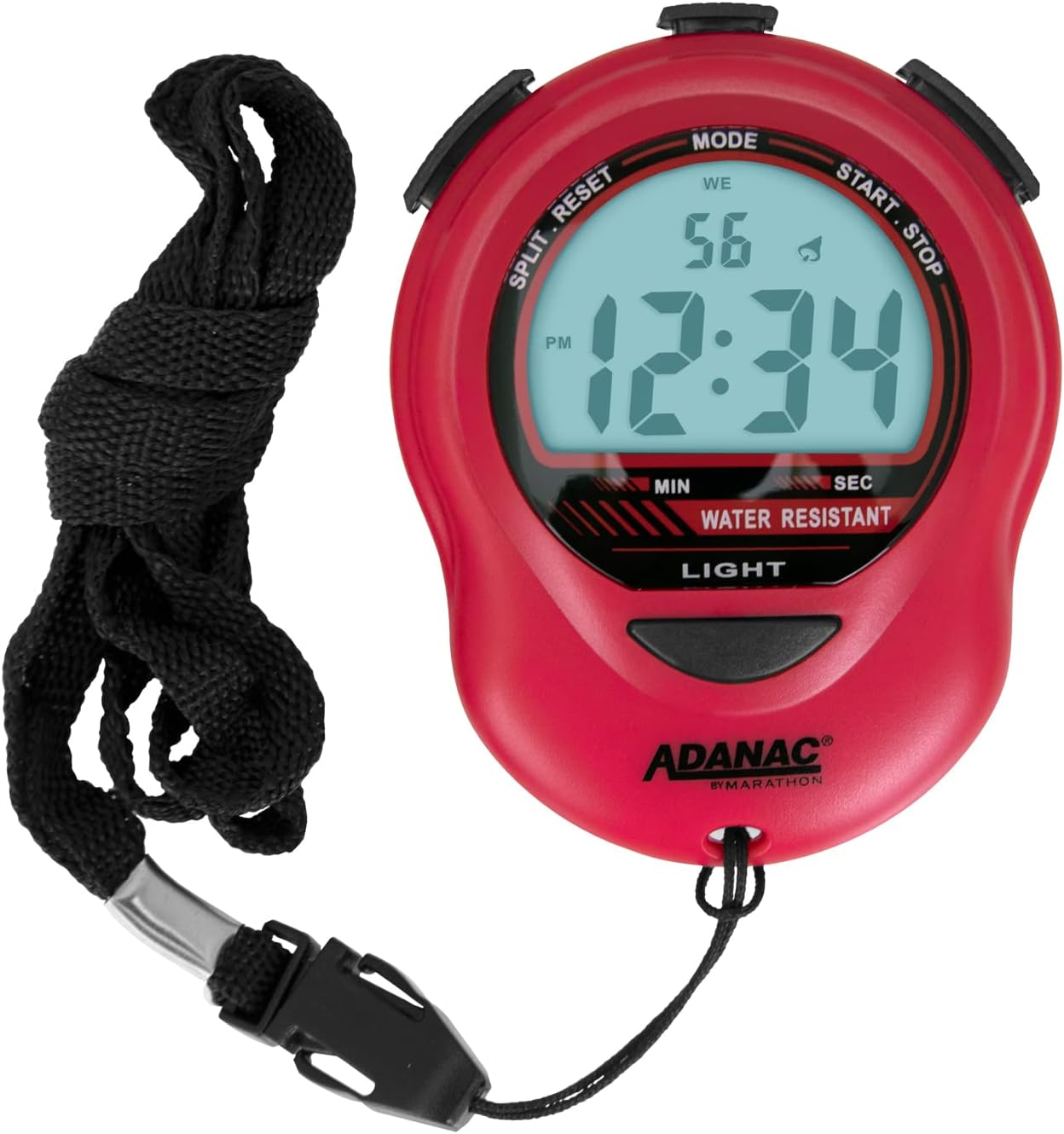
The stopwatch shown with its included 46-inch lanyard, designed for convenient carrying around the neck.
സജ്ജമാക്കുക
ബാറ്ററി ഇൻസ്റ്റാളേഷൻ
Your MARATHON ST083013 stopwatch comes with a CR2032 battery pre-installed. If the LCD screen dims or the device does not power on, the battery may need replacement.
- സ്റ്റോപ്പ് വാച്ചിന്റെ പിൻഭാഗത്ത് ബാറ്ററി കമ്പാർട്ട്മെന്റ് കണ്ടെത്തുക.
- Using a small Phillips head screwdriver, carefully remove the screws securing the battery cover.
- Gently remove the old CR2032 battery.
- പോസിറ്റീവ് (+) വശം മുകളിലേക്ക് അഭിമുഖീകരിക്കുന്ന ഒരു പുതിയ CR2032 ബാറ്ററി ഇടുക.
- ബാറ്ററി കവർ മാറ്റി സ്ക്രൂകൾ ഉപയോഗിച്ച് ഉറപ്പിക്കുക.

പിൻഭാഗം view of the stopwatch, highlighting the battery compartment and product information.
ലാനിയാർഡ് അറ്റാച്ചുചെയ്യുന്നു
The included 46-inch lanyard can be attached to the small loop at the bottom of the stopwatch for convenient carrying.
- Thread the thin loop of the lanyard through the small hole at the bottom of the stopwatch.
- Pass the main body of the lanyard through the thin loop and pull to secure.
പ്രവർത്തന നിർദ്ദേശങ്ങൾ
The MARATHON ST083013 features three primary buttons: മോഡ്, ആരംഭിക്കുക/നിർത്തുക, ഒപ്പം സ്പ്ലിറ്റ്/റീസെറ്റ്.
സമയവും തീയതിയും ക്രമീകരണം
- സാധാരണ സമയ ഡിസ്പ്ലേയിൽ നിന്ന്, അമർത്തുക മോഡ് സമയ ക്രമീകരണ മോഡ് സജീവമാകുന്നതുവരെ ബട്ടൺ ആവർത്തിച്ച് അമർത്തുക (സാധാരണയായി മിന്നുന്ന അക്കങ്ങൾ ഉപയോഗിച്ച് സൂചിപ്പിക്കും).
- ഉപയോഗിക്കുക ആരംഭിക്കുക/നിർത്തുക മിന്നുന്ന അക്കം (മണിക്കൂർ, മിനിറ്റ്, സെക്കൻഡ്, മാസം, തീയതി, ദിവസം) ക്രമീകരിക്കാൻ ബട്ടൺ അമർത്തുക.
- അമർത്തുക സ്പ്ലിറ്റ്/റീസെറ്റ് button to move to the next digit or setting.
- എല്ലാ ക്രമീകരണങ്ങളും പൂർത്തിയായിക്കഴിഞ്ഞാൽ, അമർത്തുക മോഡ് ക്രമീകരണ മോഡിൽ നിന്ന് പുറത്തുകടക്കാൻ.
സ്റ്റോപ്പ് വാച്ച് ഫംഗ്ഷൻ ഉപയോഗിക്കുന്നു
- സാധാരണ സമയ ഡിസ്പ്ലേയിൽ നിന്ന്, അമർത്തുക മോഡ് button to cycle to the stopwatch mode (usually indicated by "00:00:00" or similar).
- അമർത്തുക ആരംഭിക്കുക/നിർത്തുക സമയം ആരംഭിക്കാൻ.
- To record a split time (lap time) while timing continues, press സ്പ്ലിറ്റ്/റീസെറ്റ്. The display will momentarily show the split time, then return to the running total.
- സ്റ്റോപ്പ് വാച്ച് താൽക്കാലികമായി നിർത്താൻ, അമർത്തുക ആരംഭിക്കുക/നിർത്തുക. പുനരാരംഭിക്കാൻ വീണ്ടും അമർത്തുക.
- To stop the stopwatch completely, press ആരംഭിക്കുക/നിർത്തുക.
- To reset the stopwatch to zero, press സ്പ്ലിറ്റ്/റീസെറ്റ് when the stopwatch is stopped.
അലാറം ക്രമീകരണം
- സാധാരണ സമയ ഡിസ്പ്ലേയിൽ നിന്ന്, അമർത്തുക മോഡ് button to cycle to the alarm setting mode.
- ഉപയോഗിക്കുക ആരംഭിക്കുക/നിർത്തുക അലാറം മണിക്കൂറും മിനിറ്റും ക്രമീകരിക്കാൻ.
- ഉപയോഗിക്കുക സ്പ്ലിറ്റ്/റീസെറ്റ് to toggle the alarm on/off or to move between hour/minute settings.
- അമർത്തുക മോഡ് അലാറം ക്രമീകരണ മോഡിൽ നിന്ന് പുറത്തുകടക്കാൻ.
ബാക്ക്ലൈറ്റ് ഉപയോഗിക്കുന്നു
The stopwatch features a super-glow backlight for improved visibility in low-light conditions. Press the വെളിച്ചം button (located at the bottom front) to activate the backlight. It will remain on for a few seconds.

The stopwatch held in hands, illustrating its ergonomic design and portability.
മെയിൻ്റനൻസ്
- വൃത്തിയാക്കൽ: Wipe the stopwatch with a soft, damp തുണി. കഠിനമായ രാസവസ്തുക്കളോ ഉരച്ചിലുകളുള്ള ക്ലീനറുകളോ ഉപയോഗിക്കരുത്.
- സംഭരണം: Store the stopwatch in a cool, dry place away from direct sunlight and extreme temperatures.
- ബാറ്ററി മാറ്റിസ്ഥാപിക്കൽ: Replace the CR2032 battery when the display dims. Refer to the "Battery Installation" section for instructions.
- ജല പ്രതിരോധം: While the stopwatch is water, dust, and shock resistant, it is not designed for submersion. Avoid prolonged exposure to water.
ട്രബിൾഷൂട്ടിംഗ്
| പ്രശ്നം | സാധ്യമായ കാരണം | പരിഹാരം |
|---|---|---|
| ഡിസ്പ്ലേ മങ്ങിയതോ ശൂന്യമോ ആണ്. | ബാറ്ററി കുറവോ ഡെഡ് ബാറ്ററിയോ. | CR2032 ബാറ്ററി മാറ്റിസ്ഥാപിക്കുക. |
| ബട്ടണുകൾ പ്രതികരിക്കുന്നില്ല. | Device malfunction or temporary software glitch. | Remove and reinsert the battery to perform a soft reset. If the issue persists, contact customer support. |
| Alarm sounds randomly. | Alarm is set and active. | Refer to the "Alarm Setting" section to disable the alarm. |
| Inaccurate timing. | Rare internal error. | Perform a battery reset. If the problem continues, the unit may require service. |
സ്പെസിഫിക്കേഷനുകൾ
| ഫീച്ചർ | വിശദാംശങ്ങൾ |
|---|---|
| മോഡൽ നമ്പർ | FBA_ST083013RD |
| അളവുകൾ (L x W x H) | 5.51 x 1.5 x 8 സെ.മീ (2.17 x 0.59 x 3.15 ഇഞ്ച്) |
| ഭാരം | 68 ഗ്രാം (0.15 പൗണ്ട്) |
| പവർ ഉറവിടം | 1 x CR2032 ബാറ്ററി |
| ഡിസ്പ്ലേ തരം | ബാക്ക്ലൈറ്റുള്ള ഡിജിറ്റൽ എൽസിഡി |
| മെറ്റീരിയൽ | പ്ലാസ്റ്റിക് |
| നിറം | ചുവപ്പ് |
| ജല പ്രതിരോധം | Water, Dust, and Shock Resistant |
| ലാനിയാർഡ് നീളം | 46 ഇഞ്ച് |

Dimensional diagram of the stopwatch, indicating its height and width.
വാറൻ്റിയും പിന്തുണയും
For warranty information or technical support, please contact MARATHON customer service. Details can typically be found on the manufacturer's webസൈറ്റ് അല്ലെങ്കിൽ ഉൽപ്പന്ന പാക്കേജിംഗ്.
Manufacturer: MARATHON
Place of Business: Vaughan, ON L4K 5Y3, CA
Webസൈറ്റ്: www.MarathonWatch.com


