1. ആമുഖം
This manual provides comprehensive instructions for the installation, operation, and maintenance of your One for All SV 9357 Mono Outdoor TV Antenna. This antenna is designed to receive digital terrestrial television (DVB-T, DVB-T2) and digital audio broadcasting (DAB, DAB+) signals. Please read this manual carefully before installation and use to ensure optimal performance and safety.
2 സുരക്ഷാ വിവരങ്ങൾ
- ഔട്ട്ഡോർ ഇൻസ്റ്റലേഷൻ: Exercise extreme caution when installing the antenna outdoors, especially on rooftops or near power lines. Consider hiring a professional installer if you are not comfortable with heights or electrical work.
- കാലാവസ്ഥാ സാഹചര്യങ്ങൾ: Avoid installation during stormy weather, high winds, or when lightning is present.
- ഗ്രൗണ്ടിംഗ്: Ensure the antenna and mast are properly grounded according to local electrical codes to protect against lightning strikes.
- കേബിൾ മാനേജുമെന്റ്: Secure all cables to prevent tripping hazards and damage from wind or animals.
- വൈദ്യുതി വിതരണം: ഒരു ഉപയോഗിക്കുകയാണെങ്കിൽ amplified version or external amplifier, ensure the power supply is correctly connected and rated for outdoor use if applicable.
3. പാക്കേജ് ഉള്ളടക്കം
ഇൻസ്റ്റാളേഷൻ ആരംഭിക്കുന്നതിന് മുമ്പ് എല്ലാ ഘടകങ്ങളും പാക്കേജിൽ ഉണ്ടെന്ന് ഉറപ്പാക്കുക.

Figure 1: One for All SV 9357 antenna packaging box, showing the antenna and product details.
- One for All SV 9357 Mono Outdoor TV Antenna
- Mounting hardware (e.g., clamps, bolts, nuts)
- നിർദ്ദേശ മാനുവൽ (ഈ പ്രമാണം)
- Note: Coaxial cable and mast are typically sold separately.
4. സജ്ജീകരണവും ഇൻസ്റ്റാളേഷനും
Proper installation is crucial for optimal signal reception.
4.1 Antenna Assembly
- ബോക്സിൽ നിന്ന് എല്ലാ ഘടകങ്ങളും ശ്രദ്ധാപൂർവ്വം അൺപാക്ക് ചെയ്യുക.
- Extend the antenna elements as shown in the diagram. Ensure all elements click into place securely.
- Attach the reflector elements (if separate) to the main boom.
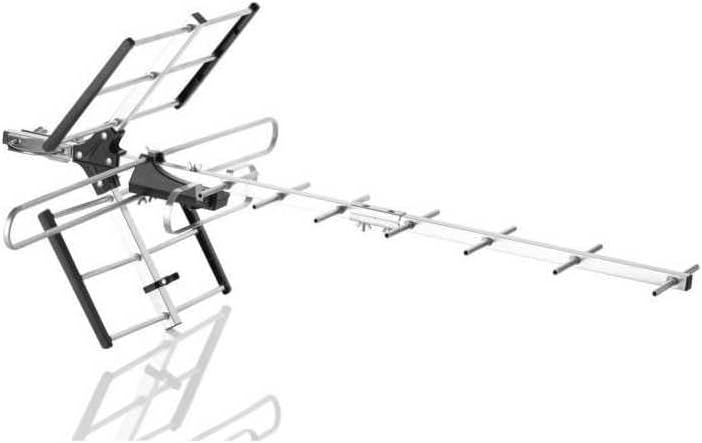
Figure 2: Fully assembled One for All SV 9357 antenna, ready for mounting.
4.2 മ ing ണ്ടിംഗ് സ്ഥാനം
Choose a mounting location that is as high as possible and has a clear line of sight to the broadcast towers. Avoid obstructions like buildings, trees, or hills.
- മേൽക്കൂര: Provides the best elevation and clear line of sight.
- അട്ടിക: Can be an option in strong signal areas, but may reduce signal strength.
- Wall/Chimney: Ensure secure mounting to a sturdy structure.

Figure 3: The SV 9357 antenna is designed for outdoor use and is resistant to various weather conditions.
4.3 Antenna Mounting
- Attach the antenna to a mast using the provided mounting hardware. Ensure the antenna is level and securely fastened.
- Mount the mast to your chosen location (rooftop, wall, chimney) using appropriate brackets and fasteners.
- Connect a high-quality coaxial cable (F-type connector) to the antenna's output port.
- Route the coaxial cable neatly and securely down to your television or set-top box, avoiding sharp bends or kinks. Use cable clips to secure the cable.
- Connect the other end of the coaxial cable to the "Antenna In" or "RF In" port on your television or digital receiver.

Figure 4: Basic tools like a screwdriver may be required for assembly and mounting.
5. പ്രവർത്തന നിർദ്ദേശങ്ങൾ
5.1 ചാനൽ സ്കാൻ
- Turn on your television or digital receiver.
- Access the TV's menu and navigate to the "Channel Setup," "Antenna Setup," or "Scan" section.
- Select "Antenna" or "Air" as the input source.
- Initiate an "Auto Scan" or "Auto Program" to search for available channels. This process may take several minutes.
- Once the scan is complete, your TV should display the received channels.
5.2 ആന്റിന ഓറിയന്റേഷൻ
For optimal reception, the antenna should be pointed towards the local broadcast towers. You can find the direction of your local towers using online resources or signal finder apps.
- Adjust the antenna's direction incrementally.
- Perform a channel scan after each adjustment to check for improved signal strength and more channels.
- Fine-tune the direction until you achieve the best possible reception for all desired channels.

Figure 5: Use a signal meter or smartphone app to assist with antenna orientation for optimal signal reception.

Figure 6: The antenna includes technology to filter out interference from 5G mobile signals.
6. പരിപാലനം
- പതിവ് പരിശോധന: Periodically inspect the antenna, mast, and cables for any signs of damage, corrosion, or loose connections, especially after severe weather.
- വൃത്തിയാക്കൽ: Gently clean the antenna elements with a soft cloth and mild detergent if necessary. Avoid abrasive cleaners or solvents.
- കേബിൾ സമഗ്രത: Ensure coaxial cables are not frayed, cracked, or exposed to excessive moisture. Replace damaged cables promptly.
7. പ്രശ്നപരിഹാരം
| പ്രശ്നം | സാധ്യമായ കാരണം | പരിഹാരം |
|---|---|---|
| No signal or poor picture quality |
|
|
| ചാനലുകൾ കാണുന്നില്ല |
|
|
| Interference from mobile signals (e.g., 5G) |
|
|
8 സ്പെസിഫിക്കേഷനുകൾ
| ബ്രാൻഡ് | എല്ലാവർക്കും വേണ്ടി ഒന്ന് |
| മോഡൽ നമ്പർ | എസ്വി 9357 |
| ആൻ്റിന തരം | Mono Outdoor TV Antenna |
| സ്വീകരണം | DAB, DAB+, DVB-T, DVB-T2 (UHF/VHF) |
| പ്രതിരോധം | 50 ഓം |
| പ്രത്യേക സവിശേഷതകൾ | Digital reception support, Frequency response, 5G filter |
| അളവുകൾ (ഏകദേശം) | 420 mm (width), 870 mm (length), 737 mm (height) - Note: These dimensions seem to be for the packaging or a specific orientation, actual antenna dimensions may vary slightly. |
| പരമാവധി ശ്രേണി | 50000 Meters (50 km) |
9. വാറൻ്റിയും പിന്തുണയും
For warranty information and technical support, please refer to the documentation provided with your purchase or visit the official One For All webസൈറ്റ്. വാറന്റി ക്ലെയിമുകൾക്കായി നിങ്ങളുടെ വാങ്ങലിന്റെ തെളിവ് സൂക്ഷിക്കുക.


