ആമുഖം
The EARTEC ULDM-HD Ultralite HD Dual Ear Replacement Main Headset is engineered for seamless, full duplex wireless communication. This headset provides clear, hands-free audio, making it ideal for professional environments requiring constant team coordination. As a main unit, it is specifically designed for compatibility with existing UltraLite HD systems, enabling the expansion of your communication network.
This manual provides essential information for setting up, operating, maintaining, and troubleshooting your ULDM-HD headset to ensure optimal performance and longevity.
ഉൽപ്പന്നം കഴിഞ്ഞുview

Main Headset View: The EARTEC ULDM-HD Ultralite HD Dual Ear Replacement Main Headset, featuring its integrated controls and microphone boom. This headset is designed for comfortable, extended use.

അനുയോജ്യത പരിശോധന: Visual guide illustrating the difference between UltraLite HD (right, compatible) and UltraLite Classic (left, incompatible) models. Ensure your existing system is UltraLite HD for proper function.
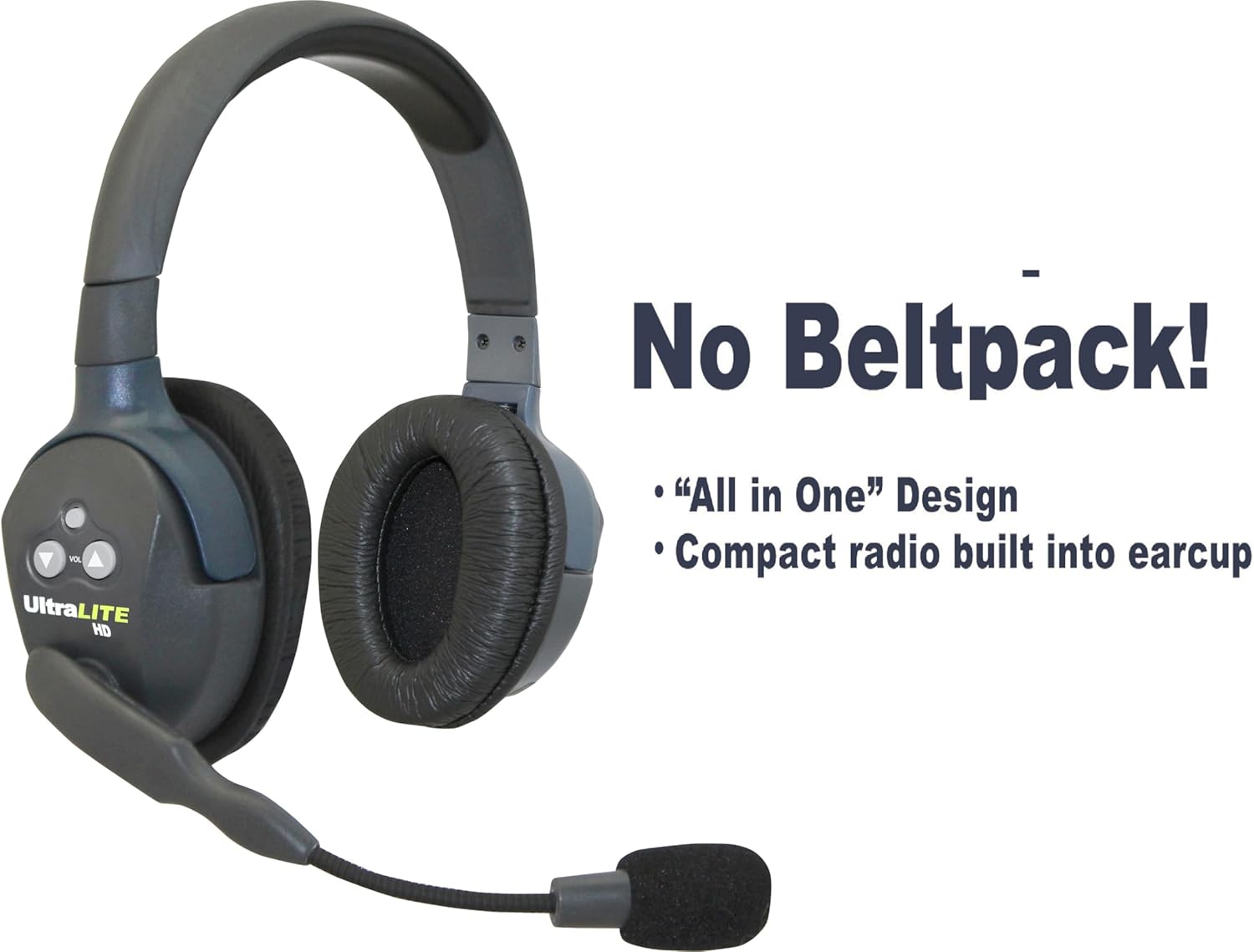
സംയോജിത ഡിസൈൻ: The headset features an "All-in-One" design with the compact radio built directly into the earcup, eliminating the need for a separate beltpack.
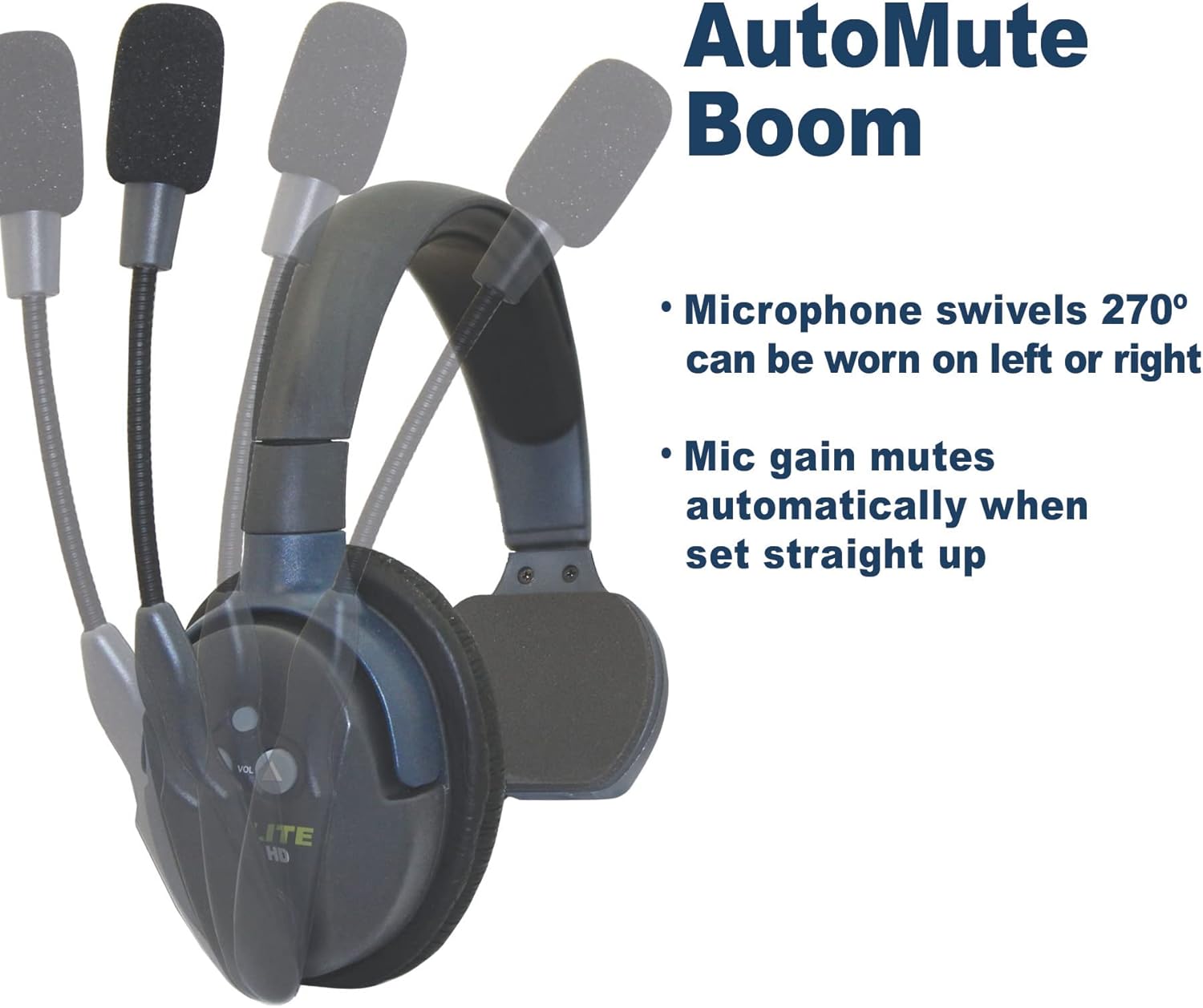
AutoMute Microphone: The microphone boom swivels 270 degrees, allowing the headset to be worn on either the left or right side. The mic gain automatically mutes when the boom is pivoted upwards.

System Expandability: An illustration showing how the UltraLite HD system can be expanded. Headsets are "Field Programmable," allowing you to add up to 5 users (1 Main and 4 Remote units) for simultaneous communication.
സജ്ജമാക്കുക
1. പ്രാരംഭ ചാർജിംഗ്
Before first use, fully charge the included rechargeable battery. The headset provides up to 6 hours of talk time on a single charge. A full charge typically takes approximately 6 hours.
2. Compatibility Verification
This ULDM-HD Main headset is അനുയോജ്യം മാത്രം with the HD version of UltraLite systems. It is not compatible with UltraLite Classic models. Visually inspect your existing headsets to ensure they are UltraLite HD.
3. സിസ്റ്റം കോൺഫിഗറേഷൻ
Each Main headset can support up to four Remote units. Only one Main headset can be used in a single UltraLite HD system. Main headsets are not compatible with HUB-based systems. For detailed pairing instructions, refer to the comprehensive ഉപയോഗത്തിനുള്ള നിർദ്ദേശങ്ങൾ (IFU) PDF.
പ്രവർത്തന നിർദ്ദേശങ്ങൾ
1. പവർ ഓൺ/ഓഫ്
Locate the power button on the earcup. Press and hold to power the headset on or off. An indicator light will confirm the power status.

Power Indicator (Red): A red light typically indicates the headset is powered on and actively transmitting or receiving.

Power Indicator (Blue): A blue light may indicate a different operational status, such as standby or charging complete, depending on the specific model's behavior.
2. വോളിയം നിയന്ത്രണം
Use the volume up and down buttons located on the earcup to adjust the listening volume to a comfortable level.
3. Microphone Usage (AutoMute Boom)
The microphone boom can pivot 270 degrees, allowing you to wear the headset on either your left or right ear. For optimal voice clarity, position the microphone approximately one inch from your mouth. The noise-cancelling microphone automatically mutes when the boom is pivoted upwards, providing privacy when not speaking.
4. വയർലെസ് ശ്രേണി
The headset offers an exceptional wireless range of up to 1,000 feet Line of Sight (LOS). Performance may vary based on environmental factors and obstructions.
മെയിൻ്റനൻസ്
1. ബാറ്ററി പരിചരണം
- Always use the provided charger for the rechargeable Lithium battery.
- ബാറ്ററിയുടെ ആയുസ്സ് വർദ്ധിപ്പിക്കുന്നതിന് അമിതമായി ചാർജ് ചെയ്യുന്നതോ പൂർണ്ണമായും കളയുന്നതോ ഒഴിവാക്കുക.
- If storing the headset for an extended period, ensure the battery is partially charged (around 50%) and store in a cool, dry place.
2. വൃത്തിയാക്കൽ
- ഹെഡ്സെറ്റ് പ്രതലങ്ങൾ മൃദുവായ, d തുണി ഉപയോഗിച്ച് തുടയ്ക്കുക.amp തുണി. കഠിനമായ രാസവസ്തുക്കളോ ഉരച്ചിലുകളുള്ള ക്ലീനറുകളോ ഉപയോഗിക്കുന്നത് ഒഴിവാക്കുക.
- Ensure no liquid enters the earcup or microphone openings.
- Clean the microphone foam cover regularly to maintain audio clarity.
3. സംഭരണം
Store the headset in a protective case or a clean, dry environment when not in use to prevent dust accumulation and physical damage.
ട്രബിൾഷൂട്ടിംഗ്
| പ്രശ്നം | സാധ്യമായ കാരണം | പരിഹാരം |
|---|---|---|
| No power/Headset not turning on | കുറഞ്ഞതോ തീർന്നതോ ആയ ബാറ്ററി. | Charge the headset battery for at least 6 hours. |
| ഓഡിയോ ഇല്ല അല്ലെങ്കിൽ മോശം ഓഡിയോ നിലവാരം |
|
|
| Headset not connecting to other units |
|
|
For more complex issues or if troubleshooting steps do not resolve the problem, please contact EARTEC customer support.
സ്പെസിഫിക്കേഷനുകൾ
| ഫീച്ചർ | വിശദാംശങ്ങൾ |
|---|---|
| മോഡലിൻ്റെ പേര് | ULDM-HD |
| ബ്രാൻഡ് | EARTEC |
| വയർലെസ് കമ്മ്യൂണിക്കേഷൻ ടെക്നോളജി | RF |
| കണക്റ്റിവിറ്റി ടെക്നോളജി | വയർലെസ് |
| അനുയോജ്യമായ ഉപകരണങ്ങൾ | HD version of UltraLite systems |
| ഉൾപ്പെടുത്തിയ ഘടകങ്ങൾ | Headset, rechargeable battery |
| ബാറ്ററി ലൈഫ് | 6 Hours (talk time) |
| ചാർജിംഗ് സമയം | 6 മണിക്കൂർ |
| നിയന്ത്രണ തരം | ബട്ടൺ നിയന്ത്രണം |
| മൈക്രോഫോൺ ഫീച്ചർ | Noise-cancelling, AutoMute Boom (pivoting) |
| വയർലെസ് ശ്രേണി | Up to 1,000 ft Line of Sight (LOS) |
| ഫോം ഫാക്ടർ | ചെവിയിൽ |
| ഇയർപീസ് ആകൃതി | ഓവൽ |
| ഇനത്തിൻ്റെ ഭാരം | 9.6 ഔൺസ് (0.6 പൗണ്ട്) |
| ഉൽപ്പന്ന അളവുകൾ | 15 x 6 x 10 ഇഞ്ച് |
| ജല പ്രതിരോധ നില | വെള്ളത്തെ പ്രതിരോധിക്കുന്ന |
| യു.പി.സി | 642892764471 |
| നിർമ്മാതാവ് | Eartec |
പിന്തുണ
For further assistance, detailed product information, or to explore other EARTEC products, please visit the official EARTEC resources:
- Official Instructions for Use (IFU) PDF: A comprehensive guide for your headset.
- Visit the EARTEC Store on Amazon: Explore the full range of EARTEC communication solutions.
For direct customer service inquiries, please refer to the contact information provided on the official EARTEC webസൈറ്റ് അല്ലെങ്കിൽ നിങ്ങളുടെ ഉൽപ്പന്ന പാക്കേജിംഗ്.


