ആമുഖം
This manual provides essential information for the safe and efficient operation of your Epson Home Cinema 3100 1080p 3LCD Home Theater Projector. Please read it thoroughly before use and retain it for future reference.
സജ്ജമാക്കുക
അൺപാക്കിംഗും പ്രാരംഭ സജ്ജീകരണവും
പാക്കേജിംഗിൽ നിന്ന് എല്ലാ ഘടകങ്ങളും ശ്രദ്ധാപൂർവ്വം നീക്കം ചെയ്യുക. ഇനിപ്പറയുന്ന ഇനങ്ങൾ ഉണ്ടെന്ന് ഉറപ്പാക്കുക:
- Epson Home Cinema 3100 Projector
- പവർ കോർഡ്
- ബാറ്ററികളുള്ള റിമോട്ട് കൺട്രോൾ
- ദ്രുത സജ്ജീകരണ ഗൈഡ്
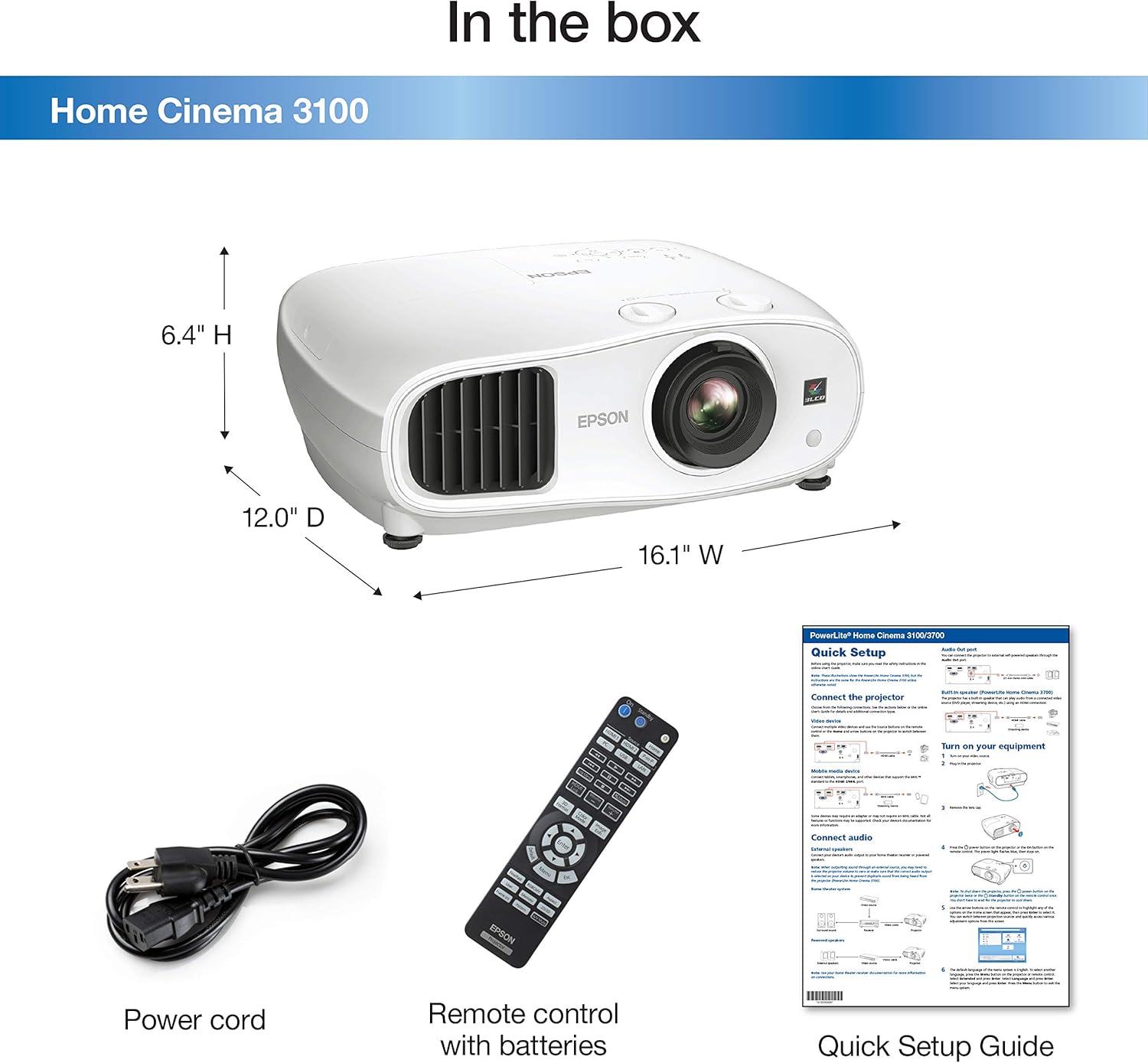
ചിത്ര വിവരണം: A white Epson Home Cinema 3100 projector is shown alongside its accessories: a black power cord, a black remote control with various buttons, and a folded quick setup guide. The image also indicates the projector's dimensions: 16.1" W, 12.0" D, 6.4" H.
Place the projector on a stable, level surface. Ensure adequate ventilation around the unit. Connect the power cord to the projector and then to a power outlet.

ചിത്ര വിവരണം: A white Epson Home Cinema 3100 projector is displayed from a front-angle perspective, highlighting its lens, ventilation grilles, and control buttons on the top surface.
ഓപ്പറേഷൻ
പവർ ചെയ്യുന്നത് ഓൺ/ഓഫ്
Press the power button on the projector or the remote control to turn the unit on. Press it again to turn off. Allow the projector to cool down completely before unplugging or moving.
ഉപകരണങ്ങൾ ബന്ധിപ്പിക്കുന്നു
The Home Cinema 3100 supports various input sources. Connect your devices using the appropriate ports on the rear of the projector.

ചിത്ര വിവരണം: An illustration detailing the compatibility and connectivity options for the Epson Home Cinema 3100. It shows icons for various devices like tablets, smartphones, laptops, game consoles, Amazon Fire TV Stick, Chromecast, Blu-ray/DVD players, Sat/Cable boxes, Roku, Apple TV, and digital cameras. Below these, the projector's rear panel is depicted with its input ports: 1x HDMI1, 1x HDMI2/MHL, 1x D-sub 15 pin (Computer), 1x USB connector Type A, 1x Mini USB (service only), and 1x Audio out.
HDMI കണക്ഷൻ: For most modern devices (Blu-ray players, game consoles, streaming sticks), use an HDMI cable to connect to the HDMI1 or HDMI2/MHL port.
കമ്പ്യൂട്ടർ കണക്ഷൻ: Use a D-sub 15 pin cable for connecting a computer.
ചിത്ര ക്രമീകരണം
Adjust the projected image for optimal viewing using the following controls:
- ഫോക്കസ് റിംഗ്: ചിത്രം മൂർച്ച കൂട്ടാൻ ലെൻസിന് ചുറ്റും ഫോക്കസ് റിംഗ് തിരിക്കുക.
- സൂം ലിവർ: Use the zoom lever to adjust the image size without moving the projector.
- ലെൻസ് ഷിഫ്റ്റ്: The projector features vertical (±60%) and horizontal (±24%) lens shift for flexible positioning. Use the dedicated dials to move the image up, down, left, or right without tilting the projector.

ചിത്ര വിവരണം: This diagram shows how the Epson Home Cinema 3100 projector can project different screen sizes (80", 100", 120") from various distances (8', 10', 12'). It visually demonstrates the flexibility in placement and image size adjustment.
വീഡിയോ പ്ലേബാക്ക്
The Epson Home Cinema 3100 is designed to deliver a high-quality viewing experience for various content, including movies and games.
വീഡിയോ വിവരണം: This video demonstrates the Epson Home Cinema 3100 projector in a home setting, showcasing its use for gaming and general entertainment. It highlights the projector's ability to create a large, immersive viewഅനുഭവം.
മെയിൻ്റനൻസ്
പ്രൊജക്ടർ വൃത്തിയാക്കുന്നു
Regular cleaning helps maintain optimal performance. Use a soft, dry cloth to wipe the exterior of the projector. For the lens, use a lens cleaning cloth and solution specifically designed for optical surfaces. Avoid abrasive cleaners or solvents.
Lamp മാറ്റിസ്ഥാപിക്കൽ
പ്രൊജക്ടർ എൽamp പരിമിതമായ ആയുസ്സ് ഉണ്ട്. lamp reaches the end of its life, a warning message will appear. Refer to the Quick Setup Guide or Epson's official support resources for detailed instructions on how to safely replace the lamp. Always use genuine Epson replacement lamps.
ട്രബിൾഷൂട്ടിംഗ്
പൊതുവായ പ്രശ്നങ്ങളും പരിഹാരങ്ങളും
- ചിത്രമില്ല:
- പ്രൊജക്ടർ ഓണാക്കിയിട്ടുണ്ടെന്നും ഇൻപുട്ട് ഉറവിടം ശരിയായി തിരഞ്ഞെടുത്തിട്ടുണ്ടെന്നും ഉറപ്പാക്കുക.
- Check all cable connections (HDMI, D-sub) between the projector and the source device.
- ഉറവിട ഉപകരണം ഓണാണെന്നും ഒരു സിഗ്നൽ ഔട്ട്പുട്ട് ചെയ്യുന്നുണ്ടെന്നും ഉറപ്പാക്കുക.
- മങ്ങിയ ചിത്രം:
- പ്രൊജക്ടർ ലെൻസിൽ ഫോക്കസ് റിംഗ് ക്രമീകരിക്കുക.
- പ്രൊജക്ഷൻ പ്രതലം പരന്നതാണെന്നും പ്രൊജക്ടർ സ്ഥിരതയുള്ളതാണെന്നും ഉറപ്പാക്കുക.
- ശബ്ദമില്ല:
- നിങ്ങളുടെ ഉറവിട ഉപകരണത്തിലെ ഓഡിയോ ക്രമീകരണങ്ങൾ പരിശോധിച്ച് വോളിയം നിശബ്ദമാക്കിയിട്ടില്ലെന്ന് ഉറപ്പാക്കുക.
- If using external speakers, verify their connection and power.
- The projector has an audio output port; ensure it's connected to an audio system if you are not using the projector's internal speaker.
- അമിത ചൂടാക്കൽ മുന്നറിയിപ്പ്:
- പ്രൊജക്ടറിന്റെ വെന്റിലേഷൻ വെന്റുകൾ അടഞ്ഞിട്ടില്ലെന്ന് ഉറപ്പാക്കുക.
- നന്നായി വായുസഞ്ചാരമുള്ള സ്ഥലത്ത് പ്രൊജക്ടർ പ്രവർത്തിപ്പിക്കുക.
- Clean any dust accumulation from the vents.
സ്പെസിഫിക്കേഷനുകൾ
| ഫീച്ചർ | വിശദാംശങ്ങൾ |
|---|---|
| ബ്രാൻഡ് | എപ്സൺ |
| മോഡൽ നമ്പർ | HC3100 |
| ഡിസ്പ്ലേ റെസല്യൂഷൻ | 1920 x 1080 (പൂർണ്ണ HD 1080p) |
| വർണ്ണ തെളിച്ചം | 2,600 ല്യൂമൻസ് |
| വെളുത്ത തെളിച്ചം | 2,600 ല്യൂമൻസ് |
| ഡൈനാമിക് കോൺട്രാസ്റ്റ് റേഷ്യോ | 60,000:1 വരെ |
| കണക്റ്റിവിറ്റി ടെക്നോളജി | HDMI |
| പ്രത്യേക ഫീച്ചർ | 3D-ക്ക് തയ്യാറാണ് |
| ശുപാർശ ചെയ്യുന്ന ഉപയോഗങ്ങൾ | ഗെയിമിംഗ്, ഹോം സിനിമ |
| ഉൽപ്പന്ന അളവുകൾ | 16.1 x 12 x 6.4 ഇഞ്ച് |
| ഇനത്തിൻ്റെ ഭാരം | 14.6 പൗണ്ട് |
| ഫാൻ ശബ്ദം | 24 dB - 35 dB |
വാറൻ്റിയും പിന്തുണയും
വാറൻ്റി വിവരങ്ങൾ
Your Epson Home Cinema 3100 projector is covered by a limited warranty. Please refer to the warranty card included with your product or visit the official Epson webവിശദമായ നിബന്ധനകൾക്കും വ്യവസ്ഥകൾക്കും സൈറ്റ്.
ഉപഭോക്തൃ പിന്തുണ
For technical assistance, troubleshooting, or service inquiries, please contact Epson customer support. Contact information can be found on the Epson webസൈറ്റിലോ നിങ്ങളുടെ ഉൽപ്പന്നത്തിന്റെ ഡോക്യുമെന്റേഷനിലോ.


