ആമുഖം
The Beats Solo3 Wireless On-Ear Headphones offer a premium listening experience with up to 40 hours of battery life, powered by the efficient Apple W1 chip. Designed for everyday use, these headphones provide Class 1 Bluetooth wireless connectivity, adjustable comfort-cushioned ear cups, and intuitive on-ear controls. They are compatible with both iOS and Android devices, ensuring a seamless audio experience.
ബോക്സിൽ എന്താണുള്ളത്
- Beats Solo3 Wireless On-Ear Headphones - Matte Black
- സംരക്ഷണ കേസ്
- Quick Start Case
- വാറൻ്റി കാർഡ്
- 3.5mm RemoteTalk cable
- Universal USB charging cable (USB-A to USB Micro-B)
- ദ്രുത ആരംഭ ഗൈഡ്
സജ്ജമാക്കുക
Your Beats Solo3 Wireless Headphones are designed for quick and easy setup. For Apple devices, simply power them on and hold them near your iPhone; they will then simultaneously connect to your Apple Watch, iPad, and Mac. For other devices, follow the standard Bluetooth pairing process.
പവർ ചെയ്യലും ജോടിയാക്കലും
To power on your headphones, locate the power button on the right earcup. Press and hold the power button for a few seconds until the indicator lights illuminate. For initial pairing, a long press will activate seeking mode, allowing your device to discover the headphones.
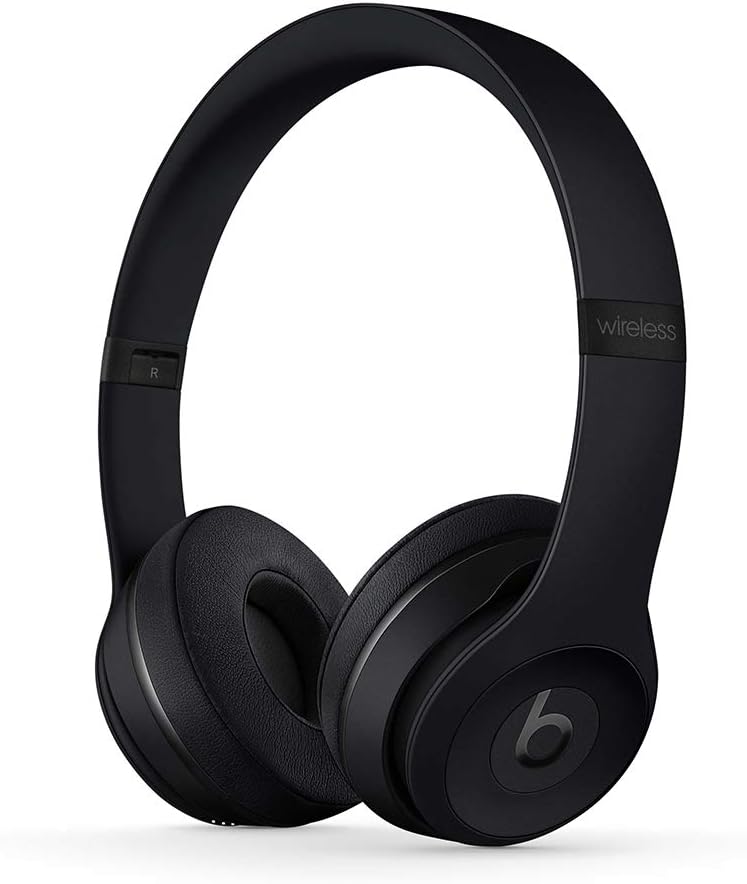
Figure 1: Beats Solo3 Wireless On-Ear Headphones in Matte Black. The headphones are shown unfolded, ready for use, highlighting their sleek design.
ചാർജിംഗ്
The Beats Solo3 headphones are charged via a Micro USB port located on the earcup. A 5-minute charge provides 3 hours of playback when the battery is low, thanks to Fast Fuel technology. A full charge can provide up to 40 hours of listening time.

ചിത്രം 2: ക്ലോസപ്പ് view of the right earcup, displaying the Micro USB charging port and the power indicator lights. The headphones can be charged using any compatible Micro USB cable.
പ്രവർത്തന നിർദ്ദേശങ്ങൾ
The Beats Solo3 headphones feature intuitive on-ear controls for managing your audio and calls.
ഓൺ-ഇയർ നിയന്ത്രണങ്ങൾ
The multifunction on-ear controls allow you to take calls, control your music (play, pause, skip tracks), and activate Siri (or your device's voice assistant).
വയർഡ് ലിസണിംഗ്
In addition to wireless connectivity, the Beats Solo3 headphones can be used in wired mode. A 3.5mm RemoteTalk cable is included for this purpose. Simply plug the cable into the 3.5mm jack on the earcup to continue listening even if the battery is depleted.

Figure 3: The left earcup of the Beats Solo3, displaying the 3.5mm audio jack. This allows for wired connection to devices, extending usability even without battery power.
മെയിൻ്റനൻസ്
To ensure the longevity and optimal performance of your Beats Solo3 Wireless Headphones, follow these maintenance guidelines:
- വൃത്തിയാക്കൽ: ഇയർകപ്പുകളും ഹെഡ്ബാൻഡും വൃത്തിയാക്കാൻ മൃദുവായതും ഉണങ്ങിയതുമായ തുണി ഉപയോഗിക്കുക. കഠിനമായ രാസവസ്തുക്കളോ ഉരച്ചിലുകളോ ഉള്ള വസ്തുക്കൾ ഉപയോഗിക്കുന്നത് ഒഴിവാക്കുക.
- സംഭരണം: When not in use, fold the headphones and store them in the provided protective carrying case to prevent damage.
- ബാറ്ററി കെയർ: മികച്ച ബാറ്ററി ലൈഫിന്, ഹെഡ്ഫോണുകൾ ഇടയ്ക്കിടെ പൂർണ്ണമായും ഡിസ്ചാർജ് ചെയ്യുന്നത് ഒഴിവാക്കുക. തുടർച്ചയായ ഉപയോഗത്തിലല്ലെങ്കിൽ പോലും അവ പതിവായി ചാർജ് ചെയ്യുക.
- തീവ്രമായ അവസ്ഥകൾ ഒഴിവാക്കുക: തീവ്രമായ താപനില, ഈർപ്പം, നേരിട്ടുള്ള സൂര്യപ്രകാശം എന്നിവയ്ക്ക് ഹെഡ്ഫോണുകൾ ദീർഘനേരം തുറന്നുകാട്ടരുത്.

Figure 4: Beats Solo3 headphones shown in their folded position, demonstrating their compact design for easy storage and portability. This helps protect them during travel.

Figure 5: The black protective carrying case for the Beats Solo3 headphones. The case is designed to snugly fit the folded headphones, offering protection against impacts and scratches.
ട്രബിൾഷൂട്ടിംഗ്
No Power / Not Charging
- Ensure the charging cable is securely connected to both the headphones and a power source.
- വ്യത്യസ്തമായ ഒരു മൈക്രോ യുഎസ്ബി കേബിളും പവർ അഡാപ്റ്ററും പരീക്ഷിക്കുക.
- Check the power source (USB port, wall adapter) to ensure it is functional.
ബ്ലൂടൂത്ത് ജോടിയാക്കൽ പ്രശ്നങ്ങൾ
- നിങ്ങളുടെ ഉപകരണത്തിൽ ബ്ലൂടൂത്ത് പ്രവർത്തനക്ഷമമാക്കിയിട്ടുണ്ടെന്ന് ഉറപ്പാക്കുക.
- Place the headphones and device close to each other.
- Turn the headphones off and on again.
- Forget the headphones from your device's Bluetooth settings and attempt to re-pair.
- For Apple devices, ensure your iCloud account is active and devices are updated to the latest OS versions.
Sound Quality Issues / No Sound
- ഹെഡ്ഫോണുകളിലെയും കണക്റ്റുചെയ്ത ഉപകരണത്തിലെയും ശബ്ദം കൂട്ടിയിട്ടുണ്ടെന്ന് ഉറപ്പാക്കുക.
- Check if the headphones are properly paired and connected.
- If using wired mode, ensure the 3.5mm cable is fully inserted into both the headphones and the audio source.
- Try playing audio from a different application or device to isolate the issue.
സ്പെസിഫിക്കേഷനുകൾ
| ബ്രാൻഡ് | അടിക്കുന്നു |
| മോഡലിൻ്റെ പേര് | MP582LL/A |
| കണക്റ്റിവിറ്റി ടെക്നോളജി | ബ്ലൂടൂത്ത് |
| വയർലെസ് കമ്മ്യൂണിക്കേഷൻ ടെക്നോളജി | ബ്ലൂടൂത്ത് |
| ബാറ്ററി ലൈഫ് | 40 മണിക്കൂർ വരെ |
| Charging Time (Fast Fuel) | 3 മണിക്കൂർ പ്ലേബാക്കിന് 5 മിനിറ്റ് |
| നിയന്ത്രണ തരം | Volume Control, Multifunction On-Ear Controls |
| ഹെഡ്ഫോണുകൾ ജാക്ക് | 3.5 mm ജാക്ക് |
| ചെവി പ്ലേസ്മെൻ്റ് | ചെവിയിൽ |
| ശബ്ദ നിയന്ത്രണം | സൗണ്ട് ഐസൊലേഷൻ |
| ഇനത്തിൻ്റെ ഭാരം | 7.6 ഔൺസ് (215 ഗ്രാം) |
| ഉൽപ്പന്ന അളവുകൾ | 8.3 x 2.7 x 2.5 ഇഞ്ച് |
വാറൻ്റി & പിന്തുണ
For detailed warranty information and support, please refer to the Warranty Card included in your product packaging.
You can also access the official User Manual in PDF format: ഉപയോക്തൃ മാനുവൽ (PDF)
For additional support, visit the official Beats Store: Beats Store on Amazon


