1. ആമുഖം
Thank you for choosing the LinQ PRO GO (A-S050C) Videocamera. This manual provides essential information for setting up, operating, and maintaining your device. Please read it carefully before use to ensure optimal performance and longevity of your camera.
The LinQ PRO GO (A-S050C) is a versatile action camera designed to capture high-definition videos and photos. It features a 2-inch HD LCD display, a 170-degree wide-angle fisheye lens, and a robust waterproof casing allowing submersion up to 30 meters. With its 12-megapixel sensor and Full HD 1080p video recording at 30fps, it is suitable for various outdoor activities and sports.
2. പാക്കേജ് ഉള്ളടക്കം
താഴെ ലിസ്റ്റ് ചെയ്തിരിക്കുന്ന എല്ലാ ഇനങ്ങളും നിങ്ങളുടെ പാക്കേജിൽ ഉൾപ്പെടുത്തിയിട്ടുണ്ടെന്ന് ദയവായി പരിശോധിക്കുക:
- LinQ PRO GO (A-S050C) Videocamera with Waterproof Housing
- യുഎസ്ബി ചാർജിംഗ് കേബിൾ
- പവർ അഡാപ്റ്റർ
- റീചാർജ് ചെയ്യാവുന്ന ലിഥിയം ബാറ്ററി (900mAh)
- Various Mounting Accessories (e.g., helmet mounts, bicycle mounts, clips, straps)
- ക്ലീനിംഗ് തുണി

ചിത്രം 2.1: LinQ PRO GO (A-S050C) Videocamera in its protective waterproof housing.
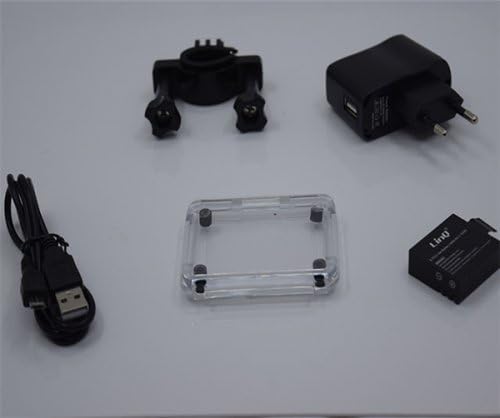
ചിത്രം 2.2: Essential accessories including the USB cable, power adapter, rechargeable battery, and an additional frame for the waterproof housing.
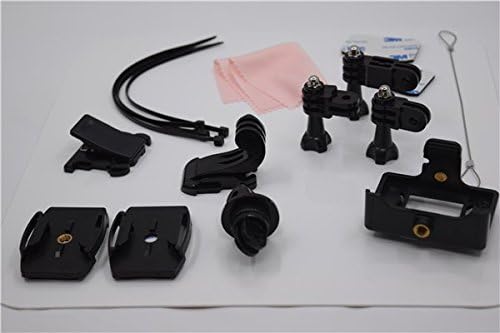
ചിത്രം 2.3: A selection of mounting accessories, including clips, adhesive mounts, and straps, for attaching the camera to various surfaces and gear.
3. സജ്ജീകരണം
3.1 ബാറ്ററി ചാർജ് ചെയ്യുന്നു
- Insert the provided 900mAh lithium battery into the camera's battery compartment.
- USB കേബിൾ ഉപയോഗിച്ച് ക്യാമറ പവർ അഡാപ്റ്ററുമായി ബന്ധിപ്പിക്കുക.
- പവർ അഡാപ്റ്റർ ഒരു വാൾ ഔട്ട്ലെറ്റിൽ പ്ലഗ് ചെയ്യുക. ചാർജിംഗ് ഇൻഡിക്കേറ്റർ ലൈറ്റ് പ്രകാശിക്കും.
- Allow approximately 3 hours for a full charge. The indicator light will change or turn off once charging is complete. A fully charged battery provides approximately 90 minutes of recording at 1080p@30fps.
3.2. Inserting a Micro SD Card
The camera supports Micro SD cards up to 32GB. A Class 10 or higher speed rating is recommended for optimal video recording performance.
- Open the Micro SD card slot cover on the side of the camera.
- Insert the Micro SD card with the gold contacts facing the back of the camera until it clicks into place.
- Close the card slot cover securely.
- It is recommended to format the Micro SD card using the camera's settings menu before first use.
3.3. പവർ ഓൺ/ഓഫ്
- To power on: Press and hold the Power/Mode button (usually on the front or top) for a few seconds until the screen illuminates.
- To power off: Press and hold the Power/Mode button again until the screen turns off.
4. പ്രവർത്തന നിർദ്ദേശങ്ങൾ
4.1. അടിസ്ഥാന പ്രവർത്തനം
- മോഡ് സ്വിച്ചിംഗ്: Press the Power/Mode button briefly to cycle through different modes (Video, Photo, Playback, Settings).
- Shutter/OK Button: Press the Shutter/OK button (usually on top) to start/stop recording video or to take a photo. In menu mode, this button confirms selections.
- നാവിഗേഷൻ ബട്ടണുകൾ: Use the Up/Down buttons (if available, often on the side) to navigate through menu options or zoom in/out.
4.2. വീഡിയോ റെക്കോർഡിംഗ്
In Video mode, the camera can record at various resolutions:
- 1920x1080 (1080p) at 30fps
- 1280x720 (720p) at 60fps
- 848x480 (WVGA) at 30fps
- 640x480 (VGA) at 30fps
Press the Shutter/OK button once to start recording. A red indicator light or on-screen icon will typically flash. Press it again to stop recording.
4.3. Photo Capture
In Photo mode, the camera supports image resolutions up to 12 megapixels:
- 12 മി
- 10 മി
- 8M
- 5M
Press the Shutter/OK button once to take a photo.
4.4. വിപുലമായ ക്രമീകരണങ്ങൾ
Access the settings menu to adjust various parameters:
- വീഡിയോ ക്രമീകരണങ്ങൾ: Loop recording, time-lapse, motion detection.
- ഫോട്ടോ ക്രമീകരണങ്ങൾ: Single shot, self-timer (5s/10s/20s), continuous shooting.
- സമ്പർക്കം: Adjust EV compensation for brighter or darker images.
- വൈറ്റ് ബാലൻസ്: Select appropriate white balance for different lighting conditions (Auto, Daylight, Cloudy, Tungsten, Fluorescent).
- ISO: Adjust light sensitivity.
- മൂർച്ച: Control image sharpness.
- തീയതി/സമയം: ശരിയായ തീയതിയും സമയവും സജ്ജമാക്കുക.
- ഭാഷ: നിങ്ങൾ ഇഷ്ടപ്പെടുന്ന ഭാഷ തിരഞ്ഞെടുക്കുക.
- SD കാർഡ് ഫോർമാറ്റ് ചെയ്യുക: Erase all data on the Micro SD card.
4.5. പ്ലേബാക്ക്
In Playback mode, you can review your captured videos and photos on the 1.5-inch LCD screen. Use the navigation buttons to scroll through files. Press the Shutter/OK button to play videos. Fast forward and rewind functions are supported for videos.
4.6. Connecting to a Computer/TV
- USB കണക്ഷൻ: Connect the camera to a computer using the USB cable. The camera will appear as a removable disk, allowing you to transfer files. It can also function as a webക്യാം
- HDMI കണക്ഷൻ: Connect the camera to an HDMI-compatible display (e.g., TV) using an HDMI cable (not included) to view your content on a larger screen.
5. പരിപാലനം
- വൃത്തിയാക്കൽ: Use the provided cleaning cloth or a soft, lint-free cloth to clean the camera lens and LCD screen. Do not use harsh chemicals or abrasive materials.
- വാട്ടർപ്രൂഫ് ഹൗസിംഗ്: Regularly inspect the waterproof housing for any cracks, damage, or debris on the O-ring seal. Ensure the O-ring is clean and properly seated before each use in water. Rinse the housing with fresh water after saltwater use and allow it to air dry.
- സംഭരണം: നേരിട്ടുള്ള സൂര്യപ്രകാശത്തിൽ നിന്നും കടുത്ത താപനിലയിൽ നിന്നും അകന്ന് തണുത്തതും വരണ്ടതുമായ സ്ഥലത്ത് ക്യാമറ സൂക്ഷിക്കുക. ക്യാമറ കൂടുതൽ നേരം ഉപയോഗിക്കുന്നില്ലെങ്കിൽ ബാറ്ററി നീക്കം ചെയ്യുക.
- ബാറ്ററി കെയർ: Avoid fully discharging the battery frequently. Recharge the battery periodically even if not in use to maintain its health.
6. പ്രശ്നപരിഹാരം
- ക്യാമറ പവർ ഓൺ ചെയ്യുന്നില്ല: Ensure the battery is fully charged. Reinsert the battery.
- വീഡിയോ റെക്കോർഡ് ചെയ്യാൻ/ഫോട്ടോ എടുക്കാൻ കഴിയില്ല: Check if a Micro SD card is inserted and properly formatted. Ensure there is sufficient space on the card.
- Poor video/image quality: Ensure the lens is clean. Check the selected resolution settings. Ensure adequate lighting.
- Water leakage in housing: Immediately remove the camera from water. Inspect the waterproof housing for damage, ensure the O-ring is clean and correctly seated, and that all latches are securely closed.
- Camera freezes: Press and hold the Power/Mode button for 10-15 seconds to force a shutdown. If the issue persists, remove and reinsert the battery.
7 സ്പെസിഫിക്കേഷനുകൾ
| ഫീച്ചർ | സ്പെസിഫിക്കേഷൻ |
|---|---|
| മോഡൽ നമ്പർ | A-S050C (6970334022037) |
| പ്രദർശിപ്പിക്കുക | 2-ഇഞ്ച് എച്ച്ഡി എൽസിഡി |
| ലെൻസ് | 170-degree Wide-Angle Fisheye, 6-glass lens |
| ചിപ്സെറ്റ് | Novatek 96650 + AR0330 |
| വീഡിയോ റെസല്യൂഷൻ | 1920x1080 (30fps), 1280x720 (60fps), 848x480 (30fps), 640x480 (30fps) |
| വീഡിയോ ഫോർമാറ്റ് | MOV (H.264 compression) |
| ചിത്ര മിഴിവ് | 12M/10M/8M/5M |
| ഇമേജ് ഫോർമാറ്റ് | ജെ.പി.ജി |
| ഫോട്ടോ മോഡുകൾ | Single Shot, Self-timer (5s/10s/20s), Continuous |
| പ്രത്യേക പ്രവർത്തനങ്ങൾ | Loop Recording, Time-lapse, Motion Detection, Dashcam/Webക്യാം ഫംഗ്ഷൻ |
| വാട്ടർപ്രൂഫ് ആഴം | Up to 30 meters (with waterproof housing) |
| സംഭരണം | Micro SD card, up to 32GB (Class 10 recommended) |
| ബാറ്ററി | 900mAh റീചാർജ് ചെയ്യാവുന്ന ലിഥിയം ബാറ്ററി |
| ബാറ്ററി ലൈഫ് | Approx. 90 minutes (1080p@30fps) |
| കണക്റ്റിവിറ്റി | USB 2.0, HDMI |
| അളവുകൾ | 59.2mm x 41mm x 29.8mm |
| ഭാരം | 60 ഗ്രാം |
8 നിയമപരമായ വിവരങ്ങൾ
This product is accompanied by a regular fiscal receipt for the cost of the product. If you require an invoice, please submit a request indicating all your details by sending a message through the 'Contact Seller' option. Warranty information should be obtained directly from your point of purchase or the seller.


