1. ആമുഖം
This manual provides detailed instructions for the installation, operation, and maintenance of the DIG RBC MVA Single-Station Battery-Operated Digital Irrigation Timer. This device is designed to automate manual brass anti-siphon valves in residential and commercial irrigation systems, particularly where AC power is unavailable.
പ്രധാന സവിശേഷതകളിൽ ഇവ ഉൾപ്പെടുന്നു:
- Easy installation for 3/4" or 1" brass manual anti-siphon valves (adapter included for 1").
- Battery-powered efficiency using two AA alkaline batteries, with a 60-second replacement window without program loss.
- Versatile programming options: weekly, odd/even days, or cyclical programming up to 30 days, with four start times per day.
- User-friendly interface with an easy-to-read LCD screen and simple 5-button programming, including manual on/off controls.
- Durable, weatherproof design suitable for harsh outdoor environments.

Figure 1: The DIG RBC MVA Digital Irrigation Timer. This image shows the blue timer unit with its protective cover open, revealing the LCD screen and control buttons, attached to a black valve actuator.
2. സജ്ജീകരണവും ഇൻസ്റ്റാളേഷനും
The RBC MVA timer is designed for easy retrofitting onto existing 3/4" or 1" manual brass anti-siphon valves. Ensure the manual anti-siphon valve is in good working condition before installation.
2.1. ഉൾപ്പെടുത്തിയിരിക്കുന്ന ഘടകങ്ങൾ
- RBC MVA Digital Irrigation Timer with 3/4" actuator and washer.
- 1" adapter and 1" washer (for 1" valves).
2.2 ഇൻസ്റ്റലേഷൻ ഘട്ടങ്ങൾ
- ജലവിതരണം ഓഫാക്കുക: Before beginning, ensure the main water supply to the anti-siphon valve is completely shut off.
- Remove Manual Handle: Carefully remove the existing manual handle from your brass anti-siphon valve.
- അഡാപ്റ്റർ തിരഞ്ഞെടുക്കുക: Determine if your valve is 3/4" or 1". The timer comes pre-assembled with a 3/4" adapter. If you have a 1" valve, replace the 3/4" adapter with the provided 1" adapter and washer.
- Attach Timer: Screw the RBC MVA timer onto the anti-siphon valve. Hand-tighten only. Do not overtighten, as this can damage the plastic threads. Ensure a snug fit to prevent leaks.
- ബാറ്ററികൾ ഇൻസ്റ്റാൾ ചെയ്യുക: Open the battery compartment (usually located on the back or side of the unit). Insert two new AA alkaline batteries, observing the correct polarity (+/-). Close the compartment securely to maintain waterproofing.
- ജലവിതരണം പുനഃസ്ഥാപിക്കുക: Slowly turn the main water supply back on and check for any leaks around the connection point.
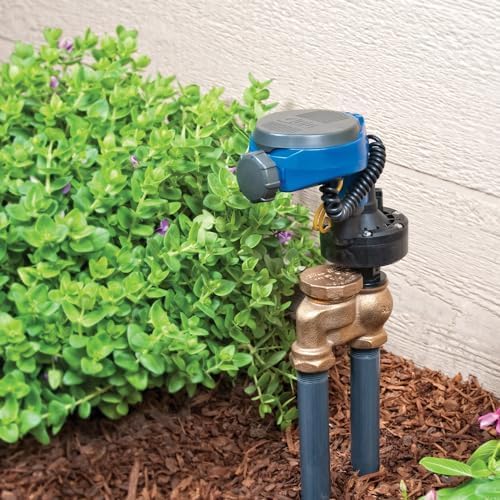
Figure 2: The DIG RBC MVA Timer installed on a brass anti-siphon valve. This image illustrates the timer unit connected to a brass valve, positioned in a garden setting with foliage and mulch.
3. പ്രവർത്തന നിർദ്ദേശങ്ങൾ
The RBC MVA timer features a user-friendly interface with an LCD screen and five control buttons for programming and manual operation.
3.1. പ്രാരംഭ സജ്ജീകരണവും സമയ ക്രമീകരണവും
- സ്ക്രീൻ സജീവമാക്കുക: Press any button to activate the LCD screen.
- നിലവിലെ സമയം സജ്ജമാക്കുക: Navigate to the time setting menu (refer to the icons on the timer's cover or screen for specific button functions). Use the arrow buttons to adjust the hour and minute, then confirm.
- നിലവിലെ ദിവസം സജ്ജമാക്കുക: Navigate to the day setting menu and use the arrow buttons to select the current day of the week.
3.2. പ്രോഗ്രാമിംഗ് ജലസേചന ഷെഡ്യൂളുകൾ
The timer supports weekly, odd/even day, or cyclical programming with up to four start times per day.
- Select Programming Mode: Use the mode button to cycle through available programming options (e.g., Weekly, Odd/Even, Cyclical).
- ആരംഭ സമയങ്ങൾ സജ്ജമാക്കുക: For each desired start time (up to four), navigate to the "Start Time" setting. Use the arrow buttons to set the hour and minute for when watering should begin.
- Set Run Duration: For each start time, set the "Run Duration" (how long the valve remains open). Use the arrow buttons to adjust the duration in minutes.
- Set Watering Days (if applicable):
- പ്രതിവാരം: Select specific days of the week for watering.
- Odd/Even: Choose to water on odd-numbered or even-numbered days of the month.
- ചാക്രിക: Set a cycle length (e.g., every 2 days) and the number of days to water within that cycle.
- Review കൂടാതെ സേവ് ചെയ്യുക: Review your programmed schedule to ensure accuracy. The timer typically saves settings automatically or prompts for confirmation.
3.3. മാനുവൽ പ്രവർത്തനം
The timer includes a manual on/off control for immediate watering outside of the programmed schedule.
- മാനുവൽ ഓൺ: Press the "Manual" button (or equivalent, refer to timer icons). The display will show a default manual run time. Use arrow buttons to adjust the desired duration. The valve will open immediately and close after the set time.
- മാനുവൽ ഓഫ്: To stop a manual watering cycle prematurely, press the "Manual" button again or the "OFF" button.
3.4. ബാറ്ററി മാറ്റിസ്ഥാപിക്കൽ
The timer operates on two AA alkaline batteries. When the battery indicator appears on the LCD screen, replace the batteries promptly. The timer provides a 60-second window to replace batteries without losing programmed settings.
- ബാറ്ററി കമ്പാർട്ട്മെൻ്റ് തുറക്കുക.
- Remove old batteries and insert two new AA alkaline batteries, ensuring correct polarity.
- ബാറ്ററി കമ്പാർട്ട്മെൻ്റ് സുരക്ഷിതമായി അടയ്ക്കുക.
4. പരിപാലനം
Regular maintenance ensures optimal performance and longevity of your irrigation timer.
- ബാറ്ററി പരിശോധന: Periodically check the battery indicator on the LCD screen. Replace batteries annually or when the low battery icon appears, even if the timer appears to be functioning.
- വൃത്തിയാക്കൽ: Clean the exterior of the timer with a damp cloth as needed. Do not use abrasive cleaners or submerge the unit in water.
- ശീതകാലം: In regions with freezing temperatures, remove the timer from the valve before the first frost. Store it indoors in a dry, protected area. Remove batteries if storing for extended periods.
- കണക്ഷൻ സമഗ്രത: Periodically inspect the connection between the timer and the valve for any signs of leaks or damage. Hand-tighten if necessary, but avoid overtightening.
5. പ്രശ്നപരിഹാരം
This section addresses common issues you might encounter with your DIG RBC MVA timer.
| പ്രശ്നം | സാധ്യമായ കാരണം | പരിഹാരം |
|---|---|---|
| Timer does not turn on or LCD is blank. | ഡെഡ് അല്ലെങ്കിൽ തെറ്റായി ഇൻസ്റ്റാൾ ചെയ്ത ബാറ്ററികൾ. | ബാറ്ററികൾ പുതിയ AA ആൽക്കലൈൻ ബാറ്ററികൾ ഉപയോഗിച്ച് മാറ്റിസ്ഥാപിക്കുക, ശരിയായ പോളാരിറ്റി ഉറപ്പാക്കുക. |
| Valve does not open at scheduled time. |
|
|
| Valve does not close or leaks continuously. |
|
|
| Watering occurs at incorrect times. | Incorrect current time or programming. | Verify and reset the current time and review all programmed schedules. |
6 സ്പെസിഫിക്കേഷനുകൾ
| മോഡൽ നമ്പർ | RBC MVA |
| ബ്രാൻഡ് | ഡി.ഐ.ജി. |
| പവർ ഉറവിടം | 2 x AA ആൽക്കലൈൻ ബാറ്ററികൾ |
| വാൽവ് അനുയോജ്യത | 3/4" and 1" Manual Brass Anti-Siphon Valves |
| പ്രോഗ്രാമിംഗ് ഓപ്ഷനുകൾ | Weekly, Odd/Even Days, Cyclical (up to 30 days) |
| ആരംഭ സമയം | Up to 4 per day |
| മെറ്റീരിയൽ | ഉയർന്ന സ്വാധീനമുള്ള പ്ലാസ്റ്റിക് |
| ഉൽപ്പന്ന അളവുകൾ | 4.25"D x 5.5"W x 8.8"H |
| ഇനത്തിൻ്റെ ഭാരം | 1.4 പൗണ്ട് |
| സ്ക്രീൻ വലിപ്പം | 4.1 ഇഞ്ച് |
| യു.പി.സി | 840620101097 |
7. വാറൻ്റിയും പിന്തുണയും
Specific warranty information for the DIG RBC MVA Digital Irrigation Timer is not provided in the available product data. For detailed warranty terms, technical support, or replacement parts, please contact DIG Corp directly through their official webസൈറ്റ് അല്ലെങ്കിൽ ഉപഭോക്തൃ സേവന ചാനലുകൾ.
നിങ്ങൾക്ക് സന്ദർശിക്കാം DIG Store on Amazon for more information or to find contact details.


