1. ആമുഖം
Thank you for choosing the Lenco PDR-030 DAB+/FM Portable Digital Radio. This manual provides essential information for setting up, operating, and maintaining your device. The PDR-030 offers high-quality digital radio reception (DAB+) and traditional FM radio, along with features such as an integrated rechargeable battery for portability, an RDS display, station memory, and an alarm clock function.
ഉൾപ്പെടുത്തിയ ഘടകങ്ങൾ:
- Lenco PDR-030 Digital Radio
- AC Power Adapter (220 Volt)
- ഉപയോക്തൃ മാനുവൽ
2 പ്രധാനപ്പെട്ട സുരക്ഷാ വിവരങ്ങൾ
- തീയോ വൈദ്യുതാഘാതമോ തടയാൻ ഉപകരണം മഴയിലോ ഈർപ്പത്തിലോ തുറന്നുകാട്ടരുത്.
- പവർ അഡാപ്റ്റർ വോളിയം ഉറപ്പാക്കുകtagഇ നിങ്ങളുടെ പ്രാദേശിക വൈദ്യുതി വിതരണവുമായി പൊരുത്തപ്പെടുന്നു.
- സി തുറക്കരുത്.asing. എല്ലാ സേവനങ്ങളും യോഗ്യതയുള്ള ഉദ്യോഗസ്ഥർക്ക് റഫർ ചെയ്യുക.
- താപ സ്രോതസ്സുകൾക്ക് സമീപമോ നേരിട്ടുള്ള സൂര്യപ്രകാശത്തിലോ യൂണിറ്റ് സ്ഥാപിക്കുന്നത് ഒഴിവാക്കുക.
- Handle the integrated battery with care. Do not attempt to replace it yourself.
- ശക്തമായ കാന്തിക മണ്ഡലങ്ങളിൽ നിന്ന് ഉപകരണം അകറ്റി നിർത്തുക.
3. ഉൽപ്പന്നം കഴിഞ്ഞുview
Familiarize yourself with the main components and controls of your Lenco PDR-030 radio.
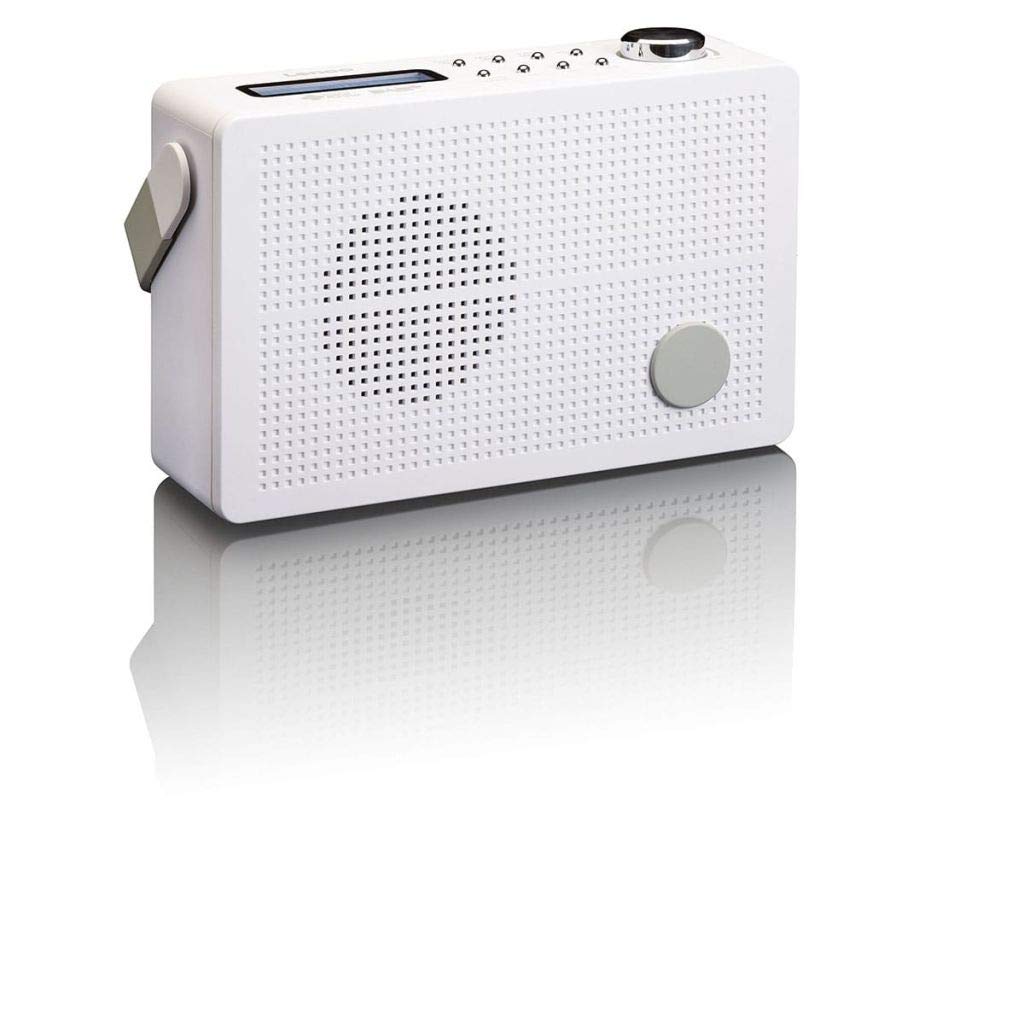
ചിത്രം 3.1: Front Panel of Lenco PDR-030 Radio. Features include a blue backlit LCD display, power/source button, alarm, sleep, info/menu, preset buttons, select/snooze, scan, previous, next buttons, and a rotary volume knob.
Key Controls and Features:
- ഡിസ്പ്ലേ: Two-line illuminated LCD for time, date, station name, and information.
- Power/Source Button: Turns the radio on/off and switches between DAB+ and FM modes.
- വോളിയം നോബ്: ഓഡിയോ ഔട്ട്പുട്ട് ലെവൽ ക്രമീകരിക്കുന്നു.
- ടെലിസ്കോപ്പിക് ആന്റിന: For optimal radio signal reception.
- ഹെഡ്ഫോൺ ജാക്ക് (3.5 മിമി): സ്വകാര്യ ശ്രവണത്തിനായി.
- Alarm/Sleep/Info/Menu/Preset Buttons: For various functions including setting alarms, sleep timer, accessing information, menu navigation, and managing station presets.
- Select/Snooze/Scan/Prev/Next Buttons: For station tuning, menu selection, and snooze function.
4. സജ്ജീകരണം
4.1 റേഡിയോ പവർ ചെയ്യുന്നു
The PDR-030 can be powered by the included AC adapter or its integrated rechargeable battery.
- എസി പവർ: Connect the supplied 220V AC power adapter to the DC input jack on the radio and then to a wall outlet. The radio will automatically begin charging the internal battery.
- ബാറ്ററി പവർ: The integrated Lithium-ion battery allows for portable use. Ensure the battery is sufficiently charged before use without the AC adapter.
4.2 ആന്റിന സജ്ജീകരണം
Extend the telescopic antenna fully for optimal reception of both DAB+ and FM signals. Adjust its position for the best signal quality.
4.3 Initial Power On and Station Scan
- അമർത്തുക ഊര്ജ്ജസ്രോതസ്സ് റേഡിയോ ഓണാക്കാനുള്ള ബട്ടൺ.
- Upon first use, the radio will automatically enter DAB+ mode and perform a full scan for available digital radio stations. This may take a few minutes.
- സ്കാൻ പൂർത്തിയായിക്കഴിഞ്ഞാൽ, റേഡിയോ ലഭ്യമായ ആദ്യത്തെ സ്റ്റേഷനിലേക്ക് ട്യൂൺ ചെയ്യും.
5. പ്രവർത്തന നിർദ്ദേശങ്ങൾ
5.1 പവർ ഓൺ/ഓഫ്
അമർത്തുക ഊര്ജ്ജസ്രോതസ്സ് റേഡിയോ ഓണാക്കാനോ ഓഫാക്കാനോ ഉള്ള ബട്ടൺ.
5.2 Mode Selection (DAB+/FM)
അമർത്തുക ഉറവിടം button repeatedly to switch between DAB+ and FM radio modes.
5.3 ട്യൂണിംഗ് സ്റ്റേഷനുകൾ
- DAB+ Mode:
- പ്രാരംഭ സ്കാനിനുശേഷം, ഉപയോഗിക്കുക മുൻ ഒപ്പം അടുത്തത് buttons to navigate through the list of available DAB+ stations.
- To perform a new full scan, press the മെനു button, navigate to "Full Scan" using മുൻ/അടുത്തത്, അമർത്തുക തിരഞ്ഞെടുക്കുക.
- എഫ്എം മോഡ്:
- അമർത്തുക സ്കാൻ ചെയ്യുക ലഭ്യമായ അടുത്ത എഫ്എം സ്റ്റേഷനായി സ്വയമേവ സ്കാൻ ചെയ്യുന്നതിനുള്ള ബട്ടൺ.
- For manual tuning, press and hold the മുൻ or അടുത്തത് ആവൃത്തി നന്നായി ക്രമീകരിക്കാനുള്ള ബട്ടണുകൾ.
5.4 Saving and Recalling Preset Stations
The radio allows you to store up to 10 DAB+ and 10 FM preset stations.
- ഒരു പ്രീസെറ്റ് സംരക്ഷിക്കാൻ:
- ആവശ്യമുള്ള സ്റ്റേഷനിലേക്ക് ട്യൂൺ ചെയ്യുക.
- അമർത്തിപ്പിടിക്കുക പ്രീസെറ്റ് button until "Preset Store" appears on the display.
- ഉപയോഗിക്കുക മുൻ/അടുത്തത് ഒരു പ്രീസെറ്റ് നമ്പർ തിരഞ്ഞെടുക്കാനുള്ള ബട്ടണുകൾ (1-10).
- അമർത്തുക തിരഞ്ഞെടുക്കുക സ്റ്റേഷൻ സ്ഥിരീകരിക്കാനും സംരക്ഷിക്കാനും.
- ഒരു പ്രീസെറ്റ് തിരിച്ചുവിളിക്കാൻ:
- അമർത്തുക പ്രീസെറ്റ് ബട്ടൺ ചുരുക്കത്തിൽ.
- ഉപയോഗിക്കുക മുൻ/അടുത്തത് ആവശ്യമുള്ള പ്രീസെറ്റ് നമ്പർ തിരഞ്ഞെടുക്കാൻ ബട്ടണുകൾ.
- അമർത്തുക തിരഞ്ഞെടുക്കുക to tune to the preset station.
5.5 വോളിയം നിയന്ത്രണം
തിരിക്കുക വോളിയം നോബ് clockwise to increase the volume and counter-clockwise to decrease it.
5.6 RDS Functionality (FM Mode)
In FM mode, the RDS (Radio Data System) function displays information such as station name, program type, and other broadcast data on the two-line LCD display.
5.7 അലാറം ക്ലോക്ക് പ്രവർത്തനം
The PDR-030 can be used as an alarm clock with two separate alarm times.
- ഒരു അലാറം സജ്ജീകരിക്കുന്നു:
- അമർത്തുക അലാറം ബട്ടൺ.
- ഉപയോഗിക്കുക മുൻ/അടുത്തത് to select Alarm 1 or Alarm 2, then press തിരഞ്ഞെടുക്കുക.
- Follow the on-screen prompts to set the alarm time, duration, source (Buzzer or Radio), frequency (Daily, Once, Weekdays, Weekends), and volume.
- Ensure the alarm is set to "On" and press തിരഞ്ഞെടുക്കുക സംരക്ഷിക്കാൻ.
- സ്നൂസ് പ്രവർത്തനം: അലാറം മുഴങ്ങുമ്പോൾ, അമർത്തുക സ്നൂസ് ചെയ്യുക button to temporarily silence it for a set period.
- സ്ലീപ്പ് ടൈമർ: അമർത്തുക ഉറങ്ങുക ഒരു സ്ലീപ്പ് ടൈമർ സജ്ജീകരിക്കാൻ ബട്ടൺ ആവർത്തിച്ച് അമർത്തുക (ഉദാ. 15, 30, 45, 60 മിനിറ്റ്), അതിനുശേഷം റേഡിയോ യാന്ത്രികമായി ഓഫാകും.
5.8 ഹെഡ്ഫോൺ കണക്ഷൻ
Connect 3.5mm stereo headphones to the headphone jack for private listening. The internal speaker will be muted automatically.
6. പരിപാലനം
6.1 വൃത്തിയാക്കൽ
Wipe the radio's exterior with a soft, dry cloth. Do not use abrasive cleaners, waxes, or solvents as they may damage the finish. Ensure no liquids enter the device.
6.2 ബാറ്ററി കെയർ
The integrated Lithium-ion battery is designed for long life. To maximize battery lifespan:
- ബാറ്ററി ഇടയ്ക്കിടെ പൂർണ്ണമായും ഡിസ്ചാർജ് ചെയ്യുന്നത് ഒഴിവാക്കുക.
- If storing the radio for an extended period, charge the battery to approximately 50% and store in a cool, dry place.
- Do not attempt to replace the battery yourself. Contact qualified service personnel if battery issues arise.
7. പ്രശ്നപരിഹാരം
| പ്രശ്നം | സാധ്യമായ കാരണം | പരിഹാരം |
|---|---|---|
| ശക്തിയില്ല | AC adapter not connected or faulty; battery discharged. | Check AC adapter connection. Charge the battery. |
| മോശം DAB+/FM റിസപ്ഷൻ | ആന്റിന നീട്ടിയിട്ടില്ല; ദുർബലമായ സിഗ്നൽ ഏരിയ; ഇടപെടൽ. | Fully extend and adjust the telescopic antenna. Move the radio to a location with better signal. Avoid placing near other electronic devices. |
| ശബ്ദമില്ല | ശബ്ദം വളരെ കുറവാണ്; ഹെഡ്ഫോണുകൾ കണക്റ്റുചെയ്തു; മ്യൂട്ട് സജീവമാക്കി. | Increase volume. Disconnect headphones. Check if mute is active (if applicable). |
| അലാറം മുഴങ്ങുന്നില്ല | Alarm not activated; alarm volume too low; incorrect time setting. | Ensure alarm is set to "On". Check alarm volume. Verify current time and alarm time settings. |
8 സ്പെസിഫിക്കേഷനുകൾ
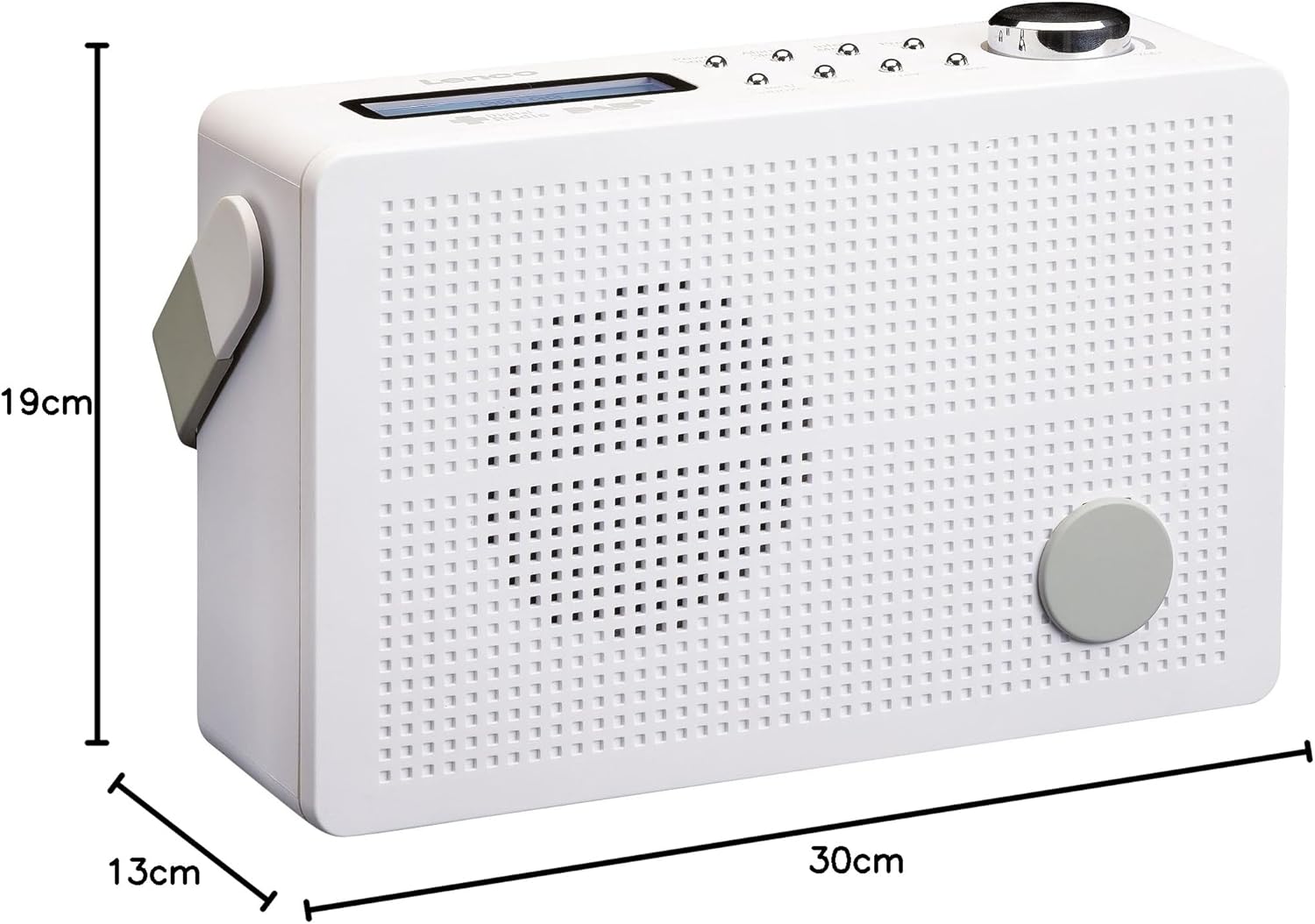
ചിത്രം 8.1: Lenco PDR-030 Dimensions.
| ഫീച്ചർ | വിശദാംശങ്ങൾ |
|---|---|
| മോഡൽ നമ്പർ | PDR-030 |
| ട്യൂണർ ടെക്നോളജി | DAB+, FM (Ukw) |
| പവർ ഉറവിടം | Battery-Powered (Integrated Lithium-ion), AC Adapter |
| എസി വോളിയംtage | 220 വോൾട്ട് |
| ഉൽപ്പന്ന അളവുകൾ (W x D x H) | 21.4 x 6.5 x 13.8 cm (approx. 22.5 x 8.5 x 15 cm as per another spec) |
| ഇനത്തിൻ്റെ ഭാരം | 9 g (Note: This seems incorrect, likely 670g from description) |
| മെറ്റീരിയൽ തരം | പ്ലാസ്റ്റിക് |
| ഹാർഡ്വെയർ ഇന്റർഫേസ് | 3.5 mm Audio (Headphone Jack) |
| പ്രത്യേക സവിശേഷതകൾ | Portable, RDS Display, Alarm Clock, Station Memory (10 DAB+, 10 FM) |
Note: Some dimensions and weight specifications provided by the manufacturer may vary slightly. The description states 670 grams for weight, while specifications list 9g. Please refer to the product packaging for the most accurate information.
9. വാറൻ്റിയും പിന്തുണയും
Lenco products are designed for reliability and performance. This product typically comes with a 24-month manufacturer's warranty from the date of purchase, covering defects in materials and workmanship. Please retain your proof of purchase for warranty claims.
For technical support, service, or warranty inquiries, please refer to the contact information provided on the Lenco official website or your local retailer. Do not attempt to repair the device yourself.
കൂടുതൽ വിവരങ്ങൾക്ക്, നിങ്ങൾക്ക് സന്ദർശിക്കാവുന്നതാണ് Lenco Store on Amazon.


