ആമുഖം
Thank you for choosing the ROLINE Cable Cover Organizer. This manual provides essential information for the proper installation, operation, and maintenance of your cable management solution. Designed to keep your workspace tidy, this under-desk mount cable tray effectively hides wires, power cords, and power strips, ensuring a clean and organized environment.
സുരക്ഷാ വിവരങ്ങൾ
- Ensure all mounting hardware is securely fastened to prevent the organizer from falling.
- Do not overload the organizer with excessive weight beyond its structural capacity.
- Keep hands clear of moving parts during installation.
- Use appropriate tools for installation to avoid injury or damage to the product or mounting surface.
പാക്കേജ് ഉള്ളടക്കം
ഇൻസ്റ്റാളേഷൻ ആരംഭിക്കുന്നതിന് മുമ്പ് എല്ലാ ഘടകങ്ങളും നിലവിലുണ്ടെന്ന് ദയവായി പരിശോധിക്കുക:
- 2 x ROLINE Cable Cover Organizer sections
- Mounting Screws (quantity may vary, typically 4-6 screws per section)
സജ്ജീകരണവും ഇൻസ്റ്റാളേഷനും
The ROLINE Cable Cover Organizer is designed for easy under-desk mounting. Follow these steps for secure installation:
- മൗണ്ടിംഗ് സ്ഥലം തിരിച്ചറിയുക: Choose a suitable location under your desk where the organizer will not interfere with legroom or desk functionality. Ensure the surface is sturdy enough to support the organizer and its contents.
- Position the Organizer: Hold one section of the cable organizer against the underside of your desk at the desired mounting position. Use a pencil to mark the locations for the mounting screws through the pre-drilled holes.
- Pre-drill Pilot Holes (Recommended): For wood or composite desks, it is recommended to pre-drill small pilot holes at the marked locations. This helps prevent wood splitting and ensures easier screw insertion. Ensure the drill bit size is smaller than the screw diameter.
- Secure the Organizer: Align the organizer with the pilot holes (if drilled) and use the provided mounting screws to firmly attach it to the underside of the desk. Ensure each screw is tightened securely.
- Repeat for Second Section: If using both sections, repeat steps 2-4 to install the second organizer section, ensuring proper alignment and spacing as needed for your cable management requirements.

ഇത് view shows the side profile of the cable organizer, illustrating the design for cable routing and the pre-drilled holes for secure mounting under a desk.
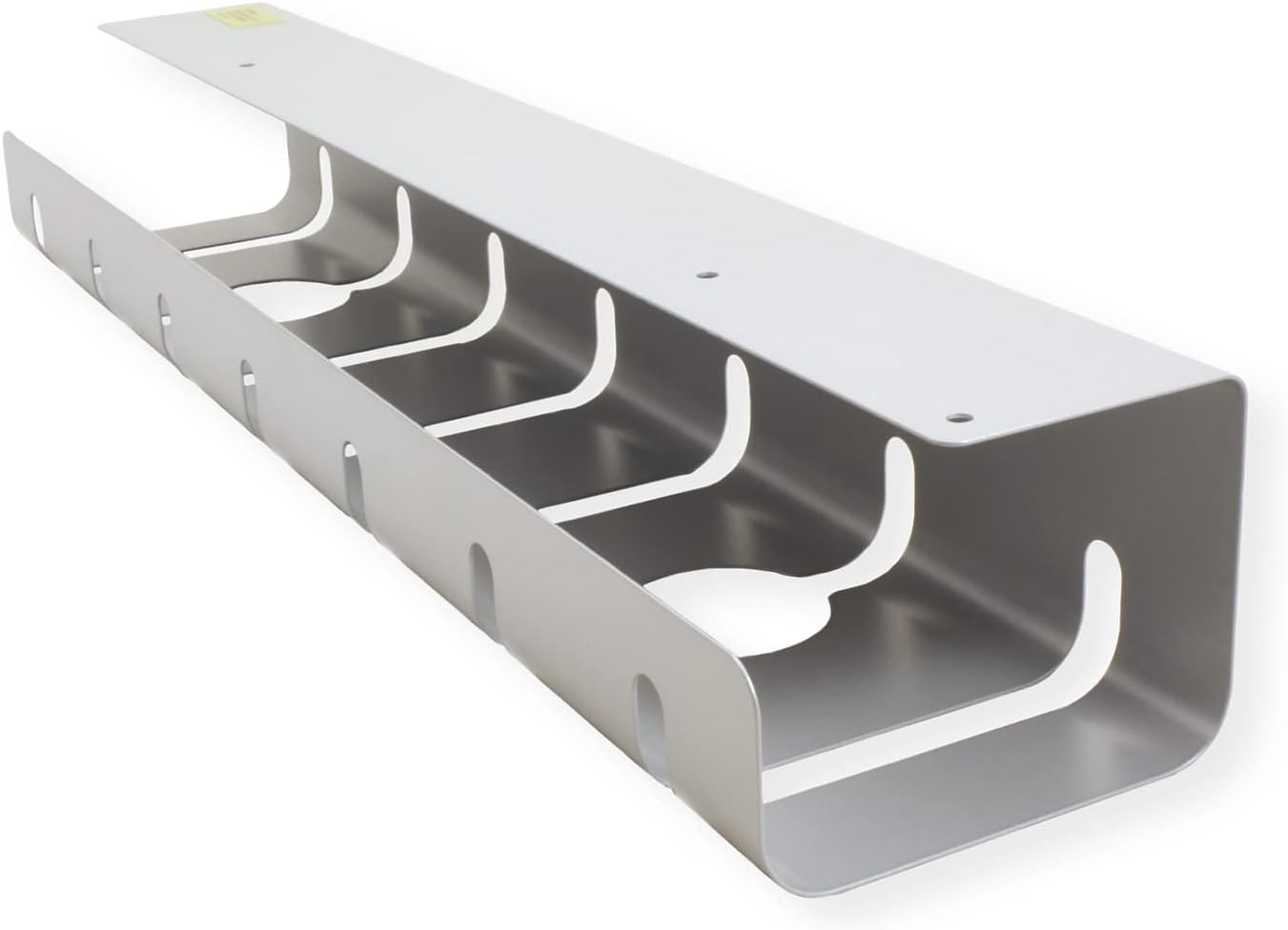
The ROLINE Cable Cover Organizer, designed for under-desk mounting, provides a neat solution for managing cables and power strips.
പ്രവർത്തന നിർദ്ദേശങ്ങൾ
Once installed, the ROLINE Cable Cover Organizer provides ample space for various cables and power strips:
- കേബിൾ റൂട്ടിംഗ്: Guide your power cables, network cables, and other computer cabling through the open slots and along the tray.
- Power Strip Placement: Place power strips or surge protectors directly into the tray. The design allows for easy access while keeping them out of sight.
- കേബിൾ ഓർഗനൈസേഷൻ: Utilize the various cutouts and the open design to route cables neatly, preventing tangles and improving airflow.
മെയിൻ്റനൻസ്
To ensure the longevity and continued performance of your cable organizer:
- വൃത്തിയാക്കൽ: Periodically wipe the organizer with a soft, damp പൊടിയും അവശിഷ്ടങ്ങളും നീക്കം ചെയ്യാൻ തുണി ഉപയോഗിക്കുക. ഉരച്ചിലുകൾ ഉള്ള ക്ലീനറുകൾ ഒഴിവാക്കുക.
- പരിശോധന: Regularly check the mounting screws to ensure they remain tight. Re-tighten if necessary.
- Cable Management Review: ഇടയ്ക്കിടെ റീview your cable setup within the organizer to ensure cables are not pinched or excessively strained.
ട്രബിൾഷൂട്ടിംഗ്
- Organizer feels loose after installation: Ensure all mounting screws are fully tightened. If the desk material is soft, consider using larger screws or washers for better grip (ensure they are appropriate for your desk thickness).
- Cables do not fit: The organizer is designed for standard power strips and cables. If specific adapters or large power bricks do not fit, consider alternative routing or placement outside the tray if safe to do so.
സ്പെസിഫിക്കേഷനുകൾ

A technical diagram displaying the precise measurements of the ROLINE Cable Cover Organizer in millimeters, including length, width, and height.
| ഫീച്ചർ | വിശദാംശങ്ങൾ |
|---|---|
| മോഡൽ നമ്പർ | 17031302 |
| Product Dimensions (each section) | 20.87 x 3.15 x 4.33 ഇഞ്ച് (530 x 80 x 110 മിമി) |
| ഇനത്തിൻ്റെ ഭാരം | 4.62 pounds (total for 2 sections) |
| മെറ്റീരിയൽ | അലുമിനിയം |
| നിറം | വെള്ളി |
| കഷണങ്ങളുടെ എണ്ണം | 2 |
| ഇൻസ്റ്റലേഷൻ തരം | Table Mount (Under Desk) |
| നിർമ്മാതാവ് | Roline |
വാറൻ്റിയും പിന്തുണയും
For warranty information, technical support, or further inquiries regarding your ROLINE Cable Cover Organizer, please refer to the official Roline webസൈറ്റിൽ ബന്ധപ്പെടുക അല്ലെങ്കിൽ അവരുടെ ഉപഭോക്തൃ സേവനവുമായി നേരിട്ട് ബന്ധപ്പെടുക. വാറന്റി ക്ലെയിമുകൾക്കായി നിങ്ങളുടെ വാങ്ങൽ രസീത് സൂക്ഷിക്കുക.


