1. ആമുഖം
The Midiplus X3 mini is a compact and versatile USB MIDI keyboard controller designed for music production and performance. This manual provides essential information for setting up, operating, and maintaining your X3 mini controller, ensuring optimal performance and longevity.
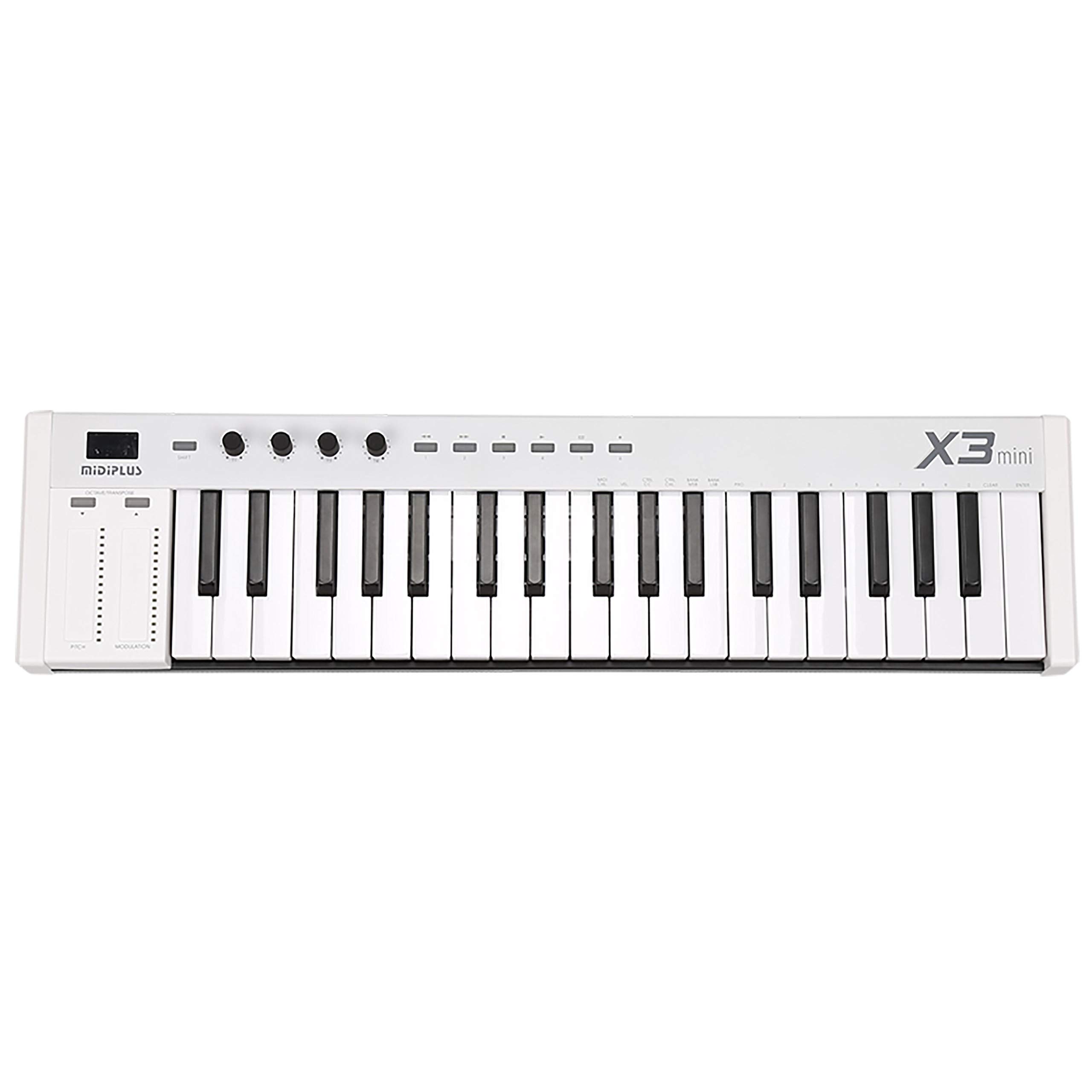
Figure 1: The Midiplus X3 mini USB MIDI Keyboard Controller, a compact and portable device for music production.
2 സുരക്ഷാ വിവരങ്ങൾ
- ഊർജ്ജ സ്രോതസ്സ്: This device is powered via USB. Ensure your USB port provides stable power. Do not attempt to power the device with an external power supply not specified by the manufacturer.
- ഈർപ്പം: Keep the device away from water or excessive moisture to prevent electric shock or damage.
- ചൂട്: Avoid placing the device near heat sources or in direct sunlight, as this may cause overheating and malfunction.
- വൃത്തിയാക്കൽ: വൃത്തിയാക്കാൻ മൃദുവായതും ഉണങ്ങിയതുമായ തുണി ഉപയോഗിക്കുക. ലിക്വിഡ് ക്ലീനറുകളോ എയറോസോളുകളോ ഉപയോഗിക്കരുത്.
- സേവനം: ഉപകരണം സ്വയം തുറക്കാനോ സർവീസ് ചെയ്യാനോ ശ്രമിക്കരുത്. എല്ലാ സർവീസിംഗും യോഗ്യതയുള്ള ഉദ്യോഗസ്ഥർക്ക് റഫർ ചെയ്യുക.
3. പാക്കേജ് ഉള്ളടക്കം
താഴെ പറയുന്ന എല്ലാ ഇനങ്ങളും നിങ്ങളുടെ പാക്കേജിൽ ഉൾപ്പെടുത്തിയിട്ടുണ്ടോ എന്ന് ദയവായി പരിശോധിക്കുക:
- Midiplus X3 mini USB MIDI Keyboard Controller
- USB കേബിൾ
- ഉപയോക്തൃ മാനുവൽ (ഈ പ്രമാണം)
4. ഉൽപ്പന്നം കഴിഞ്ഞുview
4.1 ഫ്രണ്ട് പാനൽ നിയന്ത്രണങ്ങൾ

ചിത്രം 2: വിശദാംശങ്ങൾ view of the control panel, showing the pitch bend and modulation touch strips, the Shift button, and the four customizable knobs (T1-T4).
- 25 Force-Sensitive Keys: Standard mini-keys that respond to playing dynamics.
- Pitch Bend Strip: A touch-sensitive strip for bending the pitch of notes.
- മോഡുലേഷൻ സ്ട്രിപ്പ്: A touch-sensitive strip for applying modulation effects.
- ഷിഫ്റ്റ് ബട്ടൺ: Activates secondary functions for other controls.
- OCTAVE/TRANSPOSE Buttons: Adjust the octave range or transpose the keyboard.
- T1-T4 Customizable Knobs: Four rotary knobs that can be assigned to various MIDI Continuous Controller (CC) messages.
- Customizable Playback Buttons: Buttons that can be assigned to specific MIDI functions.
- 3-Digit LED Display: നിലവിലെ ക്രമീകരണങ്ങളും മൂല്യങ്ങളും കാണിക്കുന്നു.

Figure 3: A closer look at the 25 force-sensitive mini-keys and the 'X3 mini' model designation.
4.2 പിൻ പാനൽ കണക്ഷനുകൾ

Figure 4: The rear panel connections, including the USB port for power and data, the MIDI Out port for external MIDI devices, and the Sustain pedal input.
- USB പോർട്ട്: Connects to your computer for power and MIDI data transmission.
- MIDI OUT Port: A standard 5-pin DIN connector for sending MIDI data to external hardware synthesizers or modules.
- SUSTAIN Pedal Input: Connect a standard sustain pedal (not included) for expressive playing.
5. സജ്ജീകരണം
- കമ്പ്യൂട്ടറുമായി ബന്ധിപ്പിക്കുക: Use the provided USB cable to connect the X3 mini's USB port to an available USB port on your computer. The device is USB-powered and does not require an external power adapter.
- ഡ്രൈവർ ഇൻസ്റ്റാളേഷൻ: The Midiplus X3 mini is a class-compliant device, meaning no special drivers are required for most operating systems (Windows, macOS, Linux). Your computer should automatically recognize the device.
- സോഫ്റ്റ്വെയർ സജ്ജീകരണം: Open your Digital Audio Workstation (DAW) or music software. Navigate to the MIDI settings or preferences and ensure the "Midiplus X3 mini" is selected as a MIDI input device.
- Sustain Pedal (Optional): If using a sustain pedal, connect it to the SUSTAIN input jack on the rear panel.
- External MIDI Devices (Optional): If connecting to an external hardware synthesizer or module, use a standard 5-pin MIDI cable to connect the X3 mini's MIDI OUT port to the MIDI IN port of your external device.
6. പ്രവർത്തന നിർദ്ദേശങ്ങൾ
6.1 അടിസ്ഥാന പ്ലേബാക്ക്
Once connected and recognized by your software, simply press the keys to play notes. The keys are force-sensitive, meaning the velocity (how hard you press) will affect the sound's dynamics.
6.2 ഒക്ടാവും ട്രാൻസ്പോസും
ഉപയോഗിക്കുക OCTAVE/TRANSPOSE buttons to shift the keyboard's pitch range up or down. The 3-digit LED display will indicate the current octave or transpose setting.
6.3 Pitch Bend and Modulation
The touch-sensitive പിച്ച് ബെൻഡ് ഒപ്പം മോഡുലേഷൻ strips on the left side allow for real-time expressive control over your sounds. The Pitch Bend strip typically returns to center when released, while the Modulation strip retains its last position.
6.4 Customizable Knobs and Buttons
ദി T1-T4 Knobs ഒപ്പം Customizable Playback Buttons can be assigned to control various parameters within your music software or external MIDI devices. Refer to your software's manual for instructions on MIDI CC mapping. To access secondary functions or reassign controls, press and hold the SHIFT button while interacting with the desired control.
7. പരിപാലനം
- വൃത്തിയാക്കൽ: Regularly wipe the surface of the controller with a soft, dry, lint-free cloth. Avoid using abrasive cleaners, solvents, or waxes.
- സംഭരണം: When not in use, store the X3 mini in a clean, dry environment, away from extreme temperatures and direct sunlight.
- ഗതാഗതം: If transporting the device, use appropriate padding or a carrying case to protect it from physical damage.
8. പ്രശ്നപരിഹാരം
- ശബ്ദമില്ല:
- Ensure the X3 mini is properly connected via USB and recognized by your computer.
- Verify that your DAW or music software has the X3 mini selected as a MIDI input.
- Check that the instrument track in your software is armed for recording or monitoring and has a sound loaded.
- Confirm your audio output (speakers/headphones) are connected and functioning.
- ഉപകരണം തിരിച്ചറിഞ്ഞിട്ടില്ല:
- Try connecting the X3 mini to a different USB port on your computer.
- നിങ്ങളുടെ കമ്പ്യൂട്ടർ പുനരാരംഭിച്ച് വീണ്ടും ബന്ധിപ്പിക്കാൻ ശ്രമിക്കുക.
- നിങ്ങളുടെ ഓപ്പറേറ്റിംഗ് സിസ്റ്റം കാലികമാണെന്ന് ഉറപ്പാക്കുക.
- നിയന്ത്രണങ്ങൾ പ്രതികരിക്കുന്നില്ല:
- Check if the controls are correctly mapped within your music software.
- Ensure the SHIFT button is not inadvertently held down, which might change control behavior.
9 സ്പെസിഫിക്കേഷനുകൾ
| കീകൾ | 25 force-sensitive mini-keys |
| പ്രദർശിപ്പിക്കുക | 3-അക്ക LED ഡിസ്പ്ലേ |
| നിയന്ത്രണങ്ങൾ | SHIFT button, OCTAVE/TRANSPOSE buttons, 4 customizable knobs (T1-T4), Customizable playback buttons, Pitch bend strip, Modulation strip |
| കണക്ഷനുകൾ | USB port, MIDI OUT (5-pin DIN), Sustain pedal input |
| ശക്തി | USB പവർ |
| ഡ്രൈവർ | Class-compliant (no driver needed) |
| അളവുകൾ (L x W x H) | 21.89 x 5.39 x 2.01 ഇഞ്ച് (556 x 137 x 51 മിമി) |
| ഭാരം | 4.03 പൗണ്ട് (1.83 കി.ഗ്രാം) |
10. വാറൻ്റിയും പിന്തുണയും
For warranty information and technical support, please refer to the official Midiplus webനിങ്ങളുടെ സൈറ്റിൽ ബന്ധപ്പെടുക അല്ലെങ്കിൽ നിങ്ങളുടെ പ്രാദേശിക വിതരണക്കാരനെ ബന്ധപ്പെടുക. ഏതെങ്കിലും വാറന്റി ക്ലെയിമുകൾക്ക് വാങ്ങിയതിന്റെ തെളിവായി നിങ്ങളുടെ വാങ്ങൽ രസീത് സൂക്ഷിക്കുക.


