1. ആമുഖം
This manual provides comprehensive instructions for the installation, operation, and maintenance of the Chieftec CI-01B-OP mATX Chasis. This chassis is designed for micro-ATX systems, offering a compact yet versatile solution for PC builders. Please read this manual thoroughly before beginning any installation.

This image displays the Chieftec CI-01B-OP mATX Chasis from a front-side angle, highlighting its black finish and honeycomb mesh front panel design.
2. പാക്കേജ് ഉള്ളടക്കം
Please verify that all items listed below are present in your package before proceeding with installation. If any items are missing or damaged, contact your retailer.
- Chieftec CI-01B-OP mATX Chasis
- മൗണ്ടിംഗ് സ്ക്രൂകളുടെ സെറ്റ്
- പൊടി ഫിൽട്ടർ
- HDD rails
- മൗണ്ടിംഗ് നിർദ്ദേശങ്ങൾ (ഈ മാനുവൽ)
3 പ്രധാന സവിശേഷതകൾ
The Chieftec CI-01B-OP mATX Chasis offers several features designed for ease of use and performance:
- ഫോം ഘടകം: Compact mATX cube design.
- ഫ്രണ്ട് പാനൽ: Honeycomb stamped mesh for optimized airflow.
- ഫ്രണ്ട് I/O പോർട്ടുകൾ: 2x USB 3.0, 1x USB 2.0, Mic-in, Audio-out (AZALIA / HD-Audio).
- ഡ്രൈവ് ബേസ്: 1x 5.25" external, 2x 3.5" internal, 3x 2.5" internal.
- VGA കാർഡ് പിന്തുണ: Maximum length of 320mm.
- CPU Cooler Support: പരമാവധി ഉയരം 150 മി.മീ.
- മെറ്റീരിയൽ: Durable 0.6mm thick metal construction.

This image shows a close-up of the top panel of the chassis, detailing the integrated USB 3.0, USB 2.0, microphone, and audio ports.
4. സജ്ജീകരണവും ഇൻസ്റ്റാളേഷനും
Follow these steps for proper component installation. Ensure the system is powered off and unplugged from the wall outlet before beginning any installation to prevent electric shock or damage to components.
4.1. Preparing the Chasis
Remove the side panels and any necessary covers to access the interior. Refer to the chassis diagram for panel removal instructions.
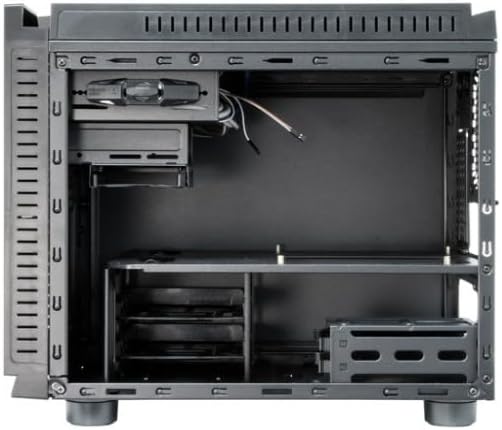
ഈ ചിത്രം ഒരു ആന്തരികം നൽകുന്നു view of the chassis, showing the motherboard tray, drive bays, and general component layout.
4.2. മദർബോർഡ് ഇൻസ്റ്റാളേഷൻ
- ചേസിസിന്റെ പിൻഭാഗത്ത് I/O ഷീൽഡ് സ്ഥാപിക്കുക.
- Align your micro-ATX motherboard with the pre-installed standoffs inside the chassis.
- നൽകിയിരിക്കുന്ന സ്ക്രൂകൾ ഉപയോഗിച്ച് മദർബോർഡ് സുരക്ഷിതമാക്കുക. അമിതമായി മുറുക്കരുത്.
4.3. പവർ സപ്ലൈ യൂണിറ്റ് (പിഎസ്യു) ഇൻസ്റ്റാളേഷൻ
- Mount the PSU in its designated area, typically at the rear bottom of the chassis.
- ചേസിസിന്റെ പിൻഭാഗത്ത് നിന്ന് സ്ക്രൂകൾ ഉപയോഗിച്ച് PSU സുരക്ഷിതമാക്കുക.
4.4. ഡ്രൈവ് ഇൻസ്റ്റലേഷൻ
- 3.5" എച്ച്ഡിഡികൾ: Attach the provided HDD rails to your 3.5" hard drives and slide them into the internal 3.5" drive bays until they click into place.
- 2.5" SSDs/HDDs: Secure 2.5" solid-state drives or hard drives into the dedicated 2.5" bays using screws.
- 5.25" അസമത്വം: Install 5.25" optical drives into the external bay from the front and secure them with screws or tool-less mechanisms if available.
4.5. Graphics Card (VGA) Installation
- Remove the necessary expansion slot covers at the rear of the chassis.
- Insert the graphics card into the appropriate PCIe slot on the motherboard.
- Secure the graphics card with a screw or latch. Ensure the card's length does not exceed 320mm.
4.6. സിപിയു കൂളർ ഇൻസ്റ്റലേഷൻ
Install your CPU cooler according to its manufacturer's instructions. Ensure the cooler's height does not exceed 150mm to allow the side panel to close properly.
4.7. കേബിൾ മാനേജ്മെന്റ്
Route power and data cables neatly behind the motherboard tray or through designated cutouts. This improves airflow and maintains a clean interior aesthetic.

This image shows the chassis with its top and side panels opened, revealing the internal structure and providing a clear view of the space available for component installation and cable routing.
4.8. Connecting Front Panel Cables
Connect the front panel USB 3.0, USB 2.0, audio, power switch, reset switch, and LED cables to the corresponding headers on your motherboard. Refer to your motherboard manual for specific header locations and pin assignments.
5. ഓപ്പറേഷൻ
Once all components are securely installed and connected, carefully close and secure the chassis panels. Connect the power cable to the PSU and an electrical outlet. Press the power button on the front panel to start your system.
6. പരിപാലനം
നിങ്ങളുടെ ചേസിസിന്റെയും അതിന്റെ ഘടകങ്ങളുടെയും മികച്ച പ്രകടനവും ദീർഘായുസ്സും ഉറപ്പാക്കാൻ പതിവ് അറ്റകുറ്റപ്പണികൾ സഹായിക്കുന്നു.
- പൊടി ഫിൽട്ടറുകൾ: Periodically clean the dust filters (e.g., front mesh, bottom PSU filter) to maintain good airflow and prevent dust buildup inside the system. Dust can impede cooling efficiency.
- ഇന്റീരിയർ ക്ലീനിംഗ്: Use compressed air to remove dust from internal components and fans. Ensure the system is powered off and unplugged before cleaning. Avoid using liquid cleaners inside the chassis.
- ബാഹ്യ ശുചീകരണം: മൃദുവായ, നേരിയ തോതിൽ d തുണി ഉപയോഗിച്ച് പുറം പ്രതലങ്ങൾ തുടയ്ക്കുക.amp തുണി. ഫിനിഷിനെ നശിപ്പിക്കുന്ന കഠിനമായ രാസവസ്തുക്കളോ ഉരച്ചിലുകളോ ഉപയോഗിക്കുന്നത് ഒഴിവാക്കുക.
7. പ്രശ്നപരിഹാരം
This section addresses common issues you might encounter during or after installation.
- സിസ്റ്റം പവർ ഓൺ ചെയ്യുന്നില്ല:
Check all power connections, including the PSU to the wall outlet, the 24-pin ATX power cable and 8-pin CPU power cable from the PSU to the motherboard, and the front panel power switch cable to the motherboard header. Ensure the PSU switch is in the 'ON' position.
- ഡിസ്പ്ലേ ഔട്ട്പുട്ട് ഇല്ല:
Ensure the graphics card is properly seated in its PCIe slot and connected to auxiliary power (if required). Verify the monitor cable is securely connected to the graphics card and the monitor is powered on and set to the correct input.
- Fans are not spinning:
Check all fan connections to the motherboard or any fan controller. Ensure power cables are properly connected to the fans.
- Front USB ports not working:
Verify that the front panel USB cables (USB 3.0 and USB 2.0) are correctly connected to the corresponding USB headers on your motherboard.
8 സാങ്കേതിക സവിശേഷതകൾ
| ഫീച്ചർ | സ്പെസിഫിക്കേഷൻ |
|---|---|
| മോഡലിൻ്റെ പേര് | CI-01B-OP |
| ഫോം ഫാക്ടർ | mATX Cube |
| അളവുകൾ (LxWxH) | 15.75 x 18.11 x 12.99 ഇഞ്ച് (400 x 460 x 330 മിമി) |
| ഇനത്തിൻ്റെ ഭാരം | 11.22 പൗണ്ട് (5.1 കി.ഗ്രാം) |
| മെറ്റീരിയൽ | Metal (0.6mm thick) |
| നിറം | കറുപ്പ് |
| ബാഹ്യ ഡ്രൈവ് ബേകൾ | 1x 5.25" |
| ആന്തരിക ഡ്രൈവ് ബേകൾ | 2x 3.5", 3x 2.5" |
| ഫ്രണ്ട് ഐ / ഒ പോർട്ടുകൾ | 2x USB 3.0, 1x USB 2.0, Mic-in, Audio-out |
| മദർബോർഡ് അനുയോജ്യത | മൈക്രോ എടിഎക്സ് |
| പരമാവധി VGA കാർഡ് ദൈർഘ്യം | 320 മി.മീ |
| പരമാവധി സിപിയു കൂളർ ഉയരം | 150 മി.മീ |
| പവർ സപ്ലൈ മൗണ്ടിംഗ് | റിയർ മൗണ്ട് |
| തണുപ്പിക്കൽ രീതി | വായു |
9. വാറൻ്റിയും പിന്തുണയും
For detailed warranty information, technical support, or service inquiries, please refer to the official Chieftec webഉൽപ്പന്നം വാങ്ങിയ സ്ഥലത്ത് നിന്ന് വാങ്ങുകയോ നിങ്ങളുടെ പ്രാദേശിക റീട്ടെയിലറെ ബന്ധപ്പെടുകയോ ചെയ്യുക. ഏതെങ്കിലും വാറന്റി ക്ലെയിമുകൾക്ക് നിങ്ങളുടെ വാങ്ങിയതിന്റെ തെളിവ് സൂക്ഷിക്കുക.
Official Chieftec Webസൈറ്റ്: https://www.chieftec.eu


