ആമുഖം
Thank you for choosing the ALLOYSEED Bluetooth FM Transmitter Car Charger. This device allows you to stream audio from your Bluetooth-enabled smartphone or tablet to your car's FM radio, make hands-free calls, and charge your mobile devices via its integrated USB port. Please read this manual carefully to ensure proper use and optimal performance.
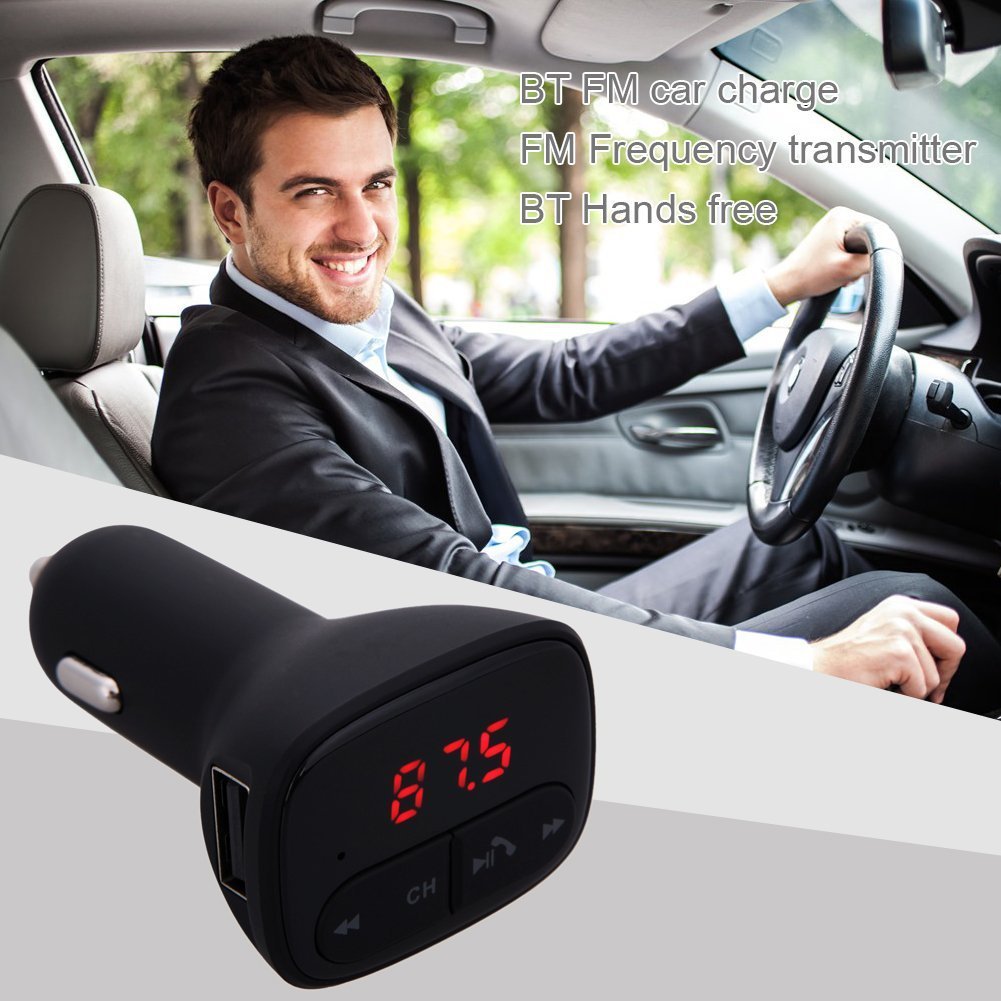
Image: The ALLOYSEED Bluetooth FM Transmitter Car Charger plugged into a car's cigarette lighter socket, with a driver in the background.
സുരക്ഷാ വിവരങ്ങൾ
- ഉപകരണം ഡിസ്അസംബ്ലിംഗ് ചെയ്യുകയോ പരിഷ്കരിക്കുകയോ ചെയ്യരുത്.
- വെള്ളം, ഈർപ്പം, തീവ്രമായ താപനില എന്നിവയിൽ നിന്ന് ഉപകരണം അകറ്റി നിർത്തുക.
- ദീർഘനേരം ഉപകരണം നേരിട്ട് സൂര്യപ്രകാശം ഏൽക്കുന്നത് ഒഴിവാക്കുക.
- Ensure the car's cigarette lighter socket provides the specified DC 12V~24V input voltage.
- Do not operate the device while driving if it distracts you from the road. Prioritize road safety.
ഉൽപ്പന്നം കഴിഞ്ഞുview
Familiarize yourself with the components of your ALLOYSEED Bluetooth FM Transmitter Car Charger:
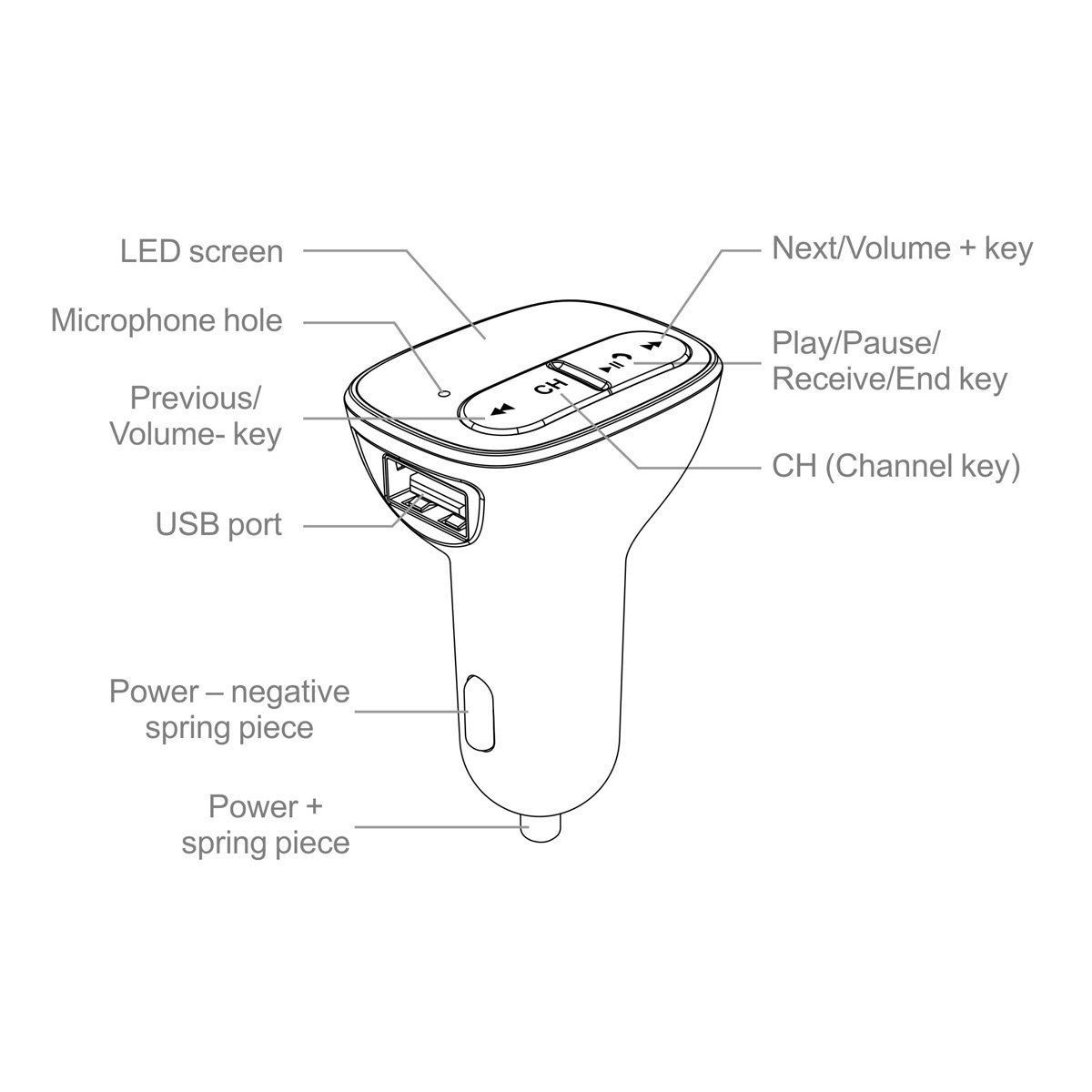
Image: A detailed diagram of the ALLOYSEED Bluetooth FM Transmitter Car Charger, highlighting its various components and controls.
- LED സ്ക്രീൻ: Displays FM frequency.
- Microphone Hole: ഹാൻഡ്സ് ഫ്രീ കോളിംഗിനായി.
- മുമ്പത്തെ/വോളിയം- കീ: മുമ്പത്തെ ട്രാക്കിനായി ഹ്രസ്വമായി അമർത്തുക, ശബ്ദം കുറയ്ക്കാൻ ദീർഘനേരം അമർത്തുക.
- Next/Volume+ Key: അടുത്ത ട്രാക്കിനായി ഷോർട്ട് പ്രസ്സ് ചെയ്യുക, വോളിയം കൂട്ടാൻ ദീർഘനേരം അമർത്തുക.
- Play/Pause/Receive/End Key: Short press to play/pause music, answer/end calls. Long press to reject calls.
- CH (Channel Key): Short press to enter FM frequency adjustment mode.
- USB പോർട്ട്: 2.1A output for charging mobile devices.
- Power - Negative Spring Piece: Connects to the negative terminal of the car's power socket.
- Power + Spring Piece: Connects to the positive terminal of the car's power socket.
സ്പെസിഫിക്കേഷനുകൾ
| ഇൻപുട്ട് വോളിയംtage | DC 12V~24V |
| വർക്ക് കറൻ്റ് | <100mA (when not charging) |
| എഫ്എം ഫ്രീക്വൻസി റേഞ്ച് | 87.5 - 108.0MHz (0.1MHz increments) |
| എഫ്എം ട്രാൻസ്മിഷൻ ദൂരം | <3 മി |
| ബ്ലൂടൂത്ത് പതിപ്പ് | V2.1+EDR |
| Bluetooth Protocols Supported | A2DP/AVRCP/HSP/HFP |
| A2DP Transmission Distance | >5 മി |
| USB ഔട്ട്പുട്ട് കറന്റ് | 2.1എ |
| USB putട്ട്പുട്ട് വോളിയംtage | 5.2V |
| ഇനത്തിൻ്റെ ഭാരം | 80 ഗ്രാം |
സജ്ജമാക്കുക
- കാർ സോക്കറ്റിലേക്ക് തിരുകുക: Plug the ALLOYSEED Bluetooth FM Transmitter into your car's 12V-24V cigarette lighter socket. The device will power on automatically, and the LED screen will display the current FM frequency.
- പവർ ഓൺ: The device powers on automatically when connected to the car's power.
പ്രവർത്തന നിർദ്ദേശങ്ങൾ
1. Setting the FM Frequency
- അമർത്തുക CH (Channel) key. The frequency display on the LED screen will start flashing.
- ഉപയോഗിക്കുക Previous/Volume- key or Next/Volume+ key to adjust the FM frequency. Select a frequency that is clear and not occupied by a local radio station.
- Once the desired frequency is set, wait a few seconds. The display will stop flashing, and the frequency will be saved.
- Tune your car's FM radio to the ഒരേ ആവൃത്തി as displayed on the transmitter.
2. ബ്ലൂടൂത്ത് ജോടിയാക്കൽ
- After powering on, the device will automatically enter Bluetooth pairing mode. The LED screen may show a Bluetooth icon or similar indicator.
- നിങ്ങളുടെ സ്മാർട്ട്ഫോണിലോ ടാബ്ലെറ്റിലോ, ബ്ലൂടൂത്ത് പ്രവർത്തനക്ഷമമാക്കി ലഭ്യമായ ഉപകരണങ്ങൾക്കായി തിരയുക.
- Select the device named "അലോയ്സീഡ്" (or similar) from the list to pair.
- Once paired, a confirmation sound or indicator may be heard/seen. You are now ready to stream audio.
3. സംഗീതം പ്ലേബാക്ക്
- After successful Bluetooth pairing, open your music player on your smartphone/tablet and start playing music.
- The audio will be transmitted to your car's FM radio.
- ഉപയോഗിക്കുക കീ പ്ലേ ചെയ്യുക / താൽക്കാലികമായി നിർത്തുക on the transmitter to play or pause music.
- ഉപയോഗിക്കുക Previous/Volume- key ഒപ്പം Next/Volume+ key for track navigation (short press) and volume adjustment (long press).
- The device has an automatic memory function, resuming the last played song when restarted.
4. ഹാൻഡ്സ്-ഫ്രീ കോളിംഗ്
- When a call comes in, the music will automatically pause.
- അമർത്തുക Play/Pause/Receive/End key കോളിന് ഉത്തരം നൽകാൻ ഒരിക്കൽ.
- ഒരു കോൾ അവസാനിപ്പിക്കാൻ, അമർത്തുക Play/Pause/Receive/End key ഒരിക്കൽ കൂടി.
- ഒരു ഇൻകമിംഗ് കോൾ നിരസിക്കാൻ, ദീർഘനേരം അമർത്തുക Play/Pause/Receive/End key.
- ബിൽറ്റ്-ഇൻ മൈക്രോഫോൺ വ്യക്തമായ ആശയവിനിമയം അനുവദിക്കുന്നു.
5. ചാർജിംഗ് ഉപകരണങ്ങൾ
- Connect your mobile device (smartphone, tablet, etc.) to the USB പോർട്ട് on the transmitter using a compatible USB charging cable.
- The USB port provides a 2.1A output for efficient charging.
മെയിൻ്റനൻസ്
- മൃദുവായതും ഉണങ്ങിയതുമായ തുണി ഉപയോഗിച്ച് ഉപകരണം വൃത്തിയാക്കുക. ലിക്വിഡ് ക്ലീനറുകളോ എയറോസോളുകളോ ഉപയോഗിക്കരുത്.
- Ensure the USB port and cigarette lighter connector are free from dust and debris.
- ദീർഘനേരം ഉപയോഗിക്കാത്തപ്പോൾ ഉപകരണം തണുത്തതും വരണ്ടതുമായ സ്ഥലത്ത് സൂക്ഷിക്കുക.
ട്രബിൾഷൂട്ടിംഗ്
- ശക്തിയില്ല: Ensure the device is securely plugged into the car's cigarette lighter socket and that the car's ignition is on. Check the car's fuse for the cigarette lighter.
- മോശം ശബ്ദ നിലവാരം/സ്റ്റാറ്റിക്:
- Adjust the FM frequency on the transmitter and your car radio to find a clear, unoccupied channel.
- Ensure the volume on your phone and car radio is set appropriately.
- Move away from areas with strong radio interference.
- ബ്ലൂടൂത്ത് ജോടിയാക്കുന്നില്ല:
- നിങ്ങളുടെ മൊബൈൽ ഉപകരണത്തിൽ ബ്ലൂടൂത്ത് പ്രവർത്തനക്ഷമമാക്കിയിട്ടുണ്ടെന്ന് ഉറപ്പാക്കുക.
- Restart the transmitter by unplugging and re-plugging it.
- നിങ്ങളുടെ ഫോണിന്റെ ബ്ലൂടൂത്ത് ക്രമീകരണങ്ങളിൽ നിന്ന് ഉപകരണം മറന്ന് വീണ്ടും ജോടിയാക്കാൻ ശ്രമിക്കുക.
- Ensure the transmitter is within range of your phone.
- USB Charging Not Working:
- Check if the charging cable is properly connected to both the device and the USB port.
- മറ്റൊരു USB കേബിൾ പരീക്ഷിക്കുക.
- Ensure the car charger is receiving power.
വാറൻ്റിയും പിന്തുണയും
This product is covered by a warranty policy. For details regarding warranty coverage, terms, and conditions, please refer to the information provided at the point of purchase or contact ALLOYSEED customer support. Keep your purchase receipt as proof of purchase.
For technical assistance or further inquiries, please contact ALLOYSEED customer support through the official channels provided by the seller or manufacturer.


