ആമുഖം
ലോമോഗ്രാഫി ലോമോ'ഇൻസ്റ്റന്റ് ഓട്ടോമാറ്റ് ഗ്ലാസ് മഗല്ലൻ എന്നത് സവിശേഷമായ സൗന്ദര്യാത്മകതയോടെ നിമിഷങ്ങൾ പകർത്തുന്നതിനായി രൂപകൽപ്പന ചെയ്തിരിക്കുന്ന ഒരു നൂതന തൽക്ഷണ ക്യാമറയാണ്. മൂർച്ചയുള്ള ചിത്രങ്ങൾക്കായി വൈഡ്-ആംഗിൾ ഗ്ലാസ് ലെൻസും വിവിധ ക്രിയേറ്റീവ് നിയന്ത്രണങ്ങളും ഇതിൽ ഉൾപ്പെടുന്നു. നിങ്ങളുടെ ക്യാമറ സജ്ജീകരിക്കുന്നതിനും പ്രവർത്തിപ്പിക്കുന്നതിനും പരിപാലിക്കുന്നതിനുമുള്ള അവശ്യ വിവരങ്ങൾ ഈ മാനുവൽ നൽകുന്നു.
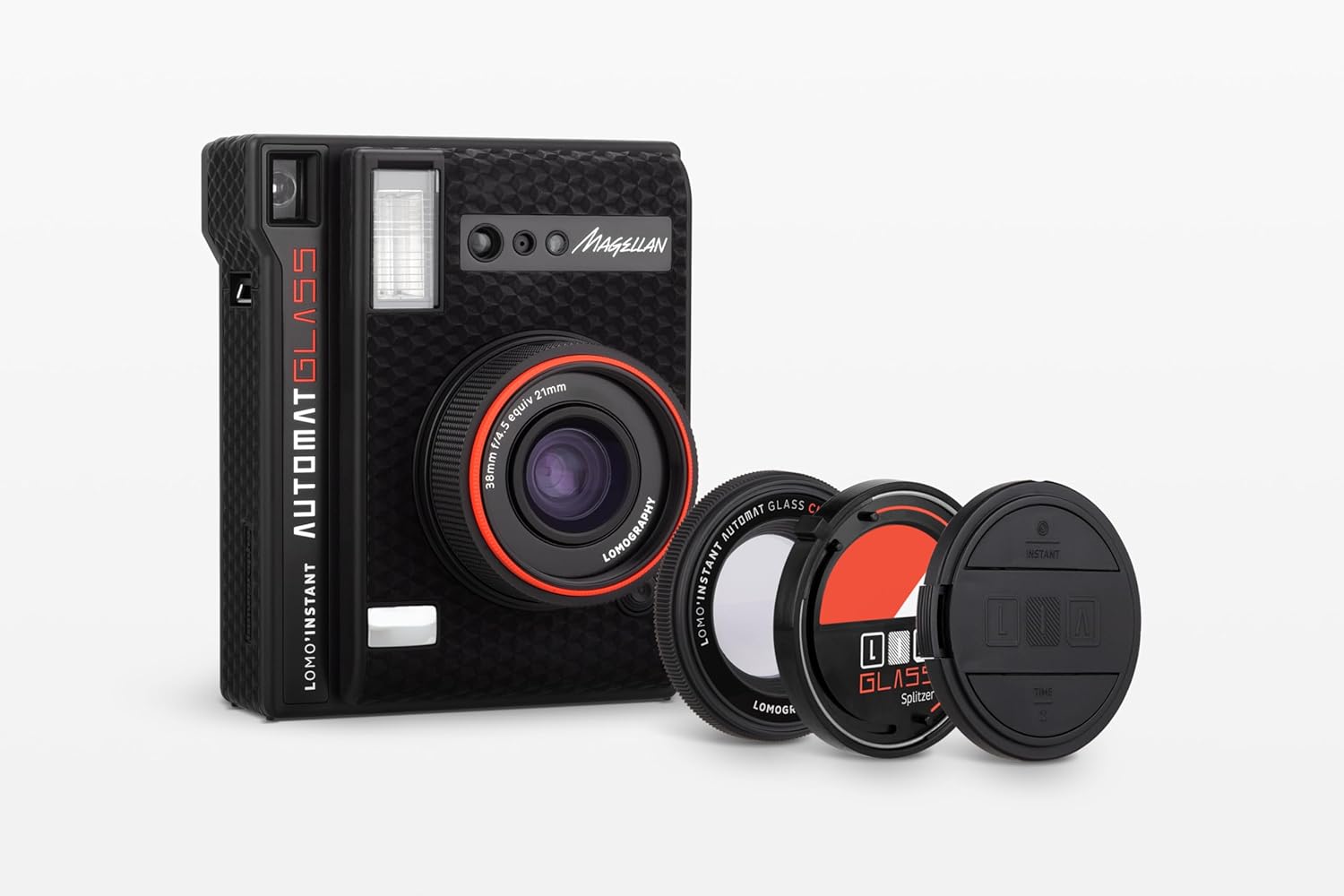
ചിത്രം: ലോമോ'ഇൻസ്റ്റന്റ് ഓട്ടോമാറ്റ് ഗ്ലാസ് മഗല്ലൻ ക്യാമറ, ഉൾപ്പെടുത്തിയ ആക്സസറികൾക്കൊപ്പം കാണിച്ചിരിക്കുന്നു, അതിന്റെ ഒതുക്കമുള്ള രൂപകൽപ്പനയും ഗ്ലാസ് ലെൻസും എടുത്തുകാണിക്കുന്നു.
പ്രധാന സവിശേഷതകൾ
- ഗ്ലാസ് ലെൻസ്: കൂടുതൽ വ്യക്തതയുള്ള തൽക്ഷണ ഫോട്ടോകൾ ഉറപ്പാക്കുന്നു.
- ഫിലിം അനുയോജ്യത: ഫ്യൂജിഫിലിം ഇൻസ്റ്റാക്സ് മിനി ഫിലിം ഉപയോഗിക്കുന്നു.
- യാന്ത്രിക ക്രമീകരണങ്ങൾ: എളുപ്പത്തിൽ ഉപയോഗിക്കുന്നതിനായി ഓട്ടോമാറ്റിക് അപ്പർച്ചർ, ഷട്ടർ സ്പീഡ്, ഫ്ലാഷ് ഔട്ട്പുട്ട് എന്നിവ ഇതിന്റെ സവിശേഷതകളാണ്.
- ക്രിയേറ്റീവ് ആക്സസറികൾ: പരീക്ഷണാത്മക ഫോട്ടോഗ്രാഫിക്കായി ഒരു ക്ലോസ്-അപ്പ് ലെൻസ്, സ്പ്ലിറ്റ്സർ, കളർ ഫിൽട്ടറുകൾ എന്നിവ ഉൾപ്പെടുന്നു.
- റിമോട്ട് കൺട്രോൾ: സൗകര്യപ്രദമായ സെൽഫികൾക്കും ഗ്രൂപ്പ് ഷോട്ടുകൾക്കും വേണ്ടി റിമോട്ട് കൺട്രോൾ ഷട്ടർ റിലീസായി ലെൻസ് ക്യാപ്പ് ഇരട്ടിയാകുന്നു.
- ക്ലോസ്-അപ്പ് ശേഷി: ക്ലോസ്-അപ്പ് അറ്റാച്ച്മെന്റ് ഉപയോഗിച്ച് 10 സെന്റീമീറ്റർ വരെ അടുത്ത് നിന്ന് വിഷയങ്ങൾ പകർത്തുക.
- ഡിസ്പ്ലേ ആക്സസറികൾ: നിങ്ങളുടെ തൽക്ഷണ ഫോട്ടോകൾ പ്രദർശിപ്പിക്കുന്നതിന് ക്ലിപ്പുകളും സ്റ്റാൻഡുകളും ഇതിൽ ലഭ്യമാണ്.
സജ്ജമാക്കുക
1. ബാറ്ററി ഇൻസ്റ്റാളേഷൻ
ക്യാമറയ്ക്ക് രണ്ട് CR2 ബാറ്ററികൾ ആവശ്യമാണ്. അവ ഇൻസ്റ്റാൾ ചെയ്യാനോ മാറ്റിസ്ഥാപിക്കാനോ:
- ക്യാമറയുടെ വശത്ത് ബാറ്ററി കമ്പാർട്ട്മെന്റ് കണ്ടെത്തുക.
- കമ്പാർട്ട്മെന്റ് കവർ തുറക്കുക.
- ശരിയായ പോളാരിറ്റി ഉറപ്പാക്കിക്കൊണ്ട് രണ്ട് CR2 ബാറ്ററികൾ ഇടുക.
- കമ്പാർട്ട്മെൻ്റ് കവർ സുരക്ഷിതമായി അടയ്ക്കുക.
2. ഫിലിം ലോഡിംഗ്
ലോമോ'ഇൻസ്റ്റന്റ് ഓട്ടോമാറ്റ് ഗ്ലാസ് മഗല്ലൻ ഫ്യൂജിഫിലിം ഇൻസ്റ്റാക്സ് മിനി ഫിലിം ഉപയോഗിക്കുന്നു. ഒരു ഫിലിം പായ്ക്ക് ലോഡ് ചെയ്യാൻ:
- ക്യാമറയുടെ പിൻഭാഗത്തുള്ള ഫിലിം വാതിൽ തുറക്കുക.
- ഫിലിം പായ്ക്കിലെ മഞ്ഞ അടയാളം ക്യാമറയുടെ ഫിലിം കമ്പാർട്ടുമെന്റിനുള്ളിലെ മഞ്ഞ അടയാളവുമായി വിന്യസിക്കുക.
- ഫിലിം പായ്ക്ക് അതിന്റെ സ്ഥാനത്ത് ക്ലിക്കായി അമർത്തുന്നത് വരെ സൌമ്യമായി അമർത്തുക. ഫിലിം പ്രതലത്തിൽ അമർത്തരുത്.
- ഫിലിം ഡോർ അടയ്ക്കുക. ക്യാമറ ഇരുണ്ട സ്ലൈഡ് യാന്ത്രികമായി പുറത്തെടുക്കും.
3. ലെൻസ് ക്യാപ് റിമോട്ട് ഘടിപ്പിക്കുന്നു
ലെൻസ് ക്യാപ്പ് ഒരു റിമോട്ട് കൺട്രോളായി പ്രവർത്തിക്കുന്നു. അതിൽ ഒരു ചെറിയ ബാറ്ററി അടങ്ങിയിരിക്കുന്നു. റിമോട്ട് പ്രവർത്തനത്തിനായി ലെൻസ് ക്യാപ്പിൽ ബാറ്ററി ശരിയായി ചേർത്തിട്ടുണ്ടെന്ന് ഉറപ്പാക്കുക.

ചിത്രം: മുൻഭാഗം view ക്യാമറയുടെ, ലെൻസും ഫ്ലാഷ് യൂണിറ്റും കാണിക്കുന്നു.
ക്യാമറ പ്രവർത്തിപ്പിക്കുന്നത്
1. പവർ ഓൺ/ഓഫ്
ക്യാമറ ഓൺ ചെയ്യാൻ, ലെൻസ് കറക്കി പോപ്പ് ഔട്ട് ചെയ്യുക. പവർ ഓഫ് ചെയ്യാൻ, ലെൻസ് തിരികെ ക്യാമറ ബോഡിയിലേക്ക് തള്ളുക.
2. ഷട്ടർ റിലീസ്
പ്രധാന ഷട്ടർ ബട്ടൺ ക്യാമറയുടെ മുൻവശത്താണ് സ്ഥിതി ചെയ്യുന്നത്. ഫോട്ടോ എടുക്കാൻ അത് അമർത്തുക. ലെൻസ് ക്യാപ്പ് ഒരു റിമോട്ട് ഷട്ടർ റിലീസായും പ്രവർത്തിക്കുന്നു.
3. ഫിലിം കൗണ്ടറും സ്റ്റാറ്റസ് സൂചകങ്ങളും
ക്യാമറയുടെ വശത്ത്, മിന്നുന്ന ലൈറ്റുകളുടെ ഒരു പരമ്പര ശേഷിക്കുന്ന ഫിലിം കൗണ്ട് സൂചിപ്പിക്കുന്നു. പിന്നിൽ, അധിക സൂചകങ്ങൾ ഫ്ലാഷ് മോഡ്, എക്സ്പോഷർ നഷ്ടപരിഹാരം പോലുള്ള നിലവിലെ ക്രമീകരണങ്ങൾ കാണിക്കുന്നു.
4. എക്സ്പോഷർ, ക്രിയേറ്റീവ് മോഡുകൾ
എക്സ്പോഷർ നിയന്ത്രിക്കുന്നതിനും സൃഷ്ടിപരമായ ഇഫക്റ്റുകൾ നേടുന്നതിനും ക്യാമറ വിവിധ സജ്ജീകരണങ്ങൾ വാഗ്ദാനം ചെയ്യുന്നു:
- ഫ്ലാഷ് നിയന്ത്രണം: ആവശ്യാനുസരണം ഫ്ലാഷ് ഓൺ അല്ലെങ്കിൽ ഓഫ് ചെയ്യുക.
- എക്സ്പോഷർ കോമ്പൻസേഷൻ: ആവശ്യമുള്ള ലൈറ്റിംഗ് ലഭിക്കുന്നതിന് കൂടുതൽ തിളക്കമുള്ളതോ ഇരുണ്ടതോ ആയ പശ്ചാത്തലങ്ങൾ ക്രമീകരിക്കുക.
- ഒന്നിലധികം എക്സ്പോഷർ മോഡ്: ഒരൊറ്റ ഫ്രെയിമിൽ ഒന്നിലധികം ഷോട്ടുകൾ ലെയറുകൾ ചെയ്യാൻ അനുവദിക്കുന്നു.
- ബൾബ് മോഡ്: ഷട്ടർ ദീർഘനേരം തുറന്നിടുന്നു, ലൈറ്റ് പെയിന്റിംഗിനോ ലോ-ലൈറ്റ് ഫോട്ടോഗ്രാഫിക്കോ അനുയോജ്യം.
5. ആക്സസറികൾ ഉപയോഗിക്കുന്നത്
- ക്ലോസ്-അപ്പ് ലെൻസ്: 10 സെന്റീമീറ്റർ വരെ അടുത്തുള്ള വസ്തുക്കളിൽ ഫോക്കസ് ചെയ്യുന്നതിന് ഈ ലെൻസ് ഘടിപ്പിക്കുക.
- സ്പ്ലിറ്റ്സർ: സ്പ്ലിറ്റ്സർ ഉപയോഗിച്ച് നിങ്ങളുടെ ഫ്രെയിമിനെ ഒന്നിലധികം ഭാഗങ്ങളായി വിഭജിക്കുക, അതുല്യമായ കോമ്പോസിഷനുകൾക്കായി.
- കളർ ഫിൽട്ടറുകൾ: നിങ്ങളുടെ ഫോട്ടോകളിൽ സൃഷ്ടിപരമായ നിറങ്ങൾ ചേർക്കാൻ വ്യത്യസ്ത കളർ ഫിൽട്ടറുകൾ ഉപയോഗിച്ച് പരീക്ഷിക്കുക.

ചിത്രം: പിന്നിലേക്ക് view ക്യാമറയുടെ, ഫിലിം എജക്ഷൻ പോർട്ടും ക്രമീകരണങ്ങൾക്കായുള്ള നിയന്ത്രണ പാനലും ചിത്രീകരിക്കുന്നു.
മെയിൻ്റനൻസ്
1. വൃത്തിയാക്കൽ
മികച്ച പ്രകടനവും ചിത്ര നിലവാരവും ഉറപ്പാക്കാൻ, നിങ്ങളുടെ ക്യാമറ വൃത്തിയായി സൂക്ഷിക്കുക:
- മൃദുവായതും ഉണങ്ങിയതുമായ ഒരു തുണി ഉപയോഗിച്ച് ക്യാമറ ബോഡി സൌമ്യമായി തുടയ്ക്കുക.
- ലെൻസ് ഉപരിതലം ശ്രദ്ധാപൂർവ്വം വൃത്തിയാക്കാൻ ലെൻസ് ക്ലീനിംഗ് തുണി അല്ലെങ്കിൽ ബ്രഷ് ഉപയോഗിക്കുക. വിരലുകൾ കൊണ്ട് ലെൻസിൽ തൊടുന്നത് ഒഴിവാക്കുക.
- ഫിലിം എജക്ഷൻ സ്ലോട്ട് പൊടിയും അവശിഷ്ടങ്ങളും ഇല്ലാതെ വൃത്തിയായി സൂക്ഷിക്കുക.
2. സംഭരണം
ഉപയോഗത്തിലില്ലാത്തപ്പോൾ, നേരിട്ടുള്ള സൂര്യപ്രകാശത്തിൽ നിന്നും കടുത്ത താപനിലയിൽ നിന്നും അകന്ന് തണുത്തതും വരണ്ടതുമായ സ്ഥലത്ത് ക്യാമറ സൂക്ഷിക്കുക. ലെൻസ് പിൻവലിച്ചിട്ടുണ്ടെന്നും ലെൻസ് ക്യാപ്പ് ഓണാണെന്നും ഉറപ്പാക്കുക.
ട്രബിൾഷൂട്ടിംഗ്
- ക്യാമറ ഓണാക്കുന്നില്ല: ബാറ്ററികൾ ശരിയായി ചേർത്തിട്ടുണ്ടോ എന്നും ആവശ്യത്തിന് ചാർജ് ഉണ്ടോ എന്നും പരിശോധിക്കുക. ആവശ്യമെങ്കിൽ മാറ്റി സ്ഥാപിക്കുക.
- ഫിലിം പുറത്തേക്ക് എജക്റ്റ് ചെയ്യുന്നില്ല: പുതിയ ഫിലിം പായ്ക്ക് ശരിയായി ലോഡ് ചെയ്തിട്ടുണ്ടെന്ന് ഉറപ്പാക്കുക. ലോഡ് ചെയ്യുമ്പോൾ ഡാർക്ക് സ്ലൈഡ് പുറത്തേക്ക് പോയില്ലെങ്കിൽ, ഫിലിം ഡോർ വീണ്ടും തുറന്ന് അടയ്ക്കാൻ ശ്രമിക്കുക.
- ഫോട്ടോകൾ വളരെ ഇരുണ്ടതാണ്/തെളിച്ചമുള്ളതാണ്: ക്യാമറയിലെ എക്സ്പോഷർ നഷ്ടപരിഹാര ക്രമീകരണങ്ങൾ ക്രമീകരിക്കുക. കുറഞ്ഞ വെളിച്ചത്തിൽ ഫ്ലാഷ് പ്രവർത്തനക്ഷമമാക്കിയിട്ടുണ്ടെന്ന് ഉറപ്പാക്കുക.
- റിമോട്ട് കൺട്രോൾ പ്രവർത്തിക്കുന്നില്ല: ലെൻസ് ക്യാപ്പ് റിമോട്ടിലെ ബാറ്ററി പരിശോധിക്കുക. ആവശ്യമെങ്കിൽ മാറ്റിസ്ഥാപിക്കുക.
- മങ്ങിയ ഫോട്ടോകൾ: ലെൻസ് വൃത്തിയുള്ളതാണെന്ന് ഉറപ്പാക്കുക. എക്സ്പോഷർ സമയത്ത് ക്യാമറ സ്ഥിരമായി പിടിക്കുക. ക്ലോസ്-അപ്പ് ഷോട്ടുകൾക്കായി, ക്ലോസ്-അപ്പ് ലെൻസ് അറ്റാച്ച്മെന്റ് ഉപയോഗിച്ചിട്ടുണ്ടെന്നും വിഷയം ശരിയായ ഫോക്കസ് പരിധിക്കുള്ളിലാണെന്നും ഉറപ്പാക്കുക.
സ്പെസിഫിക്കേഷനുകൾ
| ഫീച്ചർ | സ്പെസിഫിക്കേഷൻ |
|---|---|
| മോഡലിൻ്റെ പേര് | ലോമോ'ഇൻസ്റ്റന്റ് ഓട്ടോമാറ്റ് ഗ്ലാസ് മഗല്ലൻ |
| ഇനം മോഡൽ നമ്പർ | ലി870ബി |
| ബ്രാൻഡ് | ലോമോഗ്രഫി |
| ഫിലിം ഫോർമാറ്റ് തരം | തൽക്ഷണം (ഫ്യൂജിഫിലിം ഇൻസ്റ്റാക്സ് മിനി) |
| കുറഞ്ഞ ഷട്ടർ സ്പീഡ് | 1 സെക്കൻഡ് |
| പരമാവധി ഷട്ടർ സ്പീഡ് | 1 സെക്കൻഡ് |
| ഷട്ടർ തരം | ഫോക്കൽ പ്ലെയിൻ ഷട്ടർ |
| ഇനത്തിൻ്റെ ഭാരം | 1.1 പൗണ്ട് (0.5 കിലോഗ്രാം) |
| പാക്കേജ് അളവുകൾ | 10.39 x 6.54 x 3.46 ഇഞ്ച് |
വാറൻ്റിയും പിന്തുണയും
വാറൻ്റി വിവരങ്ങൾ
ലോമോഗ്രാഫി ഉൽപ്പന്നങ്ങൾ സാധാരണയായി നിർമ്മാതാവിന്റെ വാറണ്ടിയോടെയാണ് വരുന്നത്, മെറ്റീരിയലുകളിലെയും വർക്ക്മാൻഷിപ്പിലെയും പിഴവുകൾ ഇതിൽ ഉൾപ്പെടുന്നു. നിർദ്ദിഷ്ട വാറന്റി നിബന്ധനകൾക്കും വ്യവസ്ഥകൾക്കും, ദയവായി നിങ്ങളുടെ ഉൽപ്പന്നത്തിനൊപ്പം ഉൾപ്പെടുത്തിയിരിക്കുന്ന ഡോക്യുമെന്റേഷൻ പരിശോധിക്കുകയോ ഔദ്യോഗിക ലോമോഗ്രാഫി സന്ദർശിക്കുകയോ ചെയ്യുക. webസൈറ്റ്.
ഉപഭോക്തൃ പിന്തുണ
നിങ്ങളുടെ ലോമോ'ഇൻസ്റ്റന്റ് ഓട്ടോമാറ്റ് ഗ്ലാസ് മഗല്ലൻ ക്യാമറയെക്കുറിച്ചുള്ള കൂടുതൽ സഹായം, സാങ്കേതിക പിന്തുണ അല്ലെങ്കിൽ അന്വേഷണങ്ങൾക്കായി, ദയവായി അവരുടെ ഔദ്യോഗിക വിലാസത്തിലൂടെ ലോമോഗ്രാഫി ഉപഭോക്തൃ സേവനവുമായി ബന്ധപ്പെടുക. webസൈറ്റ് അല്ലെങ്കിൽ നിങ്ങളുടെ ഉൽപ്പന്ന പാക്കേജിംഗിൽ നൽകിയിരിക്കുന്ന ബന്ധപ്പെടാനുള്ള വിവരങ്ങൾ.
സന്ദർശിക്കുക ലോമോഗ്രാഫി സ്റ്റോർ കൂടുതൽ ഉൽപ്പന്നങ്ങൾക്കും വിവരങ്ങൾക്കും.


