1. ആമുഖം
The STRONG SRT 8541 is a high-end DVB-T2 HD receiver designed to provide exceptional television viewing experience. It supports the latest HEVC/H.265 standard, ensuring compatibility with modern broadcast technologies and delivering stunning Full HD quality. This receiver is equipped with a USB port for versatile media playback and software updates, and features an integrated cardless access system for Irdeto encrypted channels, including Freenet-TV.
Key features include storage capacity for up to 700 stations, 4 customizable favorite lists for both TV and radio programs, and a comprehensive Electronic Program Guide (EPG) for easy program management. For family-friendly viewing, it offers robust parental control options. The SRT 8541 also incorporates energy-saving functions, such as automatic standby, to reduce power consumption.

ചിത്രം 1.1: മുൻഭാഗം view of the STRONG SRT 8541 DVB-T2 Receiver, showing the display, power button, and USB port.
2. സജ്ജീകരണം
2.1 പായ്ക്ക് ചെയ്യലും ഉള്ളടക്കവും
ആരംഭിക്കുന്നതിന് മുമ്പ്, പാക്കേജിൽ എല്ലാ ഘടകങ്ങളും ഉണ്ടെന്ന് ഉറപ്പാക്കുക:
- STRONG SRT 8541 DVB-T2 Receiver
- റിമോട്ട് കൺട്രോൾ (2 AAA ബാറ്ററികൾ ഉൾപ്പെടെ)
- പവർ കേബിൾ
- നിർദ്ദേശ മാനുവൽ (ഈ പ്രമാണം)
2.2 റിസീവറിനെ ബന്ധിപ്പിക്കുന്നു
Refer to the diagram below for proper connection of your SRT 8541 receiver to your television and antenna.
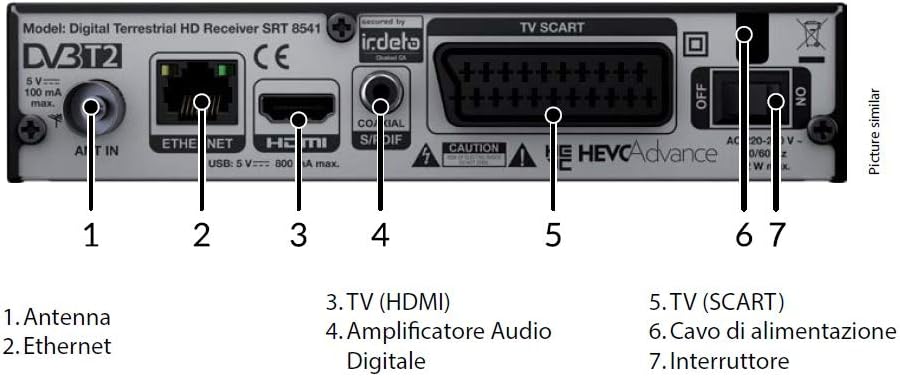
Figure 2.1: Rear panel connections of the SRT 8541.
- Antenna (1): Connect your terrestrial indoor or outdoor antenna cable to the 'ANT IN' port.
- Ethernet (2): Connect an Ethernet cable from your router to this port for potential future updates or internet-based features.
- TV (HDMI) (3): For the best picture quality, connect an HDMI cable from the 'HDMI' port on the receiver to an HDMI input on your television.
- ഡിജിറ്റൽ ഓഡിയോ Amplifier (4): Connect a coaxial S/PDIF cable to this port for digital audio output to a compatible ampലൈഫയർ അല്ലെങ്കിൽ ശബ്ദ സംവിധാനം.
- TV (SCART) (5): If your television does not have an HDMI input, use a SCART cable to connect the 'TV SCART' port on the receiver to the SCART input on your television.
- Power Cable (6): Connect the supplied power cable to the 'AC IN' port on the receiver and then to a power outlet.
- Switch (7): Use this switch to turn the main power to the receiver ON or OFF.
2.3 പ്രാരംഭ സജ്ജീകരണ വിസാർഡ്
After connecting all cables and powering on the receiver using the switch (7), the initial setup wizard will guide you through the first-time configuration. Follow the on-screen prompts to:
- Select your preferred language (English is available).
- Perform an automatic channel scan to find available DVB-T2 and DVB-T free-to-air TV and radio programs.
- Configure basic settings such as time zone.
3. റിസീവർ പ്രവർത്തിപ്പിക്കൽ
3.1 അടിസ്ഥാന പ്രവർത്തനങ്ങൾ
- പവർ ഓൺ/ഓഫ്: Use the power button on the remote control or the front panel to switch between standby and operational mode.
- ചാനൽ നാവിഗേഷൻ: Use the CH+/CH- buttons on the remote to change channels sequentially, or enter channel numbers directly using the numeric keypad.
- വോളിയം നിയന്ത്രണം: Adjust the audio level using the VOL+/VOL- buttons.
3.2 വിപുലമായ സവിശേഷതകൾ

ചിത്രം 3.1: പ്രധാന സവിശേഷതകളുടെ ദൃശ്യ പ്രാതിനിധ്യം.
- ഇലക്ട്രോണിക് പ്രോഗ്രാം ഗൈഡ് (ഇപിജി): Press the 'EPG' button on your remote to access the Electronic Program Guide. This allows you to view program schedules for up to 14 days in advance and set timers for recording or viewing.
- പ്രിയപ്പെട്ട ലിസ്റ്റുകൾ: The receiver supports 4 customizable favorite lists for TV and radio programs. You can organize your preferred channels for quick access. Refer to the on-screen menu for instructions on creating and managing these lists.
- രക്ഷാകർതൃ നിയന്ത്രണം: Implement a child lock with menu lock and age control for specific transmitters or programs. Access this feature through the system settings menu to set a PIN and configure restrictions.
- USB പ്രവർത്തനങ്ങൾ: മുൻവശത്തെ USB പോർട്ടിൽ ഒരു USB സ്റ്റോറേജ് ഉപകരണം ഇടുക. നിങ്ങൾക്ക് ഇത് ഇനിപ്പറയുന്ന കാര്യങ്ങൾക്ക് ഉപയോഗിക്കാം:
- മീഡിയ പ്ലേബാക്ക്: Play various media files (e.g., MPEG) stored on your USB device.
- സോഫ്റ്റ്വെയർ അപ്ഡേറ്റുകൾ: Update the receiver's firmware by loading new software from a USB stick.
- Recording (PVR) & Timeshift: The recording and timeshift functions are available as an optional software upgrade from the manufacturer. Once activated, you can record programs to a connected USB drive and pause live TV.
- ടൈമറുകൾ: Set up to 10 event timers with 4 modes: one-time, daily, weekly, or Monday to Friday. This is useful for scheduling recordings or reminders for your favorite shows.
- ഊർജ്ജ സംരക്ഷണം: The receiver features an automatic standby function that can be configured to activate after a definable period of inactivity, helping to conserve energy.
4. പരിപാലനം
4.1 വൃത്തിയാക്കൽ
To maintain the performance and appearance of your receiver, regularly clean the exterior with a soft, dry cloth. Do not use liquid cleaners or abrasive materials, as they may damage the finish or internal components.
4.2 സോഫ്റ്റ്വെയർ അപ്ഡേറ്റുകൾ
STRONG periodically releases software updates to improve performance, add features, or address issues. These updates can typically be installed via the USB port. Visit the official STRONG website for the latest firmware and instructions on how to perform a USB update.
5. പ്രശ്നപരിഹാരം
If you encounter issues with your SRT 8541 receiver, please consult the following common troubleshooting steps before contacting support.
| പ്രശ്നം | സാധ്യമായ കാരണം | പരിഹാരം |
|---|---|---|
| ചിത്രമോ ശബ്ദമോ ഇല്ല | Incorrect cable connection, TV input not selected, receiver not powered on. | Check HDMI/SCART cable connections. Ensure TV is on correct input (e.g., HDMI1, AV). Verify receiver is powered on (green light on front panel). |
| No signal / Poor signal quality | Antenna not connected, antenna faulty, poor reception area. | Ensure antenna cable is securely connected. Check antenna for damage. Try repositioning indoor antenna or consult an antenna specialist for outdoor antennas. Perform a new channel scan. |
| റിമോട്ട് കൺട്രോൾ പ്രവർത്തിക്കുന്നില്ല | Batteries are dead or inserted incorrectly, obstruction between remote and receiver. | Replace batteries (2x AAA). Ensure batteries are inserted with correct polarity. Remove any obstructions. Point remote directly at the receiver's front panel. |
| Cannot access encrypted channels | Subscription expired, signal issue. | Ensure your Freenet-TV subscription (if applicable) is active. Verify signal quality for the specific channel. |
If the problem persists after trying these solutions, please refer to the official STRONG support resources.
6 സ്പെസിഫിക്കേഷനുകൾ
| ഫീച്ചർ | വിശദാംശങ്ങൾ |
|---|---|
| മോഡൽ നമ്പർ | SRT 8541 |
| ഉൽപ്പന്ന അളവുകൾ | 9.9 x 16.8 x 3.9 സെ.മീ |
| ഇനത്തിൻ്റെ ഭാരം | 370 ഗ്രാം |
| നിറം | കറുപ്പ് |
| അനുയോജ്യമായ ഉപകരണങ്ങൾ | Television (Fernseher) |
| കണക്റ്റിവിറ്റി ടെക്നോളജി | USB, ഇഥർനെറ്റ്, HDMI |
| ഹാർഡ്വെയർ ഇന്റർഫേസ് | USB, ഇഥർനെറ്റ്, HDMI |
| ആകെ HDMI പോർട്ടുകൾ | 1 |
| ഔട്ട്പുട്ട് വാട്ട്tage | 5 വാട്ട്സ് |
| വാട്ട്tage | 7 വാട്ട്സ് |
| വാല്യംtage | 12 വോൾട്ട് |
| മീഡിയ ഫോർമാറ്റ് | എം.പി.ഇ.ജി |
| ബാറ്ററികൾ | 2 AAA ബാറ്ററികൾ (റിമോട്ടിന് ഉൾപ്പെടുത്തിയിരിക്കുന്നു) |
| കൺട്രോളർ തരം | റിമോട്ട് കൺട്രോൾ |
7. വാറൻ്റിയും പിന്തുണയും
For warranty information and technical support, please refer to the documentation provided with your product at the time of purchase or visit the official STRONG website. STRONG, as a member of the Skyworth Group, is committed to providing high-quality products and customer assistance.


