ആമുഖം
This manual provides detailed instructions for the installation, operation, and maintenance of your CP PLUS 8 Channel 2 MP Digital Video Recorder (DVR) model CP-ER-H0804P1. Please read this manual thoroughly before using the product to ensure proper setup and functionality. Keep this manual for future reference.
1. സജ്ജീകരണ ഗൈഡ്
1.1 അൺപാക്കിംഗും പരിശോധനയും
Carefully unpack the DVR and all accessories. Verify that all components are present and undamaged. If any items are missing or damaged, contact your vendor immediately.
1.2 Connecting the DVR
Follow these steps to connect your DVR to cameras, a monitor, and the network:
- ക്യാമറ കണക്ഷൻ: Connect your 2 MP surveillance cameras to the 8 available BNC input ports on the rear panel of the DVR.
- മോണിറ്റർ കണക്ഷൻ: Connect a monitor to the DVR using either the HDMI or VGA port. Ensure the monitor is powered on and set to the correct input source.
- നെറ്റ്വർക്ക് കണക്ഷൻ: Connect an Ethernet cable from your router or network switch to the LAN port on the DVR.
- USB ഉപകരണങ്ങൾ: Connect a USB mouse for navigation and a USB flash drive for data backup to the available USB ports.
- പവർ കണക്ഷൻ: Connect the provided power adapter to the DVR's power input and then to a power outlet.
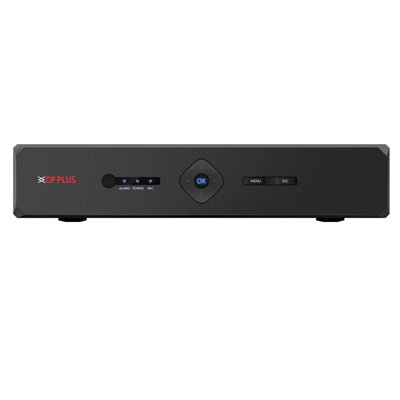
Image: Rear panel of the CP PLUS 8 Channel 2 MP DVR CP-ER-H0804P1, showing BNC camera inputs, HDMI and VGA video outputs, LAN port, USB ports, and power input. This illustrates the various connection points for setting up the DVR system.
1.3 പ്രാരംഭ പവർ-ഓൺ
After all connections are secure, power on the DVR. The system will boot up, and you should see the initial setup wizard on your connected monitor. Follow the on-screen prompts to configure basic settings such as language, date/time, and network parameters.
2. പ്രവർത്തന നിർദ്ദേശങ്ങൾ
2.1 അടിസ്ഥാന നാവിഗേഷൻ
Use the connected USB mouse to navigate the DVR's graphical user interface (GUI). Left-click to select items and right-click to return to the previous menu or access quick menus.
2.2 റെക്കോർഡിംഗ് മാനേജ്മെൻ്റ്
The DVR supports real-time recording across all 8 channels. It also features a ഇരട്ട സ്ട്രീം function, allowing for high-resolution recording for local storage and a lower-resolution stream for remote viewing, optimizing bandwidth usage.
- ഷെഡ്യൂൾ റെക്കോർഡിംഗ്: Access the 'Record' menu to set up continuous, motion-detection, or alarm-triggered recording schedules for each channel.
- മാനുവൽ റെക്കോർഡിംഗ്: Initiate manual recording directly from the live view ഇൻ്റർഫേസ്.
- റെക്കോർഡിംഗ് ക്രമീകരണങ്ങൾ: Adjust resolution, frame rate, and quality settings for each stream (main stream for recording, sub-stream for remote viewing).
2.3 പ്ലേബാക്ക്
വീണ്ടുംview രേഖപ്പെടുത്തി footage:
- പ്രധാന മെനുവിൽ നിന്ന്, 'പ്ലേബാക്ക്' തിരഞ്ഞെടുക്കുക.
- Choose the desired date and channel(s).
- Use the timeline to select the specific time segment for playback. Controls for play, pause, fast forward, and rewind are available.
2.4 നെറ്റ്വർക്ക് കോൺഫിഗറേഷൻ
Configure network settings for remote access and monitoring:
- Navigate to 'Network' settings in the main menu.
- Configure IP address settings (DHCP or Static IP).
- Set up port forwarding on your router if necessary for external access.
- Enable P2P or cloud services for easy remote viewing via mobile applications.
3. പരിപാലനം
3.1 റെഗുലർ ക്ലീനിംഗ്
DVR-ന്റെ പുറംഭാഗം മൃദുവായതും ഉണങ്ങിയതുമായ തുണി ഉപയോഗിച്ച് ഇടയ്ക്കിടെ വൃത്തിയാക്കുക. അമിതമായി ചൂടാകുന്നത് തടയാൻ വെന്റിലേഷൻ ഓപ്പണിംഗുകൾ പൊടിയിൽ നിന്ന് മുക്തമാണെന്ന് ഉറപ്പാക്കുക.
3.2 ഫേംവെയർ അപ്ഡേറ്റുകൾ
Check the official CP PLUS website for firmware updates. Regularly updating the firmware can improve system stability, add new features, and enhance security. Follow the provided instructions carefully when performing updates.
3.3 ഹാർഡ് ഡ്രൈവ് മാനേജ്മെന്റ്
The DVR uses an internal Hard Disk Drive (HDD) for video storage. Ensure the HDD is functioning correctly. If the HDD fails, replace it with a compatible model. Regular backups of critical footagഇ ശുപാർശ ചെയ്യുന്നു.
4. പ്രശ്നപരിഹാരം
4.1 മോണിറ്ററിൽ വീഡിയോ ഔട്ട്പുട്ട് ഇല്ല
- Check if the monitor is powered on and set to the correct input source (HDMI/VGA).
- Ensure the video cable is securely connected to both the DVR and the monitor.
- Try connecting to a different monitor or using a different video cable.
4.2 റെക്കോർഡിംഗ് പ്രശ്നങ്ങൾ
- Verify that the internal HDD is installed, formatted, and healthy.
- Check recording schedules and ensure they are correctly configured.
- Ensure cameras are properly connected and providing a video signal.
4.3 Network Connection Problems
- Confirm the Ethernet cable is securely connected to the DVR and the network device.
- Check network settings in the DVR to ensure the IP address, subnet mask, and gateway are correct.
- Restart your router/switch and the DVR.
5. ഉൽപ്പന്ന സവിശേഷതകൾ
| ഫീച്ചർ | സ്പെസിഫിക്കേഷൻ |
|---|---|
| ബ്രാൻഡ് | സിപി പ്ലസ് |
| മോഡൽ | CP-ER-H0804P1 |
| ചാനലുകളുടെ എണ്ണം | 8 |
| വീഡിയോ ഇൻപുട്ട് | 8 BNC ഇൻപുട്ടുകൾ |
| വീഡിയോ ഔട്ട്പുട്ട് | എച്ച്ഡിഎംഐ, വിജിഎ |
| റെക്കോർഡിംഗ് സവിശേഷതകൾ | Real-time Recording, Dual Stream |
| മീഡിയ ഫോർമാറ്റ് ഡിജിറ്റൽ വീഡിയോ | HDD (ഹാർഡ് ഡിസ്ക് ഡ്രൈവ്) |
| പാക്കേജ് അളവുകൾ | 35.99 x 30 x 11.99 സെ.മീ |
| ഇനത്തിൻ്റെ ഭാരം | 1 കിലോ 100 ഗ്രാം |
| ബാറ്ററികൾ ഉൾപ്പെടുത്തിയിട്ടുണ്ട് | ഇല്ല |
6. വാറൻ്റിയും പിന്തുണയും
For warranty information and technical support, please refer to the warranty card included with your product or visit the official CP PLUS website. Contact details for customer service and support resources are typically available on the manufacturer's webസൈറ്റ്.


