1. ആമുഖം
The Durablow TR1003 is a wireless remote control kit designed for gas heating appliances such as gas fireplaces. This kit includes a battery-powered RF transmitter with an LCD screen and a receiver, providing convenient control over your fireplace's ON/OFF functions, thermostat settings, and timer operations. It is compatible with millivolt valves and electric spark ignition modules (IPI modules).
2 സുരക്ഷാ വിവരങ്ങൾ
- പ്രധാനപ്പെട്ടത്: This device is NOT a power supply or ignitor unit. It does not produce voltage itself but passes voltage from your fireplace's thermopile for safety reasons. If used as a switch, connect it in series with a power source or circuit.
- പ്രൊഫഷണൽ ഇൻസ്റ്റാളേഷൻ: Wiring instructions should only be performed by a qualified electrician or gas technician with knowledge of gas appliances and gas valves. Incorrect wiring can damage the gas valve, electronic module, and the remote receiver.
- ബാറ്ററി സുരക്ഷ: Use recommended batteries (e.g., Energizer Lithium Batteries). Any corrosion caused by battery leakage will be considered improper use.
3. പാക്കേജ് ഉള്ളടക്കം
താഴെ ലിസ്റ്റ് ചെയ്തിരിക്കുന്ന എല്ലാ ഇനങ്ങളും നിങ്ങളുടെ പാക്കേജിൽ ഉൾപ്പെടുത്തിയിട്ടുണ്ടെന്ന് ഉറപ്പാക്കുക:
- Remote Transmitter (with LCD screen)
- റിസീവർ ബോക്സ്
- Wall Mount Cover Plate
- സ്ക്രൂകൾ
- സ്ലൈഡ് സ്വിച്ച്
- Wires with Connectors (18-inch)
- ഇൻസ്ട്രക്ഷൻ മാനുവലുകൾ
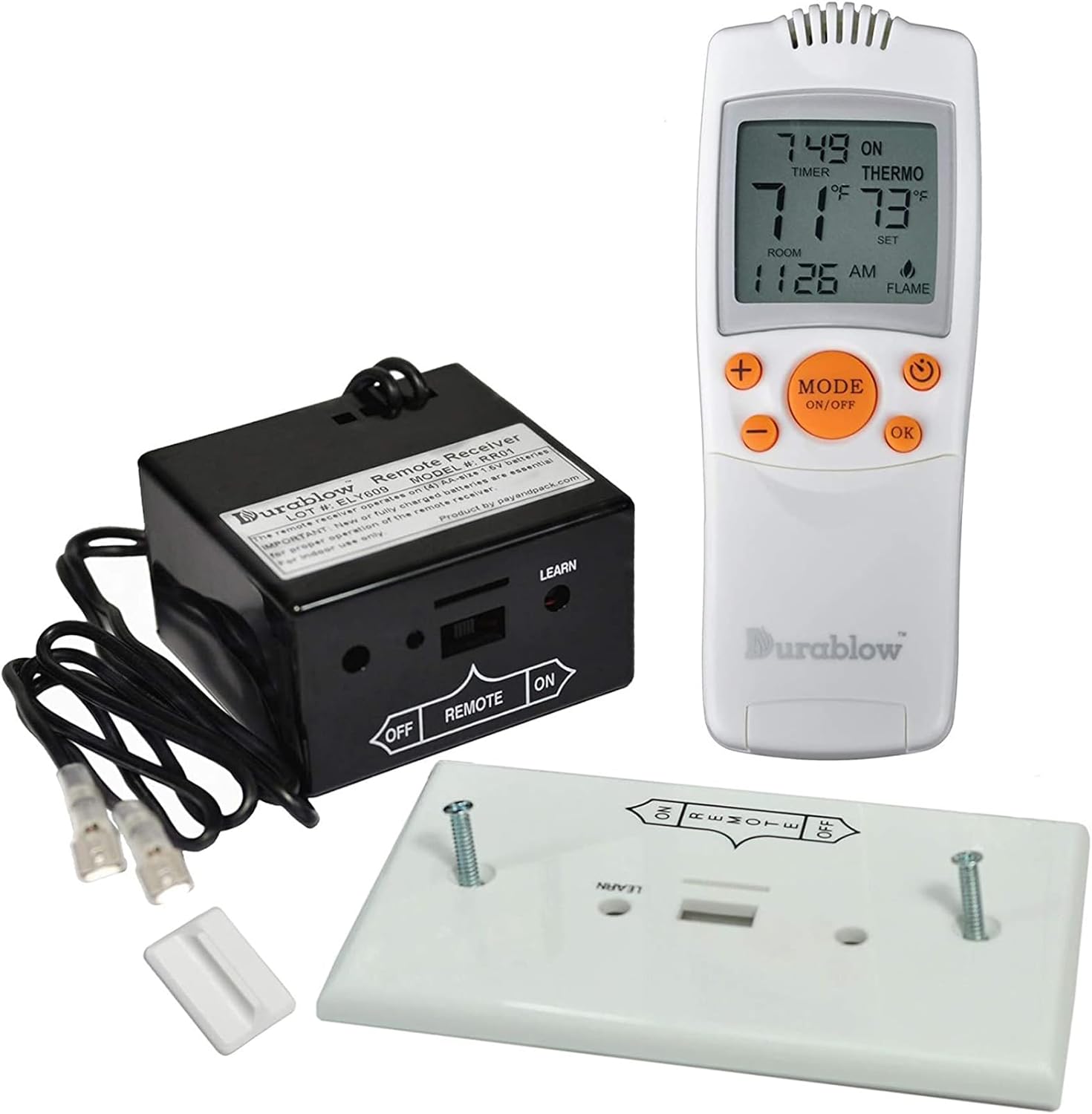
Image: Durablow TR1003 Remote Control Kit components, including the remote transmitter, receiver box, and wall plate.
4. ഇൻസ്റ്റലേഷൻ
4.1. അനുയോജ്യതാ പരിശോധന
Before installation, confirm your gas fireplace's compatibility. This remote control kit is designed for millivolt valves with TH and TH/TP terminals, or specific IPI (Intermittent Pilot Ignition) modules.
- Consult your fireplace's installation manual for the "Wiring Diagram" or check the rating plate inside/behind the fireplace to identify the gas valve type.
- Compatible IPI module models include: 593-592, GM-6KA, IPI-6000, SRV593-592, 350-M, IMP-1, J5760, J7728.

Image: Diagram illustrating a millivolt valve with TH and TP terminals for wiring connections.
4.2. ബാറ്ററി ഇൻസ്റ്റാളേഷൻ
Install batteries in both the remote transmitter and the receiver box.
- ട്രാൻസ്മിറ്റർ: Requires two (2) 1.5V AAA batteries.
- റിസീവർ: Requires four (4) AA batteries.
- Ensure correct polarity. Batteries are not included. Energizer Lithium Batteries are recommended for optimal performance and to prevent leakage.
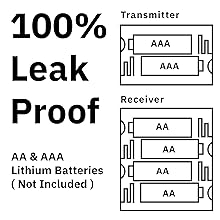
Image: Diagram illustrating the correct battery placement for both the remote transmitter (2 AAA) and the receiver unit (4 AA).
4.3. വയറിംഗ് നിർദ്ദേശങ്ങൾ
മുന്നറിയിപ്പ്: Only qualified personnel should perform wiring. Incorrect wiring can cause damage.
4.3.1. Wiring to Millivolt Valve
Connect the receiver's 18-inch wires to the TH and TH/TP terminals on your gas millivolt valve. Ensure a secure connection.
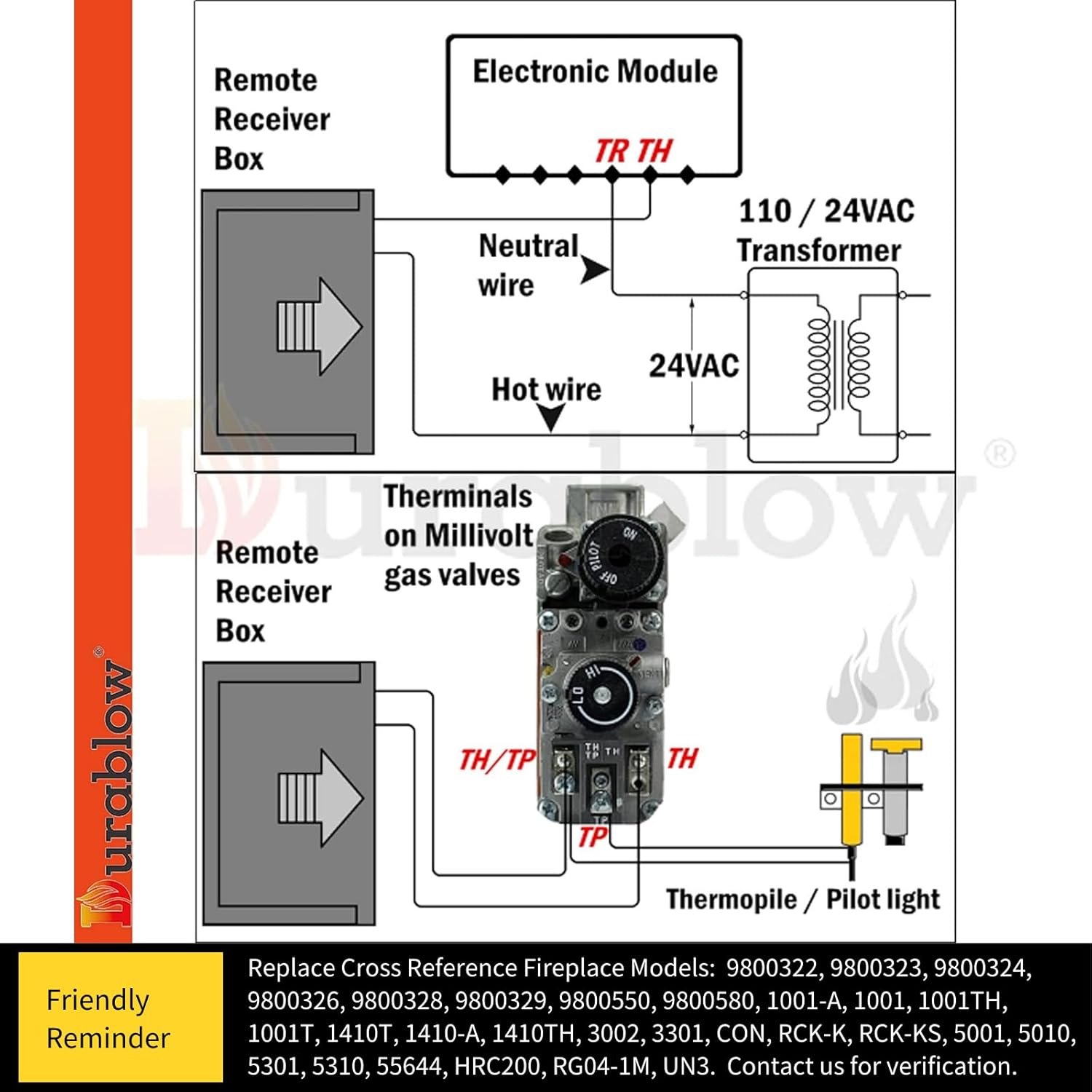
Image: Detailed wiring diagram showing how to connect the remote receiver box to a millivolt gas valve, indicating connections to TH and TH/TP terminals.
4.3.2. Wiring to IPI Pilot Ignition Control Module
For Dexen or S.I.T Electronic IPI Pilot Ignition Control Modules, locate the "OPTIONAL REMOTE CONTROL" wires on your module and connect the Durablow remote control kit wires to them.

Image: Wiring diagram illustrating the connection of the Durablow remote control to a fireplace using an SIT Control Module, highlighting the optional remote control connection points.

Image: Wiring diagram detailing the connection of the remote receiver to an IPI-6000 Ignition Module, showing correct and incorrect wall switch wiring scenarios.
The remote control can be wired in series or parallel depending on your existing setup. Refer to the diagrams below for guidance.

Image: Diagrams illustrating how to wire the remote control in series and in parallel with a millivolt valve.
4.4. Learning Function (Pairing)
The receiver features a "LEARN" function to pair with the transmitter. Consult the specific instructions included in your package for the pairing procedure. Typically, this involves pressing a button on the receiver and then a button on the transmitter within a short timeframe.

ചിത്രം: ക്ലോസ്-അപ്പ് view of the Durablow remote receiver box, highlighting the 'LEARN' button and the ON/OFF/REMOTE slide switch.
5. ഓപ്പറേഷൻ
The remote transmitter allows control of your fireplace with various modes. The LCD screen displays current settings, room temperature, and set temperature.

Image: The Durablow remote transmitter, showing its LCD screen with current time, room temperature, and set temperature.

ചിത്രം: ക്ലോസ്-അപ്പ് view of the Durablow remote control buttons, labeled for Up (+), Down (-), Mode/On/Off, Timer, and OK/Set functions.
5.1. Basic ON/OFF Control
അമർത്തുക മോഡ് ഓൺ/ഓഫ് button to turn the fireplace ON or OFF. The receiver also has a slide switch with ON, REMOTE, and OFF positions. Set it to REMOTE for remote control operation.
5.2. തെർമോസ്റ്റാറ്റ് മോഡ്
In thermostat mode, the fireplace will turn ON/OFF to maintain the set room temperature. The controllable temperature range is 45℉ (7℃) to 99℉ (37℃).
- അമർത്തുക മോഡ് ഓൺ/ഓഫ് button to cycle through modes until "THERMO" appears on the LCD.
- ഉപയോഗിക്കുക + ഒപ്പം - buttons to adjust the desired set temperature.
- The thermostat operates with room temperature swings of 1°F, 2°F, or 3°F. Refer to the detailed manual for changing the swing setting.
5.3. ടൈമർ ഫംഗ്ഷൻ
The timer feature allows you to set a duration for the fireplace operation, ranging from a 15-minute minimum to a 9-hour maximum.
- അമർത്തുക ടൈമർ button to activate and adjust the timer.
- ഉപയോഗിക്കുക + ഒപ്പം - buttons to set the desired duration.
- അമർത്തുക OK ടൈമർ ക്രമീകരണം സ്ഥിരീകരിക്കാൻ.
5.4. Childproof Safety Lock
The remote transmitter includes a childproof safety lock feature. Consult your specific instruction manual for details on how to activate and deactivate this function.
6. പരിപാലനം
6.1. ബാറ്ററി മാറ്റിസ്ഥാപിക്കൽ
Replace batteries in both the transmitter and receiver when the low battery indicator appears on the LCD screen or when the remote's range/responsiveness decreases. Always replace all batteries in a unit at the same time with new ones of the same type.
- ട്രാൻസ്മിറ്റർ: Two (2) 1.5V AAA batteries.
- റിസീവർ: Four (4) AA batteries.
ഉപയോഗിച്ച ബാറ്ററികൾ പ്രാദേശിക ചട്ടങ്ങൾക്കനുസൃതമായി നീക്കം ചെയ്യുക.
7. പ്രശ്നപരിഹാരം
If your Durablow remote control is not functioning as expected, consider the following:
- ഇഗ്നിഷൻ ഇല്ല: Remember, the Durablow remote control is not an ignitor. Ensure your fireplace's ignition system is operational.
- പ്രതികരണം ഇല്ല:
- Verify that the receiver and transmitter are within the operational range (up to 20 feet).
- Check if the receiver's slide switch is set to "REMOTE".
- Ensure batteries in both the transmitter and receiver are fresh and correctly installed.
- Re-pair the transmitter and receiver using the "LEARN" function if connection is lost.
- Millivolt Valve Issues: Check if the millivolt valve is in "IGNITE" mode.
- IPI Control Issues: Confirm that your IPI control module is working correctly.
For further technical assistance, refer to the FAQ section on the Durablow Brand Store or contact customer support.
8 സ്പെസിഫിക്കേഷനുകൾ
| ബ്രാൻഡ് | ഡ്യൂറബ്ലോ |
| മോഡൽ നമ്പർ | TR1003 |
| കൺട്രോളർ തരം | ഹാൻഡ്ഹെൽഡ് റിമോട്ട് കൺട്രോൾ |
| പ്രത്യേക സവിശേഷതകൾ | LCD Screen, Remote Control, Temperature Display, Thermostat Control, Timer |
| നിറം | വെള്ള |
| പ്രത്യേക ഉപയോഗങ്ങൾ | Gas Fireplace Remote Control |
| താപനില നിയന്ത്രണ തരം | തെർമോസ്റ്റാറ്റിക് |
| കണക്റ്റിവിറ്റി ടെക്നോളജി | RF (റേഡിയോ ഫ്രീക്വൻസി) |
| പവർ ഉറവിടം | ബാറ്ററി പവർ |
| ട്രാൻസ്മിറ്റർ ബാറ്ററികൾ | 2 x 1.5V AAA (ഉൾപ്പെടുത്തിയിട്ടില്ല) |
| റിസീവർ ബാറ്ററികൾ | 4 x AA (ഉൾപ്പെടുത്തിയിട്ടില്ല) |
| ഡിസ്പ്ലേ തരം | ബാക്ക്ലൈറ്റിനൊപ്പം എൽസിഡി |
| മൗണ്ടിംഗ് തരം | Wall Mount (for receiver) |
| പ്രവർത്തന ശ്രേണി | Up to 20 feet (non-directional RF signal) |
| താപനില പരിധി | 45℉ (7℃) to 99℉ (37℃) |

Image: The receiver box with its dimensions clearly marked, showing length, width, and height.
9. പിന്തുണയും വാറണ്ടിയും
Durablow products are designed with quality and reliability in mind, leveraging extensive industrial production experience. Components meet cUL, UL, CE, and FCC standards.
For technical questions, troubleshooting assistance, or further information, please visit the official Durablow Brand Store and refer to the FAQ section, or contact customer support directly.


