1. ആമുഖം
This manual provides essential information for the safe and effective operation, maintenance, and troubleshooting of your BLACK+DECKER KC3610 3.6V Cordless Screwdriver. Please read these instructions carefully before using the tool and retain them for future reference.
2. സുരക്ഷാ നിർദ്ദേശങ്ങൾ
തീ, വൈദ്യുതാഘാതം, വ്യക്തിപരമായ പരിക്കുകൾ എന്നിവയ്ക്കുള്ള സാധ്യത കുറയ്ക്കുന്നതിന് എല്ലായ്പ്പോഴും അടിസ്ഥാന സുരക്ഷാ മുൻകരുതലുകൾ പാലിക്കുക.
- ജോലിസ്ഥലം വൃത്തിയുള്ളതും നല്ല വെളിച്ചമുള്ളതുമായി സൂക്ഷിക്കുക. അലങ്കോലമായതോ ഇരുണ്ടതോ ആയ പ്രദേശങ്ങൾ അപകടങ്ങൾ ക്ഷണിച്ചുവരുത്തുന്നു.
- തീപിടിക്കുന്ന ദ്രാവകങ്ങൾ, വാതകങ്ങൾ, പൊടി എന്നിവയുടെ സാന്നിധ്യം പോലെ സ്ഫോടനാത്മക അന്തരീക്ഷത്തിൽ പവർ ടൂളുകൾ പ്രവർത്തിപ്പിക്കരുത്. പവർ ടൂളുകൾ സ്പാർക്കുകൾ സൃഷ്ടിക്കുന്നു, അത് പൊടിയോ പുകയോ കത്തിച്ചേക്കാം.
- പവർ ടൂൾ പ്രവർത്തിപ്പിക്കുമ്പോൾ കുട്ടികളെയും കാഴ്ചക്കാരെയും അകറ്റി നിർത്തുക. ശ്രദ്ധാശൈഥില്യങ്ങൾ നിങ്ങളുടെ നിയന്ത്രണം നഷ്ടപ്പെടുത്തും.
- ആകസ്മികമായി സ്റ്റാർട്ട് ചെയ്യുന്നത് ഒഴിവാക്കുക. ബാറ്ററി പായ്ക്കിലേക്ക് കണക്റ്റ് ചെയ്യുന്നതിനോ, ഉപകരണം എടുക്കുന്നതിനോ അല്ലെങ്കിൽ കൊണ്ടുപോകുന്നതിനോ മുമ്പ് സ്വിച്ച് ഓഫ്-പൊസിഷനിലാണെന്ന് ഉറപ്പാക്കുക.
- അതിരുകടക്കരുത്. എല്ലായ്പ്പോഴും ശരിയായ കാലും ബാലൻസും നിലനിർത്തുക. ഇത് അപ്രതീക്ഷിത സാഹചര്യങ്ങളിൽ പവർ ടൂളിൻ്റെ മികച്ച നിയന്ത്രണം സാധ്യമാക്കുന്നു.
- ശരിയായി വസ്ത്രം ധരിക്കുക. അയഞ്ഞ വസ്ത്രങ്ങളോ ആഭരണങ്ങളോ ധരിക്കരുത്. നിങ്ങളുടെ മുടിയും വസ്ത്രവും ചലിക്കുന്ന ഭാഗങ്ങളിൽ നിന്ന് അകറ്റി നിർത്തുക. അയഞ്ഞ വസ്ത്രങ്ങൾ, ആഭരണങ്ങൾ അല്ലെങ്കിൽ നീണ്ട മുടി എന്നിവ ചലിക്കുന്ന ഭാഗങ്ങളിൽ പിടിക്കാം.
- സുരക്ഷാ ഉപകരണങ്ങൾ ഉപയോഗിക്കുക. എപ്പോഴും കണ്ണ് സംരക്ഷണം ധരിക്കുക. ഡസ്റ്റ് മാസ്ക്, നോൺ-സ്കിഡ് സുരക്ഷാ ഷൂകൾ, ഹാർഡ് ഹാറ്റ്, അല്ലെങ്കിൽ ശ്രവണ സംരക്ഷണം എന്നിവ ഉചിതമായ വ്യവസ്ഥകൾക്ക് ഉപയോഗിക്കണം.
- എന്തെങ്കിലും ക്രമീകരണങ്ങൾ വരുത്തുന്നതിനും ആക്സസറികൾ മാറ്റുന്നതിനും അല്ലെങ്കിൽ പവർ ടൂളുകൾ സംഭരിക്കുന്നതിനും മുമ്പ് പവർ ടൂളിൽ നിന്ന് ബാറ്ററി പാക്ക് വിച്ഛേദിക്കുക.
- നിഷ്ക്രിയ പവർ ടൂളുകൾ കുട്ടികൾക്ക് ലഭ്യമാകാതെ സൂക്ഷിക്കുക, പവർ ടൂൾ അല്ലെങ്കിൽ ഈ നിർദ്ദേശങ്ങളുമായി പരിചയമില്ലാത്ത വ്യക്തികളെ പവർ ടൂൾ പ്രവർത്തിപ്പിക്കാൻ അനുവദിക്കരുത്.
3. പാക്കേജ് ഉള്ളടക്കം
താഴെ കൊടുത്തിരിക്കുന്ന എല്ലാ ഇനങ്ങളും നിങ്ങളുടെ പാക്കേജിൽ ഉണ്ടെന്ന് ഉറപ്പാക്കുക:
- 1 x BLACK+DECKER KC3610 Cordless Screwdriver
- 1 x വാൾ ചാർജർ
- 1 x Magnetic Bit Holder
- 10 x Screwdriver Bits (various sizes and types)
- 1 x ഇൻസ്ട്രക്ഷൻ മാനുവൽ

Figure 3.1: Complete package contents including the screwdriver, charger, and bit set.

Figure 3.2: Visual representation of the included components.
4. ഉൽപ്പന്നം കഴിഞ്ഞുview
Familiarize yourself with the various parts of your BLACK+DECKER KC3610 Cordless Screwdriver.
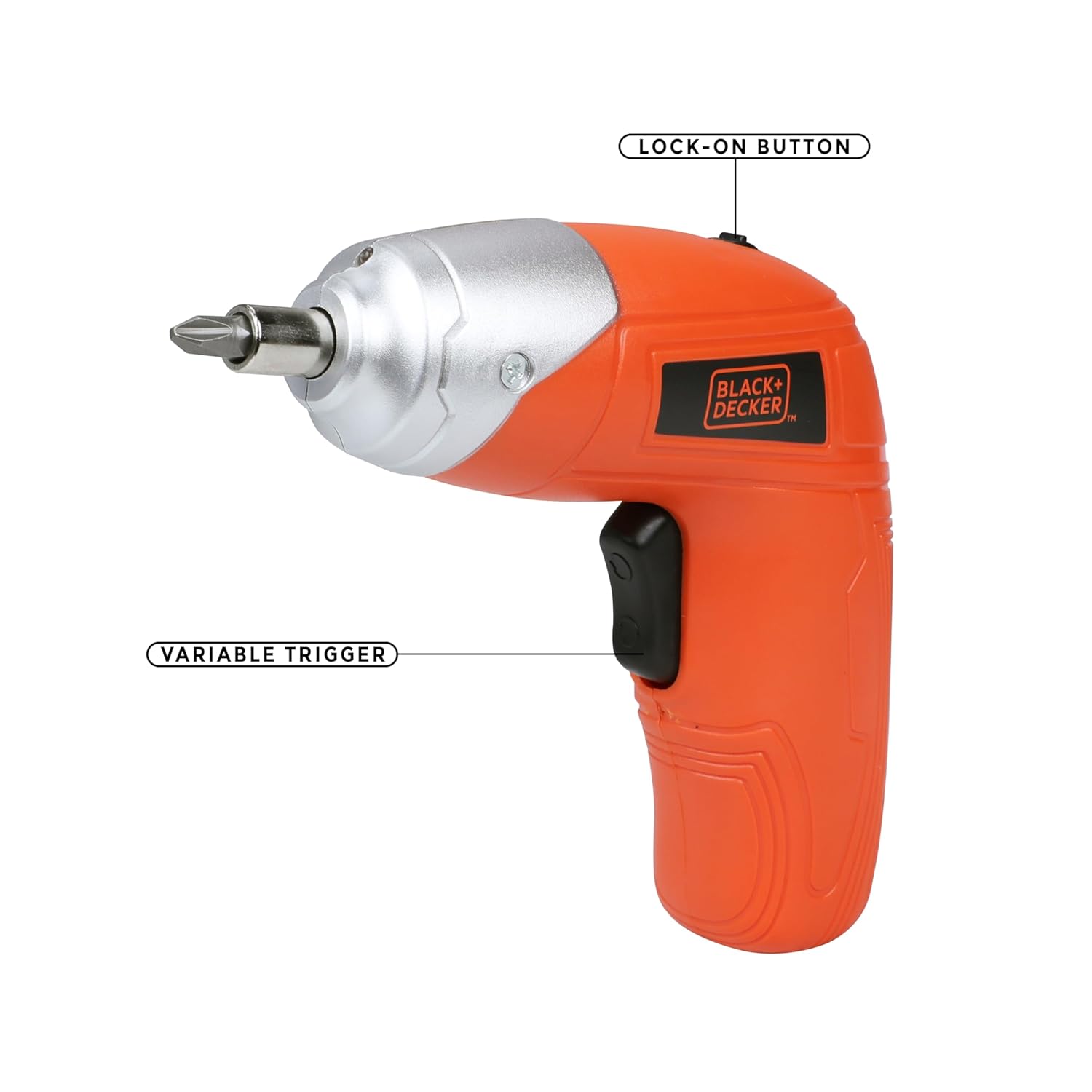
Figure 4.1: Key operational parts: Lock-on Button (top) and Variable Trigger (handle).

ചിത്രം 4.2: മുൻഭാഗം view highlighting the Tool Holder (1) and LED Light (2).

ചിത്രം 4.3: വശം view indicating LED Switch (3), Charging Indicator (4), Charging Port (5), and Main Switch (6).
5. സജ്ജീകരണം
5.1 ബാറ്ററി ചാർജ് ചെയ്യുന്നു
- Connect the wall charger to the charging port (5) on the screwdriver.
- ഒരു സാധാരണ ഇലക്ട്രിക്കൽ ഔട്ട്ലെറ്റിലേക്ക് ചാർജർ പ്ലഗ് ചെയ്യുക.
- The charging indicator (4) will illuminate to show that the battery is charging.
- Allow approximately 2 hours for a full charge. The indicator may change or turn off once fully charged (refer to specific product behavior if different).
കുറിപ്പ്: The screwdriver uses a Lithium-Ion battery. It is recommended to fully charge the battery before first use.
5.2 സ്ക്രൂഡ്രൈവർ ബിറ്റുകൾ ചേർക്കലും നീക്കം ചെയ്യലും
- Ensure the screwdriver is switched off.
- Insert the desired screwdriver bit into the tool holder (1) until it is securely seated. For smaller bits, use the magnetic bit holder provided.
- To remove a bit, simply pull it straight out from the tool holder.

Figure 5.1: Proper insertion of a screwdriver bit into the tool holder.
6. പ്രവർത്തന നിർദ്ദേശങ്ങൾ
6.1 പവർ ഓൺ/ഓഫ്, ദിശ നിയന്ത്രണം
- To operate the screwdriver, slide the main switch (6) to the desired direction (forward for tightening, reverse for loosening).
- Press the variable trigger to start the screwdriver. Release the trigger to stop.
- For continuous use, press the variable trigger and then engage the lock-on button (Figure 4.1). To disengage, press the trigger again.
6.2 Using the LED Worklight
- The integrated LED worklight (2) illuminates the work area for improved visibility.
- To activate the LED light independently, use the LED switch (3). The light may also activate automatically when the trigger is pressed.
6.3 ടോർക്ക് ക്രമീകരണം
The BLACK+DECKER KC3610 features adjustable torque, allowing you to match the fastening power to the task and material, preventing overtightening or stripping screws.
- Locate the torque adjustment mechanism (refer to product diagram if available, typically a collar near the chuck).
- Rotate the collar to select the desired torque setting. Lower settings are for smaller screws and softer materials, while higher settings are for larger screws and harder materials.
കുറിപ്പ്: Some user experiences indicate that torque adjustment may not be present or as effective as expected. Always test on a scrap piece of material first to determine the appropriate setting for your application.
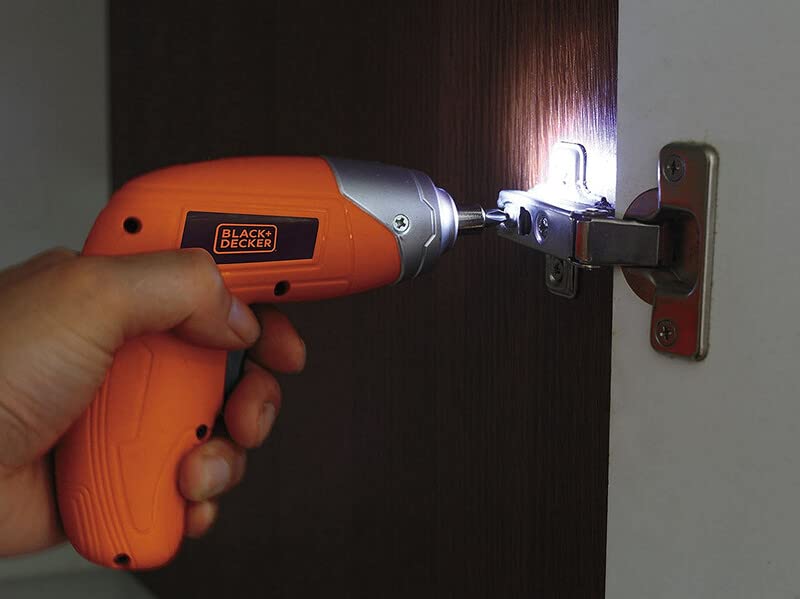
Figure 6.1: Screwdriver in operation, demonstrating the LED worklight.

Figure 6.2: Screwdriver being used for a typical fastening task.
7. പരിപാലനം
പതിവ് അറ്റകുറ്റപ്പണികൾ മികച്ച പ്രകടനം ഉറപ്പാക്കുകയും നിങ്ങളുടെ ഉപകരണത്തിന്റെ ആയുസ്സ് വർദ്ധിപ്പിക്കുകയും ചെയ്യുന്നു.
- വൃത്തിയാക്കൽ: ചൂടാകുന്നത് തടയാൻ ഉപകരണത്തിന്റെ വെന്റിലേഷൻ സ്ലോട്ടുകൾ വൃത്തിയായി സൂക്ഷിക്കുക. മൃദുവായ, ഡി ഉപയോഗിക്കുകamp വീട് വൃത്തിയാക്കാൻ തുണി ഉപയോഗിക്കുക. കഠിനമായ രാസവസ്തുക്കളോ ഉരച്ചിലുകളുള്ള ക്ലീനറുകളോ ഉപയോഗിക്കരുത്.
- സംഭരണം: Store the screwdriver and accessories in a dry, secure place out of reach of children. Ensure the battery is partially charged before long-term storage.
- ബാറ്ററി കെയർ: Do not store the battery in discharged condition. Recharge it periodically if not in use for extended periods.
8. പ്രശ്നപരിഹാരം
പൊതുവായ പ്രശ്നങ്ങളും അവയുടെ പരിഹാരങ്ങളും അറിയാൻ താഴെയുള്ള പട്ടിക കാണുക.
| പ്രശ്നം | സാധ്യമായ കാരണം | പരിഹാരം |
|---|---|---|
| സ്ക്രൂഡ്രൈവർ ഓണാക്കുന്നില്ല. | ബാറ്ററി ഡിസ്ചാർജ് ചെയ്തു. സ്വിച്ച് ഓഫ് പൊസിഷനിലാണ്. | ബാറ്ററി ചാർജ് ചെയ്യുക. Ensure the main switch is set to forward or reverse. |
| Low power or slow operation. | ബാറ്ററി കുറവാണ്. Task is too demanding for the tool. | ബാറ്ററി റീചാർജ് ചെയ്യുക. This screwdriver is designed for light-duty fastening tasks, not heavy drilling or driving large screws into dense materials. |
| Screws are stripping or overtightening. | Incorrect torque setting. Bit is worn or incorrect size. | Adjust the torque setting to a lower value. Use the correct size and type of bit for the screw. Replace worn bits. |
| ബട്ടൺ അല്ലെങ്കിൽ സ്വിച്ച് തകരാർ. | ആന്തരിക ഘടകത്തിൻ്റെ പരാജയം. | Contact customer support for assistance or warranty service. Do not attempt to repair yourself. |
9 സ്പെസിഫിക്കേഷനുകൾ
Technical specifications for the BLACK+DECKER KC3610 Cordless Screwdriver:
| ഫീച്ചർ | സ്പെസിഫിക്കേഷൻ |
|---|---|
| മോഡൽ നമ്പർ | KC3610 |
| വാല്യംtage | 3.6 വോൾട്ട് |
| ലോഡ് സ്പീഡ് ഇല്ല | 200 ആർപിഎം |
| പവർ ഉറവിടം | കോർഡ്ലെസ്സ് |
| ബാറ്ററി തരം | ലിഥിയം അയോൺ |
| ബാറ്ററി ശേഷി | 1500 mAh |
| ചാർജിംഗ് സമയം | ഏകദേശം 2 മണിക്കൂർ |
| ഇനത്തിൻ്റെ ഭാരം | 450 ഗ്രാം |
| ഉൽപ്പന്ന അളവുകൾ | 13.5L x 5.5W x 13H സെൻ്റീമീറ്റർ |
| മെറ്റീരിയൽ | പ്ലാസ്റ്റിക് |
| LED വർക്ക്ലൈറ്റ് | അതെ |
| ചാർജ് സൂചകം | അതെ |
| ടോർക്ക് അഡ്ജസ്റ്റ്മെന്റ് | അതെ |
കുറിപ്പ്: ഉൽപ്പന്ന മെച്ചപ്പെടുത്തലിനായി, മുൻകൂർ അറിയിപ്പ് കൂടാതെ സ്പെസിഫിക്കേഷനുകൾ മാറ്റത്തിന് വിധേയമാണ്.

ചിത്രം 9.1: ഓവർview പ്രധാന ഉൽപ്പന്ന സ്പെസിഫിക്കേഷനുകളുടെ.
10. വാറണ്ടിയും ഉപഭോക്തൃ പിന്തുണയും
BLACK+DECKER provides a 1 വർഷത്തെ വാറൻ്റി on this product from the date of purchase, covering manufacturing defects.
For any warranty-related issues, product feedback, or technical assistance, please contact our customer care team:
- ഫോൺ: 1860-425-1111 (തിങ്കൾ മുതൽ വെള്ളി വരെ, രാവിലെ 10 മുതൽ വൈകുന്നേരം 5 വരെ, സർക്കാർ അവധി ദിവസങ്ങൾ ഒഴികെ)
- ഇമെയിൽ: എസ്.ബി.ഡി-കസ്റ്റമർകമ്മ്യൂണിക്കേഷൻസ്@എസ്.ബി.ഡി.എൻ.സി.
- WhatsApp: +91 96060 55835
You can also find information on authorized service centers by contacting customer care.

Figure 10.1: BLACK+DECKER Total Care contact details.


