ആമുഖം
The DROK Buck Converter is a versatile DC-DC step-down voltage regulator designed to convert a wide input voltage range (DC 9V-36V) to a stable 5.2V output, suitable for powering various 5V devices, including mobile phones for fast charging. This module incorporates synchronous rectification for high efficiency and features both a DC input jack and screw terminals for flexible connectivity.
പ്രധാന സവിശേഷതകൾ:
- വൈഡ് ഇൻപുട്ട് വോളിയംtagഇ ശ്രേണി: Accepts DC 9V-36V.
- സ്ഥിരമായ ഔട്ട്പുട്ട്: Provides a fixed output of 5.2V (adjustable within 5V-5.3V based on input).
- ഉയർന്ന കാര്യക്ഷമത: Utilizes a synchronous rectification scheme.
- ഫ്ലെക്സിബിൾ കണക്റ്റിവിറ്റി: Equipped with a DC input interface and connecting terminals.
- USB ഔട്ട്പുട്ട്: Includes a USB interface with a quick charge identifying chip, compatible with Android and Apple devices.
- വിപരീത സംരക്ഷണം: Features protection against reverse input polarity.
സുരക്ഷാ വിവരങ്ങൾ
ഈ ഉപകരണം പ്രവർത്തിപ്പിക്കുന്നതിന് മുമ്പ് എല്ലാ സുരക്ഷാ നിർദ്ദേശങ്ങളും വായിച്ച് മനസ്സിലാക്കുക. ഈ നിർദ്ദേശങ്ങൾ പാലിക്കുന്നതിൽ പരാജയപ്പെടുന്നത് വൈദ്യുതാഘാതം, തീപിടുത്തം അല്ലെങ്കിൽ ഗുരുതരമായ പരിക്കിന് കാരണമായേക്കാം.
- ഇലക്ട്രിക്കൽ സുരക്ഷ: Ensure all connections are secure and correctly polarized before applying power. Incorrect wiring can damage the module and connected devices.
- വാല്യംtagഇ പരിധികൾ: നിർദ്ദിഷ്ട ഇൻപുട്ട് വോള്യം കവിയരുത്tage range of DC 9V-36V. Exceeding this range will damage the converter.
- Current Limits: Be aware of the output current capabilities based on input voltage (refer to Performance Characteristics section). Overloading the converter can lead to overheating and failure.
- പരിസ്ഥിതി: Operate the module in a dry, well-ventilated area. Avoid exposure to moisture, dust, and extreme temperatures.
- ഇൻസുലേഷൻ: Ensure the module is properly insulated to prevent accidental short circuits, especially when integrating into custom enclosures.
ഉൽപ്പന്നം കഴിഞ്ഞുview
Familiarize yourself with the components and layout of your DROK Buck Converter.
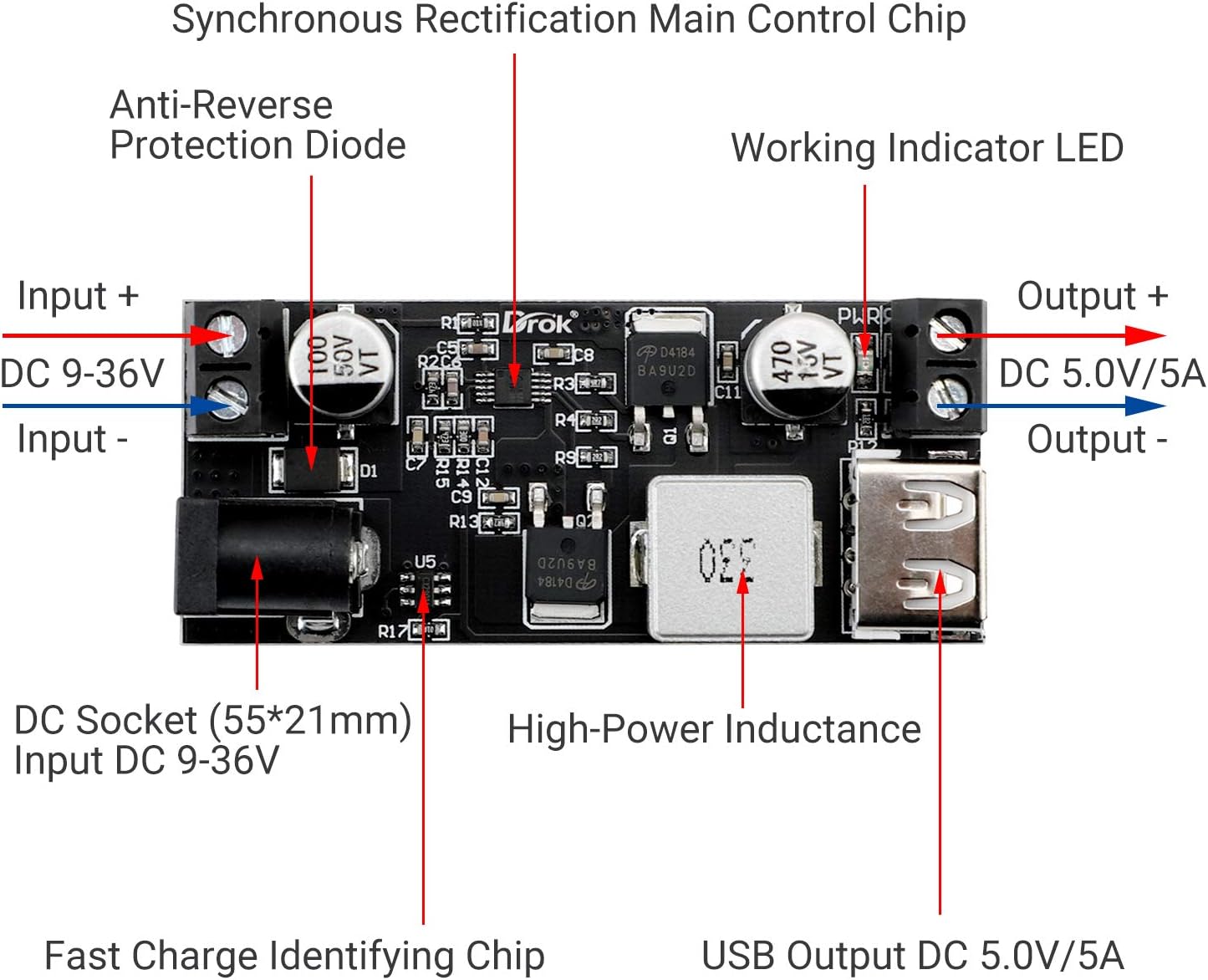

ഉൽപ്പന്ന വീഡിയോ:
വീഡിയോ 1: DROK 5V USB Buck Converter Demonstration. This video demonstrates the DROK buck converter in action, showing its ability to charge a mobile phone and highlighting its reverse polarity protection feature.
സജ്ജീകരണവും ഇൻസ്റ്റാളേഷനും
Follow these steps to correctly set up and install your buck converter:
- Prepare Input Power: Ensure your DC power source is within the 9V-36V range. Turn off the power source before making any connections.
- കണക്ട് ഇൻപുട്ട്: You have two options for connecting the input power:
- ഡിസി സോക്കറ്റ്: Plug a compatible DC power adapter (5.5*2.1mm) into the DC socket.
- സ്ക്രൂ ടെർമിനലുകൾ: Connect the positive (+) wire of your DC power source to the 'Input +' terminal and the negative (-) wire to the 'Input -' terminal. Ensure wires are securely fastened. The module includes reverse protection, but correct polarity is always recommended.
- Connect Output Device:
- USB ഔട്ട്പുട്ട്: Plug your USB charging cable into the USB port on the converter.
- സ്ക്രൂ ടെർമിനലുകൾ: For direct wiring, connect the positive (+) wire of your 5V device to the 'Output +' terminal and the negative (-) wire to the 'Output -' terminal.
- കണക്ഷനുകൾ പരിശോധിക്കുക: Double-check all wiring for correct polarity and secure connections.
- പവർ പ്രയോഗിക്കുക: Turn on your DC power source. The working indicator LED on the module should illuminate, indicating proper operation.
പ്രവർത്തന നിർദ്ദേശങ്ങൾ
Once properly installed, the DROK Buck Converter operates automatically. It will step down the input voltage to a stable 5.2V output. When a compatible device is connected to the USB port, the quick charge identifying chip will negotiate the optimal charging parameters for fast charging.
The working indicator LED provides visual confirmation that the module is receiving input power and functioning.
പ്രകടന സവിശേഷതകൾ
The output power of the buck converter varies depending on the input voltage:
| ഇൻപുട്ട് വോളിയംtagഇ റേഞ്ച് | Putട്ട്പുട്ട് വോളിയംtage | പരമാവധി put ട്ട്പുട്ട് കറന്റ് | പരമാവധി ഔട്ട്പുട്ട് പവർ |
|---|---|---|---|
| DC 9V-24V | 5.2V | 6A | 30W |
| DC 24V-32V | 5.2V | 5A | 25W |
| DC 32V-36V | 5.2V | 3.5എ | 18W |
മെയിൻ്റനൻസ്
The DROK Buck Converter is designed for reliable operation with minimal maintenance. To ensure longevity and optimal performance:
- വൃത്തിയായി സൂക്ഷിക്കു: Periodically clean the module with a soft, dry cloth to remove dust and debris. Do not use liquid cleaners.
- കണക്ഷനുകൾ പരിശോധിക്കുക: Regularly check all input and output connections to ensure they remain secure and free from corrosion.
- അമിതമായി ചൂടാക്കുന്നത് ഒഴിവാക്കുക: Ensure adequate ventilation around the module, especially during high-load operation, to prevent overheating.
- പരിസ്ഥിതി സംരക്ഷണം: Protect the module from physical impact, excessive vibration, and harsh environmental conditions.
ട്രബിൾഷൂട്ടിംഗ്
If you encounter issues with your DROK Buck Converter, refer to the following troubleshooting guide:
- ഔട്ട്പുട്ട് വോളിയം ഇല്ലtage / No Indicator Light:
- Check if the input power source is connected correctly and providing voltag9V-36V പരിധിക്കുള്ളിൽ.
- Verify input polarity. Although the module has reverse protection, incorrect wiring can prevent operation.
- Ensure all input and output wires are securely connected to the terminals or DC jack.
- Putട്ട്പുട്ട് വോളിയംtage Fluctuates / Device Not Charging:
- Check if the load connected to the output exceeds the maximum current/power rating for your input voltage (refer to Performance Characteristics). Reduce the load if necessary.
- ഇൻപുട്ട് വോളിയം ഉറപ്പാക്കുകtage is stable and not fluctuating.
- Inspect the output cable and device for any faults.
- മൊഡ്യൂൾ അമിത ചൂടാക്കൽ:
- Reduce the load on the converter.
- Ensure adequate airflow around the module. Consider adding a small fan if operating at continuous high loads in an enclosed space.
- Device Not Fast Charging:
- Ensure your device and charging cable support fast charging protocols.
- ഇൻപുട്ട് വോളിയം പരിശോധിക്കുകtage is sufficient to provide the necessary power for fast charging (higher input voltage allows for higher output power).
സ്പെസിഫിക്കേഷനുകൾ
| ഫീച്ചർ | സ്പെസിഫിക്കേഷൻ |
|---|---|
| ഇൻപുട്ട് വോളിയംtage | DC 9V-36V |
| Putട്ട്പുട്ട് വോളിയംtage | 5.2V (5V-5.3V adjustable) |
| പരമാവധി put ട്ട്പുട്ട് കറന്റ് | 6A (varies with input voltage) |
| പരമാവധി ഔട്ട്പുട്ട് പവർ | 30W (varies with input voltage) |
| ഇനം മോഡൽ നമ്പർ | 200217 |
| ASIN | B01NALDSJ0 |
| പാക്കേജ് അളവുകൾ | 4.02 x 3.35 x 0.91 ഇഞ്ച് |
| ഇനത്തിൻ്റെ ഭാരം | 0.634 ഔൺസ് |
| നിർമ്മാതാവ് | DROK |
| പ്ലഗ് ഫോർമാറ്റ് | ഡിസി പവർ ജാക്ക് |
വാറൻ്റിയും പിന്തുണയും
DROK products are designed for quality and reliability. For any questions, technical assistance, or warranty claims, please refer to the following:
- വാറൻ്റി: Each product purchased from DROK includes a one-year service period. A brand new replacement can be provided for any quality issues with your item.
- പിന്തുണയുമായി ബന്ധപ്പെടുക: കൂടുതൽ സഹായത്തിന്, ദയവായി ഉദ്യോഗസ്ഥനെ സന്ദർശിക്കുക DROK Store on Amazon അല്ലെങ്കിൽ അവരുടെ ഉപഭോക്തൃ സേവനവുമായി നേരിട്ട് ബന്ധപ്പെടുക.
- പതിവുചോദ്യങ്ങൾ: Common questions and answers can often be found on the brand's product pages or support sections.


