1. ആമുഖം
This manual provides essential information for the safe and efficient operation of your DNP DS820A Professional Dye-Sublimation Printer. The DS820A is designed for high-quality photo printing, offering a resolution of 300 x 600 dpi and supporting various print sizes up to 8x32 inches. It features a high-speed print mode, producing 8x10 inch glossy photos in approximately 29.3 seconds, and supports multiple surface options including Glossy, Luster, Matte, and Fine Matte.
Please read this manual thoroughly before using the printer to ensure proper setup, operation, and maintenance.

ചിത്രം 1: ഫ്രണ്ട് ആംഗിൾ view of the DNP DS820A printer.
2 സുരക്ഷാ വിവരങ്ങൾ
Observe the following safety precautions to prevent injury and damage to the printer:
- പ്രിന്റർ എപ്പോഴും ഒരു ഗ്രൗണ്ടഡ് പവർ ഔട്ട്ലെറ്റിലേക്ക് ബന്ധിപ്പിക്കുക.
- Do not block ventilation openings on the printer. Ensure adequate space around the unit for proper airflow.
- പ്രിന്റർ വെള്ളത്തിൽ നിന്നോ അമിതമായ ഈർപ്പത്തിൽ നിന്നോ അകറ്റി നിർത്തുക.
- Do not attempt to disassemble or repair the printer yourself. Refer to qualified service personnel.
- Use only DNP-approved media and ribbons.
3. പാക്കേജ് ഉള്ളടക്കം
പാക്കേജിൽ എല്ലാ ഇനങ്ങളും ഉണ്ടെന്ന് ഉറപ്പാക്കുക:
- DNP DS820A Printer Unit
- പവർ കേബിൾ
- USB കേബിൾ
- മീഡിയ ട്രേ
- Quick Start Guide and Documentation
Media (paper and ribbon) is typically sold separately.
4. സജ്ജീകരണം
4.1 അൺപാക്കിംഗും പ്ലേസ്മെന്റും
- പ്രിന്റർ അതിന്റെ പാക്കേജിംഗിൽ നിന്ന് ശ്രദ്ധാപൂർവ്വം നീക്കം ചെയ്യുക.
- Place the printer on a stable, level surface with sufficient space for ventilation and media loading/unloading.
- Remove all protective tapes and packing materials.
4.2 പ്രിന്റർ ബന്ധിപ്പിക്കുന്നു
- Connect the power cable to the printer's power input and then to a grounded electrical outlet.
- പ്രിന്ററിന്റെ USB പോർട്ടിലേക്കും നിങ്ങളുടെ കമ്പ്യൂട്ടറിലേക്കും USB കേബിൾ ബന്ധിപ്പിക്കുക.
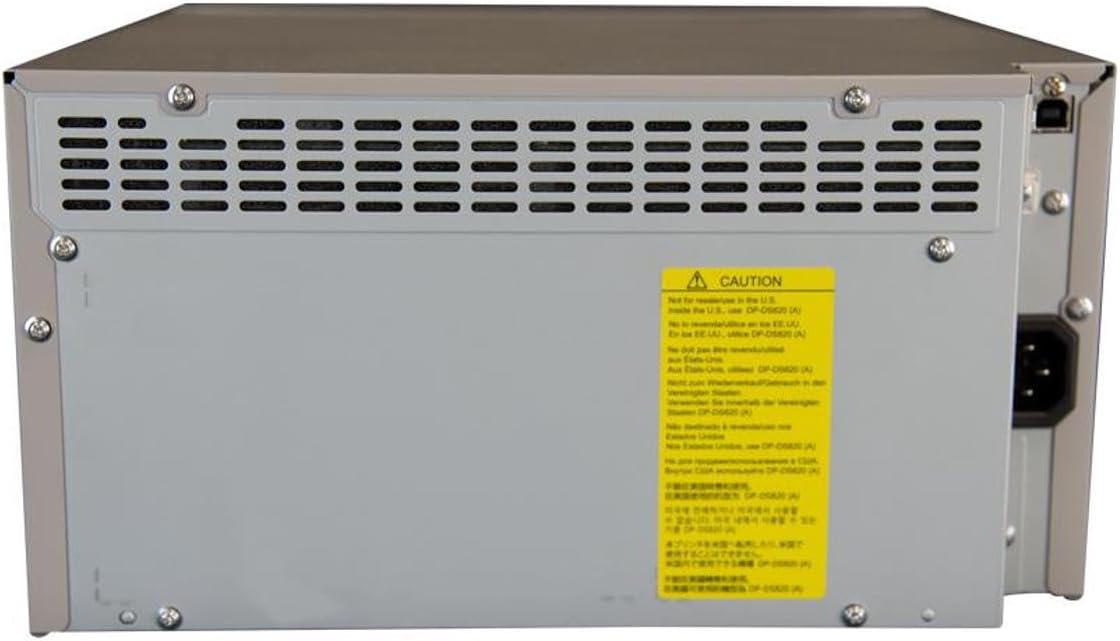
ചിത്രം 2: പിൻഭാഗം view of the DNP DS820A, highlighting connectivity ports.
4.3 ഡ്രൈവർ ഇൻസ്റ്റലേഷൻ
Install the latest printer drivers from the DNP website. The printer is compatible with Windows and Mac OS X/macOS operating systems.
4.4 Loading Media (Paper and Ribbon)
The DS820A uses a roll-fed media system. Refer to the specific instructions provided with your DNP media for detailed loading procedures. Generally, this involves opening the front panel, inserting the ribbon cassette, and then loading the paper roll into its designated slot.
5. പ്രവർത്തന നിർദ്ദേശങ്ങൾ
5.1 പവർ ഓൺ/ഓഫ്
Locate the power switch on the front or side of the printer. Flip the switch to the 'On' position to power on the printer. To power off, flip the switch to the 'Off' position.
5.2 ഇൻഡിക്കേറ്റർ ലൈറ്റുകൾ
The printer features several indicator lights on the front panel to communicate its status:
- പവർ: പ്രിന്റർ ഓണാണെന്ന് സൂചിപ്പിക്കുന്നു.
- ഓൺ/സ്റ്റാൻഡ്ബൈ: Indicates operational status or standby mode.
- RIBBON: Illuminates when the ribbon needs replacement or is incorrectly installed.
- പേപ്പർ: Illuminates when paper needs replacement or is incorrectly loaded.
- പിശക്: Indicates a general error. Refer to the troubleshooting section or driver software for details.

Figure 3: Front control panel with status indicator lights.
5.3 അച്ചടി പ്രക്രിയ
- പ്രിന്റർ ഓണാക്കിയിട്ടുണ്ടെന്നും നിങ്ങളുടെ കമ്പ്യൂട്ടറുമായി ബന്ധിപ്പിച്ചിട്ടുണ്ടെന്നും ഉറപ്പാക്കുക.
- Open the image or document you wish to print on your computer.
- Select the DNP DS820A from your printer options.
- Adjust print settings such as print size, resolution (300x600 dpi recommended for color), and surface type (Glossy, Luster, Matte, Fine Matte) in the printer driver settings.
- Initiate the print job. The printer will process and output the photo.
6. പരിപാലനം
6.1 പ്രിന്റർ വൃത്തിയാക്കുന്നു
പതിവായി വൃത്തിയാക്കുന്നത് പ്രിന്റ് ഗുണനിലവാരം നിലനിർത്താനും പ്രിന്ററിന്റെ ആയുസ്സ് വർദ്ധിപ്പിക്കാനും സഹായിക്കുന്നു.
- പുറം: മൃദുവായതും ഉണങ്ങിയതും ലിന്റ് രഹിതവുമായ തുണി ഉപയോഗിച്ച് പുറംഭാഗം തുടയ്ക്കുക. അബ്രസീവ് ക്ലീനറുകളോ ലായകങ്ങളോ ഉപയോഗിക്കരുത്.
- ഇൻ്റീരിയർ: Periodically open the front panel and gently remove any dust or debris from the media path using a soft brush or compressed air.
6.2 Media Replacement
When the RIBBON or PAPER indicator lights illuminate, it's time to replace the respective media. Open the front access panel to replace the ribbon cassette and paper roll according to the instructions provided with the DNP media.
7. പ്രശ്നപരിഹാരം
നിങ്ങൾ നേരിട്ടേക്കാവുന്ന പൊതുവായ പ്രശ്നങ്ങളെ ഈ വിഭാഗം അഭിസംബോധന ചെയ്യുന്നു.
| പ്രശ്നം | സാധ്യമായ കാരണം | പരിഹാരം |
|---|---|---|
| പ്രിന്റർ ഓണാക്കുന്നില്ല | Power cable disconnected; Power switch off | Check power cable connection; Ensure power switch is ON. |
| RIBBON light on | Ribbon empty or incorrectly installed | Replace ribbon; Reinstall ribbon correctly. |
| PAPER light on | Paper roll empty or incorrectly loaded | Replace paper roll; Re-load paper correctly. |
| പിശക് ലൈറ്റ് ഓണാണ് | പൊതുവായ പ്രിന്റർ പിശക് | Turn printer off and on; Check computer for specific error messages; Consult DNP support. |
| മോശം പ്രിന്റ് നിലവാരം | Dirty print head; Incorrect driver settings; Low quality image source | Clean printer interior; Verify print settings (DPI, media type); Use high-resolution images. |
If you encounter issues not covered here, or if solutions do not resolve the problem, contact DNP customer support.
8 സ്പെസിഫിക്കേഷനുകൾ
| ഫീച്ചർ | സ്പെസിഫിക്കേഷൻ |
|---|---|
| മോഡലിൻ്റെ പേര് | DS820A |
| പ്രിൻ്റിംഗ് ടെക്നോളജി | ഡൈ സബ്ലിമേഷൻ |
| പരമാവധി കളർ പ്രിന്റ് റെസല്യൂഷൻ | 300 x 600 dpi |
| പരമാവധി കറുപ്പും വെളുപ്പും പ്രിന്റ് റെസല്യൂഷൻ | 300 x 300 dpi or 300 x 600 dpi |
| പിന്തുണയ്ക്കുന്ന മീഡിയ വലുപ്പങ്ങൾ | 5 x 7 inches, 8 x 10 inches, 8 x 12 inches, up to 8 x 32 inches (panoramic) |
| പ്രിന്റ് മീഡിയ തരങ്ങൾ | Glossy photo paper, Luster, Matte, Fine Matte |
| Print Speed (8x10 Glossy) | ഏകദേശം 29.3 സെക്കൻഡ് |
| പരമാവധി ഇൻപുട്ട് ഷീറ്റ് ശേഷി | 250 sheets (depending on media type) |
| ഔട്ട്പുട്ട് ഷീറ്റ് ശേഷി | 250 ഷീറ്റുകൾ |
| ട്രേകളുടെ എണ്ണം | 2 |
| കണക്റ്റിവിറ്റി ടെക്നോളജി | USB 2.0 |
| ഹാർഡ്വെയർ ഇന്റർഫേസ് | USB |
| നിയന്ത്രണ രീതി | ആപ്പ് |
| പ്രിൻ്റർ ഔട്ട്പുട്ട് | Color; Monochrome |
| ഇനത്തിൻ്റെ ഭാരം | 36 പൗണ്ട് (16.33 കി.ഗ്രാം) |
| ഉൽപ്പന്ന അളവുകൾ (L x W x H) | 19.25 x 17.25 x 12 ഇഞ്ച് (48.9 x 43.8 x 30.5 സെ.മീ) |
| നിർമ്മാതാവ് | ഡിഎൻപി |
| യു.പി.സി | 650415905867 |
9. വാറൻ്റിയും പിന്തുണയും
The DNP DS820A printer comes with a full warranty. For specific warranty terms and conditions, please refer to the documentation included with your product or visit the official DNP webസൈറ്റ്.
For technical assistance, troubleshooting beyond this manual, or to inquire about service, please contact DNP customer support directly. Contact information can typically be found on the DNP webസൈറ്റിലോ നിങ്ങളുടെ ഉൽപ്പന്നത്തിന്റെ പാക്കേജിംഗിലോ.


