ആമുഖം
Thank you for choosing Utilitech LED Puck Lights. This kit is designed to provide efficient and warm illumination for various indoor spaces such as under cabinets, in closets, or on shelves. Featuring a plug-and-play design and a long lifespan, these lights offer a simple and effective lighting solution. This manual provides comprehensive instructions for safe installation, operation, and maintenance of your new LED puck lights.

Image: Three Utilitech LED Puck Lights, showcasing their compact, round design and integrated connecting cables.
പ്രധാനപ്പെട്ട സുരക്ഷാ വിവരങ്ങൾ
ഇൻസ്റ്റാൾ ചെയ്യുന്നതിനും ഉപയോഗിക്കുന്നതിനും മുമ്പ് ദയവായി എല്ലാ നിർദ്ദേശങ്ങളും ശ്രദ്ധാപൂർവ്വം വായിക്കുക. ഭാവിയിലെ റഫറൻസിനായി ഈ മാനുവൽ സൂക്ഷിക്കുക.
- ഇൻഡോർ ഉപയോഗത്തിന് മാത്രം: These lights are designed for indoor use in dry locations. Do not expose to water or high humidity.
- ഊർജ്ജ സ്രോതസ്സ്: Use only with the provided power adapter. Ensure the power outlet voltage matches the product's requirements (120 Volts AC).
- ഇൻസ്റ്റലേഷൻ: Ensure power is disconnected before installation or maintenance. Do not modify the product or its components.
- ചൂട്: While LED lights produce less heat than traditional bulbs, ensure adequate ventilation around the fixtures.
- വൃത്തിയാക്കൽ: Clean only with a soft, dry cloth. Do not use abrasive cleaners or solvents.
- നീക്കം ചെയ്യൽ: ഇലക്ട്രോണിക് മാലിന്യങ്ങൾക്കുള്ള പ്രാദേശിക നിയന്ത്രണങ്ങൾക്കനുസൃതമായി ഉൽപ്പന്നം സംസ്കരിക്കുക.
പാക്കേജ് ഉള്ളടക്കം
Verify that all items listed below are included in your package. If any parts are missing or damaged, please contact customer support.

Image: Detailed diagram illustrating the components included in the Utilitech LED Puck Lights kit, including the power cord, puck lights, linking cables, and mounting hardware.
| ഇനം | വിവരണം | അളവ് |
|---|---|---|
| പവർ കോർഡ് | 72-inch power cord with adapter | 1 |
| എൽഇഡി പക്ക് ലൈറ്റ് | 3-watt LED puck light (round, black) | 3 |
| ലിങ്കിംഗ് കേബിൾ | 12-inch quick-connect cables for linking puck lights | 2 |
| മൗണ്ടിംഗ് സ്ക്രൂകൾ | M3 x 10mm screws for mounting | 6 |
സജ്ജീകരണവും ഇൻസ്റ്റാളേഷനും
Follow these steps to properly install your Utilitech LED Puck Lights. Ensure the power source is disconnected before beginning installation.
ഘട്ടം 1: നിങ്ങളുടെ ലേഔട്ട് ആസൂത്രണം ചെയ്യുക
Determine the desired locations for each puck light. Consider the area you wish to illuminate and the proximity to a power outlet. The linking cables allow for flexible spacing between lights.
Step 2: Mounting the Puck Lights
- Place a puck light at your desired mounting location. The back of the puck light serves as a template for screw placement.
- Using the two keyhole slots on the back of the puck light as a guide, mark the locations for the mounting screws on the surface.
- Drill small pilot holes if necessary, then insert the provided mounting screws (M3 x 10mm) into the marked locations, leaving a small gap between the screw head and the surface.
- Align the keyhole slots on the back of the puck light with the screw heads and slide the light into place, ensuring it is securely fastened.
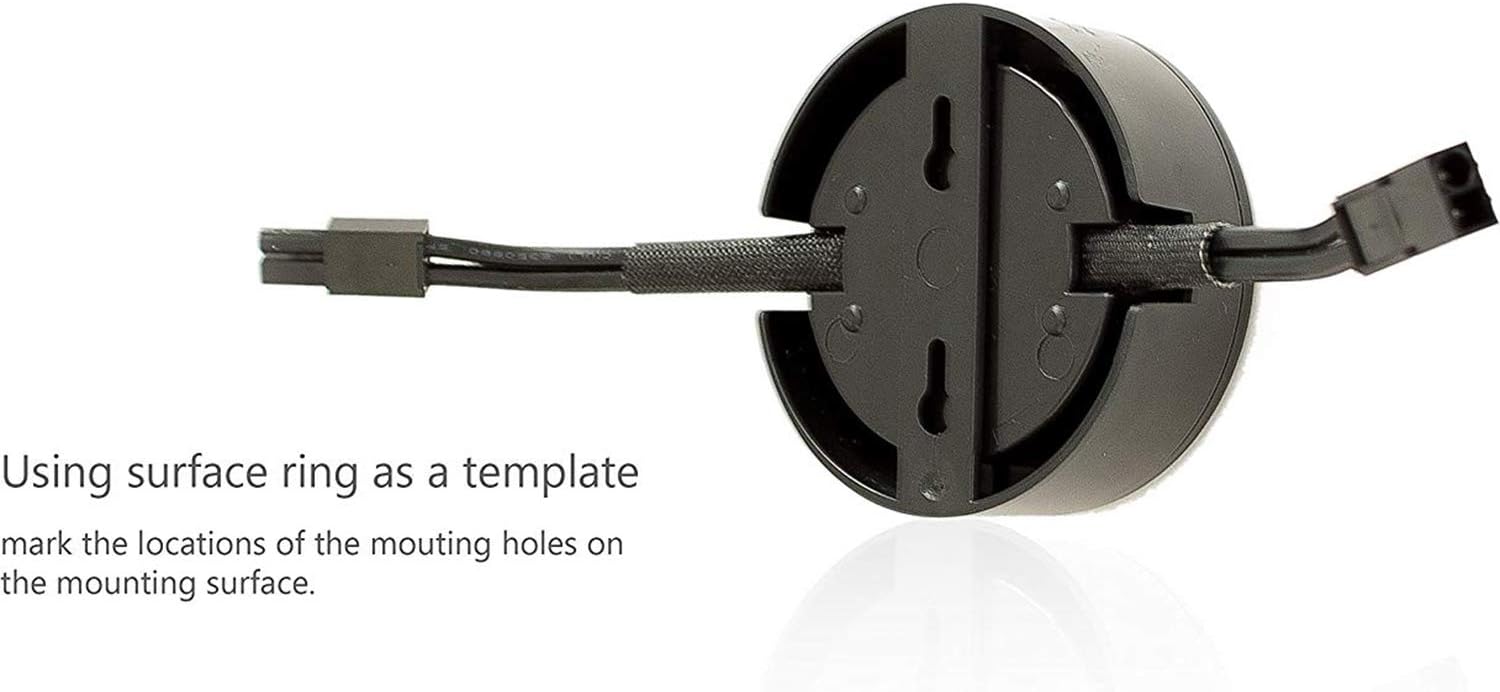
Image: The reverse side of a Utilitech LED Puck Light, highlighting the keyhole slots used for mounting. This image demonstrates how to use the light itself as a template to mark screw positions on the installation surface.
Step 3: Connecting the Lights
- Connect the puck lights to each other using the provided 12-inch quick-connect linking cables.
- Ensure the connectors are fully inserted and secure. The system is designed for a simple plug-and-play connection.

Image: Two hands demonstrating the quick and easy connection process of two Utilitech LED Puck Lights using their integrated linking cables.
ഘട്ടം 4: പവർ കണക്ഷൻ
- Connect the main power cord to the first puck light in your series.
- Plug the power adapter into a standard 120V AC wall outlet.
പ്രവർത്തന നിർദ്ദേശങ്ങൾ
The Utilitech LED Puck Lights feature a simple plug-and-play operation with an instant-on feature.
ഓൺ/ഓഫ് ചെയ്യുന്നു
Once properly installed and connected to a power source, the lights will turn on instantly when power is supplied. To turn the lights off, simply unplug the power adapter from the wall outlet or use a switched outlet if available.

Image: A single Utilitech LED Puck Light emitting its 3000K warm white light, demonstrating its operational appearance.
മെയിൻ്റനൻസ്
These LED puck lights require minimal maintenance.
- വൃത്തിയാക്കൽ: Ensure the lights are unplugged and cool before cleaning. Wipe the surface gently with a soft, dry, lint-free cloth. Do not use liquid cleaners, sprays, or abrasive materials.
- ബൾബ് മാറ്റിസ്ഥാപിക്കൽ: The LED bulbs are integrated and not user-replaceable. The product has a long lifespan of approximately 25,000 hours.
- സംഭരണം: If storing the lights for an extended period, disconnect them from power and store them in a cool, dry place.
ട്രബിൾഷൂട്ടിംഗ്
If you encounter issues with your Utilitech LED Puck Lights, refer to the table below for common problems and solutions.
| പ്രശ്നം | സാധ്യമായ കാരണം | പരിഹാരം |
|---|---|---|
| വിളക്കുകൾ തെളിയുന്നില്ല. | ഔട്ട്ലെറ്റിലേക്ക് വൈദ്യുതിയില്ല. അയഞ്ഞ കണക്ഷൻ. തെറ്റായ പവർ അഡാപ്റ്റർ. | മറ്റൊരു ഉപകരണം പ്ലഗ് ഇൻ ചെയ്തുകൊണ്ട് ഔട്ട്ലെറ്റ് പ്രവർത്തിക്കുന്നുണ്ടോയെന്ന് പരിശോധിക്കുക. Ensure all quick-connect cables and the power cord are securely plugged in. Contact customer support if the power adapter is suspected to be faulty. |
| Only some lights are working. | Loose connection between puck lights. Damaged linking cable. | Check the connections of the non-working lights and ensure they are fully inserted. Inspect linking cables for any visible damage. Replace if necessary. |
| ലൈറ്റുകൾ മിന്നിമറയുന്നു അല്ലെങ്കിൽ മങ്ങുന്നു. | അസ്ഥിരമായ വൈദ്യുതി വിതരണം. ഓവർലോഡഡ് സർക്യൂട്ട്. | Ensure the power outlet provides stable voltage. Avoid connecting to circuits with high power fluctuations. Do not connect more lights than the system is designed for. |
സ്പെസിഫിക്കേഷനുകൾ
Detailed technical specifications for the Utilitech LED Puck Lights.
| ഫീച്ചർ | വിശദാംശങ്ങൾ |
|---|---|
| ബ്രാൻഡ് | യൂട്ടിലിടെക് |
| മോഡൽ നമ്പർ | 0709184 |
| പ്രകാശ സ്രോതസ്സ് തരം | എൽഇഡി |
| ഇളം നിറം | 3000K വാം വൈറ്റ് |
| തെളിച്ചം | 391 Lumens (total for 3-pack) |
| വാട്ട്tage | 9.3 watts (total for 3-pack) |
| വാല്യംtage | 120 വോൾട്ട് എസി |
| അളവുകൾ (ഓരോ പക്കിനും) | 2.66" Width x 1" Height (2.66 x 2.66 x 1 inches) |
| ജീവിതകാലയളവ് | ഏകദേശം 25,000 മണിക്കൂർ |
| ഇൻസ്റ്റലേഷൻ തരം | Plug-in, Under Cabinet Mounting |
| നിയന്ത്രണ രീതി | Plug-in (Instant On) |
| മെറ്റീരിയൽ | പ്ലാസ്റ്റിക് |
| സർട്ടിഫിക്കേഷനുകൾ | ETL സുരക്ഷാ ലിസ്റ്റിംഗ് |
വാറൻ്റിയും പിന്തുണയും
Utilitech stands behind the quality of its products.
- ഉപഭോക്തൃ ഗ്യാരണ്ടി: This product comes with a 100% Customer Usage Guarantee, ensuring satisfaction with your lighting solution.
- സാങ്കേതിക സഹായം: For technical assistance, troubleshooting beyond this manual, or warranty inquiries, please refer to the contact information provided on the product packaging or the official Utilitech webസൈറ്റ്.
- ഓൺലൈൻ ഉറവിടങ്ങൾ: Visit the Utilitech webകൂടുതൽ ഉൽപ്പന്ന വിവരങ്ങൾ, പതിവുചോദ്യങ്ങൾ, പിന്തുണാ ഉറവിടങ്ങൾ എന്നിവയ്ക്കുള്ള സൈറ്റ്.


