ഉൽപ്പന്നം കഴിഞ്ഞുview
The Fanvil X3S is a 2-line color screen SIP phone designed for efficient communication in office environments. It features an extra-large 320 x 240 2.4-inch color LCD for enhanced visual information and user experience. This model supports HD Voice and offers dual 10/100 Mbps network ports. It is suitable for various network setups and supports secure communication protocols.
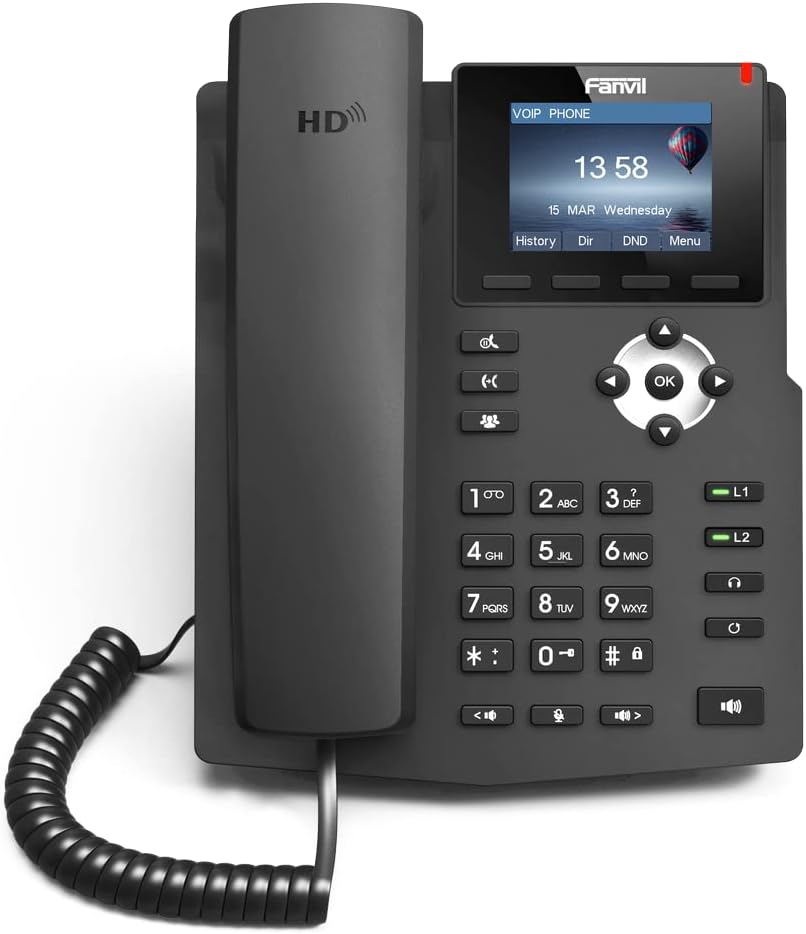
ചിത്രം: മുൻഭാഗം view of the Fanvil X3S SIP Phone, showing the handset, keypad, navigation buttons, and color display screen. The screen displays time and date, with menu options below.
പാക്കേജ് ഉള്ളടക്കം
ഇൻസ്റ്റാളേഷനുമായി മുന്നോട്ടുപോകുന്നതിനുമുമ്പ്, എല്ലാ ഇനങ്ങളും പാക്കേജിൽ ഉണ്ടെന്ന് ഉറപ്പാക്കുക:
- Fanvil X3S SIP Phone Unit
- ഹാൻഡ്സെറ്റ്
- ഹാൻഡ്സെറ്റ് കോർഡ്
- ഇഥർനെറ്റ് കേബിൾ
- Power Adapter (for non-PoE models)
- ഡെസ്ക് സ്റ്റാൻഡ്
- ദ്രുത ഇൻസ്റ്റലേഷൻ ഗൈഡ്
സജ്ജീകരണവും ഇൻസ്റ്റാളേഷനും
1. ഫോൺ കൂട്ടിച്ചേർക്കൽ
- Attach the desk stand to the main unit by aligning the tabs and sliding it into place until it clicks.
- Connect the coiled handset cord to the handset and the designated handset port on the phone base.
2. നെറ്റ്വർക്കിലേക്കും പവറിലേക്കും കണക്റ്റുചെയ്യുന്നു
- നെറ്റ്വർക്ക് കണക്ഷൻ: Connect one end of the Ethernet cable to the LAN port on the phone and the other end to a network switch or router.
- പവർ കണക്ഷൻ:
- If using the included power adapter: Connect the power adapter to the power port on the phone and then plug it into an electrical outlet.
- Note: This model (X3S) does not support Power over Ethernet (PoE). A power adapter is required.
3. പ്രാരംഭ കോൺഫിഗറേഷൻ
Upon first boot, the phone will attempt to obtain an IP address via DHCP. You may need to access the phone's web interface or use the phone's menu for SIP account registration and further network settings. Refer to your VoIP service provider's instructions for specific SIP account details.
പ്രവർത്തന നിർദ്ദേശങ്ങൾ
അടിസ്ഥാന കോൾ പ്രവർത്തനങ്ങൾ
- ഒരു കോൾ ചെയ്യുന്നു: Lift the handset, dial the number, and press the ഡയൽ ചെയ്യുക soft key or the # key. Alternatively, dial the number and then lift the handset.
- ഒരു കോളിന് മറുപടി നൽകുന്നു: ഹാൻഡ്സെറ്റ് ഉയർത്തുക അല്ലെങ്കിൽ അമർത്തുക സ്പീക്കർ ബട്ടൺ.
- ഒരു കോൾ അവസാനിപ്പിക്കുന്നു: ഹാൻഡ്സെറ്റ് മാറ്റിസ്ഥാപിക്കുക അല്ലെങ്കിൽ അമർത്തുക കോൾ അവസാനിപ്പിക്കുക സോഫ്റ്റ് കീ.
- വീണ്ടും ഡയൽ ചെയ്യുക: അമർത്തുക വീണ്ടും ഡയൽ ചെയ്യുക soft key to call the last dialed number.
വിപുലമായ സവിശേഷതകൾ
- പിടിക്കുക: ഒരു കോൾ സമയത്ത്, അമർത്തുക പിടിക്കുക soft key. Press it again to resume the call.
- കൈമാറ്റം: ഒരു കോൾ സമയത്ത്, അമർത്തുക കൈമാറ്റം soft key, dial the new number, and then press കൈമാറ്റം again (blind transfer) or wait for the party to answer before pressing കൈമാറ്റം (ട്രാൻസ്ഫറിൽ പങ്കെടുത്തു).
- നിശബ്ദമാക്കുക: അമർത്തുക നിശബ്ദമാക്കുക കോളിനിടയിൽ നിങ്ങളുടെ മൈക്രോഫോൺ മ്യൂട്ട് ചെയ്യാൻ ബട്ടൺ അമർത്തുക. അൺമ്യൂട്ട് ചെയ്യാൻ വീണ്ടും അമർത്തുക.
- സ്പീക്കർഫോൺ: അമർത്തുക സ്പീക്കർ button to toggle speakerphone mode.
- വോളിയം ക്രമീകരണം: ഉപയോഗിക്കുക വോളിയം buttons during a call to adjust handset, headset, or speaker volume.
- BLF (Busy Lamp Field) Buttons: The X3S features 2 BLF buttons. These can be configured to monitor the status of other extensions (busy, ringing, available) and allow for quick dialing or call pickup. Configuration is typically done via the phone's web ഇൻ്റർഫേസ്.
മെയിൻ്റനൻസ്
Proper maintenance ensures the longevity and optimal performance of your Fanvil X3S SIP Phone.
- വൃത്തിയാക്കൽ: ഫോണിന്റെ പ്രതലം വൃത്തിയാക്കാൻ മൃദുവായതും ഉണങ്ങിയതുമായ തുണി ഉപയോഗിക്കുക. കഠിനമായ പാടുകൾക്ക്, അല്പം ഡി.amp cloth with mild, non-abrasive cleaner can be used. Avoid using harsh chemicals, solvents, or abrasive materials.
- പരിസ്ഥിതി: Keep the phone in a dry environment, away from direct sunlight, excessive heat, and moisture. Ensure proper ventilation around the device.
- കേബിളുകൾ: Periodically check all connected cables (handset cord, Ethernet, power) for any signs of damage or loose connections.
- സോഫ്റ്റ്വെയർ അപ്ഡേറ്റുകൾ: Regularly check the Fanvil official website for firmware updates. Keeping the firmware updated can improve performance, add new features, and address security vulnerabilities. Firmware updates are typically performed via the phone's web ഇൻ്റർഫേസ്.
ട്രബിൾഷൂട്ടിംഗ്
| പ്രശ്നം | സാധ്യമായ കാരണം | പരിഹാരം |
|---|---|---|
| ഫോൺ പവർ ഓൺ ആകുന്നില്ല. | No power connection; faulty power adapter. | Ensure power adapter is securely connected to the phone and a working electrical outlet. Test outlet with another device. |
| ഡയൽ ടോൺ ഇല്ല. | Network connection issue; SIP account not registered. | Check Ethernet cable connection. Verify network connectivity. Ensure SIP account is correctly configured and registered (check phone display for registration status). Restart the phone. |
| കോളുകൾ വിളിക്കാനോ സ്വീകരിക്കാനോ കഴിയില്ല. | SIP account not registered; network firewall issues; incorrect dial plan. | Confirm SIP account registration. Check network firewall settings (ports 5060 UDP/TCP, RTP ports). Consult your VoIP service provider for dial plan or network specific issues. |
| മോശം ഓഡിയോ നിലവാരം (എക്കോ, സ്റ്റാറ്റിക്). | Network congestion; faulty handset/headset; environmental interference. | Check network bandwidth. Try a different handset or headset. Ensure phone is not near strong electromagnetic interference sources. |
| ഡിസ്പ്ലേ ശൂന്യമാണ് അല്ലെങ്കിൽ നിശ്ചലമാണ്. | സോഫ്റ്റ്വെയർ തകരാർ; വൈദ്യുതി പ്രശ്നം. | Unplug the power adapter, wait 10 seconds, then plug it back in to restart the phone. If issue persists, contact support. |
സ്പെസിഫിക്കേഷനുകൾ
| ഫീച്ചർ | വിശദാംശങ്ങൾ |
|---|---|
| മോഡൽ | Fanvil X3S |
| SIP Lines | 2 |
| പ്രദർശിപ്പിക്കുക | 2.4-inch (320x240) Color LCD |
| HD വോയ്സ് | പിന്തുണച്ചു |
| BLF Buttons | 2 |
| നെറ്റ്വർക്ക് പോർട്ടുകൾ | ഡ്യുവൽ 10/100 Mbps ഇഥർനെറ്റ് |
| PoE പിന്തുണ | No (External Power Adapter Required) |
| ഇൻസ്റ്റലേഷൻ ഓപ്ഷനുകൾ | Desktop / Wall-mount |
| അളവുകൾ (L x W x H) | 2.52 x 8.82 x 10.98 ഇഞ്ച് (6.4 x 22.4 x 27.9 സെ.മീ) |
| ഇനത്തിൻ്റെ ഭാരം | 1.65 പൗണ്ട് (0.75 കി.ഗ്രാം) |
| നിർമ്മാതാവ് | ഫാൻവിൽ |
വാറൻ്റിയും പിന്തുണയും
For warranty information, please refer to the warranty card included with your product or visit the official Fanvil webസൈറ്റ്. വാറന്റി നിബന്ധനകളും വ്യവസ്ഥകളും പ്രദേശത്തിനനുസരിച്ച് വ്യത്യാസപ്പെടാം.
For technical support, firmware updates, and additional resources, please visit the Fanvil support portal:
Fanvil Official Support Webസൈറ്റ്
When contacting support, please have your product model (X3S) and serial number ready.


