1. ആമുഖം
This manual provides essential information for the safe and efficient operation of your Omnitronic TRM-202MK3 Rotary DJ Mixer. Please read this manual thoroughly before using the device to ensure proper setup, optimal performance, and longevity of your equipment. The Omnitronic TRM-202MK3 is a robust 2-channel rotary DJ mixer designed for professional audio mixing applications.
2. സുരക്ഷാ നിർദ്ദേശങ്ങൾ
- ഇലക്ട്രിക്കൽ സുരക്ഷ: Always connect the device to a grounded power outlet. Do not expose the unit to rain or moisture. Disconnect the power cord before cleaning or servicing.
- വെൻ്റിലേഷൻ: യൂണിറ്റിന് ചുറ്റും മതിയായ വായുസഞ്ചാരം ഉറപ്പാക്കുക. വെന്റിലേഷൻ തുറസ്സുകൾ തടയരുത്.
- ലിക്വിഡ് ഒഴിവാക്കൽ: Keep liquids away from the device. Spills can cause electric shock or damage.
- കൈകാര്യം ചെയ്യൽ: Avoid dropping or subjecting the unit to heavy impacts.
- സേവനം: എല്ലാ സേവനങ്ങളും യോഗ്യതയുള്ള ഉദ്യോഗസ്ഥരെ ഏൽപ്പിക്കുക. യൂണിറ്റ് സ്വയം നന്നാക്കാൻ ശ്രമിക്കരുത്.
3. പാക്കേജ് ഉള്ളടക്കം
Please check that all items are present and in good condition upon unpacking:
- Omnitronic TRM-202MK3 Rotary DJ Mixer
- പവർ കേബിൾ
- ഉപയോക്തൃ മാനുവൽ
4. ഉൽപ്പന്നം കഴിഞ്ഞുview
4.1 ഫ്രണ്ട് പാനൽ നിയന്ത്രണങ്ങൾ
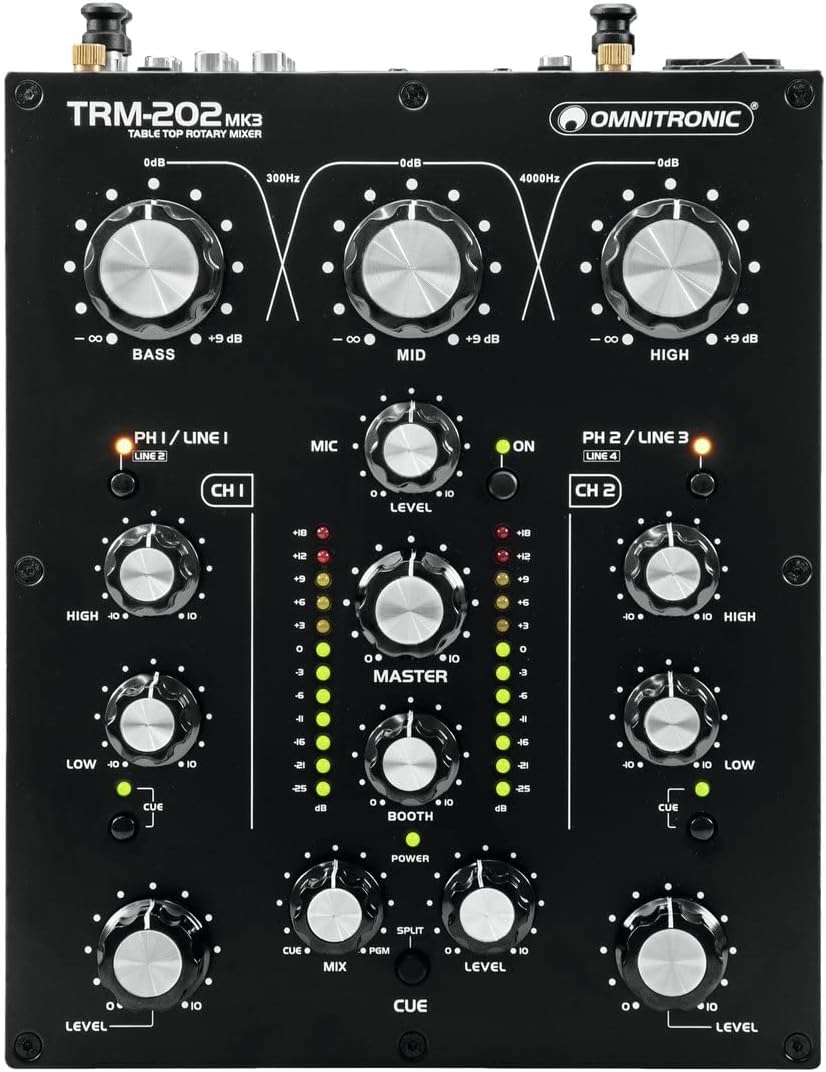
Image: Front panel view of the Omnitronic TRM-202MK3 Rotary DJ Mixer, showcasing all knobs, switches, and LED indicators.
The front panel provides access to all operational controls:
- 3-Band Isolator EQ: Large rotary knobs for BASS, MID, and HIGH frequencies, allowing precise frequency manipulation for the overall mix.
- Channel Controls (CH 1 & CH 2): Each channel features a PH/LINE input selector, HIGH and LOW EQ knobs, a CUE button for monitoring, and a large LEVEL rotary knob for volume control.
- മൈക്രോഫോൺ വിഭാഗം: MIC input (XLR) with a LEVEL knob and an ON switch.
- മാസ്റ്റർ വിഭാഗം: MASTER rotary knob for overall output volume, BOOTH rotary knob for monitor output volume, and dual LED VU meters for visual level monitoring.
- Cue Section: CUE MIX and CUE LEVEL knobs, along with a SPLIT switch, for headphone monitoring adjustments.
- ഹെഡ്ഫോൺ ഔട്ട്പുട്ട്: 6.3mm (1/4-inch) jack for connecting headphones.
4.2 പിൻ പാനൽ കണക്ഷനുകൾ
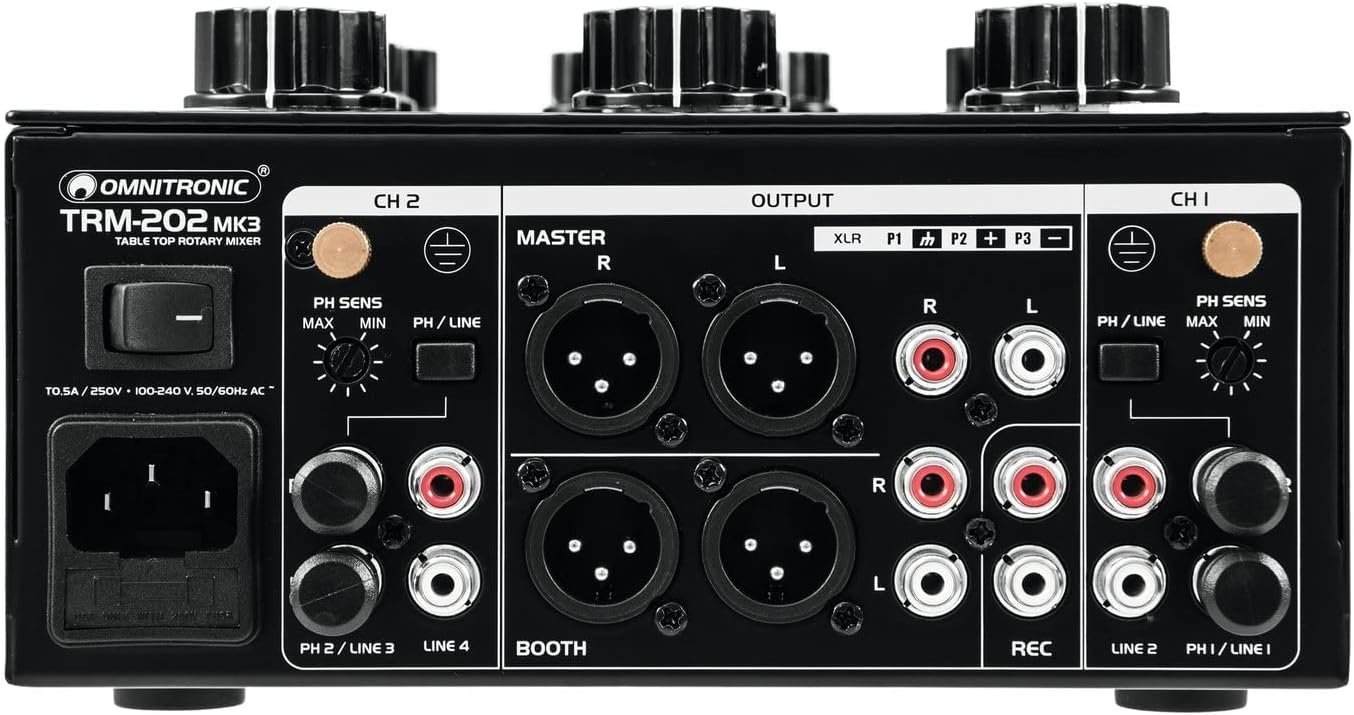
Image: Rear panel view of the Omnitronic TRM-202MK3 Rotary DJ Mixer, showing all input and output ports, power connection, and ground terminals.
The rear panel houses all audio input and output connections, as well as the power input:
- പവർ ഇൻപുട്ട്: IEC power connector with integrated fuse holder and main power switch.
- Channel Inputs (CH 1 & CH 2): RCA stereo inputs for PHONO (turntables) and LINE (CD players, media players). Each channel has a PH SENS (Phono Sensitivity) switch for adjusting input gain.
- മാസ്റ്റർ ഔട്ട്പുട്ട്: Balanced XLR and unbalanced RCA stereo outputs for connecting to a main sound system.
- ബൂത്ത് ഔട്ട്പുട്ട്: Balanced XLR and unbalanced RCA stereo outputs for connecting to monitor speakers.
- റെക്കോർഡ് ഔട്ട്പുട്ട്: Unbalanced RCA stereo output for connecting to a recording device.
- Ground Terminals: Screw terminals for connecting ground wires from turntables.
5. സജ്ജീകരണം
- പവർ കണക്ഷൻ: Connect the supplied power cable to the IEC inlet on the rear panel and then to a suitable grounded AC power outlet (240V AC). Ensure the power switch is in the OFF position before connecting.
- ഓഡിയോ സോഴ്സ് കണക്ഷൻ:
- For turntables, connect the RCA cables to the PHONO inputs of CH 1 or CH 2. Connect the turntable's ground wire to the corresponding ground terminal on the mixer. Set the PH/LINE switch on the front panel to 'PH'. Adjust the PH SENS switch on the rear panel if necessary.
- For CD players, media players, or other line-level devices, connect the RCA cables to the LINE inputs of CH 1 or CH 2. Set the PH/LINE switch on the front panel to 'LINE'.
- ഔട്ട്പുട്ട് കണക്ഷൻ:
- Main Sound System: Connect the MASTER XLR or RCA outputs to your ampലൈഫയർ അല്ലെങ്കിൽ പവർഡ് സ്പീക്കറുകൾ.
- മോണിറ്റർ സ്പീക്കറുകൾ: Connect the BOOTH XLR or RCA outputs to your monitor speakers.
- റെക്കോർഡിംഗ് ഉപകരണം: Connect the REC RCA output to your recording interface or device.
- മൈക്രോഫോൺ കണക്ഷൻ: If using a microphone, connect it to the DJ MIC XLR input on the front panel.
- ഹെഡ്ഫോൺ കണക്ഷൻ: മുൻ പാനലിലെ PHONES ജാക്കിലേക്ക് നിങ്ങളുടെ ഹെഡ്ഫോണുകൾ പ്ലഗ് ചെയ്യുക.
6. പ്രവർത്തന നിർദ്ദേശങ്ങൾ

ചിത്രം: ക്ലോസ്-അപ്പ് view of hands adjusting the rotary knobs on the Omnitronic TRM-202MK3 mixer, demonstrating typical operation.
- പവർ ഓൺ: After all connections are made, switch the main power switch on the rear panel to the ON position. The POWER LED on the front panel will illuminate.
- ഇൻപുട്ട് തിരഞ്ഞെടുക്കൽ: For each channel, ensure the PH/LINE switch is set correctly according to your connected audio source.
- Adjusting Channel Levels: Start playing audio from your source. Slowly turn up the LEVEL knob for the active channel. Observe the VU meters; aim for the signal to peak in the yellow segment, avoiding the red 'clip' segment.
- Using the 3-Band Isolator EQ: The BASS, MID, and HIGH knobs allow you to cut or boost frequencies for the overall mix. Use these to shape your sound.
- മാസ്റ്റർ ഔട്ട്പുട്ട്: Slowly turn up the MASTER knob to send the mixed audio to your main sound system. Adjust to a comfortable listening level.
- ബൂത്ത് ഔട്ട്പുട്ട്: Adjust the BOOTH knob to control the volume of your monitor speakers. This allows you to hear your mix independently of the main output.
- Cueing and Monitoring: Press the CUE button for the channel you wish to monitor in your headphones. Use the CUE LEVEL knob to adjust headphone volume and the CUE MIX knob to blend between the cued channel and the master output. The SPLIT switch allows for split cue monitoring.
- മൈക്രോഫോൺ ഉപയോഗം: Turn the MIC LEVEL knob to the minimum position before speaking. Press the MIC ON switch and slowly increase the MIC LEVEL to the desired volume.
- പവർ ഓഫ്: Before powering off, turn down all LEVEL and MASTER knobs. Then, switch the main power switch to the OFF position.
7. പരിപാലനം
- വൃത്തിയാക്കൽ: Use a soft, dry cloth to clean the exterior of the mixer. Do not use abrasive cleaners or solvents.
- സംഭരണം: When not in use, store the mixer in a clean, dry environment, away from direct sunlight and extreme temperatures.
- വെൻ്റിലേഷൻ: Regularly check that the ventilation openings are free from dust and debris.
8. പ്രശ്നപരിഹാരം
- ശക്തിയില്ല: Check the power cable connection, the main power switch, and the fuse in the IEC inlet. Ensure the power outlet is functional.
- സൗണ്ട് ഔട്ട്പുട്ട് ഇല്ല: Verify all audio cables are securely connected. Check channel LEVEL, MASTER, and BOOTH knobs are turned up. Ensure input sources are playing and their levels are adequate. Check ampലിഫയർ/സ്പീക്കർ കണക്ഷനുകളും പവറും.
- വികലമായ ശബ്ദം: Reduce input levels to prevent clipping (indicated by red LEDs on VU meters). Check cable integrity. Ensure PH/LINE switches are set correctly for the input source.
- ഹം അല്ലെങ്കിൽ ശബ്ദം: Ensure all ground wires from turntables are connected to the mixer's ground terminals. Check for faulty cables or interference from other electronic devices.
- മൈക്രോഫോൺ പ്രവർത്തിക്കുന്നില്ല: Ensure the MIC ON switch is engaged and the MIC LEVEL knob is turned up. Check microphone cable and microphone functionality.
9 സ്പെസിഫിക്കേഷനുകൾ
| ഫീച്ചർ | സ്പെസിഫിക്കേഷൻ |
|---|---|
| മോഡൽ നമ്പർ | 10355922 (TRM-202MK3) |
| ബ്രാൻഡ് | ഓമ്നിട്രോണിക് |
| നിറം | കറുപ്പ് |
| ചാനലുകളുടെ എണ്ണം | 2 |
| കണക്റ്റിവിറ്റി ടെക്നോളജി | Auxiliary, USB (as per product specifications, though USB port not visible in images) |
| പവർ ഉറവിടം | വയർഡ് ഇലക്ട്രിക് |
| വാല്യംtage | 240 വോൾട്ട് (എസി) |
| ഇനത്തിൻ്റെ ഭാരം | 3.18 കിലോഗ്രാം (7.01 പൗണ്ട്) |
| നിർമ്മാതാവ് | ഓമ്നിട്രോണിക് |
10. വാറൻ്റിയും പിന്തുണയും
For warranty information and technical support, please refer to the documentation provided at the time of purchase or contact your retailer or the manufacturer directly. Specific warranty terms may vary by region and retailer.


