1. ആമുഖം
This manual provides comprehensive instructions for the installation, operation, and maintenance of your LUXUL Epic 4 Gigabit Router, model ABR-4500. Please read this manual thoroughly before using the device to ensure proper functionality and to maximize its performance. Keep this manual for future reference.
2. ഉൽപ്പന്നം കഴിഞ്ഞുview
2.1 ഫ്രണ്ട് പാനൽ
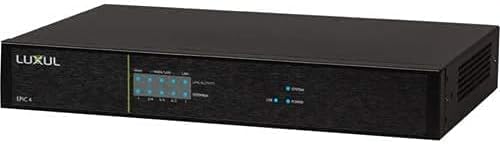
ചിത്രം 1: ഫ്രണ്ട് view of the LUXUL Epic 4 Gigabit Router (ABR-4500). This image displays the front panel of the router, featuring the LUXUL logo on the left, followed by LED indicators for system status and network activity. The indicators typically show power status, system health, and activity for the WAN and LAN ports.
The front panel of the ABR-4500 router features LED indicators that provide visual feedback on the device's operational status. These indicators typically include:
- സിസ്റ്റം LED: Indicates the overall status of the router.
- പവർ എൽഇഡി: Shows if the device is powered on.
- WAN/LAN LEDs: Display activity and link status for the respective network ports.
2.2 പിൻ പാനൽ

ചിത്രം 2: പിൻഭാഗം view of the LUXUL Epic 4 Gigabit Router (ABR-4500). This image shows the rear panel with various ports and controls. From left to right, it includes a USB 3.0 port, multiple WAN/LAN Gigabit Ethernet ports, a reset button, a power input, and a power switch.
The rear panel provides all necessary connectivity options:
- യുഎസ്ബി 3.0 പോർട്ട്: For connecting external storage or other compatible devices.
- WAN Ports (1-4): Gigabit Ethernet ports for connecting to the internet service provider (ISP) or other WAN sources.
- LAN പോർട്ടുകൾ (1-4): Gigabit Ethernet ports for connecting local network devices.
- റീസെറ്റ് ബട്ടൺ: ഫാക്ടറി ഡിഫോൾട്ട് ക്രമീകരണങ്ങൾ പുനഃസ്ഥാപിക്കാൻ ഉപയോഗിക്കുന്നു.
- പവർ ഇൻപുട്ട്: Connector for the power adapter.
- വൈദ്യുതി സ്വിച്ച്: ഉപകരണം ഓണാക്കാനോ ഓഫാക്കാനോ.
3. പാക്കേജ് ഉള്ളടക്കം
നിങ്ങളുടെ പാക്കേജിൽ എല്ലാ ഇനങ്ങളും ഉണ്ടെന്ന് ഉറപ്പാക്കുക:
- LUXUL Epic 4 Gigabit Router (ABR-4500)
- പവർ കേബിൾ
- Quick Installation Guide (not included in this manual)
4. സജ്ജീകരണം
Follow these steps to set up your LUXUL ABR-4500 router:
- പവർ കണക്ഷൻ: Connect the power cable to the router's power input port and then plug the other end into a power outlet.
- Internet Connection (WAN): Connect your modem or internet service provider's (ISP) device to one of the WAN ports on the router using an Ethernet cable.
- Local Network Connection (LAN): Connect your computers or other network devices to the LAN ports using Ethernet cables.
- പവർ ഓൺ: Press the power switch on the rear panel to turn on the router.
- സൂചക പരിശോധന: Wait for the System and WAN/LAN LEDs on the front panel to stabilize, indicating a successful connection and boot-up.
- പ്രാരംഭ കോൺഫിഗറേഷൻ: റൂട്ടറിലേക്ക് പ്രവേശിക്കുക web-based management interface from a connected computer by opening a web browser and entering the default IP address (refer to the Quick Installation Guide or product documentation for the specific IP address and login credentials).
5. പ്രവർത്തന നിർദ്ദേശങ്ങൾ
Once the router is set up, you can manage its functions through the web-അടിസ്ഥാനമാക്കിയുള്ള ഇന്റർഫേസ്.
5.1 ആക്സസ് ചെയ്യുന്നു Web ഇൻ്റർഫേസ്
- Ensure your computer is connected to the router via an Ethernet cable or Wi-Fi.
- എ തുറക്കുക web ബ്രൗസർ (ഉദാ. ക്രോം, ഫയർഫോക്സ്, എഡ്ജ്).
- Enter the router's default IP address (e.g., 192.168.0.1 or 192.168.1.1) into the address bar and press Enter.
- Enter your username and password when prompted. (Default credentials are often found in the Quick Installation Guide or on a label on the router).
5.2 പ്രധാന സവിശേഷതകളും ക്രമീകരണങ്ങളും
- നെറ്റ്വർക്ക് ക്രമീകരണങ്ങൾ: Configure WAN connection types (DHCP, Static IP, PPPoE), LAN IP address, and subnet mask.
- വയർലെസ് ക്രമീകരണങ്ങൾ: Set up Wi-Fi network names (SSIDs), passwords, security protocols (WPA2/WPA3), and channel settings.
- ഫയർവാൾ: Manage security rules, port forwarding, and parental controls.
- QoS (സേവന നിലവാരം): നിർദ്ദിഷ്ട ആപ്ലിക്കേഷനുകൾക്കോ ഉപകരണങ്ങൾക്കോ വേണ്ടി നെറ്റ്വർക്ക് ട്രാഫിക്കിന് മുൻഗണന നൽകുക.
- സിസ്റ്റം ഉപകരണങ്ങൾ: ഫേംവെയർ അപ്ഡേറ്റ് ചെയ്യുക, കോൺഫിഗറേഷനുകൾ ബാക്കപ്പ് ചെയ്യുക/പുനഃസ്ഥാപിക്കുക, കൂടാതെ view സിസ്റ്റം ലോഗുകൾ.
6. പരിപാലനം
പതിവ് അറ്റകുറ്റപ്പണികൾ നിങ്ങളുടെ റൂട്ടറിന്റെ മികച്ച പ്രകടനവും ദീർഘായുസ്സും ഉറപ്പാക്കുന്നു.
- ഫേംവെയർ അപ്ഡേറ്റുകൾ: Periodically check the Luxul webഫേംവെയർ അപ്ഡേറ്റുകൾക്കായുള്ള സൈറ്റ്. ഫേംവെയർ അപ്ഡേറ്റ് ചെയ്യുന്നത് പ്രകടനം മെച്ചപ്പെടുത്താനും പുതിയ സവിശേഷതകൾ ചേർക്കാനും സുരക്ഷാ കേടുപാടുകൾ പരിഹരിക്കാനും കഴിയും.
- ശാരീരിക ശുദ്ധീകരണം: Keep the router in a clean, dust-free environment. Gently clean the exterior with a soft, dry cloth. Do not use liquid cleaners.
- വെൻ്റിലേഷൻ: Ensure the router has adequate ventilation to prevent overheating. Do not block ventilation openings.
- പാസ്വേഡ് സുരക്ഷ: Regularly change your router's administrative password and Wi-Fi passwords to enhance security.
- റീബൂട്ട് ചെയ്യുന്നു: If you experience network issues, a simple reboot (power cycling the router) can often resolve minor problems.
7. പ്രശ്നപരിഹാരം
നിങ്ങൾ നേരിട്ടേക്കാവുന്ന പൊതുവായ പ്രശ്നങ്ങളെ ഈ വിഭാഗം അഭിസംബോധന ചെയ്യുന്നു.
- ഇൻ്റർനെറ്റ് കണക്ഷൻ ഇല്ല:
- Check if the modem is working correctly.
- Verify that the Ethernet cable from the modem is securely connected to the router's WAN port.
- മോഡം, റൂട്ടർ എന്നിവ റീബൂട്ട് ചെയ്യുക.
- Check WAN settings in the router's web ഇൻ്റർഫേസ്.
- കുറഞ്ഞ നെറ്റ്വർക്ക് വേഗത:
- Ensure your internet plan supports the expected speeds.
- Check for interference if using Wi-Fi.
- Limit the number of devices actively using bandwidth.
- റൂട്ടർ ഫേംവെയർ അപ്ഡേറ്റ് ചെയ്യുക.
- റൂട്ടർ ആക്സസ് ചെയ്യാൻ കഴിയില്ല Web ഇൻ്റർഫേസ്:
- നിങ്ങളുടെ ഉപകരണം റൂട്ടറുമായി ബന്ധിപ്പിച്ചിട്ടുണ്ടെന്ന് ഉറപ്പാക്കുക.
- Verify the correct IP address is being used.
- നിങ്ങളുടെ ബ്രൗസറിന്റെ കാഷെ മായ്ക്കുകയോ മറ്റൊരു ബ്രൗസർ ഉപയോഗിക്കുകയോ ചെയ്യുക.
- If you forgot the password, you may need to perform a factory reset using the reset button (this will erase all custom settings).
8 സ്പെസിഫിക്കേഷനുകൾ
| ഫീച്ചർ | വിശദാംശങ്ങൾ |
|---|---|
| ബ്രാൻഡ് | ലക്സൽ |
| മോഡലിൻ്റെ പേര് | ABR-4500 |
| വയർലെസ് തരം | 802.11ac |
| ഫ്രീക്വൻസി ബാൻഡ് ക്ലാസ് | ഡ്യുവൽ-ബാൻഡ് |
| ഓപ്പറേറ്റിംഗ് സിസ്റ്റം | ProWatch+ |
| ഇനത്തിൻ്റെ ഭാരം | 4.35 പൗണ്ട് |
| ഉൽപ്പന്ന അളവുകൾ (LxWxH) | 1 x 1 x 1 ഇഞ്ച് |
| കണക്റ്റിവിറ്റി ടെക്നോളജി | ബ്ലൂടൂത്ത് |
| ആൻ്റിന തരം | ആന്തരികം |
| അനുയോജ്യമായ ഉപകരണങ്ങൾ | പേഴ്സണൽ കമ്പ്യൂട്ടർ |
| ആദ്യ തീയതി ലഭ്യമാണ് | ഏപ്രിൽ 5, 2017 |
Note: The LUXUL Epic 4 Gigabit Router (ABR-4500) is primarily a wired router. Specifications such as "Wireless Type: 802.11ac", "Frequency Band Class: Dual-Band", "Connectivity Technology: Bluetooth", and "Antenna Type: Internal" may refer to capabilities when integrated into a larger Luxul system with compatible wireless access points or other devices, and not necessarily to integrated wireless functionality within the ABR-4500 unit itself. The listed product dimensions (1x1x1 inches) appear to be placeholder values and may not reflect the actual physical size of the device. Please refer to official Luxul documentation for the most accurate and complete specifications.
9. വാറൻ്റിയും പിന്തുണയും
For warranty information and technical support, please refer to the official Luxul website or contact your authorized Luxul dealer. Luxul typically provides warranty and support for products purchased through authorized channels. It is recommended to retain your proof of purchase for warranty claims.
Note: Products purchased from unauthorized resellers may not be eligible for manufacturer warranty or support. Always verify the seller's authorization status to ensure full product support.


