ആമുഖം
വാങ്ങിയതിന് നന്ദി.asing the Trevi RR 501 BT Portable Bluetooth, USB, SD, MP3 Stereo Boombox. This manual provides essential information for the safe and efficient use of your new device. Please read these instructions carefully before operating the unit and retain them for future reference.
സുരക്ഷാ വിവരങ്ങൾ
- ഈ ഉപകരണം മഴയിലോ ഈർപ്പത്തിലോ തുറന്നുകാട്ടരുത്.
- വെൻ്റിലേഷൻ ഓപ്പണിംഗുകളൊന്നും തടയരുത്.
- പവർ കോർഡ് നുള്ളിയെടുക്കുകയോ നടക്കുകയോ ചെയ്തിട്ടില്ലെന്ന് ഉറപ്പാക്കുക.
- നിർമ്മാതാവ് വ്യക്തമാക്കിയ അറ്റാച്ച്മെൻ്റുകൾ/ആക്സസറികൾ മാത്രം ഉപയോഗിക്കുക.
- ഇടിമിന്നൽ ഉണ്ടാകുമ്പോഴോ അല്ലെങ്കിൽ ദീർഘനേരം ഉപയോഗിക്കാതിരിക്കുമ്പോഴോ ഉപകരണം പ്ലഗ് ഊരിവയ്ക്കുക.
- എല്ലാ സേവനങ്ങളും യോഗ്യതയുള്ള സേവന ഉദ്യോഗസ്ഥർക്ക് റഫർ ചെയ്യുക.
- യൂണിറ്റ് തുറക്കരുത് casing; ഉള്ളിൽ ഉപയോക്തൃ-സേവനയോഗ്യമായ ഭാഗങ്ങളൊന്നുമില്ല.
പാക്കേജ് ഉള്ളടക്കം
നിങ്ങളുടെ പാക്കേജിൽ ഇനിപ്പറയുന്ന ഇനങ്ങൾ ഉൾപ്പെടുത്തിയിട്ടുണ്ടോയെന്ന് ദയവായി പരിശോധിക്കുക:
- Trevi RR 501 BT Boombox Unit
- എസി പവർ കേബിൾ
- ഉപയോക്തൃ മാനുവൽ (ഈ പ്രമാണം)
ഉൽപ്പന്നം കഴിഞ്ഞുview
Familiarize yourself with the main components of your Trevi RR 501 BT Boombox.
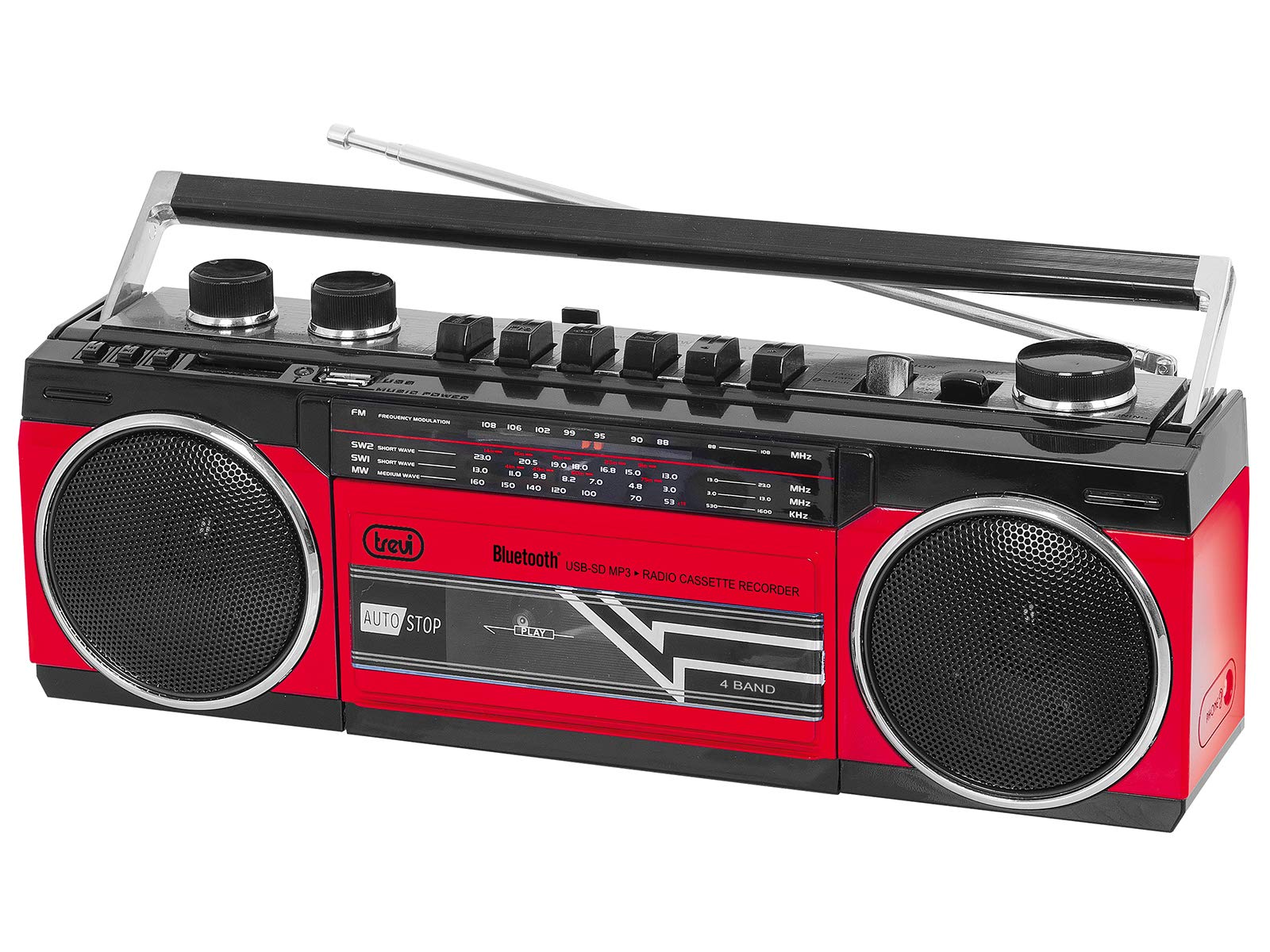
ചിത്രം 1: ഫ്രണ്ട് view of the Trevi RR 501 BT Boombox, showing the dual speakers, control panel, and cassette deck.

ചിത്രം 2: കോണാകൃതിയിലുള്ളത് view of the Trevi RR 501 BT Boombox, highlighting the side profile കൈകാര്യം ചെയ്യുക.
പ്രധാന ഘടകങ്ങൾ:
- സ്പീക്കറുകൾ: Two integrated stereo speakers.
- നിയന്ത്രണ പാനൽ: Buttons for playback, mode selection, and tuning.
- വോളിയം നോബ്: ഓഡിയോ ഔട്ട്പുട്ട് ലെവൽ ക്രമീകരിക്കുന്നു.
- ട്യൂണിംഗ് നോബ്: For radio frequency selection.
- മോഡ് സെലക്ടർ: Switches between Radio, Bluetooth, USB, SD, and Cassette modes.
- കാസറ്റ് ഡെക്ക്: For playing and recording audio cassettes.
- USB പോർട്ട്: യുഎസ്ബി ഫ്ലാഷ് ഡ്രൈവ് പ്ലേബാക്കിനായി.
- SD കാർഡ് സ്ലോട്ട്: SD കാർഡ് പ്ലേബാക്കിനായി.
- ആൻ്റിന: Telescopic antenna for FM radio reception.
- പവർ ഇൻപുട്ട്: എസി പവർ കേബിൾ ബന്ധിപ്പിക്കുന്നതിന്.
- ബാറ്ററി കമ്പാർട്ട്മെൻ്റ്: (Located on the bottom/rear) For optional battery operation.
സജ്ജമാക്കുക
പവർ കണക്ഷൻ:
- എസി പവർ: Insert the AC power cable into the AC input jack on the back of the unit, then plug the other end into a standard wall outlet.
- ബാറ്ററി പവർ (ഓപ്ഷണൽ): Open the battery compartment cover (usually on the bottom or rear). Insert the required number of D-size batteries (not included), ensuring correct polarity (+/-). Close the compartment cover securely.
Note: When using AC power, batteries are automatically disconnected. Remove batteries if the unit will not be used for an extended period.
പ്രവർത്തന നിർദ്ദേശങ്ങൾ
പവർ ഓൺ/ഓഫ്:
To turn the unit on, rotate the വോളിയം നോബ് clockwise until you hear a click. To turn off, rotate the വോളിയം നോബ് counter-clockwise until it clicks off.
Radio Operation (FM):
- യൂണിറ്റ് ഓണാക്കുക.
- സജ്ജമാക്കുക മോഡ് സെലക്ടർ to "RADIO".
- ഒപ്റ്റിമൽ റിസപ്ഷനായി ടെലിസ്കോപ്പിക് ആന്റിന നീട്ടുക.
- തിരിക്കുക ട്യൂബ് നോബ് to select your desired FM station.
- ക്രമീകരിക്കുക വോളിയം നോബ് to your preferred listening level.
ബ്ലൂടൂത്ത് കണക്ഷൻ:
- യൂണിറ്റ് ഓണാക്കുക.
- സജ്ജമാക്കുക മോഡ് സെലക്ടർ to "BT" (Bluetooth). The unit will enter pairing mode, indicated by a flashing LED.
- നിങ്ങളുടെ Bluetooth പ്രാപ്തമാക്കിയ ഉപകരണത്തിൽ (ഉദാ: സ്മാർട്ട്ഫോൺ, ടാബ്ലെറ്റ്), Bluetooth പ്രാപ്തമാക്കി ലഭ്യമായ ഉപകരണങ്ങൾക്കായി തിരയുക.
- Select "Trevi RR 501 BT" from the list of devices.
- Once paired, the LED indicator will stop flashing and remain solid. You can now play audio from your device through the boombox.
USB/SD പ്ലേബാക്ക്:
- യൂണിറ്റ് ഓണാക്കുക.
- ഇതിലേക്ക് ഒരു USB ഫ്ലാഷ് ഡ്രൈവ് ചേർക്കുക USB പോർട്ട് അല്ലെങ്കിൽ ഒരു SD കാർഡ് SD കാർഡ് സ്ലോട്ട്. Ensure the media contains MP3 audio files.
- സജ്ജമാക്കുക മോഡ് സെലക്ടർ to "USB/SD". The unit will automatically begin playing the first compatible audio file.
- Use the playback control buttons (e.g., Play/Pause, Next, Previous) on the unit to manage your audio.
കാസറ്റ് പ്ലേബാക്ക്:
- യൂണിറ്റ് ഓണാക്കുക.
- അമർത്തുക നിർത്തുക/പുറത്തള്ളുക button on the cassette deck to open the cassette compartment.
- Insert an audio cassette with the open edge facing upwards and the tape side facing you. Close the compartment door.
- സജ്ജമാക്കുക മോഡ് സെലക്ടർ to "TAPE".
- അമർത്തുക കളിക്കുക പ്ലേബാക്ക് ആരംഭിക്കുന്നതിനുള്ള ബട്ടൺ.
- ഉപയോഗിക്കുക റിവൈൻഡ് ചെയ്യുക ഒപ്പം ഫാസ്റ്റ് ഫോർവേഡ് ടേപ്പ് നാവിഗേറ്റ് ചെയ്യാനുള്ള ബട്ടണുകൾ.
- അമർത്തുക നിർത്തുക/പുറത്തള്ളുക to stop playback and open the compartment.
Cassette Recording:
- Insert a blank cassette into the cassette deck.
- Select the desired audio source (Radio, Bluetooth, USB, SD) using the മോഡ് സെലക്ടർ.
- Start playback of the source audio.
- അമർത്തുക രേഖപ്പെടുത്തുക button (usually red) on the cassette deck. The കളിക്കുക ബട്ടണും പ്രവർത്തിക്കും. റെക്കോർഡിംഗ് ആരംഭിക്കും.
- റെക്കോർഡിംഗ് നിർത്താൻ, അമർത്തുക നിർത്തുക/പുറത്തള്ളുക ബട്ടൺ.
മെയിൻ്റനൻസ്
- വൃത്തിയാക്കൽ: യൂണിറ്റിന്റെ പുറംഭാഗം വൃത്തിയാക്കാൻ മൃദുവായതും ഉണങ്ങിയതുമായ തുണി ഉപയോഗിക്കുക. അബ്രസീവ് ക്ലീനറുകളോ ലായകങ്ങളോ ഉപയോഗിക്കരുത്.
- കാസറ്റ് ഡെക്ക് കെയർ: ഇടയ്ക്കിടെ ടേപ്പ് ഹെഡുകളും പിഞ്ച് റോളറുകളും ഒരു കോട്ടൺ സ്വാബ് ഉപയോഗിച്ച് ചെറുതായി വൃത്തിയാക്കുക d.ampഐസോപ്രോപൈൽ ആൽക്കഹോൾ ഉപയോഗിച്ചാണ് നിർവഹിച്ചത്.
- സംഭരണം: When not in use for extended periods, store the unit in a cool, dry place, away from direct sunlight and extreme temperatures. Remove batteries if applicable.
ട്രബിൾഷൂട്ടിംഗ്
| പ്രശ്നം | സാധ്യമായ കാരണം | പരിഹാരം |
|---|---|---|
| ശക്തിയില്ല | പവർ കേബിൾ ബന്ധിപ്പിച്ചിട്ടില്ല; ബാറ്ററികൾ തീർന്നു അല്ലെങ്കിൽ തെറ്റായി ചേർത്തിരിക്കുന്നു. | Check AC power connection; Replace batteries or ensure correct polarity. |
| മോശം റേഡിയോ സ്വീകരണം | ആന്റിന നീട്ടിയിട്ടില്ല; ദുർബലമായ സിഗ്നൽ. | ടെലിസ്കോപ്പിക് ആന്റിന പൂർണ്ണമായും നീട്ടുക; മികച്ച സിഗ്നലിനായി യൂണിറ്റ് പുനഃസ്ഥാപിക്കുക. |
| ബ്ലൂടൂത്ത് ജോടിയാക്കുന്നില്ല | യൂണിറ്റ് BT മോഡിൽ അല്ല; ഉപകരണം വളരെ അകലെയാണ്; ഇതിനകം മറ്റൊരു ഉപകരണവുമായി ജോടിയാക്കിയിരിക്കുന്നു. | Ensure mode is set to BT; Move device closer; Disconnect from other devices. |
| USB/SD പ്ലേ ചെയ്യുന്നില്ല | തെറ്റായ മോഡ്; അനുയോജ്യമല്ല file format; Corrupted media. | Set mode to USB/SD; Ensure files are MP3; Try different USB/SD media. |
| കാസറ്റ് പ്ലേബാക്ക് പ്രശ്നങ്ങൾ | Cassette inserted incorrectly; Tape heads dirty. | Re-insert cassette correctly; Clean tape heads and pinch rollers. |
സ്പെസിഫിക്കേഷനുകൾ
| ബ്രാൻഡ് | ട്രെവി |
| മോഡൽ നമ്പർ | 0RR50102 |
| കണക്റ്റിവിറ്റി ടെക്നോളജി | ബ്ലൂടൂത്ത്, യുഎസ്ബി |
| സ്പീക്കർ തരം | സ്റ്റീരിയോ |
| അളവുകൾ (L x W x H) | 50 x 50 x 28 സെൻ്റീമീറ്റർ |
| പവർ ഉറവിടം | AC |
| ഇനത്തിൻ്റെ ഭാരം | 1.25 കിലോഗ്രാം |
| ഔട്ട്പുട്ട് പവർ | 6 വാട്ട്സ് |
| നിറം | ചുവപ്പ് |
| ശൈലി | റെട്രോ |
വാറൻ്റിയും പിന്തുണയും
For warranty information and technical support, please refer to the warranty card included with your product or visit the official Trevi website. Information regarding spare parts availability and software updates is not provided in the product specifications.
ഏതെങ്കിലും വാറന്റി ക്ലെയിമുകൾക്കായി നിങ്ങളുടെ വാങ്ങിയതിന്റെ തെളിവ് സൂക്ഷിക്കുക.


