1. ആമുഖം
Thank you for choosing the Beninca Bull 1024C Automatic Slide Chain Gate Opener. This system is designed for intensive use, providing reliable and secure operation for your sliding gate. It features an integrated energy-saving system (ESA SYSTEM) and can operate even during power failures with an optional battery pack. This manual provides essential information for the safe installation, operation, and maintenance of your gate opener.
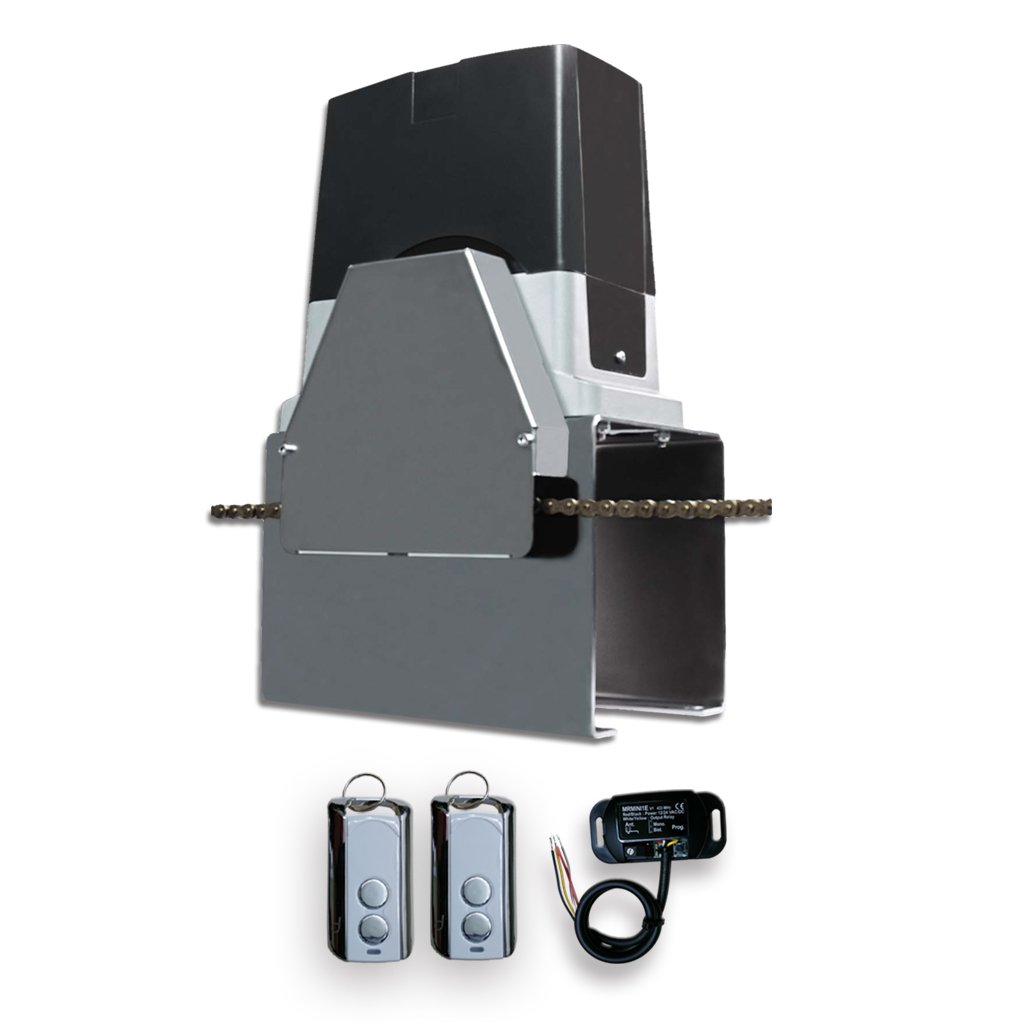
Figure 1: Beninca Bull 1024C Automatic Slide Chain Gate Opener
2 പ്രധാനപ്പെട്ട സുരക്ഷാ വിവരങ്ങൾ
Please read and understand all safety instructions before installation and operation. Failure to follow these instructions may result in serious injury or property damage.
- യോഗ്യതയുള്ള ഉദ്യോഗസ്ഥർ: ഇൻസ്റ്റാളേഷനും അറ്റകുറ്റപ്പണിയും യോഗ്യതയുള്ള ഉദ്യോഗസ്ഥർ മാത്രമേ നടത്താവൂ.
- വൈദ്യുതി വിച്ഛേദിക്കൽ: Always disconnect power to the gate opener before performing any maintenance or adjustments.
- ചലിക്കുന്ന ഭാഗങ്ങൾ: Keep hands, feet, and clothing clear of the gate and its moving parts during operation.
- കുട്ടികളും വളർത്തുമൃഗങ്ങളും: Do not allow children or pets to play near the gate or its controls.
- അടിയന്തര റിലീസ്: Familiarize yourself with the manual release mechanism for emergency situations.
- Obstruction Sensors: Ensure all safety devices, such as photocells and anti-crushing controls, are correctly installed and functioning.
- പരിസ്ഥിതി വ്യവസ്ഥകൾ: The unit is designed for outdoor use but should be protected from direct water jets and extreme weather conditions.
3. പാക്കേജ് ഉള്ളടക്കം
താഴെ പട്ടികപ്പെടുത്തിയിരിക്കുന്ന എല്ലാ ഘടകങ്ങളും നിങ്ങളുടെ പാക്കേജിൽ ഉണ്ടെന്ന് ഉറപ്പാക്കുക:
- 1 x Beninca Bull 1024C Gate Opener with CPanel
- 1 x റിസീവർ
- 2 x Remote Control units
- Mounting hardware (bolts, washers, etc.)
- മാനുവൽ റിലീസ് കീ
- Adjustable magnetic stops
- Strong chain brackets

Figure 2: Typical package contents (illustration may vary)
4. സജ്ജീകരണവും ഇൻസ്റ്റാളേഷനും
This section outlines the general steps for installing the Beninca Bull 1024C gate opener. Refer to the detailed installation diagrams for precise measurements and wiring.
4.1 ഓപ്പറേറ്ററെ മൌണ്ട് ചെയ്യുന്നു
- Prepare a stable, level concrete base for the operator. The 10-inch high-rise galvanized base should be securely anchored.
- Position the operator unit ensuring proper alignment with the gate's chain.
- Secure the operator to the base using appropriate anchor bolts.
- Attach the strong chain brackets to the gate, ensuring they are aligned with the operator's sprocket.
- Install the chain, ensuring it is taut but not overly tight, allowing for smooth movement.

Figure 3: Operator mounting and chain installation
4.2 ഇലക്ട്രിക്കൽ കണക്ഷനുകൾ
All electrical connections must be performed by a qualified electrician in accordance with local regulations.
- Ensure the main power supply is disconnected before opening the control panel.
- Access the internal electronic board by removing the weather-resistant plastic cover.
- Connect the 24Vdc power supply to the designated terminals on the control board.
- Connect any external safety devices (photocells, safety edges) and accessories (keypads, intercoms) to their respective terminals.
- Close the control panel cover securely to maintain weather resistance.

Figure 4: Electrical wiring diagram (consult full manual for details)
4.3 Adjusting Magnetic Stops
The adjustable magnetic stops define the gate's open and closed positions.
- Manually move the gate to its desired fully open position.
- Mount the 'open' magnetic stop on the gate rail so that it activates the sensor on the operator.
- Repeat the process for the 'closed' position.
- Fine-tune the positions for precise gate travel.
5. ഓപ്പറേഷൻ
5.1 വിദൂര നിയന്ത്രണ ജോടിയാക്കൽ
The system includes a long-range radio-receiver and two remote controls. To pair additional remotes or re-pair existing ones:
- Press the programming button on the receiver board (refer to the control panel diagram for exact location).
- While the receiver is in programming mode, press the desired button on your remote control.
- The receiver's LED will indicate successful pairing.
- Test the remote control to ensure proper operation.

Figure 5: Remote control unit
5.2 Basic Gate Operation
- Pressing a paired remote control button will initiate the gate's movement (open or close).
- A second press during movement will stop the gate.
- മൂന്നാമത്തെ അമർത്തൽ ഗേറ്റിന്റെ ദിശ മാറ്റും.
- The system features soft-start and soft-stop for smooth and quiet operation.
5.3 ESA System Functionality
The patented ESA (Energy-Saving-App) system ensures extremely low-power absorption. When the gate is not in use, the system enters a standby mode, effectively turning off to conserve energy. This contributes to the 24Vdc operator's efficiency for intensive use.
5.4 മാനുവൽ റിലീസ്
In case of power failure or malfunction, the gate can be operated manually using the provided key lock release mechanism. Insert the key into the lock on the operator and turn it to disengage the motor, allowing the gate to be moved by hand.
6. പരിപാലനം
Regular maintenance ensures the longevity and reliable operation of your Beninca Bull 1024C gate opener. Always disconnect power before performing any maintenance.
- പ്രതിമാസ: Check the gate's movement for any obstructions or unusual noises. Ensure the chain is properly tensioned and lubricated.
- ത്രൈമാസിക: Inspect all electrical connections for corrosion or loose wiring. Test safety devices (photocells, anti-crushing control) for proper function.
- വാർഷികം: Have a qualified technician perform a comprehensive inspection of the entire system, including the motor, gearbox (aluminum gear-box grease-lubricated), and control board.
- വൃത്തിയാക്കൽ: Keep the operator unit and surrounding area clean from debris, leaves, and dirt. The weather-resistant plastic cover should be wiped clean.
7. ട്രബിൾഷൂട്ടിംഗ് ഗൈഡ്
നിങ്ങൾ നേരിട്ടേക്കാവുന്ന സാധാരണ പ്രശ്നങ്ങളെ ഈ വിഭാഗം അഭിസംബോധന ചെയ്യുന്നു. ഇവിടെ പട്ടികപ്പെടുത്തിയിട്ടില്ലാത്ത പ്രശ്നങ്ങൾക്ക്, ഉപഭോക്തൃ പിന്തുണയുമായി ബന്ധപ്പെടുക.
| പ്രശ്നം | സാധ്യമായ കാരണം | പരിഹാരം |
|---|---|---|
| ഗേറ്റ് നീങ്ങുന്നില്ല. | No power; remote not paired; safety device activated; manual release engaged. | Check power supply; re-pair remote; check safety sensors for obstructions; ensure manual release is disengaged. |
| ഗേറ്റ് അപ്രതീക്ഷിതമായി നിന്നു | Obstruction detected (amperometric anti-crushing control); faulty safety device; power fluctuation. | Remove obstruction; check and clean safety sensors; consult electrician for power issues. |
| റിമോട്ട് കൺട്രോൾ പ്രവർത്തിക്കുന്നില്ല | Remote battery low/dead; remote out of range; remote not paired. | Replace remote battery; ensure you are within range; re-pair remote control. |
| Gate moves sluggishly | Chain tension incorrect; gate rollers/track obstructed; motor issue. | Adjust chain tension; clean gate track and rollers; contact support if motor issue suspected. |
8 സാങ്കേതിക സവിശേഷതകൾ
Key technical details for the Beninca Bull 1024C Automatic Slide Chain Gate Opener:
| ഫീച്ചർ | വിശദാംശങ്ങൾ |
|---|---|
| മോഡൽ | Bull 1024C |
| നിർമ്മാതാവ് | ബെനിൻക |
| വൈദ്യുതി വിതരണം | 24Vdc |
| ഉപയോഗം | തീവ്രമായ ഉപയോഗം |
| ഊർജ്ജ സംരക്ഷണ സംവിധാനം | Integrated ESA SYSTEM |
| സുരക്ഷാ സവിശേഷതകൾ | Amperometric anti-crushing control, Encoder-based operation |
| നിയന്ത്രണ പാനൽ | Internal electronic board with LCD display for programming |
| ക്രമീകരണങ്ങൾ | Digital adjusting for torque & timing, Soft-start, soft-stop, cycle counter |
| ഗിയർബോക്സ് | Aluminum, grease-lubricated |
| അടിസ്ഥാനം | 10" high-rise galvanized base |
9. വാറണ്ടിയും ഉപഭോക്തൃ പിന്തുണയും
Beninca products are manufactured to high-quality standards. This product typically comes with a manufacturer's warranty covering defects in materials and workmanship. Please refer to your purchase documentation or contact your retailer for specific warranty terms and conditions.
For technical assistance, troubleshooting, or to inquire about spare parts, please contact your authorized Beninca dealer or customer support:
- Webസൈറ്റ്: www.beninca.com
- ഇമെയിൽ: support@beninca.com
- ഫോൺ: Consult your regional Beninca distributor for local contact numbers.


