1. ആമുഖം
This user manual provides detailed instructions for the installation, operation, and maintenance of your Antec NeoECO Modular NE650M Power Supply. The NE650M is a high-efficiency power supply solution designed to provide stable and reliable power to your computer system. It features advanced hybrid cable management, 80 PLUS BRONZE certification, and a quiet 120 mm fan for optimal performance.

Figure 1.1: Antec NeoECO Modular NE650M Power Supply and its retail packaging.
2 സുരക്ഷാ വിവരങ്ങൾ
Please read and understand all safety precautions before installing or operating the power supply. Failure to do so may result in personal injury or damage to the product or other components.
- ഇൻസ്റ്റാളേഷൻ അല്ലെങ്കിൽ അറ്റകുറ്റപ്പണികൾക്ക് മുമ്പ് എസി ഔട്ട്ലെറ്റിൽ നിന്ന് വൈദ്യുതി വിതരണം വിച്ഛേദിക്കപ്പെട്ടുവെന്ന് ഉറപ്പാക്കുക.
- പവർ സപ്ലൈ തുറക്കരുത് casing. ഉയർന്ന വോളിയംtages are present inside, and there are no user-serviceable parts. Opening the casing വാറന്റി അസാധുവാക്കും.
- നന്നായി വായുസഞ്ചാരമുള്ള സ്ഥലത്ത് വൈദ്യുതി വിതരണം സ്ഥാപിക്കുക.
- വൈദ്യുതി വിതരണത്തിൽ വെള്ളം കയറുകയോ അമിതമായ ഈർപ്പം കയറുകയോ ചെയ്യരുത്.
- വൈദ്യുതി വിതരണത്തിനൊപ്പം നൽകിയിരിക്കുന്ന കേബിളുകൾ മാത്രം ഉപയോഗിക്കുക.
- നിങ്ങളുടെ കമ്പ്യൂട്ടർ സിസ്റ്റത്തിന്റെ ശരിയായ ഗ്രൗണ്ടിംഗ് ഉറപ്പാക്കുക.
3. സവിശേഷതകൾ
The Antec NeoECO Modular NE650M Power Supply offers a range of features designed for performance and reliability:
- 650W Continuous Power: Guaranteed 650W of Continuous Power from Antec.
- 80 PLUS BRONZE certified: Up to 88% efficient to reduce your electricity bill.
- AQ3: Antec Quality.
- 120 mm DBB Silence: Whisper-quiet high-quality double ball bearing fan with long lifetime.
- Thermal Manager: An advanced low voltage fan control for optimal heat and noise management.
- Hybrid Cable Management: Allows for a cleaner build and improved airflow by using only necessary cables.
- Japanese Heavy-Duty Capacitors: Ensures stable power output and long-term reliability.
- Universal Input with Active Power Factor Correction (PFC): Provides stable power across a wide range of input voltages.
4. പാക്കേജ് ഉള്ളടക്കം
പാക്കേജിൽ എല്ലാ ഇനങ്ങളും ഉണ്ടെന്ന് ഉറപ്പാക്കുക:
- Antec NeoECO Modular NE650M Power Supply Unit
- Modular Cable Set (PCIe, SATA, Peripheral)
- എസി പവർ കോർഡ്
- മൗണ്ടിംഗ് സ്ക്രൂകൾ
- ഉപയോക്തൃ മാനുവൽ / ഉൽപ്പന്നം കഴിഞ്ഞുview പ്രമാണം
- വാറൻ്റി വിവരങ്ങൾ

Figure 4.1: Contents included with the Antec NeoECO Modular NE650M Power Supply.
5. സജ്ജീകരണവും ഇൻസ്റ്റാളേഷനും
Follow these steps to properly install your Antec NeoECO Modular NE650M Power Supply into your computer system:
- നിങ്ങളുടെ സിസ്റ്റം തയ്യാറാക്കുക:
- നിങ്ങളുടെ കമ്പ്യൂട്ടർ ഓഫാക്കി വാൾ ഔട്ട്ലെറ്റിൽ നിന്ന് എസി പവർ കോർഡ് വിച്ഛേദിക്കുക.
- നിങ്ങളുടെ കമ്പ്യൂട്ടർ കേസ് തുറക്കുക.
- നിലവിലുള്ള ഒരു പവർ സപ്ലൈ മാറ്റിസ്ഥാപിക്കുകയാണെങ്കിൽ, പഴയ പിഎസ്യുവിൽ നിന്ന് എല്ലാ കേബിളുകളും വിച്ഛേദിച്ച് കേസിൽ നിന്ന് അത് നീക്കം ചെയ്യുക.
- പവർ സപ്ലൈ മൌണ്ട് ചെയ്യുക:
- Carefully slide the NE650M power supply into the PSU bay of your computer case. Ensure the fan is oriented correctly (typically facing down if your case has a bottom vent, or up if it's a top-mounted PSU).
- നൽകിയിരിക്കുന്ന മൗണ്ടിംഗ് സ്ക്രൂകൾ ഉപയോഗിച്ച് കേസിലേക്കുള്ള പവർ സപ്ലൈ സുരക്ഷിതമാക്കുക.

ചിത്രം 5.1: മുകളിൽ view of the power supply, showing the 120mm fan.
- അവശ്യ കേബിളുകൾ ബന്ധിപ്പിക്കുക:
- Connect the 24-pin ATX motherboard power cable to your motherboard.
- Connect the 4+4 pin (8-pin) EPS/CPU power cable to your motherboard's CPU power connector.
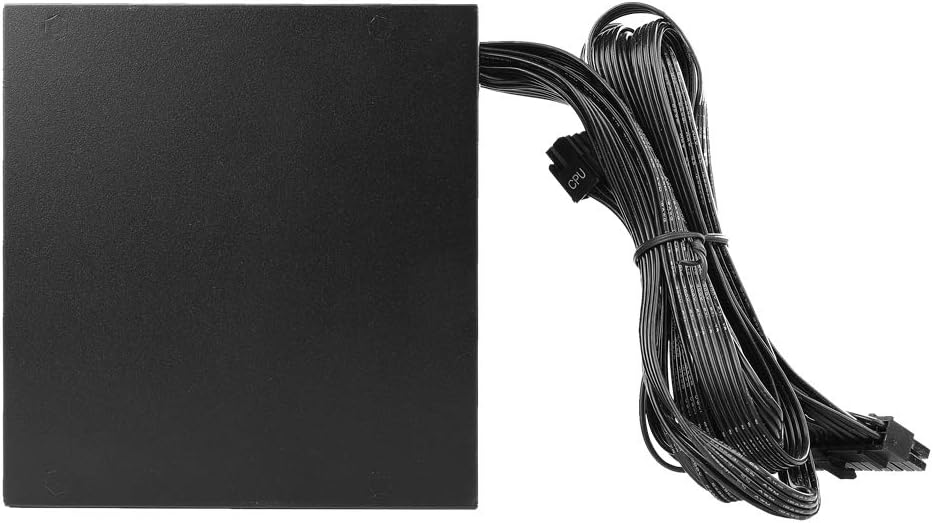
Figure 5.2: The power supply with its permanently attached 24-pin ATX and 8-pin EPS/CPU cables.
- മോഡുലാർ കേബിളുകൾ ബന്ധിപ്പിക്കുക:
- നിങ്ങളുടെ ഘടകങ്ങൾക്ക് ആവശ്യമായ മോഡുലാർ കേബിളുകൾ തിരിച്ചറിയുക (ഉദാ: ഗ്രാഫിക്സ് കാർഡുകൾക്കുള്ള PCIe, SSD/HDD-കൾക്കുള്ള SATA, ഫാനുകൾ/ആക്സസറികൾക്കുള്ള പെരിഫറൽ).
- Plug the required modular cables into the corresponding ports on the power supply. The ports are labeled for clarity (e.g., "PCI-E", "SATA/PATA").
- Connect the other end of these cables to your components.
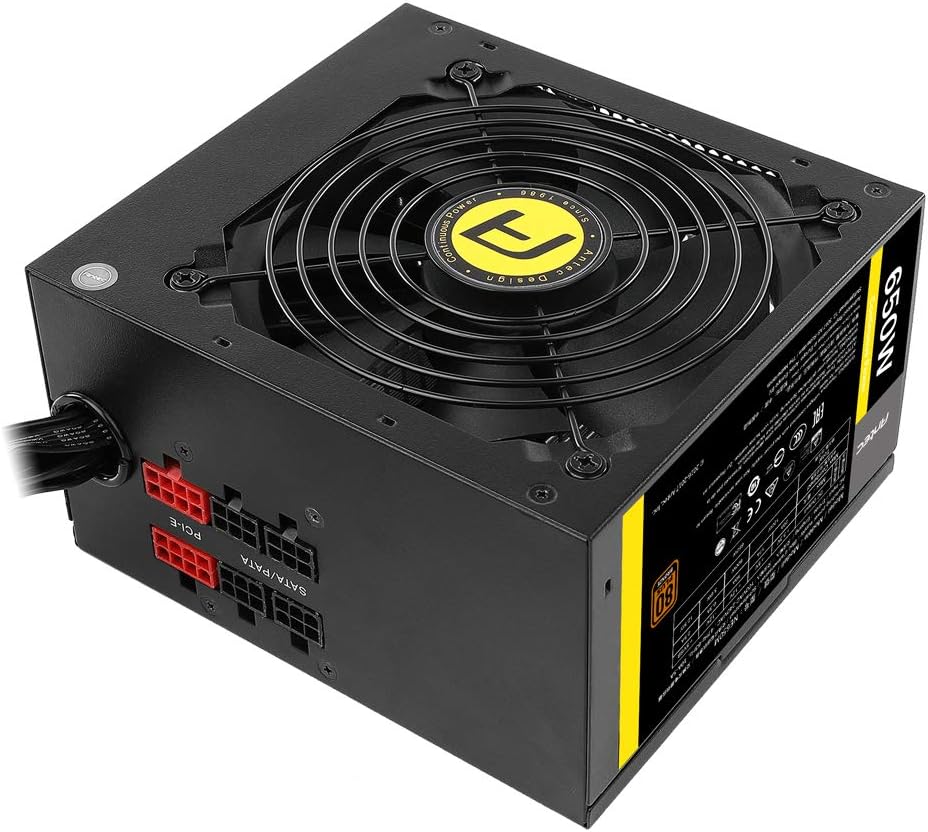
Figure 5.3: Modular cable connections on the power supply unit.
- കേബിൾ മാനേജുമെന്റ്:
നിങ്ങളുടെ കേസിനുള്ളിലെ വായുപ്രവാഹവും സൗന്ദര്യവും മെച്ചപ്പെടുത്തുന്നതിന് കേബിളുകൾ വൃത്തിയായി റൂട്ട് ചെയ്യുക.
- കേസ് അടച്ച് എസി പവർ ബന്ധിപ്പിക്കുക:
- നിങ്ങളുടെ കമ്പ്യൂട്ടർ കേസ് അടയ്ക്കുക.
- Connect the AC power cord to the power supply's inlet and then to a wall outlet.

Figure 5.4: Rear panel of the power supply with power switch and AC input.
6. പ്രവർത്തന നിർദ്ദേശങ്ങൾ
Once installed, operating the Antec NeoECO Modular NE650M Power Supply is straightforward:
- പവർ ഓൺ: Ensure the power switch on the back of the PSU is in the "I" (On) position.
- സിസ്റ്റം ആരംഭം: Press the power button on your computer case to start your system. The power supply will automatically provide the necessary power to your components.
- ഫാൻ പ്രവർത്തനം: The 120mm Double Ball Bearing fan will operate automatically based on the power supply's thermal load, ensuring optimal cooling and quiet operation.
- പവർ ഓഫ്: To shut down your system, use the operating system's shutdown function. For complete power disconnection, switch the PSU's power switch to the "O" (Off) position and unplug the AC cord.
7. പരിപാലനം
The Antec NeoECO Modular NE650M Power Supply is designed for reliable, long-term operation with minimal maintenance. However, following these guidelines can help ensure its longevity:
- വൃത്തിയായി സൂക്ഷിക്കു: Periodically clean the exterior of the power supply and the fan grille to prevent dust buildup, which can impede airflow and cooling. Use compressed air to gently clear dust from the fan and vents.
- ശരിയായ വെൻ്റിലേഷൻ ഉറപ്പാക്കുക: Make sure your computer case has adequate airflow and that the power supply's intake and exhaust vents are not obstructed.
- ഓവർലോഡിംഗ് ഒഴിവാക്കുക: റേറ്റുചെയ്ത വാട്ടിൽ കവിയരുത്tage of the power supply. Ensure your system's power requirements are within the NE650M's 650W capacity.
- പരിസ്ഥിതി വ്യവസ്ഥകൾ: Operate the power supply within recommended temperature and humidity ranges.
8. പ്രശ്നപരിഹാരം
If you encounter issues with your Antec NeoECO Modular NE650M Power Supply, refer to the following common troubleshooting steps:
| പ്രശ്നം | സാധ്യമായ കാരണം | പരിഹാരം |
|---|---|---|
| സിസ്റ്റം പവർ ഓണാക്കുന്നില്ല. |
|
|
| സിസ്റ്റം ഓൺ ആവുന്നു, പക്ഷേ ഉടൻ തന്നെ ഷട്ട് ഡൗൺ ആകും. |
|
|
| Fan is not spinning or is excessively loud. |
|
|
If the problem persists after trying these steps, please contact Antec customer support for further assistance.
9 സ്പെസിഫിക്കേഷനുകൾ
Detailed specifications for the Antec NeoECO Modular NE650M Power Supply:
| മോഡലിൻ്റെ പേര് | NE650M |
| ബ്രാൻഡ് | Antec |
| ഔട്ട്പുട്ട് വാട്ട്tage | 650 വാട്ട്സ് |
| 80 പ്ലസ് സർട്ടിഫിക്കേഷൻ | വെങ്കലം |
| ഫോം ഫാക്ടർ | ATX12V |
| തണുപ്പിക്കൽ രീതി | Air (120mm DBB Fan) |
| അളവുകൾ (L x W x H) | 14 x 15 x 8.6 Centimetres (approx. 13.97 x 14.99 x 8.64 cm) |
| ഇനത്തിൻ്റെ ഭാരം | 1.45 കിലോഗ്രാം (3.2 പൗണ്ട്) |
| ഇൻപുട്ട് വോളിയംtage | 230 Volts (Universal Input) |
| കണക്ടറുകൾ | PCI Express, SATA, ATX 24-pin, EPS 4+4 pin |
| ആദ്യ തീയതി ലഭ്യമാണ് | ഫെബ്രുവരി 24, 2017 |

Figure 9.1: Product label with detailed electrical specifications and certifications.
10. വാറൻ്റിയും പിന്തുണയും
Antec provides a warranty for the NeoECO Modular NE650M Power Supply. Please refer to the warranty card included in your package for specific terms and conditions, including warranty duration and coverage.
For technical support, troubleshooting assistance, or warranty claims, please contact Antec customer service through their official webസൈറ്റ് അല്ലെങ്കിൽ നിങ്ങളുടെ ഉൽപ്പന്ന ഡോക്യുമെന്റേഷനിൽ നൽകിയിരിക്കുന്ന ബന്ധപ്പെടാനുള്ള വിവരങ്ങൾ.
ആന്റക് ഒഫീഷ്യൽ Webസൈറ്റ്: www.antec.com
കുറിപ്പ്: വാറന്റി ആവശ്യങ്ങൾക്കായി വാങ്ങിയതിന്റെ തെളിവായി നിങ്ങളുടെ വാങ്ങൽ രസീത് സൂക്ഷിക്കുക.


