1. ആമുഖം
This manual provides instructions for the safe and effective use of your ABLEGRID 4-Pin AC/DC Adapter. This adapter is designed to provide power to compatible Toshiba LCD TV models, including 17WL46B, 17WLT46B, 17WL56B, and 17WLT56B. Please read this manual thoroughly before use and retain it for future reference.
2 സുരക്ഷാ വിവരങ്ങൾ
സുരക്ഷിതമായ പ്രവർത്തനം ഉറപ്പാക്കുന്നതിനും കേടുപാടുകൾ തടയുന്നതിനും, ദയവായി ഇനിപ്പറയുന്ന സുരക്ഷാ മാർഗ്ഗനിർദ്ദേശങ്ങൾ പാലിക്കുക:
- അഡാപ്റ്റർ ഉപയോഗിക്കുന്നതിന് മുമ്പ് എല്ലാ നിർദ്ദേശങ്ങളും വായിക്കുക.
- ഈർപ്പം, മഴ, അല്ലെങ്കിൽ തീവ്രമായ താപനില എന്നിവയിൽ അഡാപ്റ്റർ തുറന്നുകാട്ടരുത്.
- Ensure adequate ventilation around the adapter during use to prevent overheating.
- Do not attempt to open, modify, or repair the adapter. Refer all servicing to qualified personnel.
- The adapter features built-in safety protections: ഓവർ വോളിയംtagഇ പ്രൊട്ടക്ഷൻ (ഒവിപി), ഓവർ കറന്റ് പ്രൊട്ടക്ഷൻ (ഒസിപി), ഒപ്പം ഷോർട്ട് സർക്യൂട്ട് പരിരക്ഷണം (എസ്സിപി).
- നിർദ്ദേശം 65 മുന്നറിയിപ്പ്: ഈ ഉൽപ്പന്നത്തിൽ കാൻസർ, ജനന വൈകല്യങ്ങൾ അല്ലെങ്കിൽ മറ്റ് പ്രത്യുൽപാദന ഹൃദ്രോഗങ്ങൾ എന്നിവ ഉണ്ടാക്കാൻ കാലിഫോർണിയ സ്റ്റേറ്റിന് അറിയപ്പെടുന്ന രാസവസ്തുക്കൾ അടങ്ങിയിരിക്കാം.
3. പാക്കേജ് ഉള്ളടക്കം
നിങ്ങളുടെ പാക്കേജിൽ ഇനിപ്പറയുന്ന ഇനങ്ങൾ അടങ്ങിയിട്ടുണ്ടെന്ന് പരിശോധിക്കുക:
- 1 x ABLEGRID 4-Pin AC/DC Adapter
- 1 x പവർ കോർഡ്
4. സജ്ജീകരണം
Follow these steps to connect your ABLEGRID AC/DC Adapter:
- ടിവിയിലേക്ക് കണക്റ്റ് ചെയ്യുക: Locate the power input port on your Toshiba LCD TV. Connect the 4-pin connector of the ABLEGRID adapter securely into this port.
- പവർ കോർഡ് ബന്ധിപ്പിക്കുക: Plug the provided power cord into the input receptacle on the ABLEGRID adapter.
- ഔട്ട്ലെറ്റിലേക്ക് കണക്റ്റുചെയ്യുക: Plug the other end of the power cord into a standard electrical wall outlet. Ensure the outlet provides 100-240VAC, 50/60Hz.
തുടരുന്നതിന് മുമ്പ് എല്ലാ കണക്ഷനുകളും ദൃഢവും സുരക്ഷിതവുമാണെന്ന് ഉറപ്പാക്കുക.

Image 1: The ABLEGRID 4-Pin AC/DC Adapter showing the 4-pin output connector and the power input.
5. പ്രവർത്തന നിർദ്ദേശങ്ങൾ
Once the adapter is correctly set up and connected to your Toshiba LCD TV and a power outlet, it will automatically supply the necessary power. No additional configuration is required for the adapter itself.
- Turn on your Toshiba LCD TV using its power button or remote control as you normally would.
- The adapter is designed for continuous operation within its specified voltagഇ ശ്രേണി.
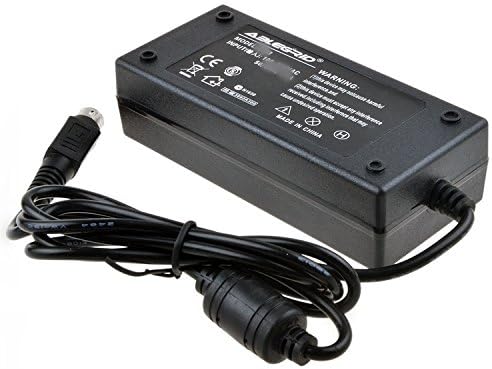
ചിത്രം 2: മുകളിൽ view of the ABLEGRID 4-Pin AC/DC Adapter, displaying product labeling and specifications.
6. പരിപാലനം
Proper maintenance helps extend the life of your adapter:
- വൃത്തിയാക്കൽ: Disconnect the adapter from the power outlet and the TV before cleaning. Use a dry, soft cloth to wipe the surface. Do not use liquid cleaners or abrasive materials.
- സംഭരണം: When not in use for extended periods, store the adapter in a cool, dry place, away from direct sunlight and moisture.
- കൈകാര്യം ചെയ്യൽ: Avoid dropping the adapter or subjecting it to strong impacts. Do not pull on the cord to disconnect it from the outlet; always grasp the plug.
7. പ്രശ്നപരിഹാരം
If you encounter issues with your adapter, refer to the following common solutions:
- No Power to TV:
- Ensure the adapter's 4-pin connector is fully inserted into the TV's power input.
- Verify that the power cord is securely connected to both the adapter and the wall outlet.
- Test the wall outlet with another device to confirm it is functional.
- Check if your TV's power button is pressed or if the remote control is working correctly.
- അഡാപ്റ്റർ അമിത ചൂടാക്കൽ:
- Ensure the adapter is placed in an area with adequate ventilation and is not covered by cloths or other objects.
- If the adapter feels excessively hot, disconnect it from power and allow it to cool down.
- If overheating persists after ensuring proper ventilation, discontinue use and contact customer support.
If these steps do not resolve the issue, please contact ABLEGRID customer support.
8 സ്പെസിഫിക്കേഷനുകൾ
| ബ്രാൻഡ് | ABLEGRID |
| ഇൻപുട്ട് വോളിയംtage | 100-240 VAC, 50/60Hz |
| പ്രധാന പവർ കണക്റ്റർ തരം | 4-പിൻ |
| സംരക്ഷണ സവിശേഷതകൾ | ഓവർ വോളിയംtage Protection (OVP), Over Current Protection (OCP), Short Circuit Protection (SCP) |
| പവർ ഉറവിടം | കോർഡഡ് ഇലക്ട്രിക് |
9. വാറൻ്റിയും പിന്തുണയും
For detailed warranty information regarding your ABLEGRID 4-Pin AC/DC Adapter, please refer to the documentation provided with your purchase. If you have any questions, require technical assistance, or need to report an issue, please contact ABLEGRID customer support.
You can also visit the official ABLEGRID store for more product information and support resources:


