1. ആമുഖം
This manual provides detailed instructions for the proper setup, operation, and maintenance of your Yunteng YT-1288 Selfie Stick. Please read this manual thoroughly before using the product to ensure safe and efficient operation.
The Yunteng YT-1288 is a versatile monopod designed for capturing self-portraits and group photos from extended distances. It features an integrated Bluetooth remote shutter for convenient photo capture and is compatible with both iOS and Android devices.
2. ഉൽപ്പന്ന ഘടകങ്ങൾ
The Yunteng YT-1288 Selfie Stick consists of the following main components:
- Extendable Monopod: An aluminum alloy pole that extends and retracts.
- ഫോൺ ഉടമ: ക്രമീകരിക്കാവുന്ന ഒരു clamp നിങ്ങളുടെ സ്മാർട്ട്ഫോൺ സുരക്ഷിതമായി സൂക്ഷിക്കാൻ.
- ബ്ലൂടൂത്ത് റിമോട്ട് ഷട്ടർ: An integrated or detachable remote for wireless photo capture.
- റിസ്റ്റ് സ്ട്രാപ്പ്: For added security during use.
- സെൽഫി മിറർ: A small mirror on the phone holder for rear camera framing.
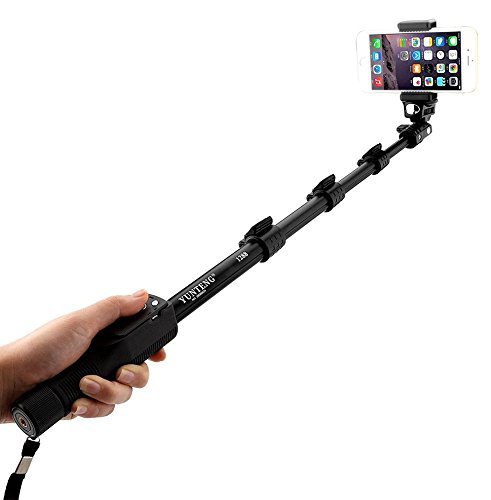
Figure 2.1: The Yunteng YT-1288 Selfie Stick fully extended with a smartphone mounted.
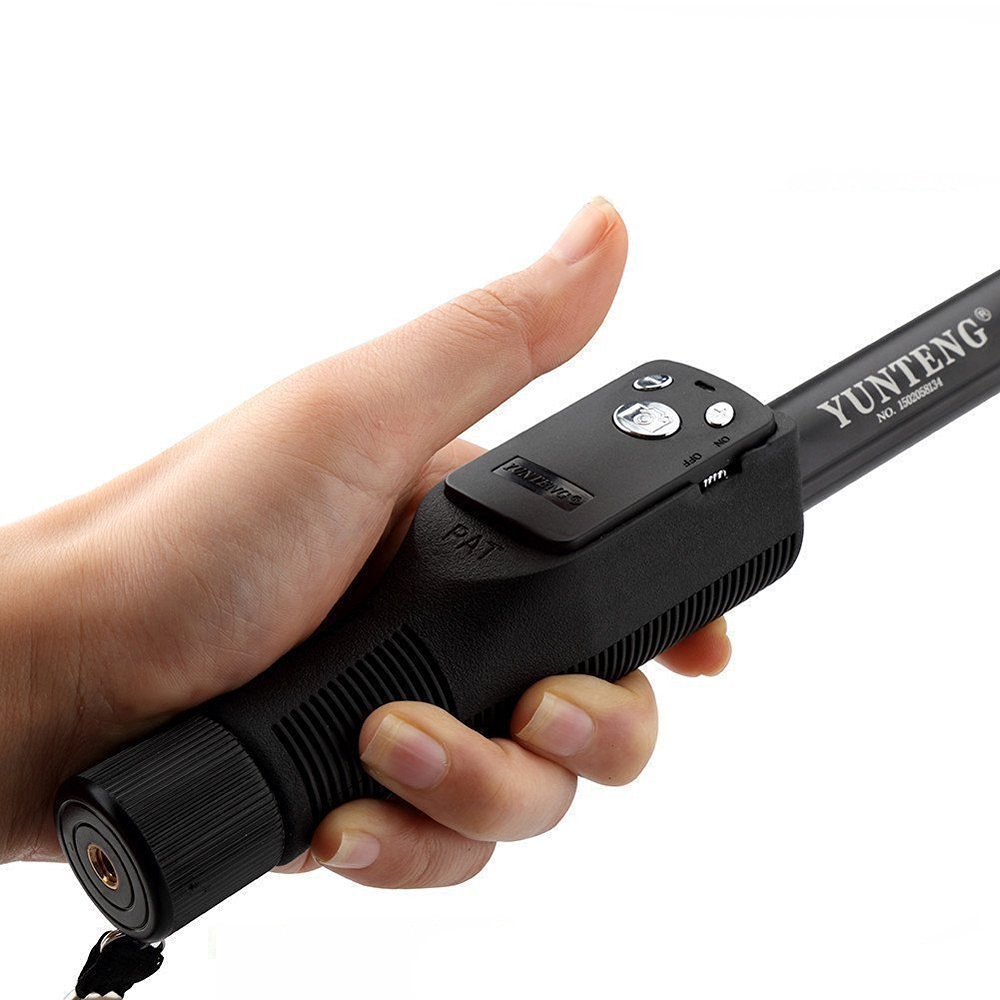
Figure 2.2: Detail of the handle and integrated Bluetooth remote shutter buttons.

Figure 2.3: The selfie mirror located on the phone holder for improved framing with the rear camera.
3. സജ്ജീകരണ നിർദ്ദേശങ്ങൾ
3.1 ഫോൺ ഹോൾഡർ ഘടിപ്പിക്കൽ
- Locate the 1/4-inch screw on the top of the monopod.
- Align the screw port on the phone holder with the screw on the monopod.
- Rotate the phone holder clockwise until it is securely fastened. Do not overtighten.
3.2 ബ്ലൂടൂത്ത് റിമോട്ട് ഷട്ടർ ജോടിയാക്കൽ
- Ensure the Bluetooth remote shutter is charged (if applicable) and has a CR2032 battery installed.
- Turn on the Bluetooth remote shutter by sliding the ON/OFF switch to the 'ON' position. An indicator light should flash.
- നിങ്ങളുടെ സ്മാർട്ട്ഫോണിൽ, ബ്ലൂടൂത്ത് ക്രമീകരണങ്ങളിലേക്ക് നാവിഗേറ്റ് ചെയ്യുക.
- ബ്ലൂടൂത്ത് പ്രവർത്തനക്ഷമമാക്കി ലഭ്യമായ ഉപകരണങ്ങൾക്കായി തിരയുക.
- Select 'AB Shutter' or a similar name from the list of devices to pair.
- Once paired, the indicator light on the remote will stop flashing or show a steady light.
3.3 നിങ്ങളുടെ സ്മാർട്ട്ഫോൺ ചേർക്കൽ
- Gently expand the spring-loaded clamps of the phone holder.
- Carefully place your smartphone into the holder, ensuring it is centered and securely gripped by the clamps. The phone holder supports devices with a tensile width of 5.5-8.5 cm.
- Adjust the angle of the phone holder as desired.
4. പ്രവർത്തന നിർദ്ദേശങ്ങൾ
4.1 മോണോപോഡ് നീട്ടലും പിൻവലിക്കലും
- To extend: Hold the handle firmly and pull each segment of the monopod outwards to your desired length. The monopod has 4 segments and extends from approximately 42.5 cm to 125 cm.
- To retract: Push each segment back into the main body until fully collapsed.
4.2 Capturing Photos
- നിങ്ങളുടെ സ്മാർട്ട്ഫോണിന്റെ ക്യാമറ ആപ്ലിക്കേഷൻ തുറന്നിട്ടുണ്ടെന്ന് ഉറപ്പാക്കുക.
- Position the selfie stick and your phone for the desired shot.
- Press the appropriate button on the Bluetooth remote shutter to capture a photo. For iOS devices, use the iOS button; for Android devices, use the Android button.
4.3 അനുയോജ്യത
The Bluetooth remote shutter is compatible with Android 4.2.2 or newer and iOS 6.0 or newer operating systems.
5. പരിപാലനം
- വൃത്തിയാക്കൽ: Wipe the monopod and phone holder with a soft, dry cloth. Avoid using harsh chemicals or abrasive materials.
- സംഭരണം: Store the selfie stick in a cool, dry place away from direct sunlight and extreme temperatures.
- ബാറ്ററി മാറ്റിസ്ഥാപിക്കൽ (ബ്ലൂടൂത്ത് റിമോട്ട്): The Bluetooth remote uses a CR2032 coin cell battery. To replace, open the battery compartment on the remote, remove the old battery, and insert a new CR2032 battery with the positive (+) side facing up.
- ഓവർലോഡിംഗ് ഒഴിവാക്കുക: Do not exceed the maximum recommended weight of 1.0 kg on the monopod.
6. പ്രശ്നപരിഹാരം
- റിമോട്ട് ജോടിയാക്കുന്നില്ല: Ensure the remote is turned on and within 10 meters (30 feet) of your phone. Check if the battery needs replacement. Try turning Bluetooth off and on again on your phone.
- Remote not taking photos: Ensure the remote is successfully paired. Check your phone's camera settings; some phones may require specific settings for external shutters. Ensure your phone's operating system is compatible (Android 4.2.2+ or iOS 6.0+).
- Phone not fitting in holder: Verify your phone's width is within the 5.5-8.5 cm range supported by the holder. Remove any bulky phone cases if necessary.
- Monopod segments not extending/retracting smoothly: Check for any obstructions or debris. Do not force the segments.
7 സ്പെസിഫിക്കേഷനുകൾ
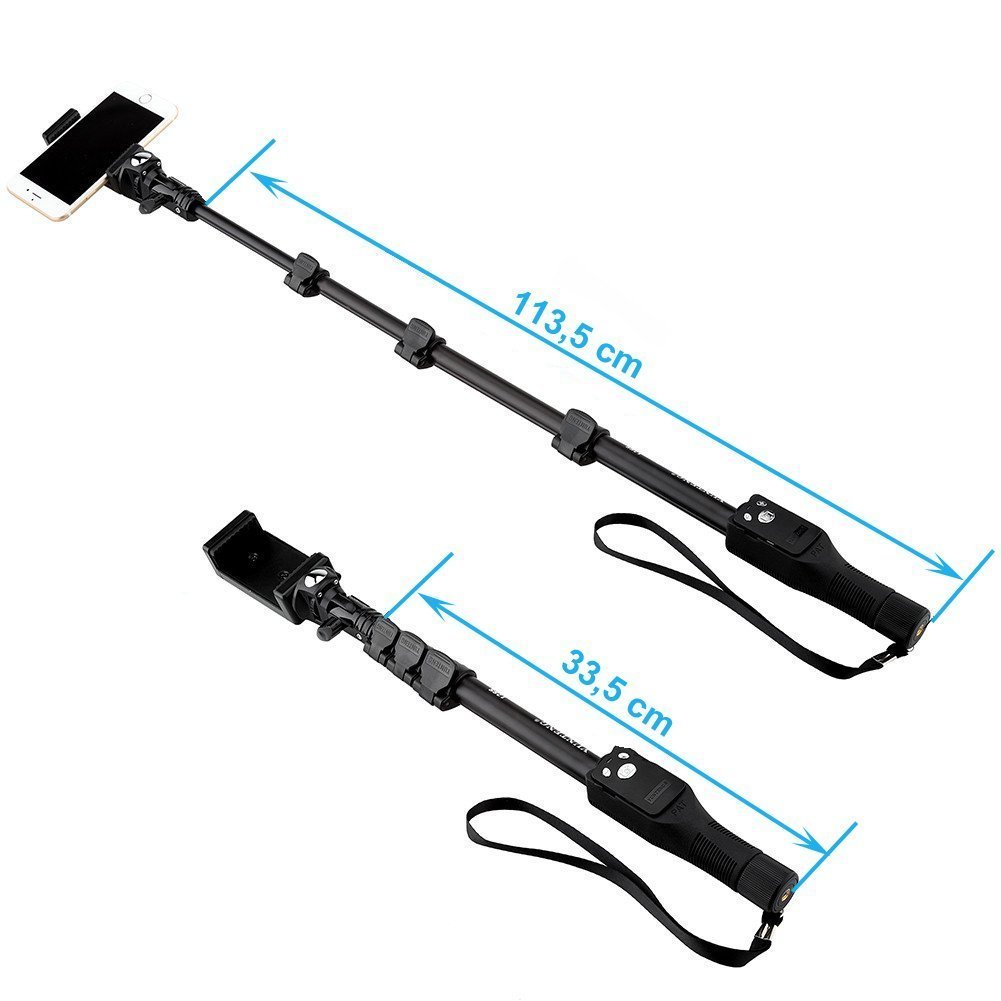
Figure 7.1: Approximate dimensions of the Yunteng YT-1288 Selfie Stick in collapsed and extended states.
7.1 Monopod
- മെറ്റീരിയൽ: അലുമിനിയം അലോയ്
- ക്യാമറ ഇന്റർഫേസ്: Universal 1/4 inch screw
- മൊത്തം ഭാരം: ഏകദേശം 300 ഗ്രാം
- സെഗ്മെൻ്റുകൾ: 4
- പരമാവധി ലോഡ് കപ്പാസിറ്റി: ഏകദേശം 1.0 കി.ഗ്രാം
- വിപുലീകരിച്ച ദൈർഘ്യം: Approximately 42.5 cm to 125 cm
- നിറം: കറുപ്പ്
7.2 ഫോൺ ഹോൾഡർ
- നിറം: കറുപ്പ്
- മെറ്റീരിയൽ: Plastic + Metals + Silica
- Tensile Width: 5.5 സെ.മീ മുതൽ 8.5 സെ.മീ
- Screw Port: Universal 1/4 inch screw port
7.3 Bluetooth Remote Shutter (AB Shutter)
- ആശയവിനിമയം: ബ്ലൂടൂത്ത് പതിപ്പ് 3.0
- ട്രാൻസ്മിറ്റ് ഫ്രീക്വൻസി: 2.4GHz-2.4835GHz
- ആശയവിനിമയ ദൂരം: Up to 10m (30FT)
- ബാറ്ററി തരം: CR2032 x1 cell
- ഏകദേശ ബാറ്ററി ലൈഫ്: 6 months (under working in 10 times a day)
- ഭാരം: ഏകദേശം 12 ഗ്രാം
- നിറം: ഓറഞ്ച്
8. വാറൻ്റിയും പിന്തുണയും
Specific warranty information for the Yunteng YT-1288 Selfie Stick is not provided in this manual. For warranty claims or technical support, please contact the retailer or manufacturer directly with your purchase details.
Always refer to the official Yunteng website or your point of purchase for the most current support and warranty policies.


