1. ആമുഖം
This manual provides detailed instructions for the safe and efficient operation, installation, and maintenance of your ALORAIR Storm LGR Extreme Commercial Dehumidifier. Please read this manual thoroughly before operating the unit and retain it for future reference.
The ALORAIR Storm LGR Extreme is a high-capacity Low Grain Refrigerant (LGR) dehumidifier designed for commercial, industrial, and water damage restoration applications. It is capable of removing up to 180 pints of water per day at saturation (90°F, 90% Relative Humidity) and 85 PPD at AHAM conditions (80°F, 60% Relative Humidity), covering areas up to 2,300 square feet.
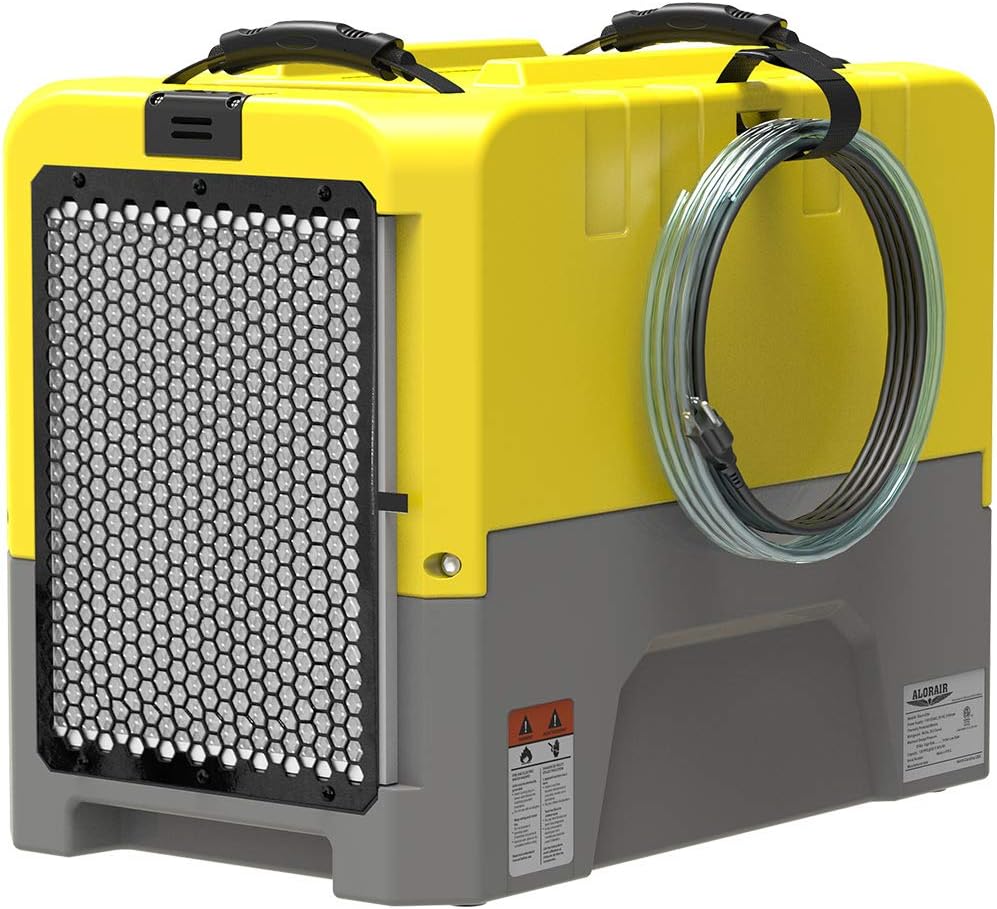
Image 1.1: ALORAIR Storm LGR Extreme Dehumidifier. This image shows the compact, yellow and grey unit with its front air intake grille and a coiled drain hose attached to the side.
Its compact design and built-in pump make it suitable for various environments, including basements, crawl spaces, warehouses, and job sites.
2 സുരക്ഷാ വിവരങ്ങൾ
തീപിടുത്തം, വൈദ്യുതാഘാതം അല്ലെങ്കിൽ പരിക്കുകൾ എന്നിവയ്ക്കുള്ള സാധ്യത കുറയ്ക്കുന്നതിന് ഇനിപ്പറയുന്ന സുരക്ഷാ മുൻകരുതലുകൾ എപ്പോഴും പാലിക്കുക.
- ഉപകരണം ഉപയോഗിക്കുന്നതിന് മുമ്പ് എല്ലാ നിർദ്ദേശങ്ങളും വായിക്കുക.
- വൈദ്യുതി വിതരണം വോള്യവുമായി പൊരുത്തപ്പെടുന്നുണ്ടെന്ന് ഉറപ്പാക്കുകtage requirements specified on the unit's label.
- Do not operate the unit with a damaged cord or plug. If the power cord is damaged, it must be replaced by the manufacturer or a qualified service agent.
- Do not block air intake or exhaust openings. Maintain adequate clearance around the unit for proper airflow.
- Do not insert objects into the air outlets or inlets.
- Keep the unit away from water sources and wet environments.
- Always unplug the dehumidifier before cleaning, servicing, or moving it.
- ഈ ഉപകരണം, അവരുടെ സുരക്ഷയ്ക്ക് ഉത്തരവാദിയായ ഒരു വ്യക്തി ഉപകരണത്തിൻ്റെ ഉപയോഗത്തെ സംബന്ധിച്ച മേൽനോട്ടമോ നിർദ്ദേശമോ നൽകിയിട്ടില്ലെങ്കിൽ, ശാരീരികമോ ഇന്ദ്രിയപരമോ മാനസികമോ ആയ കഴിവുകൾ കുറഞ്ഞതോ അനുഭവത്തിൻ്റെയും അറിവിൻ്റെയും അഭാവം ഉള്ള വ്യക്തികൾക്ക് (കുട്ടികൾ ഉൾപ്പെടെ) ഉപയോഗിക്കാൻ ഉദ്ദേശിച്ചുള്ളതല്ല.
- കുട്ടികൾ ഉപകരണം ഉപയോഗിച്ച് കളിക്കുന്നില്ലെന്ന് ഉറപ്പാക്കാൻ മേൽനോട്ടം വഹിക്കണം.
- The unit is designed for commercial use.
3. സജ്ജീകരണവും ഇൻസ്റ്റാളേഷനും
3.1 അൺപാക്കിംഗ്
- ഡീഹ്യൂമിഡിഫയർ അതിന്റെ പാക്കേജിംഗിൽ നിന്ന് ശ്രദ്ധാപൂർവ്വം നീക്കം ചെയ്യുക.
- Inspect the unit for any shipping damage. Contact your supplier immediately if damage is found.
- എല്ലാ പാക്കിംഗ് സാമഗ്രികളും നീക്കം ചെയ്യുക, അവ ഉത്തരവാദിത്തത്തോടെ വിനിയോഗിക്കുക.
3.2 പ്ലേസ്മെൻ്റ്
Position the dehumidifier on a stable, level surface. Ensure there is at least 1 foot (30 cm) of clearance around the air intake and exhaust for optimal performance. The unit is designed to be compact and can be placed in tight spaces such as crawl spaces or basements.

Image 3.1: ALORAIR Dehumidifier in various settings. This image illustrates the dehumidifier's versatility, showing it in a commercial warehouse, a crawl space, a basement, and an industrial environment.
3.3 ഡ്രെയിനേജ് സജ്ജീകരണം
The Storm LGR Extreme features a built-in condensate pump for automatic drainage. This eliminates the need for manual emptying of a water tank.
- Locate the drain hose connection point on the unit.
- Connect the provided 19.6 ft (6 meter) drain hose securely to the outlet.
- Route the drain hose to a suitable drainage point, such as a sink, floor drain, or outside. The pump can lift water up to 14.7 ft (4.5 meters) vertically.
- Ensure the hose is not kinked or obstructed to allow for continuous drainage.

Image 3.2: Diagram of the built-in condensate pump and drainage system. This illustration shows the internal components of the dehumidifier, highlighting the pump and the path of the drain hose for continuous water removal.
3.4 Stacking for Transport
The unit is designed to be stackable for efficient storage and transportation. Ensure units are securely stacked before moving.

Image 3.3: Stackable design for easy transportation. This image shows multiple dehumidifiers stacked on top of each other, demonstrating their space-saving design for storage and transport.
4. പ്രവർത്തന നിർദ്ദേശങ്ങൾ
4.1 കൺട്രോൾ പാനൽ ഓവർview
The ALORAIR Storm LGR Extreme features an intelligent touch panel for easy operation.

Image 4.1: Easy operation and intuitive display. This image highlights the digital control panel, showing the unit's operational status, inlet temperature, and humidity levels.
4.2 അടിസ്ഥാന പ്രവർത്തനം
- Plug-and-Go: അനുയോജ്യമായ ഒരു ഇലക്ട്രിക്കൽ ഔട്ട്ലെറ്റിലേക്ക് പവർ കോർഡ് ബന്ധിപ്പിക്കുക.
- പവർ ഓൺ: അമർത്തുക പവർ യൂണിറ്റ് ഓണാക്കാൻ നിയന്ത്രണ പാനലിലെ ബട്ടൺ.
- Set Humidity: ഉപയോഗിക്കുക സെറ്റ് buttons (up/down arrows) to adjust the desired humidity level. The unit will operate until the set humidity is reached.
- മെനു നാവിഗേഷൻ: അമർത്തുക മെനു button to cycle through various display options and settings.
4.3 ഓട്ടോമാറ്റിക് സവിശേഷതകൾ
- ഓട്ടോ ഓൺ/ഓഫ്: The unit automatically turns on and off to maintain the set humidity level.
- Memory Starting: In case of a power interruption, the unit will automatically restart with the previous settings once power is restored.
- ഓട്ടോ ഡിഫ്രോസ്റ്റ്: The dehumidifier features an automatic defrost function to prevent ice buildup on the coils, ensuring efficient operation in cooler conditions. During a defrost cycle, moisture removal may temporarily decrease until the coils are clear.

Image 4.2: Moisture extraction machine features. This image highlights key automatic functions: Auto Operation, Auto Defrost, and Memory Restart, which enhance user convenience and unit efficiency.
4.4 വിവരങ്ങൾ പ്രദർശിപ്പിക്കുക
The digital display provides real-time operational data:
- GPP (Grains Per Pound): Indicates the moisture content in the air.
- Inlet/Outlet Temperature and Humidity: Shows the conditions of the air entering and exiting the unit.
- Coil Temperature: Displays the temperature of the evaporator coils.
- കംപ്രസ്സർ Amps: Current draw of the compressor.
- ആകെ Amps: Total current draw of the unit.
- Job Hours: Resettable timer for tracking operation duration for specific tasks.
- Total Life Hours: Cumulative operational hours of the unit.
5. പരിപാലനം
പതിവ് അറ്റകുറ്റപ്പണികൾ നിങ്ങളുടെ ഡീഹ്യൂമിഡിഫയറിന്റെ ദീർഘായുസ്സും കാര്യക്ഷമമായ പ്രകടനവും ഉറപ്പാക്കുന്നു.
5.1 എയർ ഫിൽറ്റർ വൃത്തിയാക്കൽ/മാറ്റിസ്ഥാപിക്കൽ
The unit is equipped with a washable MERV-8 air filter designed to capture microscopic airborne particles without significantly impacting airflow.
- Turn off and unplug the dehumidifier before accessing the filter.
- Locate and remove the air filter from its slot.
- Clean the filter by vacuuming or rinsing with warm water. Allow it to dry completely before reinstallation.
- It is recommended to clean the filter monthly and replace it every 3-6 months, depending on usage and environmental conditions.
5.2 പൊതുവായ ശുചീകരണം
- ഒരു സോഫ്റ്റ്, ഡി ഉപയോഗിച്ച് യൂണിറ്റിൻ്റെ പുറംഭാഗം തുടയ്ക്കുകamp തുണി. ഉരച്ചിലുകളുള്ള ക്ലീനറുകളോ ലായകങ്ങളോ ഉപയോഗിക്കരുത്.
- Ensure all vents are clear of dust and debris.
5.3 പമ്പ് പരിപാലനം
The built-in pump has a purge button to manually drain the condensate. This can be useful for ensuring the pump is clear or for draining the unit before moving.
- അമർത്തുക പമ്പ് button on the control panel to initiate a manual drain cycle. The pump will run for approximately 25 seconds.
- Regularly check the drain hose for blockages or kinks.
6. പ്രശ്നപരിഹാരം
This section addresses common issues you might encounter with your dehumidifier.
| പ്രശ്നം | സാധ്യമായ കാരണം | പരിഹാരം |
|---|---|---|
| യൂണിറ്റ് ഓണാക്കുന്നില്ല | വൈദ്യുതി വിതരണം ഇല്ല വൈദ്യുതി കമ്പികൾ കേടായി | വൈദ്യുതി കണക്ഷനും ഔട്ട്ലെറ്റും പരിശോധിക്കുക. Inspect power cord for damage; contact service if damaged. |
| Dehumidifier not removing moisture | എയർ ഫിൽട്ടർ അടഞ്ഞുപോയി മുറിയിലെ താപനില വളരെ കുറവാണ് ഈർപ്പം ക്രമീകരണം വളരെ കൂടുതലാണ് ഡിഫ്രോസ്റ്റ് സൈക്കിളിലെ യൂണിറ്റ് | എയർ ഫിൽട്ടർ വൃത്തിയാക്കുക അല്ലെങ്കിൽ മാറ്റിസ്ഥാപിക്കുക. Ensure ambient temperature is within operating range (above 33°F / 1°C). ആവശ്യമുള്ള ഈർപ്പം ക്രമീകരണം കുറയ്ക്കുക. Allow the unit to complete its automatic defrost cycle. |
| വെള്ളം ചോർച്ച | Drain hose kinked or blocked Drain hose not securely connected | Check and clear any obstructions in the drain hose. Ensure the drain hose is firmly attached to the unit and directed to a proper drain. |
| Unit displays E4/E5 error code | Refrigerant leak or sensor issue | Turn off the unit and unplug it. Contact customer support for assistance. Do not attempt to repair refrigerant systems yourself. |
| യൂണിറ്റ് ശബ്ദമയമാണ് | യൂണിറ്റ് നിരപ്പായ പ്രതലത്തിലല്ല. എയർ ഫിൽട്ടർ അടഞ്ഞുപോയി ആന്തരിക ഘടക പ്രശ്നം | യൂണിറ്റ് ഒരു സുസ്ഥിരവും ലെവൽ പ്രതലത്തിൽ സ്ഥാപിക്കുക. എയർ ഫിൽട്ടർ വൃത്തിയാക്കുക അല്ലെങ്കിൽ മാറ്റിസ്ഥാപിക്കുക. ശബ്ദം തുടരുകയാണെങ്കിൽ, ഉപഭോക്തൃ പിന്തുണയുമായി ബന്ധപ്പെടുക. |
For issues not listed here or if problems persist, please contact ALORAIR customer support.
7 സ്പെസിഫിക്കേഷനുകൾ
| ഫീച്ചർ | വിശദാംശങ്ങൾ |
|---|---|
| ബ്രാൻഡ് | അലോറൈർ |
| മോഡലിൻ്റെ പേര് | കൊടുങ്കാറ്റ് എൽജിആർ എക്സ്ട്രീം |
| ഈർപ്പം കുറയ്ക്കാനുള്ള ശേഷി (സാച്ചുറേഷൻ) | പ്രതിദിനം 180 പൈന്റ്സ് |
| ഈർപ്പം നീക്കം ചെയ്യുന്നതിനുള്ള ശേഷി (AHAM) | പ്രതിദിനം 85 പൈന്റ്സ് |
| ഫ്ലോർ ഏരിയ കവറേജ് | 2,300 ചതുരശ്ര അടി വരെ |
| എയർ ഫ്ലോ കപ്പാസിറ്റി | മിനിറ്റിന് 210 ക്യുബിക് അടി (CFM) |
| ഉൽപ്പന്ന അളവുകൾ (L x W x H) | 22.8" x 13.7" x 17.3" |
| ഇനത്തിൻ്റെ ഭാരം | 64.3 പൗണ്ട് |
| മെറ്റീരിയൽ | പോളിയെത്തിലീൻ (PE) |
| നിറം | മഞ്ഞ |
| വാട്ട്tage | 646.3 വാട്ട്സ് |
| ഓപ്പറേഷൻ മോഡുകൾ | Continuous, Timer, Pump Drainage, Auto-Defrost |
| പ്രത്യേക സവിശേഷതകൾ | Adjustable Humidity Control, Automatic Defrost, Built-In Pump, Continuous Draining, Digital Display |
| ഹോസ് നീളം കളയുക | 19.6 അടി |
| Drain Vertical Height | 14.7 അടി |
| ഉയർന്ന താപനില റേറ്റിംഗ് | 104 ഡിഗ്രി ഫാരൻഹീറ്റ് |
| സർട്ടിഫിക്കേഷനുകൾ | ETL Compliant |

Image 7.1: Product dimensions. This image provides a visual representation of the dehumidifier's length, width, and height measurements.
8. വാറൻ്റിയും പിന്തുണയും
ALORAIR stands behind the quality of its products. The Storm LGR Extreme dehumidifier comes with a comprehensive limited warranty.
8.1 Limited 5-Year Warranty
- 6 മാസത്തെ ഭാഗങ്ങളും അധ്വാനവും: മാറ്റിസ്ഥാപിക്കൽ ഭാഗങ്ങൾക്കോ യൂണിറ്റിനോ ഉള്ള ഷിപ്പ്മെന്റ് ചാർജുകൾ ഉൾപ്പെടുന്നു.
- 1 വർഷത്തെ ഭാഗങ്ങളും അധ്വാനവും: Excludes shipment charges for sending the defective product back for repair or replacement.
- 3-Year Parts and Labor: Coverage for the refrigeration system only.
- 5-Year Compressor and Coil: Specific coverage for these critical components.
For additional warranty information or to initiate a warranty claim, please refer to the official ALORAIR website or contact customer support directly. Ensure you retain your proof of purchase.
8.2 ഉപഭോക്തൃ പിന്തുണ
If you have any questions, require technical assistance, or need to troubleshoot an issue, please contact ALORAIR customer support. Contact details can typically be found on the manufacturer's webസൈറ്റ് അല്ലെങ്കിൽ ഉൽപ്പന്ന പാക്കേജിംഗിൽ.


