ഉൽപ്പന്നം കഴിഞ്ഞുview
The Sky Viper v2450FPV Streaming Drone offers an immersive flying experience with its First-Person View (FPV) capabilities. The included FPV headset allows users to view live streaming video directly from the drone's camera, providing a unique perspective as if onboard. Designed for both advanced and beginner pilots, the v2450FPV features Flight Assist for simplified control, ensuring stable flight and easy capture of aerial footage. Its lightweight and durable construction contributes to its safety and longevity.
പ്രധാന സവിശേഷതകൾ:
- FPV Headset: Experience the drone's point of view with live video streaming.
- Optional Pro-Style Thumbsticks: Customize your controller for enhanced precision.
- Pivoting Camera: Adjust the camera to point forward for flight path recording or downward for scenery capture.
- Auto Launch and Land: One-button functionality for stationary hover and gentle landings.
- മൈക്രോ എസ്ഡി കാർഡ് സ്ലോട്ട്: Enables direct video recording for optimal quality (card sold separately).

Image: The Sky Viper v2450FPV Streaming Drone package, including the drone, remote controller, and FPV goggles.
ബോക്സിൽ എന്താണുള്ളത്
നിങ്ങളുടെ പാക്കേജിൽ എല്ലാ ഘടകങ്ങളും ഉണ്ടെന്ന് ഉറപ്പാക്കുക:
- Sky Viper Streaming Drone
- കൺട്രോളർ
- ഫോൺ മൗണ്ട് ഹോൾഡർ
- 3.7V 650mAh LiPo ബാറ്ററി
- യുഎസ്ബി ചാർജർ കേബിൾ
- Replacement Blades (4)
- Blade Guards (4)
- Pro-Style Thumb Sticks (2)
- Game-Style Thumb Sticks (2)
- സ്ക്രൂഡ്രൈവർ & അധിക സ്ക്രൂകൾ
- Operators Manual (this document)
- FPV ഹെഡ്സെറ്റ്

Image: All included components laid out, featuring the drone, controller, and FPV goggles.
സജ്ജമാക്കുക
1. ബാറ്ററി ഇൻസ്റ്റാളേഷനും ചാർജിംഗും
- ഡ്റോൺ ബാറ്ററി: Insert the 3.7V 650mAh LiPo battery into the drone's battery compartment. Ensure it is securely connected.
- ചാർജിംഗ്: Use the provided USB charger cable to charge the drone's battery. Connect the cable to a USB power source. The charging indicator will show when charging is complete.
- കൺട്രോളർ ബാറ്ററികൾ: Install 3 AAA batteries (not included) into the remote controller.
2. Blade Guard Installation
Attach the four blade guards to the drone's arms. These guards help protect the propellers during flight and minor impacts. Use the provided screwdriver and extra screws if necessary to secure them.
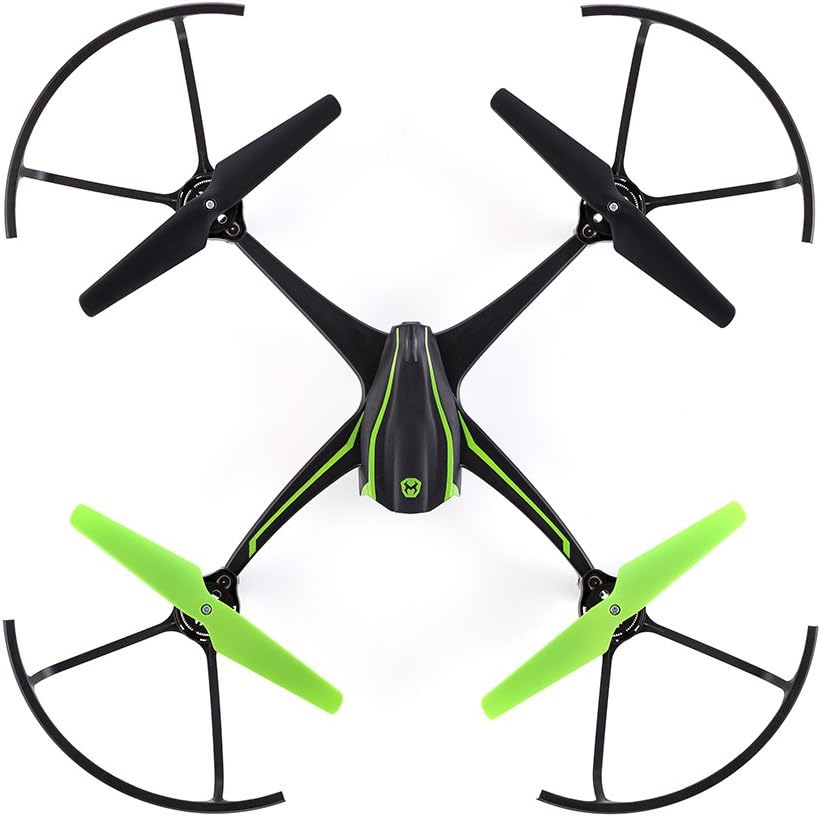
ചിത്രം: മുകളിൽ view of the drone, illustrating the installed blade guards.
3. App Download and Wi-Fi Connection
To enable live streaming and FPV functionality, download the "Sky Viper Video Viewer" app on your smart device (smartphone or tablet).
- ഇതിനായി തിരയുക "Sky Viper Video Viewer" in your device's app store and install it.
- നിങ്ങളുടെ ഡ്രോണിന്റെ പവർ ഓൺ ചെയ്യുക.
- On your smart device, go to Wi-Fi settings and connect to the drone's Wi-Fi network (e.g., "SKYVIPER17_XXXXXX").
- Upon first connection, you will be prompted to create a unique password for the drone's Wi-Fi network.
- After setting the password, reconnect to the drone's Wi-Fi network using your new password.
- Open the "Sky Viper Video Viewer" app.
Video: This video demonstrates the process of connecting your smart device to the Sky Viper v2450FPV drone via Wi-Fi, setting up the FPV app, and performing a Wi-Fi password reset.
4. FPV Headset Preparation
- Once the app is open and connected, tap the FPV icon on the right side of the screen to switch to FPV mode. The screen will split into two views.
- Place your smart device into the tray of the FPV headset.
- Insert the tray with your smart device into the FPV headset.
- Adjust the optics on the headset to suit your vision for a clear FPV experience.

Image: The FPV headset, designed to hold a smartphone for an immersive first-person view.
പ്രവർത്തന നിർദ്ദേശങ്ങൾ
1. കൺട്രോളർ ഓവർview
The remote controller allows precise manipulation of the drone's flight. It includes standard controls for throttle, direction, and special function buttons.

Image: The drone's remote controller with a smartphone mounted, displaying various control buttons and joysticks.
2. ഫ്ലൈറ്റ് മോഡുകൾ
- Auto Flight Mode: Provides simplified controls for easier flying, ideal for beginners.
- Manual Flight Mode: Offers more direct control over the drone's movements, suitable for experienced pilots.
- Switch between modes using the designated button on the controller.
3. Auto Launch and Land
Utilize the "Launch" and "Land" buttons on the controller for automated take-off and landing sequences. Pressing "Launch" will initiate a stable ascent to a hover, while "Land" will perform a gentle descent.
4. Streaming and Recording
The v2450FPV drone can stream live video to your connected smart device and record footage. For the best video quality, it is recommended to record directly to a micro SD card (not included) inserted into the slot at the rear of the drone.
- Ensure a micro SD card is inserted for high-quality recording.
- Use the app interface to initiate and stop video recording.
- The pivoting camera allows you to adjust the viewing angle for diverse shots.
മെയിൻ്റനൻസ്
1. ബാറ്ററി പരിചരണം
- Always use the provided USB charger cable for the drone's LiPo battery.
- അമിതമായി ചാർജ് ചെയ്യുകയോ ബാറ്ററി പൂർണ്ണമായും കളയുകയോ ചെയ്യരുത്.
- ഉപയോഗത്തിലില്ലാത്തപ്പോൾ തണുത്തതും ഉണങ്ങിയതുമായ സ്ഥലത്ത് ബാറ്ററികൾ സൂക്ഷിക്കുക.
2. ബ്ലേഡ് മാറ്റിസ്ഥാപിക്കൽ
In case of damaged propellers, replace them with the provided spare blades. Use the screwdriver to carefully remove the old blades and install new ones, ensuring they are oriented correctly.
3 ജനറൽ ക്ലീനിംഗ്
Wipe the drone and controller with a soft, dry cloth. Avoid using harsh chemicals or liquids that could damage electronic components.
ട്രബിൾഷൂട്ടിംഗ്
1. Wi-Fi Password Reset
If you forget your drone's Wi-Fi password, you can reset it using the controller:
- Power on both your remote controller and the drone.
- ഒരേസമയം അമർത്തിപ്പിടിക്കുക left and right trim buttons കൂടാതെ പവർ ബട്ടൺ 5 സെക്കൻഡ് കൺട്രോളറിൽ.
- You will hear a chime indicating that the Wi-Fi password has been reset. You can then set a new password when reconnecting via the app.
2. Drone Not Responding
- Ensure both the drone and controller are powered on and fully charged.
- Re-pair the controller with the drone if necessary (refer to the full manual for pairing instructions if this basic manual doesn't cover it).
- Check for any obstructions to the propellers or damage to the drone.
3. Poor Video Quality or Disconnection
- Ensure your smart device is within optimal Wi-Fi range of the drone.
- മറ്റ് വൈ-ഫൈ നെറ്റ്വർക്കുകളിൽ നിന്നോ ഇലക്ട്രോണിക് ഉപകരണങ്ങളിൽ നിന്നോ ഉള്ള ഇടപെടൽ കുറയ്ക്കുക.
- For best video quality, record directly to a micro SD card inserted into the drone.
സ്പെസിഫിക്കേഷനുകൾ
| ഫീച്ചർ | വിശദാംശങ്ങൾ |
|---|---|
| ബ്രാൻഡ് | സ്കൈ വൈപ്പർ |
| മോഡലിൻ്റെ പേര് | v2450FPV |
| പ്രത്യേക ഫീച്ചർ | FPV ഹെഡ്സെറ്റ് |
| പ്രായപരിധി (ശുപാർശ ചെയ്യുന്നത്) | 12 വർഷവും അതിൽ കൂടുതലും |
| നിറം | കറുപ്പ് |
| വീഡിയോ ക്യാപ്ചർ റെസല്യൂഷൻ | 1080p |
| കണക്റ്റിവിറ്റി ടെക്നോളജി | വൈഫൈ |
| നൈപുണ്യ നില | തുടക്കക്കാരൻ |
| ഇനത്തിൻ്റെ ഭാരം | 16 cesൺസ് (1 പൗണ്ട്) |
| ബാറ്ററി ശേഷി | 650 മില്ലിamp Hours (LiPo) |
| വീഡിയോ ക്യാപ്ചർ ഫോർമാറ്റ് | MP4 |
| റിമോട്ട് കൺട്രോൾ ടെക്നോളജി | ബ്ലൂടൂത്ത് |
| നിയന്ത്രണ തരം | റിമോട്ട് കൺട്രോൾ |
| ഉൽപ്പന്ന അളവുകൾ | 20 x 4.5 x 13.5 ഇഞ്ച് |
| ഇനം മോഡൽ നമ്പർ | 01734 |
| യു.പി.സി | 816322017349 |
വാറൻ്റിയും പിന്തുണയും
For detailed warranty information and customer support, please refer to the official Sky Viper webസൈറ്റിൽ ബന്ധപ്പെടുകയോ അവരുടെ ഉപഭോക്തൃ സേവന വിഭാഗവുമായി ബന്ധപ്പെടുകയോ ചെയ്യുക. ഏതെങ്കിലും വാറന്റി ക്ലെയിമുകൾക്ക് വാങ്ങിയതിന്റെ തെളിവായി നിങ്ങളുടെ വാങ്ങൽ രസീത് സൂക്ഷിക്കുക.
- ഓൺലൈൻ പിന്തുണ: സന്ദർശിക്കുക Sky Viper Store on Amazon ഉൽപ്പന്ന വിവരങ്ങൾക്കും ഉറവിടങ്ങൾക്കും.
- ബന്ധപ്പെടുക: ഉൽപ്പന്ന പാക്കേജിംഗ് അല്ലെങ്കിൽ ഔദ്യോഗിക പാക്കേജിംഗ് കാണുക. website for direct customer service contact details.


