1. ആമുഖം
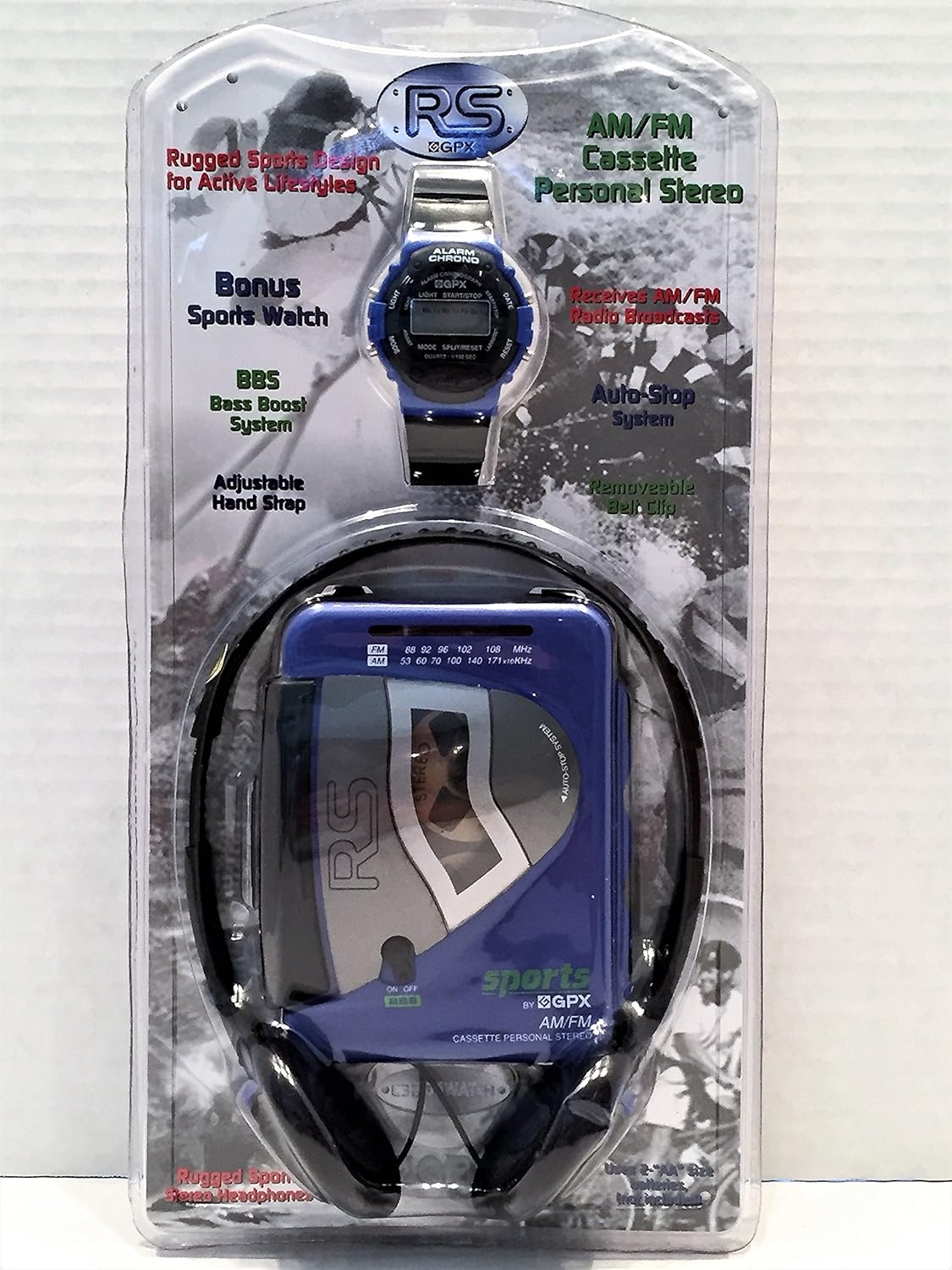
The GPX C3204RS is a rugged, portable AM/FM stereo cassette player designed for active lifestyles. It features a durable build, AM/FM radio reception, Bass Boost System (BBS), and comes with personal stereo headphones.
പ്രധാന സവിശേഷതകൾ
- AM/FM Stereo Cassette Player
- Rugged Sports Design
- Receives AM/FM Radio Broadcasts
- BBS Bass Boost System
- Adjustable Hand Strap with Removable Belt Clip
2. സജ്ജീകരണം
അൺപാക്ക് ചെയ്യുന്നു
Carefully remove all components from the packaging. Ensure you have the cassette player, headphones, and any included accessories.
ഉപകരണം പവർ ചെയ്യുന്നു
The GPX C3204RS requires batteries for operation.
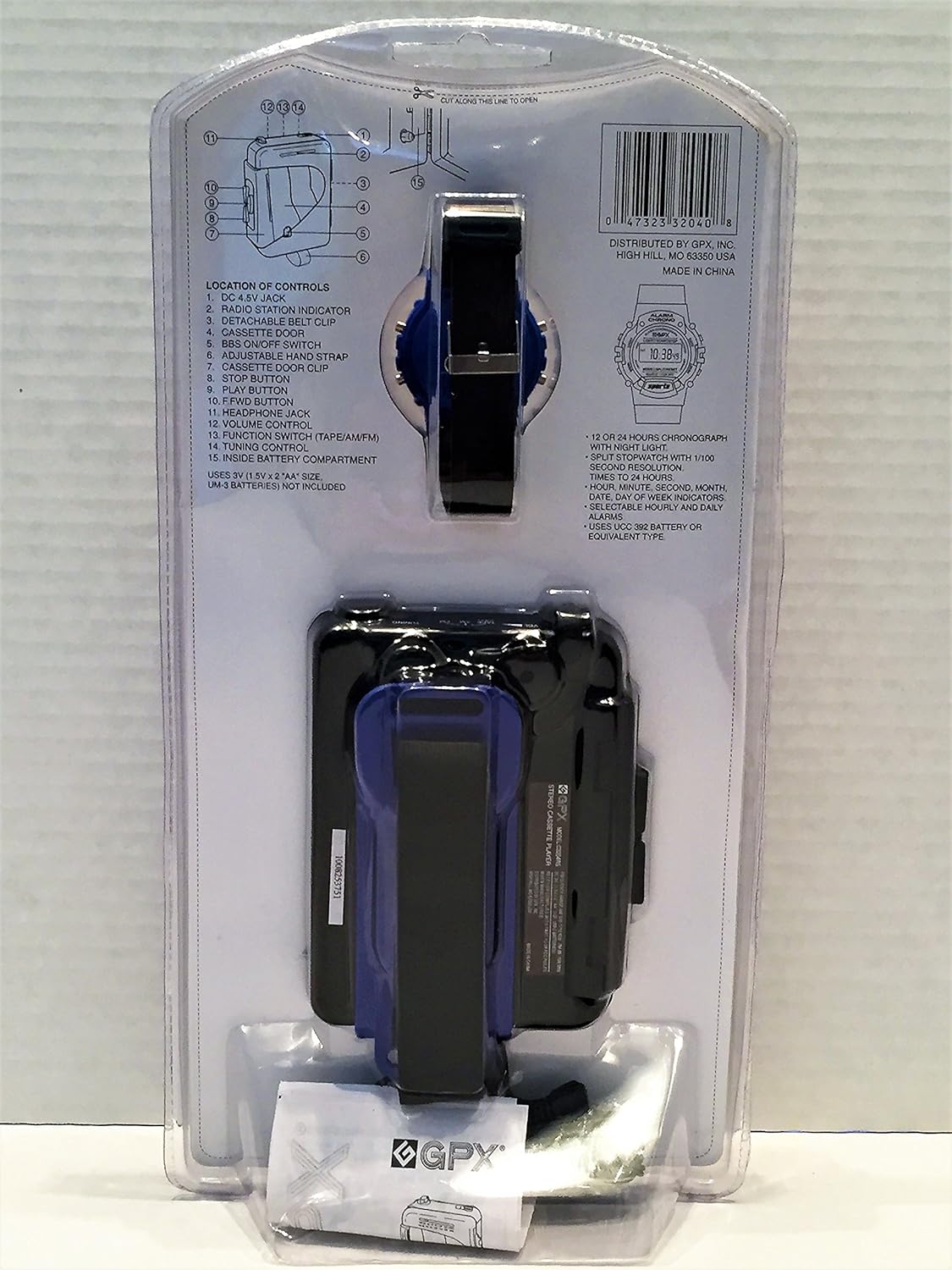
- യൂണിറ്റിന്റെ പിൻഭാഗത്ത് ബാറ്ററി കമ്പാർട്ട്മെന്റ് കണ്ടെത്തുക.
- ബാറ്ററി കമ്പാർട്ട്മെൻ്റ് കവർ തുറക്കുക.
- പോളാരിറ്റി സൂചകങ്ങൾ (+/-) അനുസരിച്ച് ആവശ്യമായ ബാറ്ററികൾ (ഉദാ: 2 x AA ബാറ്ററികൾ, ഉൾപ്പെടുത്തിയിട്ടില്ല) ചേർക്കുക.
- ബാറ്ററി കമ്പാർട്ട്മെൻ്റ് കവർ സുരക്ഷിതമായി അടയ്ക്കുക.
ഹെഡ്ഫോണുകൾ ബന്ധിപ്പിക്കുന്നു
Plug the 3.5mm jack of the included headphones into the headphone port on the side of the cassette player.
3. പ്രവർത്തന നിർദ്ദേശങ്ങൾ
കാസറ്റ് പ്ലേബാക്ക്
- Open the cassette door by pressing the 'OPEN' button or sliding the latch.
- Insert a cassette tape with the open side facing upwards and the tape side facing the playback head.
- Close the cassette door firmly.
- Press the 'PLAY' button to begin playback.
- Adjust the volume using the volume control dial.
- Use the 'FAST FORWARD' (FF) and 'REWIND' (REW) buttons to navigate the tape.
- Press the 'STOP' button to stop playback.
- Press the 'EJECT' button (if available) or open the cassette door to remove the tape.
AM/FM റേഡിയോ പ്രവർത്തനം
- Slide the function switch to 'RADIO' or 'AM/FM'.
- Select either 'AM' or 'FM' band using the band selector switch.
- Rotate the 'TUNING' dial to find your desired radio station.
- Adjust the volume using the volume control dial.
Bass Boost System (BBS)
To enhance bass frequencies, slide the 'BBS' switch to the 'ON' position. Slide it to 'OFF' to disable.
4. പരിപാലനവും പരിചരണവും
- Keep the unit dry. If it gets wet, wipe it dry immediately.
- ഒരു സോഫ്റ്റ്, ഡി ഉപയോഗിച്ച് യൂണിറ്റ് വൃത്തിയാക്കുകamp തുണി. ഉരച്ചിലുകളുള്ള ക്ലീനറുകളോ ലായകങ്ങളോ ഉപയോഗിക്കരുത്.
- Periodically clean the cassette player's head and pinch roller with a specialized cassette head cleaner to ensure optimal sound quality.
- ചോർച്ച തടയാൻ യൂണിറ്റ് ദീർഘനേരം ഉപയോഗിക്കുന്നില്ലെങ്കിൽ ബാറ്ററികൾ നീക്കം ചെയ്യുക.
- യൂണിറ്റ് തീവ്രമായ താപനില, നേരിട്ടുള്ള സൂര്യപ്രകാശം അല്ലെങ്കിൽ ഉയർന്ന ഈർപ്പം എന്നിവയിൽ ഏൽക്കുന്നത് ഒഴിവാക്കുക.
5. പ്രശ്നപരിഹാരം
| പ്രശ്നം | സാധ്യമായ കാരണം | പരിഹാരം |
|---|---|---|
| ശക്തിയില്ല | ബാറ്ററികൾ തീർന്നിരിക്കുന്നു അല്ലെങ്കിൽ തെറ്റായി ചേർത്തിരിക്കുന്നു. | ബാറ്ററികൾ മാറ്റിസ്ഥാപിക്കുക അല്ലെങ്കിൽ ശരിയായ പോളാരിറ്റി ഉറപ്പാക്കുക. |
| ഹെഡ്ഫോണുകളിൽ നിന്ന് ശബ്ദമില്ല | Headphones not plugged in correctly; volume too low; headphones faulty. | Ensure headphones are fully plugged in; increase volume; try different headphones. |
| കാസറ്റ് ടേപ്പ് പ്ലേ ചെയ്യുന്നില്ല | Tape is jammed; cassette door not closed; 'PLAY' button not pressed. | Check tape for damage; ensure cassette door is closed; press 'PLAY'. |
| മോശം റേഡിയോ സ്വീകരണം | Weak signal; antenna not extended (if applicable); interference. | Adjust tuning; reposition the unit; try a different location. |
| ശബ്ദം വികലമാക്കി | Volume too high; dirty cassette head; faulty tape. | Lower volume; clean cassette head; try a different tape. |
6 സ്പെസിഫിക്കേഷനുകൾ
| ഫീച്ചർ | വിശദാംശങ്ങൾ |
|---|---|
| ബ്രാൻഡ് | GPX |
| മോഡൽ നമ്പർ | C3204RS |
| അളവുകൾ (L x W x H) | 35.6 x 18 x 10.2 സെ.മീ |
| ഭാരം | 456 ഗ്രാം |
| പവർ ഉറവിടം | DC 4.5V (2 x AA Batteries, not included) |
| കണക്റ്റിവിറ്റി ടെക്നോളജി | Wired (for headphones) |
| നിറം | നീല |
| ഫോം ഫാക്ടർ | ക്ലിപ്പ്-ഓൺ |
| നിർമ്മാതാവ് | GPX, Inc. |
| ASIN | B0722Z98CV |
7. വാറൻ്റിയും പിന്തുണയും
For warranty information or technical support, please refer to the documentation included with your purchase or visit the official GPX webസൈറ്റ്. വാറന്റി ക്ലെയിമുകൾക്കായി നിങ്ങളുടെ വാങ്ങലിന്റെ തെളിവ് സൂക്ഷിക്കുക.
നിർമ്മാതാവ്: GPX, Inc.
മോഡൽ: C3204RS


