1. ആമുഖം
This manual provides detailed instructions for the setup, operation, maintenance, and troubleshooting of your Lexmark XC4140 Multifunction Color Laser Printer. Please read this manual thoroughly before using the device to ensure proper and safe operation.
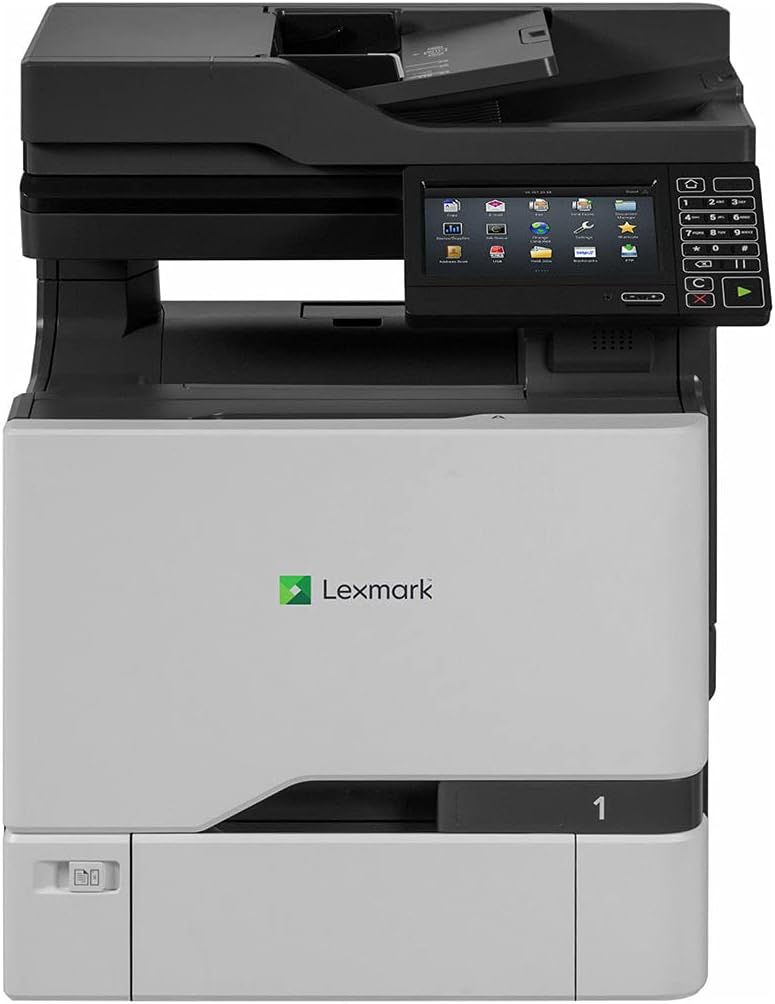
ചിത്രം 1: മുൻഭാഗം view of the Lexmark XC4140 Multifunction Color Laser Printer. This image shows the printer's main body, the control panel with a touchscreen display, and the paper output tray.
2. സജ്ജീകരണം
2.1 അൺപാക്കിംഗും പ്ലേസ്മെന്റും
Carefully remove the printer from its packaging. Ensure all packing materials and protective tapes are removed. Place the printer on a stable, level surface with adequate ventilation. Avoid direct sunlight and areas with extreme temperature fluctuations.
2.2 ബന്ധിപ്പിക്കുന്ന പവർ
Connect the power cord to the printer's power input and then to a grounded electrical outlet. Do not use extension cords or power strips unless absolutely necessary and ensure they are rated for the printer's power requirements.
2.3 ടോണർ കാട്രിഡ്ജുകൾ സ്ഥാപിക്കൽ
- പ്രിന്ററിന്റെ മുൻവശത്തെ ആക്സസ് വാതിൽ തുറക്കുക.
- Remove the new toner cartridges from their packaging.
- Shake each cartridge gently to distribute the toner.
- ഓരോ കാട്രിഡ്ജും അതിന്റെ അനുബന്ധ സ്ലോട്ടിൽ അത് സ്ഥലത്ത് ക്ലിക്ക് ചെയ്യുന്നതുവരെ തിരുകുക. നിറങ്ങൾ ലേബലുകളുമായി പൊരുത്തപ്പെടുന്നുണ്ടെന്ന് ഉറപ്പാക്കുക.
- മുൻവശത്തെ പ്രവേശന വാതിൽ അടയ്ക്കുക.
2.4 പേപ്പർ ലോഡ് ചെയ്യുന്നു
The Lexmark XC4140 supports various paper sizes, including up to 11x17 inches (A3). Open the paper tray and adjust the guides to fit the paper size. Load the paper stack face down, ensuring it does not exceed the maximum fill line.
2.5 നെറ്റ്വർക്കും യുഎസ്ബി കണക്ഷനും
- ഇഥർനെറ്റ്: Connect an Ethernet cable from the printer's Ethernet port to your network router or switch.
- USB: Connect a USB 2.0 cable from the printer's USB port to your computer.
After connecting, power on the printer. The control panel will guide you through initial setup, including language selection and network configuration.
3. പ്രിന്റർ പ്രവർത്തിപ്പിക്കൽ
3.1 കൺട്രോൾ പാനൽ ഓവർview
The Lexmark XC4140 features a color touchscreen display and a numeric keypad for navigation and input. Common functions like Copy, Scan, and Print are accessible directly from the main screen.
3.2 പ്രമാണങ്ങൾ അച്ചടിക്കൽ
- Ensure the printer is connected to your computer or network and drivers are installed.
- നിങ്ങളുടെ കമ്പ്യൂട്ടറിൽ പ്രിന്റ് ചെയ്യാൻ ആഗ്രഹിക്കുന്ന പ്രമാണം തുറക്കുക.
- ആപ്ലിക്കേഷന്റെ മെനുവിൽ നിന്ന് "പ്രിന്റ്" തിരഞ്ഞെടുക്കുക.
- Choose "Lexmark XC4140" as your printer.
- Adjust print settings (e.g., color/monochrome, duplex, paper size) as needed.
- "പ്രിന്റ്" ക്ലിക്ക് ചെയ്യുക.
The printer supports duplex (two-sided) printing automatically. Print speeds are up to 40 pages per minute (ppm) for both black and color documents.
3.3 പ്രമാണങ്ങൾ സ്കാൻ ചെയ്യുന്നു
The XC4140 includes a flatbed scanner. You can scan documents to a computer, network folder, or email.
- Place the document face down on the scanner glass or use the automatic document feeder (ADF).
- On the printer's control panel, select the "Scan" function.
- Choose your scan destination (e.g., Scan to Network, Scan to Email, Scan to USB).
- Adjust scan settings such as resolution (up to 1200 x 1200 dpi), color mode, and file ഫോർമാറ്റ്.
- "സ്കാൻ ആരംഭിക്കുക" അമർത്തുക.
3.4 പ്രമാണങ്ങൾ പകർത്തൽ
To make copies using the Lexmark XC4140:
- യഥാർത്ഥ പ്രമാണം സ്കാനർ ഗ്ലാസിലോ ADF-ലോ വയ്ക്കുക.
- നിയന്ത്രണ പാനലിൽ, "പകർത്തുക" ഫംഗ്ഷൻ തിരഞ്ഞെടുക്കുക.
- Enter the number of copies desired using the numeric keypad.
- Adjust copy settings such as color/monochrome, reduction/enlargement, and duplex options.
- Press the "Start" button (green play icon).
Maximum copy speed for both black and white is 40 ppm.
4. പരിപാലനം
4.1 ടോണർ കാട്രിഡ്ജുകൾ മാറ്റിസ്ഥാപിക്കൽ
The printer will display a message when a toner cartridge is low or empty. To replace:
- മുൻവശത്തെ പ്രവേശന വാതിൽ തുറക്കുക.
- Grasp the handle of the empty cartridge and pull it out.
- Unpack a new Lexmark toner cartridge (Cyan, Magenta, Yellow, or Black).
- Shake the new cartridge gently.
- Insert the new cartridge into the correct slot until it locks into place.
- മുൻവശത്തെ പ്രവേശന വാതിൽ അടയ്ക്കുക.
4.2 പ്രിന്റർ വൃത്തിയാക്കുന്നു
പതിവായി വൃത്തിയാക്കുന്നത് പ്രിന്റ് ഗുണനിലവാരം നിലനിർത്താനും നിങ്ങളുടെ പ്രിന്ററിന്റെ ആയുസ്സ് വർദ്ധിപ്പിക്കാനും സഹായിക്കുന്നു.
- പുറം: ഒരു മൃദുവായ, ഡി ഉപയോഗിച്ച് ബാഹ്യ പ്രതലങ്ങൾ തുടയ്ക്കുകamp, ലിന്റ് രഹിത തുണി. അബ്രാസീവ് ക്ലീനറുകൾ ഉപയോഗിക്കരുത്.
- സ്കാനർ ഗ്ലാസ്: ഗ്ലാസ് ക്ലീനർ ഉപയോഗിച്ച് നനച്ച മൃദുവായ തുണി ഉപയോഗിച്ച് സ്കാനർ ഗ്ലാസ് വൃത്തിയാക്കുക.
- ആന്തരിക ഘടകങ്ങൾ: Refer to the printer's on-screen prompts or Lexmark support for specific internal cleaning procedures, such as cleaning the fuser or transfer roller.
5. പ്രശ്നപരിഹാരം
This section addresses common issues you might encounter with your Lexmark XC4140 printer.
| പ്രശ്നം | സാധ്യമായ കാരണം | പരിഹാരം |
|---|---|---|
| പ്രിന്റർ പ്രതികരിക്കുന്നില്ല | പവർ കേബിൾ വിച്ഛേദിക്കപ്പെട്ടു, നെറ്റ്വർക്ക് പ്രശ്നം, ഡ്രൈവർ പ്രശ്നം. | Check power connections. Verify network cable or USB connection. Reinstall printer drivers. |
| മോശം പ്രിന്റ് നിലവാരം | കുറഞ്ഞ ടോണർ, തെറ്റായ പേപ്പർ തരം, വൃത്തികെട്ട ഘടകങ്ങൾ. | Replace low toner cartridges. Ensure correct paper settings. Clean internal components as per maintenance section. |
| പേപ്പർ കുടുങ്ങി | Improperly loaded paper, foreign objects, worn rollers. | Remove jammed paper carefully. Reload paper correctly. Inspect for foreign objects. |
| സ്കാനർ പ്രവർത്തിക്കുന്നില്ല | Software issue, connection problem. | Restart the printer and computer. Check network/USB connection. Ensure scanner drivers are installed. |
For more complex issues, refer to the Lexmark support webസൈറ്റ് അല്ലെങ്കിൽ ഉപഭോക്തൃ സേവനവുമായി ബന്ധപ്പെടുക.
6 സ്പെസിഫിക്കേഷനുകൾ
Key technical specifications for the Lexmark XC4140 Multifunction Color Laser Printer:
- മോഡലിൻ്റെ പേര്: XC4140
- പ്രിൻ്റിംഗ് ടെക്നോളജി: ലേസർ
- പ്രവർത്തനങ്ങൾ: പ്രിന്റ് ചെയ്യുക, പകർത്തുക, സ്കാൻ ചെയ്യുക
- Print Speed (Black & Color): 40 ppm വരെ
- Print Resolution (Max): 1200 x 1200 dpi (നിറവും കറുപ്പും)
- ഡ്യൂപ്ലെക്സ് പ്രിന്റിംഗ്: ഓട്ടോമാറ്റിക്
- സ്കാനർ തരം: ഫ്ലാറ്റ്ബെഡ്
- പരമാവധി കോപ്പി സ്പീഡ് (കറുപ്പും വെളുപ്പും): 40 പി.പി.എം
- പരമാവധി ഇൻപുട്ട് ഷീറ്റ് ശേഷി: 500 ഷീറ്റുകൾ
- Supported Media Sizes: Up to 11x17 inches (A3)
- കണക്റ്റിവിറ്റി: Gigabit Ethernet, USB 2.0
- നിയന്ത്രണ രീതി: Touch (Touchscreen Display)
- മഷി നിറം: Cyan, Magenta, Yellow, Black (Toner)
- ഇനത്തിൻ്റെ ഭാരം: 141 പൗണ്ട്
- ഇനം മോഡൽ നമ്പർ: 40ZV9720
- UPC: 734646622974
7. വാറൻ്റി വിവരങ്ങൾ
The Lexmark XC4140 Multifunction Color Laser Printer comes with a പരിമിതമായ വാറൻ്റി. For specific terms, conditions, and duration of the warranty, please refer to the warranty card included with your product or visit the official Lexmark support webസൈറ്റ്. വാറന്റി ക്ലെയിമുകൾക്കായി നിങ്ങളുടെ വാങ്ങലിന്റെ തെളിവ് സൂക്ഷിക്കുക.
8. ഉപഭോക്തൃ പിന്തുണ
For technical assistance, driver downloads, or further information regarding your Lexmark XC4140 printer, please visit the official Lexmark support webസൈറ്റ് അല്ലെങ്കിൽ അവരുടെ ഉപഭോക്തൃ സേവന വിഭാഗവുമായി ബന്ധപ്പെടുക.
- Lexmark Official Webസൈറ്റ്: www.lexmark.com
- പിന്തുണാ പേജ്: Refer to the support section on the Lexmark webപതിവുചോദ്യങ്ങൾ, ട്രബിൾഷൂട്ടിംഗ് ഗൈഡുകൾ, കോൺടാക്റ്റ് ഓപ്ഷനുകൾ എന്നിവയ്ക്കുള്ള സൈറ്റ്.


