ആമുഖം
Thank you for choosing the Veho ZB-6 On-Ear Wireless Bluetooth Headphones. This manual provides essential information for setting up, operating, and maintaining your headphones to ensure optimal performance and longevity. Please read this manual thoroughly before using the product.
പാക്കേജ് ഉള്ളടക്കം
താഴെ പറയുന്ന ഇനങ്ങൾക്കായി ബോക്സ് ചെക്ക് ചെയ്യുക:
- Veho ZB-6 Bluetooth Headphones
- 120cm Auxiliary Cable with 3.5mm Jack
- Micro USB to USB-A Charging Cable
- Multi-lingual User Manual (English, French, Spanish, German, Italian, Portuguese, Japanese & Chinese)
ഉൽപ്പന്നം കഴിഞ്ഞുview
Familiarize yourself with the components and controls of your Veho ZB-6 headphones.
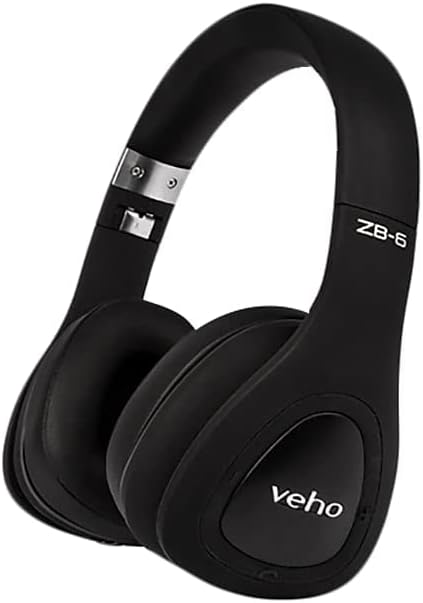
ചിത്രം 1: മൊത്തത്തിൽ view of the Veho ZB-6 On-Ear Wireless Bluetooth Headphones in black. The image displays the adjustable headband, soft earcups, and the 'veho' logo on the left earcup.

ചിത്രം 2: വശം view of the Veho ZB-6 headphones, highlighting the control buttons located on the earcup. These controls include power, volume, and track selection buttons, along with the charging port and 3.5mm auxiliary input.

ചിത്രം 3: The Veho ZB-6 headphones shown in their folded configuration, demonstrating their compact design for easy portability and storage.
സജ്ജമാക്കുക
ഹെഡ്ഫോണുകൾ ചാർജ് ചെയ്യുന്നു
Before first use, fully charge your Veho ZB-6 headphones. A full charge provides up to 24 hours of continuous music playback.
- ചാർജിംഗ് കേബിളിന്റെ മൈക്രോ യുഎസ്ബി അറ്റം ഹെഡ്ഫോൺ ഇയർകപ്പിലെ ചാർജിംഗ് പോർട്ടുമായി ബന്ധിപ്പിക്കുക.
- ചാർജിംഗ് കേബിളിന്റെ USB-A അറ്റം ഒരു USB പവർ സ്രോതസ്സുമായി ബന്ധിപ്പിക്കുക (ഉദാ: കമ്പ്യൂട്ടർ USB പോർട്ട്, USB വാൾ അഡാപ്റ്റർ).
- The LED indicator on the headphones will illuminate during charging and change color or turn off when fully charged.
ബ്ലൂടൂത്ത് ജോടിയാക്കൽ
Pair your Veho ZB-6 headphones with your Bluetooth-enabled device (smartphone, tablet, PC, MP3 player).
- ഹെഡ്ഫോണുകൾ ഓഫാണെന്ന് ഉറപ്പാക്കുക.
- Press and hold the Power button on the earcup for approximately 6 seconds until the LED indicator flashes blue and red alternately. This indicates the headphones are in pairing mode.
- നിങ്ങളുടെ ഉപകരണത്തിൽ, ബ്ലൂടൂത്ത് പ്രവർത്തനക്ഷമമാക്കി ലഭ്യമായ ഉപകരണങ്ങൾക്കായി തിരയുക.
- Select "Veho ZB-6" from the list of found devices.
- Once paired, the LED indicator on the headphones will flash blue slowly, and you will hear a confirmation tone.
- The headphones will automatically connect to the last paired device when turned on, if it is within range.
പ്രവർത്തന നിർദ്ദേശങ്ങൾ
അടിസ്ഥാന നിയന്ത്രണങ്ങൾ
- പവർ ഓൺ/ഓഫ്: പവർ ബട്ടൺ 3 സെക്കൻഡ് അമർത്തിപ്പിടിക്കുക.
- പ്ലേ/താൽക്കാലികമായി നിർത്തുക: Play/Pause ബട്ടൺ ഒരിക്കൽ അമർത്തുക.
- വോളിയം കൂട്ടുക: വോളിയം അപ്പ് (+) ബട്ടൺ അമർത്തുക.
- വോളിയം താഴേക്ക്: വോളിയം ഡൗൺ (-) ബട്ടൺ അമർത്തുക.
- അടുത്ത ട്രാക്ക്: വോളിയം അപ്പ് (+) ബട്ടൺ അമർത്തിപ്പിടിക്കുക.
- മുമ്പത്തെ ട്രാക്ക്: വോളിയം ഡൗൺ (-) ബട്ടൺ അമർത്തിപ്പിടിക്കുക.
കോൾ മാനേജുമെന്റ്
The built-in microphone allows for hands-free calling.
- ഉത്തരം/അവസാന കോൾ: Press the Play/Pause button once during an incoming call or an active call.
- കോൾ നിരസിക്കുക: ഇൻകമിംഗ് കോൾ വരുമ്പോൾ പ്ലേ/പോസ് ബട്ടൺ 2 സെക്കൻഡ് അമർത്തിപ്പിടിക്കുക.
- അവസാന നമ്പർ വീണ്ടും ഡയൽ ചെയ്യുക: പ്ലേ/പോസ് ബട്ടൺ രണ്ടുതവണ അമർത്തുക.
Voice Commands (Siri/Google Now)
The Veho ZB-6 headphones support voice commands for compatible devices.
- വോയ്സ് അസിസ്റ്റന്റിനെ സജീവമാക്കുക: Press the Play/Pause button twice quickly.
ഓക്സിലറി മോഡ്
Use the included 3.5mm auxiliary cable to connect the headphones to devices without Bluetooth connectivity, or when the headphone battery is depleted.
- Connect one end of the 3.5mm auxiliary cable to the headphone's AUX port.
- മറ്റേ അറ്റം നിങ്ങളുടെ ഉപകരണത്തിന്റെ ഓഡിയോ ഔട്ട്പുട്ട് ജാക്കുമായി ബന്ധിപ്പിക്കുക.
- In auxiliary mode, the headphone's power and Bluetooth functions are disabled, and audio is transmitted directly via the cable.
പരിപാലനവും പരിചരണവും
- വൃത്തിയാക്കൽ: മൃദുവായതും ഉണങ്ങിയതുമായ തുണി ഉപയോഗിച്ച് ഹെഡ്ഫോണുകൾ തുടയ്ക്കുക. അബ്രാസീവ് ക്ലീനറുകളോ ലായകങ്ങളോ ഉപയോഗിക്കരുത്.
- സംഭരണം: When not in use, store the headphones in a cool, dry place. The folding design allows for compact storage.
- ഈർപ്പം ഒഴിവാക്കുക: ഹെഡ്ഫോണുകൾ വെള്ളത്തിലോ അമിതമായ ഈർപ്പത്തിലോ തുറന്നുകാട്ടരുത്.
- താപനില: Avoid extreme temperatures, as this can affect battery life and overall performance.
ട്രബിൾഷൂട്ടിംഗ്
| പ്രശ്നം | പരിഹാരം |
|---|---|
| ഹെഡ്ഫോണുകൾ പവർ ഓൺ ചെയ്യുന്നില്ല. | Ensure the headphones are fully charged. Connect to a power source using the supplied USB cable. |
| ഉപകരണവുമായി ജോടിയാക്കാൻ കഴിയില്ല. |
|
| ശബ്ദമില്ല അല്ലെങ്കിൽ കുറഞ്ഞ ശബ്ദമില്ല. |
|
| ശബ്ദ വികൃതത. |
|
സ്പെസിഫിക്കേഷനുകൾ
| ഫീച്ചർ | വിശദാംശങ്ങൾ |
|---|---|
| മോഡൽ | VEP-014-ZB6 |
| കണക്റ്റിവിറ്റി ടെക്നോളജി | വയർലെസ്, ബ്ലൂടൂത്ത് 4.1 |
| വയർലെസ് കമ്മ്യൂണിക്കേഷൻ ടെക്നോളജി | ബ്ലൂടൂത്ത് |
| ബാറ്ററി ലൈഫ് | Up to 24 hours continuous music playback |
| ബാറ്ററി തരം | റീചാർജ് ചെയ്യാവുന്ന ലിഥിയം അയോൺ |
| വാല്യംtage | 3.7 വോൾട്ട് |
| മൈക്രോഫോൺ ഫോർമാറ്റ് | ബിൽറ്റ്-ഇൻ |
| നിയന്ത്രണ തരം | Voice Control, Buttons |
| മെറ്റീരിയൽ | റബ്ബർ |
| ഫോം ഫാക്ടർ | ചെവിയിൽ |
| ശബ്ദ നിയന്ത്രണം | സൗണ്ട് ഐസൊലേഷൻ |
| ഹെഡ്ഫോണുകൾ ജാക്ക് | 3.5 mm ജാക്ക് |
| ഇനത്തിൻ്റെ ഭാരം | 290 ഗ്രാം |
| ഉൽപ്പന്ന അളവുകൾ | 18.8 x 17.78 x 7.37 സെ.മീ |
വാറൻ്റിയും പിന്തുണയും
Veho products are designed to meet high quality standards. For information regarding warranty coverage, technical support, or service, please refer to the warranty card included with your product or visit the official Veho webസൈറ്റ്. വാറന്റി ക്ലെയിമുകൾക്കായി നിങ്ങളുടെ വാങ്ങലിന്റെ തെളിവ് സൂക്ഷിക്കുക.
For further assistance, please contact Veho customer support.


