1. ആമുഖം
The Monoprice Blackbird 4K 8x8 HDMI Matrix Switch is designed to independently distribute any of eight HDMI inputs to any of eight displays. This device supports advanced video and audio technologies, including 4K@60Hz 4:4:4, HDR, and 18Gbps bandwidth, ensuring high-quality signal transmission. It offers versatile control options via front panel, IR remote, RS232, and a web-based GUI for seamless integration into various setups.
പ്രധാന സവിശേഷതകൾ:
- Independently distributes any of eight HDMI sources to any of eight HDMI displays.
- Supports video resolutions up to 4K@60Hz 4:4:4, including 1080p 3D video.
- Fully compliant with HDMI 2.0 and HDCP 2.2 standards.
- Features 18Gbps maximum bandwidth.
- Includes eight digital coaxial S/PDIF outputs for audio extraction.
- Multiple control methods: Front panel buttons, IR remote control, RS232, and TCP/IP (web-based GUI).
- Front panel LCD screen displays real-time connection status.
- DIP switches for manual EDID management.
2 സുരക്ഷാ വിവരങ്ങൾ
Please read this entire manual before operating this device, paying extra attention to these safety warnings and guidelines. Keep this manual for future reference.
- ഈ ഉപകരണം വെള്ളത്തിലേക്കോ ഈർപ്പത്തിലേക്കോ തുറന്നുകാണിക്കരുത്.
- ഭാരമുള്ള വസ്തുക്കൾ ഉപകരണത്തിൽ വയ്ക്കരുത്.
- Do not attempt to open, service, or modify this device. There are no user-serviceable parts inside.
- Use only the provided power adapter. Using an unauthorized power supply may damage the device and void the warranty.
- അമിതമായി ചൂടാക്കുന്നത് തടയാൻ യൂണിറ്റിന് ചുറ്റും ശരിയായ വായുസഞ്ചാരം ഉറപ്പാക്കുക.
- ഇടിമിന്നൽ ഉണ്ടാകുമ്പോഴോ ദീർഘനേരം ഉപയോഗിക്കാതിരിക്കുമ്പോഴോ വൈദ്യുതി വിച്ഛേദിക്കുക.
3. പാക്കേജ് ഉള്ളടക്കം
Please ensure you have all the following items before proceeding with the installation:
- 1x Monoprice Blackbird 4K 8x8 HDMI Matrix Switch
- 1x IR വിദൂര നിയന്ത്രണം
- 1x IR Receiver Extender Cable
- 1x RS232 കേബിൾ
- 1x DC 24V പവർ അഡാപ്റ്റർ
- 2x Mounting Ears (Brackets)
- 1x ഉപയോക്തൃ മാനുവൽ (ഈ പ്രമാണം)

Figure 3.1: Package Contents. This image displays the main unit, an IR remote control, an IR receiver cable, an RS232 cable, a power adapter, and mounting brackets.
4. ഉൽപ്പന്ന ഡയഗ്രം
4.1 ഫ്രണ്ട് പാനൽ

Figure 4.1: Front Panel Layout. The front panel features power indicator, IR receiver, input and output selection buttons (1-8), ENTER, ALL, CLEAR buttons, and preset recall/store buttons.
- പവർ എൽഇഡി: പവർ സ്റ്റാറ്റസ് സൂചിപ്പിക്കുന്നു.
- ഐആർ റിസീവർ: For receiving signals from the IR remote control.
- INPUTS Buttons (1-8): Selects the desired HDMI input source.
- OUTPUTS Buttons (1-8): Selects the desired HDMI output display.
- എന്റർ ബട്ടൺ: തിരഞ്ഞെടുക്കൽ സ്ഥിരീകരിക്കുന്നു.
- എല്ലാ ബട്ടൺ: Routes the selected input to all outputs.
- ക്ലിയർ ബട്ടൺ: Clears current selection.
- PRESET RECALL/HOLD TO STORE Buttons (1-4): Recalls or stores routing presets.
4.2 പിൻ പാനൽ
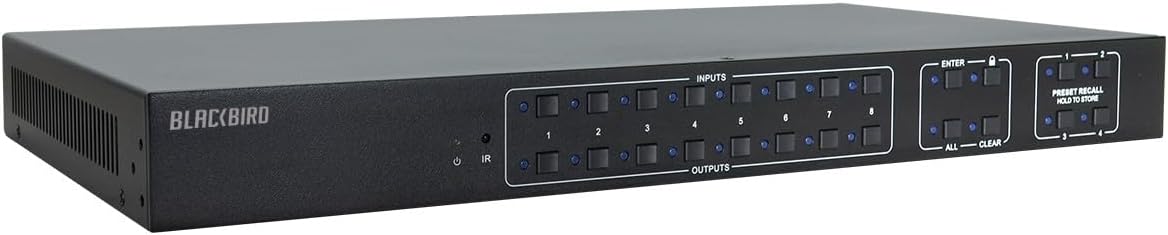
Figure 4.2: Rear Panel Layout. The rear panel includes eight HDMI inputs, eight HDMI outputs, eight SPDIF audio outputs, RS232 port, TCP/IP port, IR EYE port, and DC 24V power input.
- HDMI INPUTS (1-8): Connect your HDMI source devices (e.g., Blu-ray player, game console).
- HDMI OUTPUTS (1-8): Connect your HDMI displays (e.g., TV, projector).
- SPDIF Outputs (1-8): Digital coaxial audio outputs for each corresponding HDMI output.
- IR EYE: Connect the IR receiver extender cable.
- RS232: Serial port for computer control.
- TCP/IP: Ethernet port for network control via web-അധിഷ്ഠിത ജിയുഐ.
- ഡിസി 24 വി: ഉൾപ്പെടുത്തിയിരിക്കുന്ന പവർ അഡാപ്റ്ററിനുള്ള പവർ ഇൻപുട്ട്.
- EDID DIP Switches: For manual EDID configuration.
5. സജ്ജീകരണം
5.1 കണക്ഷൻ നിർദ്ദേശങ്ങൾ
- Ensure all devices (sources, displays, and the matrix switch) are powered off before making connections.
- Connect your HDMI source devices (e.g., Blu-ray players, media streamers, game consoles) to the HDMI INPUT ports (1-8) on the rear panel of the matrix switch using high-quality HDMI cables.
- Connect your HDMI displays (e.g., TVs, projectors) to the HDMI OUTPUT ports (1-8) on the rear panel of the matrix switch using high-quality HDMI cables.
- If desired, connect audio receivers or sound systems to the corresponding SPDIF Outputs (1-8) using coaxial audio cables.
- For IR remote control, connect the IR Receiver Extender Cable to the IR EYE port. Position the IR receiver in a location where it can receive signals from the remote.
- For RS232 control, connect a computer or control system to the RS232 port using the provided RS232 cable.
- For TCP/IP control, connect an Ethernet cable from your network router or switch to the TCP/IP port.
- Connect the DC 24V Power Adapter to the DC 24V input port on the matrix switch, then plug the adapter into a power outlet.
5.2 പ്രാരംഭ പവർ ഓൺ
After all connections are made, power on your displays first, then your HDMI source devices, and finally the Monoprice Blackbird 4K 8x8 HDMI Matrix Switch. The front panel LCD will display the current routing status.
6. ഓപ്പറേഷൻ
6.1 Front Panel Control
To route an input to an output using the front panel:
- ആവശ്യമുള്ളത് അമർത്തുക ഔട്ട്പുട്ടുകൾ button (1-8) for the display you wish to control.
- ആവശ്യമുള്ളത് അമർത്തുക ഇൻപുട്ടുകൾ button (1-8) for the source you want to display.
- അമർത്തുക പ്രവേശിക്കുക button to confirm the routing.
To route one input to all outputs, select the desired ഇൻപുട്ടുകൾ ബട്ടൺ, തുടർന്ന് അമർത്തുക എല്ലാം button, and finally പ്രവേശിക്കുക.
6.2 IR റിമോട്ട് കൺട്രോൾ
The included IR remote control mirrors the functionality of the front panel buttons. Point the remote towards the IR receiver on the front panel or the connected IR Eye extender to control the matrix switch.
6.3 RS232 നിയന്ത്രണം
The RS232 port allows for control via a computer or third-party control system. Refer to the detailed RS232 command set documentation (typically available on the Monoprice product page) for specific commands and protocols.
6.4 TCP/IP (Web-based GUI) Control
The matrix switch features a built-in web server for control via a web browser. Connect the switch to your network via the TCP/IP port. Obtain the IP address of the device (refer to the network settings or use a network scanner if DHCP is enabled). Enter the IP address into your web browser to access the GUI and manage routing, EDID, and other settings.
6.5 EDID മാനേജ്മെന്റ്
The matrix switch supports EDID management to ensure compatibility between sources and displays. DIP switches on the rear panel allow for manual configuration of EDID settings. Consult the full manual or product page for specific EDID modes and their corresponding DIP switch settings.
7. പ്രശ്നപരിഹാരം
| പ്രശ്നം | സാധ്യമായ കാരണം | പരിഹാരം |
|---|---|---|
| ഡിസ്പ്ലേയിൽ വീഡിയോ ഔട്ട്പുട്ട് ഇല്ല. | Incorrect input/output selection; Loose HDMI cables; EDID incompatibility; Source/display issues. | Verify correct input/output routing. Check all HDMI cable connections. Adjust EDID settings using DIP switches or web GUI. Test source and display directly. |
| ഓഡിയോ ഔട്ട്പുട്ട് ഇല്ല. | Audio format not supported; Loose audio cables; Display/receiver audio settings. | Ensure audio format is supported. Check SPDIF cable connections. Verify audio settings on display/receiver. |
| Control issues (IR, RS232, TCP/IP). | IR receiver blocked; Incorrect RS232 settings; Network connectivity issues; Incorrect IP address. | Ensure clear line of sight for IR. Verify RS232 baud rate and settings. Check network cable and IP address. Reboot the matrix switch and network devices. |
| ഇടയ്ക്കിടെയുള്ള സിഗ്നൽ അല്ലെങ്കിൽ മിന്നൽ. | ഗുണനിലവാരമില്ലാത്ത HDMI കേബിളുകൾ; കേബിളിന്റെ നീളം വളരെ കൂടുതലാണ്; സിഗ്നൽ ഇടപെടൽ. | Use certified high-speed HDMI cables. Consider shorter cables or an HDMI extender/repeater for long runs. Ensure cables are not near strong interference sources. |
8 സ്പെസിഫിക്കേഷനുകൾ
| ഫീച്ചർ | സ്പെസിഫിക്കേഷൻ |
|---|---|
| മോഡൽ നമ്പർ | 124180 |
| HDMI പാലിക്കൽ | HDMI 2.0 |
| HDCP പാലിക്കൽ | HDCP 2.2 |
| വീഡിയോ ബാൻഡ്വിഡ്ത്ത് | 18 ജിബിപിഎസ് |
| പിന്തുണയ്ക്കുന്ന പ്രമേയങ്ങൾ | Up to 4K@60Hz 4:4:4, 1080p 3D |
| വർണ്ണ ആഴം | 8-ബിറ്റ്, 10-ബിറ്റ്, 12-ബിറ്റ് |
| ഓഡിയോ p ട്ട്പുട്ടുകൾ | 8x Digital Coaxial S/PDIF |
| നിയന്ത്രണ രീതികൾ | Front Panel, IR Remote, RS232, TCP/IP (Web GUI) |
| ഉൽപ്പന്ന അളവുകൾ (L x W x H) | 21.6 x 13.4 x 5.8 ഇഞ്ച് |
| ഇനത്തിൻ്റെ ഭാരം | 8.1 പൗണ്ട് |
| വൈദ്യുതി വിതരണം | DC 24V |
| പ്രവർത്തന താപനില | 0°C മുതൽ 40°C വരെ (32°F മുതൽ 104°F വരെ) |
| സംഭരണ താപനില | -20°C മുതൽ 60°C വരെ (-4°F മുതൽ 140°F വരെ) |
9. പരിപാലനം
The Monoprice Blackbird 4K 8x8 HDMI Matrix Switch requires minimal maintenance. To ensure optimal performance and longevity:
- വൃത്തിയാക്കൽ: യൂണിറ്റിന്റെ പുറംഭാഗം വൃത്തിയാക്കാൻ മൃദുവായതും ഉണങ്ങിയതുമായ തുണി ഉപയോഗിക്കുക. ലിക്വിഡ് ക്ലീനറുകളോ എയറോസോൾ ക്ലീനറുകളോ ഉപയോഗിക്കരുത്.
- വെൻ്റിലേഷൻ: Ensure that the ventilation openings are not blocked. Do not place the unit in an enclosed space without adequate airflow.
- സംഭരണം: യൂണിറ്റ് ദീർഘനേരം സൂക്ഷിക്കുകയാണെങ്കിൽ, വൈദ്യുതിയിൽ നിന്ന് വിച്ഛേദിച്ച് നേരിട്ടുള്ള സൂര്യപ്രകാശത്തിൽ നിന്നും കടുത്ത താപനിലയിൽ നിന്നും അകന്ന് തണുത്തതും വരണ്ടതുമായ സ്ഥലത്ത് സൂക്ഷിക്കുക.
10. വാറൻ്റിയും പിന്തുണയും
Monoprice stands behind its products. For warranty information, technical support, or customer service inquiries, please visit the official Monoprice website or contact their customer support team directly. Please have your product model number (124180) and purchase details ready when contacting support.
ഏറ്റവും കാലികമായ വിവരങ്ങൾക്കും ഉറവിടങ്ങൾക്കും, ദയവായി സന്ദർശിക്കുക: www.monoprice.com


