1. ആമുഖം
This manual provides detailed instructions for the installation, operation, and maintenance of your ZOOKKI Solar Motion Sensor Lights. These outdoor lights are designed to provide efficient and reliable illumination for various outdoor spaces, utilizing solar power and motion detection technology.
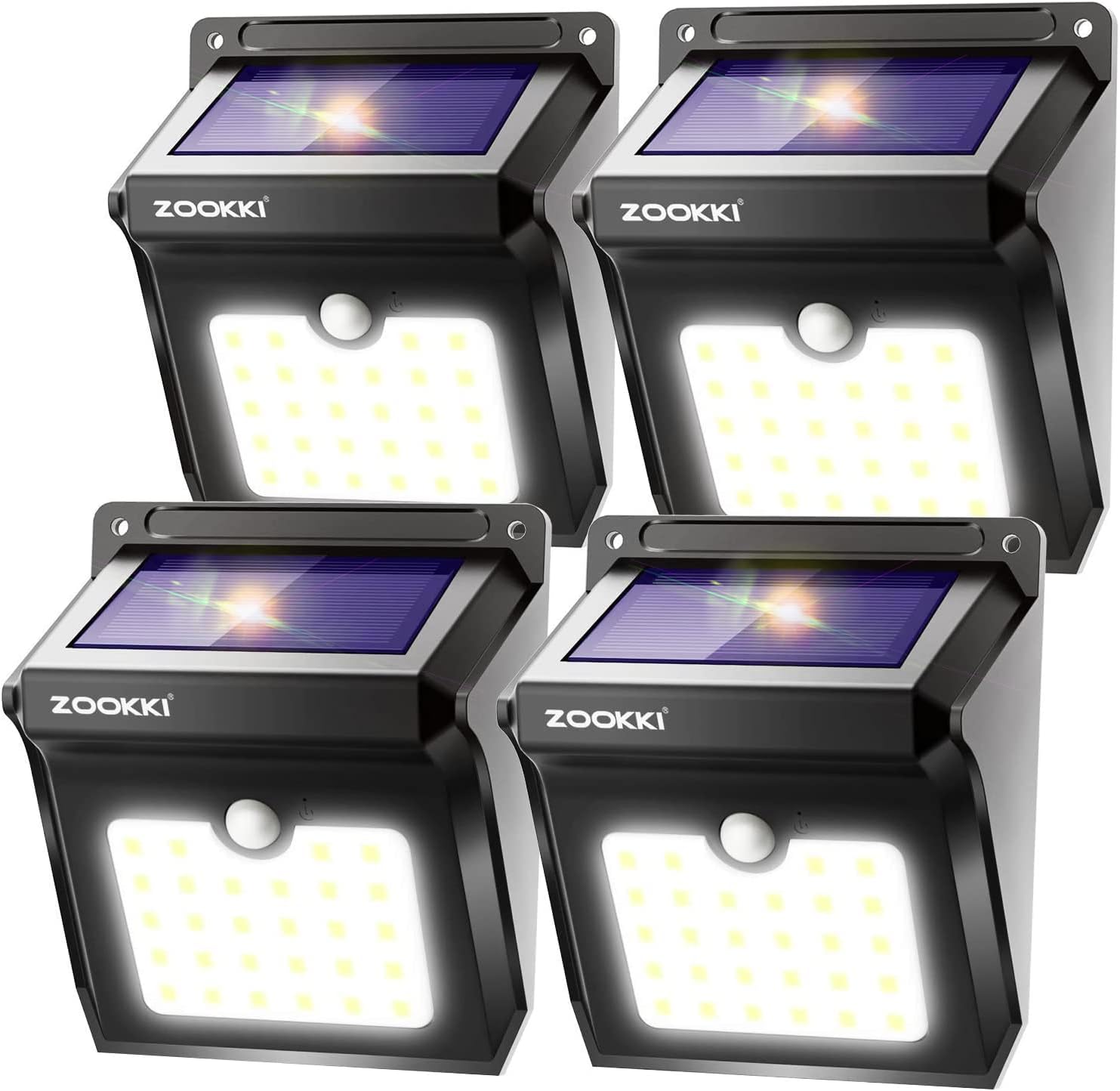
Image 1.1: A 4-pack of ZOOKKI Solar Motion Sensor Lights, showcasing the product's design and quantity.
2. ഉൽപ്പന്ന സവിശേഷതകൾ
- Wireless Solar Powered: Equipped with 28 bright LEDs and a 1200mAh rechargeable Li-ion battery, these lights charge under direct sunlight (6-8 hours).
- Intelligent Motion Sensor: Detects movement up to 26 feet away within a 120° wide-angle. Lights automatically turn ON at night or in darkness when motion is detected, and turn OFF after approximately 30 seconds of no continuous motion.
- നീണ്ടുനിൽക്കുന്ന നിർമ്മാണം: Made of high-impact ABS material, ensuring IP65 waterproof, heatproof, and frost-resistant performance for various weather conditions.
- എളുപ്പമുള്ള ഇൻസ്റ്റാളേഷൻ: Simple activation and mounting with provided hardware.
- ഉയർന്ന തെളിച്ചം: Delivers 400 Lumens of light.

Image 2.1: Illustration demonstrating the 120-degree wide sensing angle and 26-foot sensing distance of the solar motion sensor light.
3. പാക്കേജ് ഉള്ളടക്കം
എല്ലാ ഘടകങ്ങളും ഉണ്ടെന്ന് ഉറപ്പാക്കാൻ പാക്കേജ് പരിശോധിക്കുക:
- 4 x സോളാർ മോഷൻ സെൻസർ ലൈറ്റുകൾ
- 2 x Key Pins (for activation)
- 8 x എക്സ്പാൻഷൻ പില്ലർ-ഹിംഗുകൾ
- 8 x സ്ക്രൂകൾ ഇൻസ്റ്റാൾ ചെയ്യുന്നു
- 1 x ഇൻസ്ട്രക്ഷൻ മാനുവൽ

Image 3.1: The complete package contents, including four solar lights, mounting hardware, key pins, and the user manual.
4. സജ്ജീകരണവും ഇൻസ്റ്റാളേഷനും
Follow these steps to properly install your solar motion sensor lights:
- Prepare the Light: സോളാർ പാനലിൽ നിന്ന് സംരക്ഷിത ഫിലിം കീറുക.
- ഉപകരണം സജീവമാക്കുക: Insert the provided key pin into the small switch hole on the light to activate it.
- ടെസ്റ്റ് പ്രവർത്തനം: Cover the solar panel to simulate darkness and test if the light turns on.
- ലൊക്കേഷൻ തിരഞ്ഞെടുക്കുക: Select an outdoor location that receives direct sunlight for at least 6-8 hours daily to ensure optimal charging. The recommended installation height is 6.5-13 feet (2-4 meters).
- വെളിച്ചം മൌണ്ട് ചെയ്യുക: Drill two holes at your chosen location, insert the expansion pillar-hinges, and then secure the light with the provided screws. Alternatively, you can use 3M double-sided tape (not included) or hang the light with a rope for temporary placement.

Image 4.1: Visual guide illustrating the four main steps for installation: removing protective film, activating with a key pin, testing the light, and drilling holes for screw mounting.
5. പ്രവർത്തന നിർദ്ദേശങ്ങൾ
The ZOOKKI Solar Motion Sensor Lights operate automatically based on light conditions and motion detection:
- പകൽസമയ പ്രവർത്തനം: During the day, the solar panel converts sunlight into electricity and stores it in the internal battery. The light will remain OFF and charge.
- Nighttime Operation (Motion Detected): At night or in dark conditions, the light will automatically turn ON to full brightness when motion is detected within its 120° sensing range and up to 26 feet distance.
- Nighttime Operation (No Motion): If no further motion is detected for approximately 30 seconds, the light will automatically turn OFF to conserve battery power.

Image 5.1: Illustration depicting the solar light's functionality: charging during daylight hours and activating with its sensitive PIR motion sensor at night.

Image 5.2: A sequence of images showing the light's behavior: 1. Auto turn off and charging during the day. 2. Turns on when it senses movement. 3. Remains on when movement stays active. 4. Turns off after 30 seconds of no movement.
6. പരിപാലനം
To ensure optimal performance and longevity of your ZOOKKI Solar Motion Sensor Lights, follow these maintenance guidelines:
- വൃത്തിയുള്ള സോളാർ പാനൽ: പതിവായി സോഫ്റ്റ്, ഡി ക്ലീനർ ഉപയോഗിച്ച് സോളാർ പാനൽ തുടയ്ക്കുക.amp cloth to remove dust, dirt, or debris. A clean panel ensures maximum sunlight absorption and charging efficiency.
- തടസ്സങ്ങൾ മായ്ക്കുക: Ensure no trees, bushes, or other objects are blocking direct sunlight from reaching the solar panel, especially during peak charging hours.
- കാലാവസ്ഥ പ്രതിരോധം: The lights are IP65 waterproof, heat-resistant, and frost-resistant. While designed to withstand various weather conditions, extreme accumulation of snow or ice on the solar panel may temporarily reduce charging efficiency. Clear any heavy accumulation if necessary.
- ബാറ്ററി കെയർ: The integrated Li-ion battery is designed for long-term use. Avoid disassembling the unit, as this may damage the battery or void the warranty.

Image 6.1: Visual representation of the light's IP65 waterproof rating, heat resistance, and frost resistance, indicating its suitability for all weather conditions.
7. പ്രശ്നപരിഹാരം
If your solar lights are not functioning as expected, consider the following common issues and solutions:
- Light Does Not Turn On at Night:
- Ensure the light has been activated with the key pin.
- Verify the solar panel is receiving direct sunlight for at least 6-8 hours during the day. Relocate if necessary.
- Check for any light sources nearby (e.g., streetlights, other outdoor lights) that might be preventing the solar light from activating, as it is designed to turn on only in darkness.
- Motion Sensor Not Detecting:
- Ensure the light is installed within the recommended height range (6.5-13 feet).
- Check for obstructions (e.g., branches, large plants) that might be blocking the sensor's field of view.
- സെൻസർ ലെൻസ് വൃത്തിയാക്കി അതിൽ നിന്ന് അഴുക്കോ അവശിഷ്ടങ്ങളോ നീക്കം ചെയ്യുക.
- Light Stays Dim or Only Works for a Short Period:
- ബാറ്ററി പൂർണ്ണമായും ചാർജ് ചെയ്തിട്ടുണ്ടാകില്ല. സോളാർ പാനൽ വൃത്തിയുള്ളതാണെന്നും ആവശ്യത്തിന് നേരിട്ട് സൂര്യപ്രകാശം ലഭിക്കുന്നുണ്ടെന്നും ഉറപ്പാക്കുക.
- Consider the ambient temperature; extreme cold can affect battery performance.
8 സ്പെസിഫിക്കേഷനുകൾ
| ഫീച്ചർ | വിശദാംശങ്ങൾ |
|---|---|
| ബ്രാൻഡ് | സൂക്കി |
| മോഡലിൻ്റെ പേര് | ZK-SL-101 (SL2P) |
| പ്രകാശ സ്രോതസ്സ് തരം | സോളാർ എൽഇഡി ലൈറ്റുകൾ |
| പ്രകാശ സ്രോതസ്സുകളുടെ എണ്ണം | 28 എൽ.ഇ.ഡി |
| തെളിച്ചം | 400 ല്യൂമെൻസ് |
| പവർ ഉറവിടം | സൗരോർജ്ജം |
| ബാറ്ററി | 1200mAh ലിഥിയം അയൺ (ഉൾപ്പെടുത്തിയത്) |
| വാല്യംtage | 3.7 വോൾട്ട് |
| വാട്ട്tage | 1.3 വാട്ട്സ് |
| മോഷൻ സെൻസർ ആംഗിൾ | 120° |
| മോഷൻ സെൻസർ ദൂരം | Up to 26 feet (3-5 meters) |
| ജല പ്രതിരോധ നില | IP65 വാട്ടർപ്രൂഫ് |
| മെറ്റീരിയൽ | അക്രിലോണിട്രൈൽ ബ്യൂട്ടാഡീൻ സ്റ്റൈറൈൻ (എബിഎസ്) |
| ഉൽപ്പന്ന അളവുകൾ | 5.1"L x 4.3"W x 2.7"H |
| ഇൻസ്റ്റലേഷൻ തരം | Wall-Mounted, Self-Adhesive, Screw-In |
| ശരാശരി ബാറ്ററി ലൈഫ് | 5000 മണിക്കൂർ |
| യു.പി.സി | 708315163747 |
9. വാറൻ്റിയും പിന്തുണയും
ZOOKKI provides the following warranty and support for this product:
- വാറൻ്റി കാലയളവ്: 6-month manufacturer warranty.
- പണം തിരികെ നൽകാനുള്ള ഗ്യാരണ്ടി: 30-Day Money Back Guarantee.
- ഉൽപ്പന്ന വാറൻ്റി: 90-Day Limited Product Warranty.
- ഉപഭോക്തൃ പിന്തുണ: For any inquiries or support needs, please refer to the contact information provided with your purchase documentation or visit the official ZOOKKI webസൈറ്റ്.


