1. ആമുഖം
This manual provides detailed instructions for the installation, operation, and troubleshooting of the avedio links HDMI Extender. This device allows for the extension of HDMI audio and video signals over a single Cat5e/6/7 Ethernet cable, supporting resolutions up to 1080P Full HD and 3D, over distances up to 196 feet (60 meters).
The extender consists of a Transmitter (TX) unit and a Receiver (RX) unit, designed for reliable signal transmission in various environments such as home entertainment, digital signage, and conference rooms.
2. പാക്കേജ് ഉള്ളടക്കം
- 1x HDMI Extender Transmitter (TX) Unit
- 1x HDMI Extender Receiver (RX) Unit
- 2x DC 5V Power Adapters
- 1x ഉപയോക്തൃ മാനുവൽ

Ensure all items are present and undamaged. Contact customer support if any components are missing or faulty.
3. ഉൽപ്പന്ന സവിശേഷതകൾ
- Extends HDMI signal up to 196 feet (60 meters) using a single Cat6/7 cable.
- Supports Cat5e cable up to 165 feet (50 meters).
- Supports Full HD 1080P resolution (1920x1080@60Hz) and 3D.
- Compatible with HDMI 1.4a and HDCP 1.4.
- Supports deep color up to 36 bits.
- Supports uncompressed digital audio formats including DTS-HD, Dolby TrueHD, DTS, Dolby-AC3, and DSD.
- Features EDID copy/reset functionality for display compatibility.
- Plug and play operation, no driver installation required.
- Built-in automatic adjustment system for stable signal transmission.
4. ഘടക ഐഡന്റിഫിക്കേഷൻ
4.1 Transmitter (TX) Unit
- സ്റ്റാറ്റസ് LED: Indicates power and signal status.
- എച്ച്ഡിഎംഐ ഇൻപുട്ട്: Connects to the HDMI source device.
- DC/5V: പവർ ഇൻപുട്ട് പോർട്ട്.
- EDID ബട്ടൺ: For EDID management.
- CAT5e/6/7 Output (RJ45): Connects to the Receiver unit via Ethernet cable.
4.2 Receiver (RX) Unit
- സ്റ്റാറ്റസ് LED: Indicates power and signal status.
- HDMI ഔട്ട്പുട്ട്: Connects to the HDMI display device.
- DC/5V: പവർ ഇൻപുട്ട് പോർട്ട്.
- CAT5e/6/7 Input (RJ45): Connects to the Transmitter unit via Ethernet cable.

5. സജ്ജീകരണ നിർദ്ദേശങ്ങൾ
Follow these steps to set up your avedio links HDMI Extender:
- പവർ ഓഫ് ഡിവൈസുകൾ: Ensure all HDMI source devices (e.g., PC, Blu-ray player, Fire Stick) and display devices (e.g., HDTV, projector) are powered off before making connections.
- Connect HDMI Source to TX: Use a high-quality HDMI cable to connect your HDMI source device to the എച്ച്ഡിഎംഐ ഇൻപുട്ട് port on the Transmitter (TX) unit.
- Connect TX to RX via Ethernet: Connect one end of a Cat5e/6/7 Ethernet cable to the CAT5e/6/7 Output (RJ45) port on the Transmitter (TX) unit. Connect the other end of the Ethernet cable to the CAT5e/6/7 Input (RJ45) port on the Receiver (RX) unit.
- For optimal performance, a Cat6 or Cat7 cable is recommended.
- Maximum length for Cat6/7 is 196 feet (60 meters).
- Maximum length for Cat5e is 165 feet (50 meters).
- Avoid using flat Ethernet cables or Cat5 cables, as they may not provide stable transmission.
- Connect RX to HDMI Display: Use a high-quality HDMI cable to connect your HDMI display device to the HDMI ഔട്ട്പുട്ട് port on the Receiver (RX) unit.
- പവർ പ്രയോഗിക്കുക: Connect the included DC 5V power adapters to the DC/5V ports on both the Transmitter (TX) and Receiver (RX) units. Plug the power adapters into a power outlet. The Status LEDs on both units should illuminate.
- പവർ ഓൺ ഉപകരണങ്ങൾ: Power on your HDMI display device first, then power on your HDMI source device. The video and audio signal should now be extended to your display.


6 EDID മാനേജ്മെന്റ്
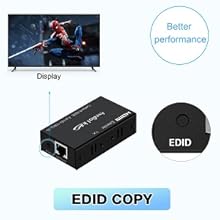
The EDID (Extended Display Identification Data) function ensures compatibility between the source and display devices. The avedio links HDMI Extender features an EDID button on the Transmitter (TX) unit for managing display information.
- EDID Copy Mode:
- Connect your primary display directly to the HDMI source device.
- Connect the HDMI Extender as described in Section 5, ensuring the display is connected to the RX unit's HDMI output.
- With all devices powered on and a signal present, press the EDID ബട്ടൺ on the Transmitter (TX) unit once. The extender will copy the EDID information from the connected display to ensure optimal compatibility.
- EDID Reset Mode:
- If you encounter display issues or wish to revert to a default EDID setting, press and hold the EDID ബട്ടൺ on the Transmitter (TX) unit for 3 seconds. This will reset the EDID to a default 1080p 3D stereo setting.
7. പ്രശ്നപരിഹാരം
If you experience issues with the HDMI Extender, refer to the following troubleshooting steps:
- No Picture or Signal:
- Ensure both the TX and RX units are powered on and their Status LEDs are illuminated.
- Verify all HDMI and Ethernet cables are securely connected.
- Test the HDMI cables directly between the source and display to confirm they are functional.
- Ensure the Ethernet cable is a Cat5e, Cat6, or Cat7 cable and is within the recommended length limits (165ft for Cat5e, 196ft for Cat6/7). Avoid Cat5 cables.
- Try a different Ethernet cable, preferably a high-quality Cat6 or Cat7 UTP cable. Flat cables may cause issues.
- Perform an EDID copy (refer to Section 6) to ensure compatibility with your display.
- Try resetting the EDID to default (refer to Section 6).
- Power cycle all devices (source, extender units, display) in the correct order: display first, then source.
- മിന്നിമറയുന്നതോ ഇടയ്ക്കിടെയുള്ളതോ ആയ സിഗ്നൽ:
- This often indicates a poor quality or excessively long Ethernet cable. Replace the Ethernet cable with a shorter, higher-quality Cat6 or Cat7 cable.
- Ensure there are no strong electromagnetic interference sources near the Ethernet cable.
- Check power connections for stability.
- ഓഡിയോ ഇല്ല:
- നിങ്ങളുടെ ഉറവിട ഉപകരണത്തിലെയും ഡിസ്പ്ലേയിലെയും ഓഡിയോ ക്രമീകരണങ്ങൾ പരിശോധിക്കുക.
- HDMI കേബിളുകൾ ഓഡിയോ ട്രാൻസ്മിഷനെ പിന്തുണയ്ക്കുന്നുണ്ടെന്ന് ഉറപ്പാക്കുക.
- Perform an EDID copy or reset.
- Picture Quality Issues (e.g., blurry, color distortion):
- Check the resolution settings on your source device. Ensure it is compatible with the extender and display.
- Use shorter, higher-quality HDMI and Ethernet cables.
8 സ്പെസിഫിക്കേഷനുകൾ
| ഫീച്ചർ | സ്പെസിഫിക്കേഷൻ |
|---|---|
| HDMI പതിപ്പ് | HDMI 1.4a |
| എച്ച്ഡിസിപി പതിപ്പ് | HDCP 1.4 |
| പിന്തുണയ്ക്കുന്ന പ്രമേയങ്ങൾ | 1080p/1080i/720p/576p/576i/480p/480i (24/50/60fs) |
| 3D പിന്തുണ | അതെ |
| ആഴത്തിലുള്ള വർണ്ണ പിന്തുണ | 36 ബിറ്റ് |
| പരമാവധി ട്രാൻസ്മിഷൻ ബാൻഡ്വിഡ്ത്ത് | 6.75 ജിബിപിഎസ് |
| പിന്തുണയ്ക്കുന്ന ഓഡിയോ ഫോർമാറ്റുകൾ | DTS-HD/Dolby-true HD/DTS/Dolby-AC3/DSD |
| Ethernet Cable Requirement | Cat5e/6/7 (UTP recommended) |
| Max Extension Distance (Cat5e) | 165 അടി (50 മീറ്റർ) |
| Max Extension Distance (Cat6/7) | 196 അടി (60 മീറ്റർ) |
| Input/Output HDMI Cable Distance | Up to 49 feet (15 meters) AWG26 HDMI standard cable |
| വൈദ്യുതി വിതരണം | DC 5V/1A (2 units included) |
| പ്രവർത്തന താപനില | 0°C മുതൽ 40°C വരെ (32°F മുതൽ 104°F വരെ) |
| പ്രവർത്തന ഹ്യുമിഡിറ്റി | 5% മുതൽ 90% വരെ RH (കണ്ടെൻസിംഗ് അല്ലാത്തത്) |
| അളവുകൾ (ഓരോ യൂണിറ്റിനും) | ഏകദേശം 5.31 x 3.94 x 2.76 ഇഞ്ച് (പാക്കേജ് അളവുകൾ) |
| ഭാരം (ഓരോ യൂണിറ്റിനും) | ഏകദേശം 8.8 ഔൺസ് (ഇനത്തിന്റെ ഭാരം) |
9 സുരക്ഷാ വിവരങ്ങൾ
- ഈ യൂണിറ്റ് വെള്ളം, ഈർപ്പം, അല്ലെങ്കിൽ അമിതമായ ഈർപ്പം എന്നിവയ്ക്ക് വിധേയമാക്കരുത്.
- നേരിട്ട് സൂര്യപ്രകാശത്തിലോ ചൂട് സ്രോതസ്സുകൾക്ക് സമീപമോ യൂണിറ്റ് സ്ഥാപിക്കരുത്.
- Use only the provided power adapters. Using unauthorized power adapters may damage the device and void the warranty.
- യൂണിറ്റ് സ്വയം തുറക്കാനോ നന്നാക്കാനോ ശ്രമിക്കരുത്. എല്ലാ സേവനങ്ങളും യോഗ്യതയുള്ള ഉദ്യോഗസ്ഥരെ ഏൽപ്പിക്കുക.
- ഉപകരണം കുട്ടികളിൽ നിന്ന് അകറ്റി നിർത്തുക.
- അമിതമായി ചൂടാകുന്നത് തടയാൻ യൂണിറ്റുകൾക്ക് ചുറ്റും ശരിയായ വായുസഞ്ചാരം ഉറപ്പാക്കുക.
10. ഉപഭോക്തൃ പിന്തുണ
For technical assistance or product inquiries, please contact avedio links customer support. Refer to the product packaging or the official avedio links webബന്ധപ്പെടാനുള്ള വിവരങ്ങൾക്കുള്ള സൈറ്റ്.
Please have your product model number (HDMI Extender 196FT) and purchase details ready when contacting support.


