1. ആമുഖം
This manual provides detailed instructions for the setup, operation, maintenance, and troubleshooting of your MUNBYN P068 Direct Thermal Receipt Printer. The P068 is a high-speed POS printer designed for efficient receipt printing, featuring an auto-cutter and multiple connectivity options.

Figure 1.1: MUNBYN P068 Direct Thermal Receipt Printer
പ്രധാന സവിശേഷതകൾ:
- High-speed printing up to 300mm/sec.
- Automatic paper cutter for neat receipt separation.
- Incoming order reminder with sound and light indicator (can be disabled).
- DIP switches for direct configuration of print functions.
- Multiple interface connections: USB, Serial, and Ethernet.
- Wall-hanging design for flexible placement.
2. സജ്ജീകരണവും ഇൻസ്റ്റാളേഷനും
2.1 പായ്ക്ക് ചെയ്യലും പ്രാരംഭ പരിശോധനയും
Carefully remove the printer from its packaging. Verify that all components are present: the printer unit, power adapter, USB cable, and any included documentation. Inspect the printer for any signs of physical damage.
2.2 പ്രിന്റർ ബന്ധിപ്പിക്കുന്നു
The MUNBYN P068 supports USB, Serial, and Ethernet connections. Choose the appropriate connection method for your POS system.

Figure 2.1: Three Interfaces Connection
- USB കണക്ഷൻ: Connect the square end of the USB cable to the printer's USB port and the rectangular end to an available USB port on your computer or POS system.
- സീരിയൽ കണക്ഷൻ: Connect the serial cable to the printer's serial port and to the serial port on your computer or POS system.
- Ethernet (LAN) Connection: Connect an Ethernet cable from the printer's LAN port to your network router or switch. This method requires network configuration.
- പവർ കണക്ഷൻ: Connect the power adapter to the printer's power input and then plug it into a suitable power outlet.
2.3 ഡ്രൈവർ ഇൻസ്റ്റലേഷൻ
For proper functionality, especially with Windows-based systems, you will need to install the printer driver. The driver can typically be found on the manufacturer's website or on an included CD/USB drive. Follow the on-screen instructions during installation.
2.4 തെർമൽ പേപ്പർ ലോഡുചെയ്യുന്നു
The printer uses 80mm wide thermal paper rolls. To load paper:
- Open the paper cover by pressing the release latch.
- Insert the thermal paper roll with the paper feeding from the bottom, ensuring the leading edge is straight.
- കട്ടറിന് അപ്പുറത്തേക്ക് ഒരു ചെറിയ അളവിലുള്ള പേപ്പർ പുറത്തെടുക്കുക.
- പേപ്പർ കവർ അതിന്റെ സ്ഥാനത്ത് ക്ലിക്കു ചെയ്യുന്നത് വരെ ദൃഡമായി അടയ്ക്കുക.
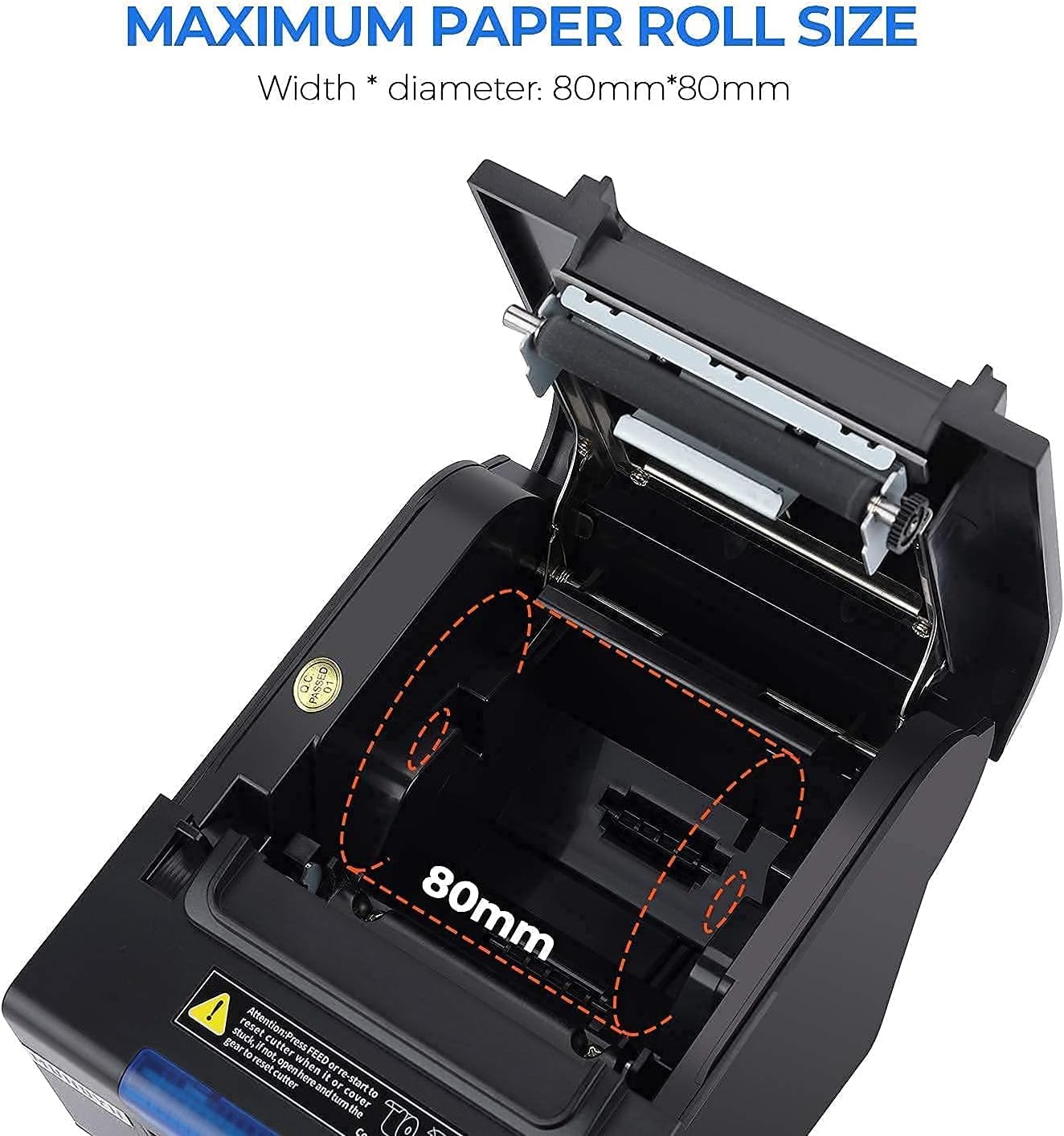
Figure 2.2: Maximum Paper Roll Size and Loading
2.5 ഡിഐപി സ്വിച്ച് ക്രമീകരണങ്ങൾ
The printer features DIP switches on the bottom for direct configuration of various functions without requiring software adjustments. These include settings for the auto-cutter, beeper, print density, and character codes.

Figure 2.3: DIP Switch Functions
Refer to the table in Figure 2.3 for specific switch functions and their corresponding ON/OFF positions. Use a small tool to adjust the switches.
2.6 Wall Hanging Design
The MUNBYN P068 printer supports wall mounting. Two hanging holes are located on the bottom of the printer for this purpose, allowing for space-saving installation in various environments such as kitchens or retail counters.

Figure 2.4: Wall Mount Design
3. പ്രിന്റർ പ്രവർത്തിപ്പിക്കൽ
3.1 പവർ ഓൺ/ഓഫ്
To power on the printer, press the power switch located on the front or side of the unit. The indicator lights will illuminate. To power off, press the switch again.
3.2 Printing Receipts
Once connected and drivers are installed, the printer will receive print commands from your POS software or application. Ensure the paper roll is correctly loaded before initiating print jobs.

Figure 3.1: High-Speed Printing Mechanism
3.3 Automatic Paper Cutter
The integrated auto-cutter will automatically cut receipts after each print job, ensuring clean and organized output. This feature can be enabled or disabled via the DIP switches.
3.4 Incoming Order Reminder
The printer is equipped with an incoming order reminder system, which includes a sound and light indicator. This feature alerts staff to new orders, helping to prevent missed transactions. The reminder system can be configured or closed using the DIP switches.
4. പരിപാലനം
4.1 പ്രിന്റർ വൃത്തിയാക്കുന്നു
പതിവായി വൃത്തിയാക്കുന്നത് പ്രിന്റ് ഗുണനിലവാരം നിലനിർത്താനും നിങ്ങളുടെ പ്രിന്ററിന്റെ ആയുസ്സ് വർദ്ധിപ്പിക്കാനും സഹായിക്കുന്നു.
- പ്രിന്റ് ഹെഡ്: ഒരു കോട്ടൺ സ്വാബ് ഉപയോഗിച്ച് ചെറുതായി നനയ്ക്കുക dampened with isopropyl alcohol to gently wipe the thermal print head. Allow it to dry completely before use. Clean the print head regularly, especially if print quality degrades.
- പേപ്പർ പാത്ത്: Remove any paper dust or debris from the paper path using a soft brush or compressed air.
- പുറം: പ്രിന്ററിന്റെ പുറംഭാഗം മൃദുവായ, d തുണി ഉപയോഗിച്ച് തുടയ്ക്കുക.amp തുണി. കഠിനമായ രാസവസ്തുക്കളോ ഉരച്ചിലുകളുള്ള ക്ലീനറുകളോ ഉപയോഗിക്കുന്നത് ഒഴിവാക്കുക.
4.2 Replacing the Paper Roll
When the paper roll is nearing its end, a red line may appear on the receipt, or the printer may stop feeding paper. Follow the instructions in Section 2.4 to replace the paper roll.
5. പ്രശ്നപരിഹാരം
This section addresses common issues you might encounter with your MUNBYN P068 printer.
| പ്രശ്നം | സാധ്യമായ കാരണം | പരിഹാരം |
|---|---|---|
| പ്രിന്റർ ഓണാക്കുന്നില്ല | Power cable loose; power outlet faulty; printer switch off. | Check power connections; try a different outlet; ensure power switch is ON. |
| No printing / Blank receipts | Paper loaded incorrectly (upside down); out of paper; driver not installed; incorrect port selected. | Reload paper correctly (thermal side facing print head); replace paper roll; install/reinstall driver; verify port settings in software. |
| Receipts cut off / Incorrect margins | Incorrect paper size setting in driver; DIP switch settings. | Verify paper size (80mm) in printer driver settings. Check DIP switch settings for character per line or other print density options. |
| കമ്പ്യൂട്ടർ പ്രിന്റർ തിരിച്ചറിഞ്ഞില്ല. | USB/Serial/Ethernet cable loose or faulty; driver not installed or corrupted. | Check cable connections; try a different cable or port; reinstall printer driver. |
| Auto-cutter not working | DIP switch for cutter is OFF; paper jam. | Check DIP switch settings (SW-1) to ensure auto-cutter is ON. Clear any paper jams. |
| അനുയോജ്യത പ്രശ്നങ്ങൾ | Printer not compatible with specific POS systems or operating systems. | Note: This printer is generally not compatible with iOS devices (iPad, iPhone), DoorDash, Square, or Ubereats. Always verify compatibility with your POS system before purchase. |
5.1 POS System Compatibility
It is important to note that the MUNBYN P068 printer has specific compatibility limitations. It is generally അനുയോജ്യമല്ല with iOS devices (such as iPad and iPhone), DoorDash, Square, or Ubereats. For other POS systems, please refer to the compatibility chart below or contact MUNBYN support for verification.

Figure 5.1: POS System Compatibility Chart
6 സ്പെസിഫിക്കേഷനുകൾ
| ഫീച്ചർ | സ്പെസിഫിക്കേഷൻ |
|---|---|
| മോഡലിൻ്റെ പേര് | ITPP068 |
| പ്രിൻ്റിംഗ് ടെക്നോളജി | തെർമൽ |
| പരമാവധി പ്രിന്റ് വേഗത (മോണോക്രോം) | 300 മിമി/സെക്കൻഡ് |
| പരമാവധി കറുപ്പും വെളുപ്പും പ്രിന്റ് റെസല്യൂഷൻ | 203 ഡിപിഐ |
| കണക്റ്റിവിറ്റി ടെക്നോളജി | USB, ഇഥർനെറ്റ്, സീരിയൽ |
| പ്രത്യേക ഫീച്ചർ | Auto-cutter |
| പരമാവധി മീഡിയ വലുപ്പം | 7.62cm x 22.86cm (3 1/8" x 230' Inches) |
| ഉൽപ്പന്ന അളവുകൾ | 7.8 x 5.8 x 5.4 ഇഞ്ച് (5.8"D x 7.8"W x 5.4"H) |
| ഇനത്തിൻ്റെ ഭാരം | 5.15 പൗണ്ട് |
| നിറം | കറുപ്പ് |
| അനുയോജ്യമായ ഉപകരണങ്ങൾ | Laptops (Windows OS) |
| പ്രിന്റർ ഇങ്ക് തരം | No Ink (Thermal) |
| യു.പി.സി | 653334974457 |
7. വാറൻ്റിയും പിന്തുണയും
7.1 വാറൻ്റി വിവരങ്ങൾ
The MUNBYN P068 Receipt Printer comes with a Full Warranty, typically covering the product for 2 years from the date of purchase. Please refer to your purchase documentation or the official MUNBYN webനിർദ്ദിഷ്ട വാറന്റി നിബന്ധനകൾക്കും വ്യവസ്ഥകൾക്കും സൈറ്റ്.
7.2 ഉപഭോക്തൃ പിന്തുണ
MUNBYN offers comprehensive customer support to assist with any inquiries or issues you may encounter.

Figure 7.1: MUNBYN Support Services
- 24/7 സേവനം: സഹായം മുഴുവൻ സമയവും ലഭ്യമാണ്.
- റിമോട്ട് സജ്ജീകരണം: Support for setting up your printer remotely.
- Local Tech Support: Access to local technical assistance.
- എങ്ങനെ ചെയ്യാം വീഡിയോകൾ: Instructional videos are available to guide you through various processes.
For support, please visit the official MUNBYN website or contact their customer service directly using the contact information provided with your product or on their webസൈറ്റ്.


