ആമുഖം
This manual provides essential information for the installation, operation, and maintenance of your Intel 8th Gen Core i5-8400 Processor. The Intel Core i5-8400 is a powerful desktop processor featuring 6 processing cores and 6 threads, designed to deliver enhanced performance for mainstream PC users. It includes Intel UHD Graphics 630 for a rich visual experience and supports two-channel DDR4 memory technology up to 64 GB at 2666 MT/s. This processor requires a motherboard based on the Intel 300 series chipset.
പാക്കേജ് ഉള്ളടക്കം
Upon opening the box, you will typically find the following items:
- ഇന്റൽ കോർ i5-8400 പ്രോസസർ
- Intel Stock Heat Sink and Fan (with pre-applied thermal paste)
- ഉപയോക്തൃ മാനുവൽ / ഡോക്യുമെന്റേഷൻ
- Intel Core i5 Sticker

Figure 1: Retail packaging of the Intel Core i5-8400 Processor, showing the "CORE i5 8TH GEN" branding and key features.
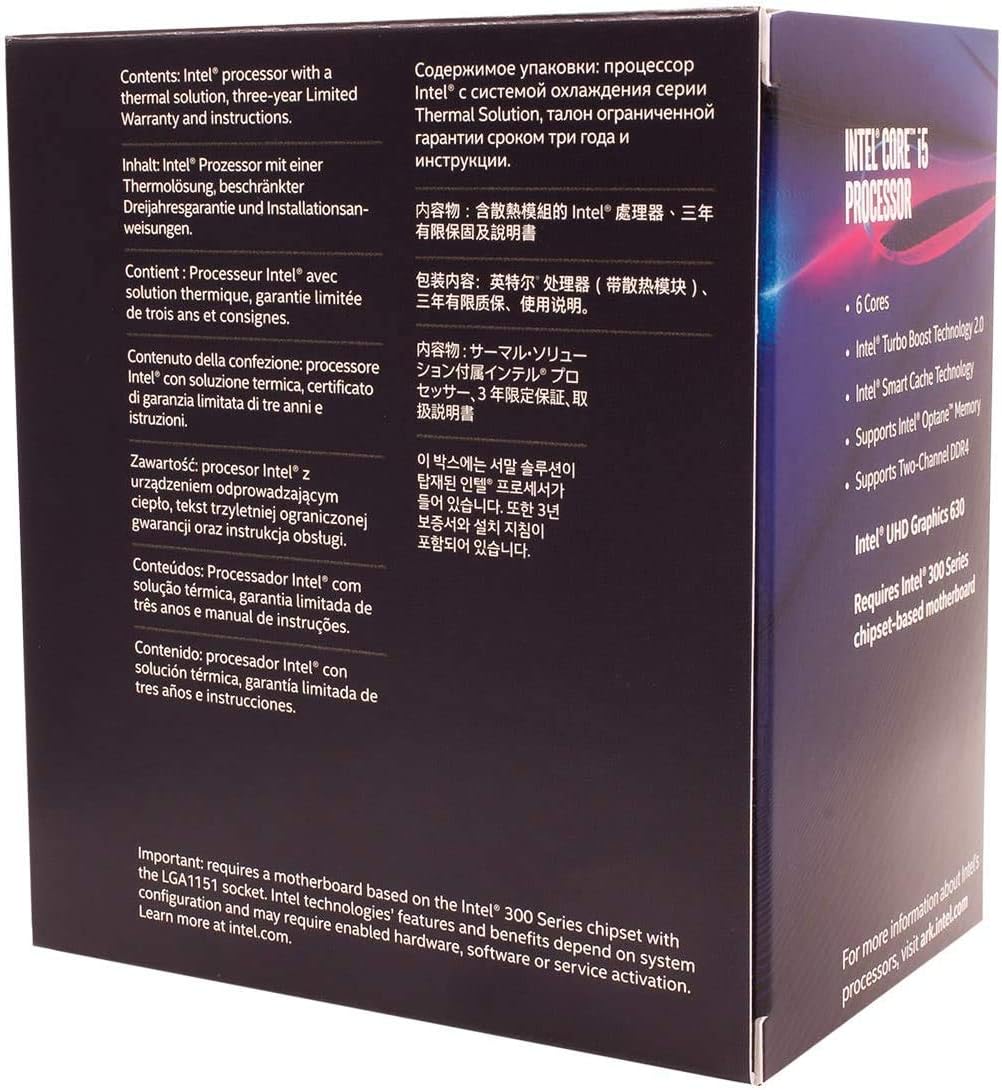
ചിത്രം 2: പിൻഭാഗം view of the processor box, displaying contents and compatibility information in multiple languages. It highlights the requirement for an Intel 300 Series chipset motherboard.
സജ്ജീകരണവും ഇൻസ്റ്റാളേഷനും
Installing your Intel Core i5-8400 processor requires careful handling and adherence to proper procedures. Ensure your system is powered off and unplugged before beginning installation.
- മദർബോർഡ് അനുയോജ്യത: Verify that your motherboard is based on the Intel 300 series chipset (e.g., Z370, B360, H310) and supports the LGA 1151 socket.
- സോക്കറ്റ് തയ്യാറാക്കുക: Open the CPU retention lever on the motherboard's LGA 1151 socket. Carefully lift the load plate.
- പ്രോസസ്സർ ഇൻസ്റ്റാൾ ചെയ്യുക: Gently align the processor with the socket, ensuring the gold triangle on the processor matches the triangle on the socket. Lower the processor straight down into the socket without forcing it.
- പ്രോസസ്സർ സുരക്ഷിതമാക്കുക: Close the load plate and push down the retention lever until it clicks into place.
- ഹീറ്റ് സിങ്കും ഫാനും ഇൻസ്റ്റാൾ ചെയ്യുക: The included Intel stock heat sink has pre-applied thermal paste. Align the four push-pins on the heat sink with the holes around the CPU socket on the motherboard. Press down firmly on each pin until it clicks, ensuring it is securely fastened. Connect the heat sink fan cable to the CPU_FAN header on your motherboard.

ചിത്രം 3: മുകളിൽ view of the Intel Core i5-8400 processor, showing the integrated heat spreader (IHS) with the Intel logo.

ചിത്രം 4: താഴെ view of the Intel Core i5-8400 processor, displaying the contact pads that interface with the motherboard's LGA 1151 socket.

Figure 5: The Intel stock heat sink and fan included with the processor, designed for efficient cooling under standard operating conditions. It comes with pre-applied thermal paste.
Important Note on Thermal Paste: Thermal paste is crucial for efficient heat transfer from the CPU to the heat sink. The included stock cooler has it pre-applied. If using an aftermarket cooler, ensure you apply a thin, even layer of thermal paste before mounting the cooler.
പ്രവർത്തന പരിഗണനകൾ
The Intel Core i5-8400 processor is designed for optimal performance within its specified parameters. Key operating features include:
- അടിസ്ഥാന ക്ലോക്ക് വേഗത: 2.80 GHz
- പരമാവധി ടർബോ ഫ്രീക്വൻസി: Up to 4.00 GHz (Intel Turbo Boost Technology 2.0 automatically increases frequency when needed)
- കോറുകൾ/ത്രെഡുകൾ: 6 കോറുകൾ / 6 ത്രെഡുകൾ
- കാഷെ: 9 എംബി ഇന്റൽ സ്മാർട്ട് കാഷെ
- സംയോജിത ഗ്രാഫിക്സ്: ഇൻ്റൽ UHD ഗ്രാഫിക്സ് 630
- മെമ്മറി പിന്തുണ: DDR4-2666, up to 64 GB, Dual Channel
- ഇന്റൽ ഒപ്റ്റെയ്ൻ മെമ്മറി: Supported for system acceleration when paired with a 2.5" HDD.
For best performance, ensure your operating system and drivers are up to date. Monitor CPU temperatures, especially during demanding tasks, to prevent thermal throttling.
മെയിൻ്റനൻസ്
ശരിയായ അറ്റകുറ്റപ്പണി നിങ്ങളുടെ പ്രോസസ്സറിന്റെ ദീർഘായുസ്സും സ്ഥിരതയുള്ള പ്രകടനവും ഉറപ്പാക്കുന്നു.
- പൊടി നീക്കം: Regularly clean dust from the CPU heat sink and fan, as well as other internal PC components. Dust accumulation can impede airflow and lead to overheating. Use compressed air for effective cleaning.
- തെർമൽ പേസ്റ്റ്: While the pre-applied thermal paste is durable, consider reapplying high-quality thermal paste every few years or if you notice increased temperatures. This requires carefully removing the heat sink, cleaning old paste, and applying new.
- ഡ്രൈവർ അപ്ഡേറ്റുകൾ: Keep your motherboard chipset drivers and Intel graphics drivers updated. Visit the official Intel webനിങ്ങളുടെ മദർബോർഡ് നിർമ്മാതാവിന്റെയോ webഏറ്റവും പുതിയ പതിപ്പുകൾക്കായുള്ള സൈറ്റ്.
- ബയോസ്/യുഇഎഫ്ഐ അപ്ഡേറ്റുകൾ: Periodically check for BIOS/UEFI updates for your motherboard. These updates can improve compatibility, stability, and performance.
ട്രബിൾഷൂട്ടിംഗ്
If you encounter issues with your Intel Core i5-8400 processor, refer to the following common troubleshooting steps:
| പ്രശ്നം | സാധ്യമായ കാരണം | പരിഹാരം |
|---|---|---|
| സിസ്റ്റം ബൂട്ട് ചെയ്യുന്നില്ല / ഡിസ്പ്ലേ ഇല്ല | Improper CPU installation, incompatible motherboard, RAM issues. |
|
| Overheating / System shutdowns | Improper heat sink installation, insufficient thermal paste, poor airflow. |
|
| Poor performance / Lag | Outdated drivers, background processes, thermal throttling. |
|
സ്പെസിഫിക്കേഷനുകൾ
- പ്രോസസർ മോഡൽ: ഇൻ്റൽ കോർ i5-8400
- മോഡൽ നമ്പർ: ബിഎക്സ് 80684ഐ58400
- Cores / Threads: 6 കോറുകൾ / 6 ത്രെഡുകൾ
- അടിസ്ഥാന ക്ലോക്ക് വേഗത: 2.80 GHz
- പരമാവധി ടർബോ ഫ്രീക്വൻസി: 4.00 GHz
- കാഷെ: 9 എംബി ഇന്റൽ സ്മാർട്ട് കാഷെ
- സംയോജിത ഗ്രാഫിക്സ്: ഇൻ്റൽ UHD ഗ്രാഫിക്സ് 630
- ടിഡിപി: 65W
- സോക്കറ്റ്: LGA 1151
- മെമ്മറി പിന്തുണ: DDR4-2666, Dual Channel, up to 64 GB
- ഉൽപ്പന്ന അളവുകൾ: 4.57 x 2.76 x 3.98 ഇഞ്ച്
- ഇനത്തിൻ്റെ ഭാരം: 2.11 ഔൺസ്
വാറൻ്റിയും പിന്തുണയും
The Intel Core i5-8400 Processor typically comes with a three-year limited warranty from Intel. For detailed warranty information, terms, and conditions, please refer to the documentation included in your product box or visit the official Intel support webസൈറ്റ്.
സാങ്കേതിക പിന്തുണ, ഡ്രൈവർ ഡൗൺലോഡുകൾ, അധിക ഉറവിടങ്ങൾ എന്നിവയ്ക്കായി, ദയവായി സന്ദർശിക്കുക ഇന്റൽ പിന്തുണ Webസൈറ്റ്.


