1. ആമുഖം
The Fortinet FortiGate-60E-POE is a compact, all-in-one network security appliance designed to deliver comprehensive threat protection for small to medium-sized businesses and branch offices. This device integrates multiple security functions, including firewall, VPN, intrusion prevention, antivirus, web filtering, and application control, into a single platform. The Power over Ethernet (PoE) capabilities simplify deployment for connected devices. This manual provides essential information for the proper installation, configuration, and maintenance of your FortiGate-60E-POE appliance.
2 സുരക്ഷാ വിവരങ്ങൾ
Please read all safety instructions before operating the device. Failure to follow these instructions may result in electric shock, fire, or damage to the product. Keep this manual for future reference.
- ഊർജ്ജ സ്രോതസ്സ്: Use only the power adapter supplied with the device. Ensure the power outlet is properly grounded.
- വെൻ്റിലേഷൻ: വെന്റിലേഷൻ ദ്വാരങ്ങളൊന്നും തടയരുത്. അമിതമായി ചൂടാകുന്നത് തടയാൻ ഉപകരണത്തിന് ചുറ്റും മതിയായ വായുസഞ്ചാരം ഉറപ്പാക്കുക.
- പരിസ്ഥിതി: നേരിട്ട് സൂര്യപ്രകാശം, താപ സ്രോതസ്സുകൾ, ഈർപ്പം എന്നിവയിൽ നിന്ന് അകന്ന്, വരണ്ടതും നന്നായി വായുസഞ്ചാരമുള്ളതുമായ സ്ഥലത്ത് ഉപകരണം പ്രവർത്തിപ്പിക്കുക.
- സേവനം: ഈ ഉൽപ്പന്നം സ്വയം സേവിക്കാൻ ശ്രമിക്കരുത്. യോഗ്യതയുള്ള സേവന ഉദ്യോഗസ്ഥർക്ക് എല്ലാ സേവനങ്ങളും റഫർ ചെയ്യുക.
3. പാക്കേജ് ഉള്ളടക്കം
Verify that your package contains the following items. If any item is missing or damaged, please contact your vendor.
- FortiGate-60E-POE Appliance
- പവർ അഡാപ്റ്റർ
- ഇഥർനെറ്റ് കേബിൾ
- ദ്രുത ആരംഭ ഗൈഡ്
4. ഉൽപ്പന്നം കഴിഞ്ഞുview
4.1 ഫ്രണ്ട് പാനൽ
The front panel of the FortiGate-60E-POE features status indicators and network ports for connectivity and monitoring.

ചിത്രം 4.1: ഫ്രണ്ട് view of the FortiGate-60E-POE. This image displays the front panel of the FortiGate-60E-POE, featuring the Fortinet logo, model name, and various LED indicators. From left to right, the LEDs include PWR (Power), STATUS, HA (High Availability), and PoE status indicators (A and B). To the right are individual Link/Act and Speed LEDs for each of the network ports (A, B, 1-5, DMZ, WAN1, WAN2).
- PWR LED: Indicates power status. Green for normal operation.
- സ്റ്റാറ്റസ് LED: സിസ്റ്റം സ്റ്റാറ്റസ് സൂചിപ്പിക്കുന്നു.
- HA LED: Indicates High Availability status.
- PoE LEDs (A, B): Indicate Power over Ethernet status for respective ports.
- ലിങ്ക്/ആക്റ്റ് LED-കൾ: ഓരോ പോർട്ടിനുമുള്ള നെറ്റ്വർക്ക് ലിങ്കും പ്രവർത്തനവും സൂചിപ്പിക്കുക.
- സ്പീഡ് എൽഇഡികൾ: Indicate connection speed for each port.
4.2 പിൻ പാനൽ
The rear panel provides essential connectivity ports for power, console access, USB devices, and network interfaces.
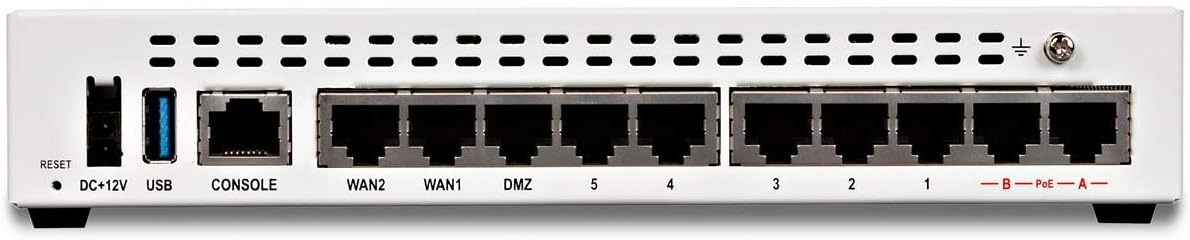
ചിത്രം 4.2: പിൻഭാഗം view of the FortiGate-60E-POE. This image displays the rear panel of the FortiGate-60E-POE. From left to right, it shows a Reset button, DC+12V power input, a USB port, a CONSOLE port (RJ45), WAN2, WAN1, DMZ, and five LAN ports (1-5). On the far right, there are two PoE ports labeled A and B, and a grounding screw.
- റീസെറ്റ് ബട്ടൺ: ഫാക്ടറി ഡിഫോൾട്ട് ക്രമീകരണങ്ങൾ പുനഃസ്ഥാപിക്കാൻ ഉപയോഗിക്കുന്നു.
- ഡിസി+12വി: പവർ ഇൻപുട്ട് കണക്റ്റർ.
- USB പോർട്ട്: For connecting USB devices (e.g., external storage, 3G/4G modem).
- കൺസോൾ പോർട്ട്: RJ45 port for command-line interface (CLI) access.
- WAN1/WAN2 Ports: Wide Area Network interfaces for internet connectivity.
- DMZ Port: Demilitarized Zone port for public-facing servers.
- LAN പോർട്ടുകൾ (1-5): Local Area Network ports for internal network devices.
- PoE Ports (A, B): Power over Ethernet ports for compatible devices.
5. സജ്ജീകരണം
5.1 ഫിസിക്കൽ ഇൻസ്റ്റലേഷൻ
- പ്ലേസ്മെൻ്റ്: Place the FortiGate appliance on a stable, flat surface or mount it in a rack (if applicable, using a separately purchased rackmount kit). Ensure proper ventilation.
- പവർ കണക്ഷൻ: Connect the supplied power adapter to the DC+12V port on the rear panel and then plug it into a grounded electrical outlet.
- ഗ്രൗണ്ടിംഗ്: For optimal protection, connect a grounding wire to the grounding screw on the rear panel and to a suitable earth ground.
5.2 പ്രാരംഭ നെറ്റ്വർക്ക് കണക്ഷൻ
- LAN-ലേക്ക് കണക്റ്റുചെയ്യുക: Connect an Ethernet cable from one of the LAN ports (e.g., port 1) on the FortiGate to your management computer.
- WAN-ലേക്ക് കണക്റ്റുചെയ്യുക: Connect an Ethernet cable from your internet service provider's modem or router to the WAN1 port on the FortiGate.
- പവർ ഓൺ: Ensure the power adapter is connected and the device powers on. The PWR LED on the front panel should illuminate green.
5.3 അടിസ്ഥാന കോൺഫിഗറേഷൻ ആക്സസ്
You can access the FortiGate for initial configuration via a web browser (GUI) or the command-line interface (CLI).
- GUI ആക്സസ്: എ തുറക്കുക web browser on your management computer and navigate to
https://192.168.1.99(default IP address). Log in with the default usernameadminand no password. - CLI ആക്സസ്: Connect a console cable from your computer's serial port to the CONSOLE port on the FortiGate. Use a terminal emulator (e.g., PuTTY) with settings: 9600 baud, 8 data bits, no parity, 1 stop bit, no flow control.
6. പ്രവർത്തിക്കുന്നു
Once the initial setup is complete, you can configure the FortiGate-60E-POE to secure your network. The device operates as a Unified Threat Management (UTM) appliance, providing multiple layers of security.
- Firewall Policies: Configure rules to control incoming and outgoing network traffic.
- VPN: Set up Virtual Private Networks for secure remote access or site-to-site connectivity.
- നുഴഞ്ഞുകയറ്റം തടയൽ സംവിധാനം (IPS): Protect against known exploits and vulnerabilities.
- ആന്റിവൈറസ്/ആന്റി-മാൽവെയർ: Scan traffic for malicious software.
- Web ഫിൽട്ടറിംഗ്: Control access to websites based on categories or specific URLs.
- ആപ്ലിക്കേഷൻ നിയന്ത്രണം: Manage and monitor application usage on your network.
- PoE പ്രവർത്തനം: The PoE ports (A, B) can power compatible devices such as IP phones or wireless access points, simplifying cabling.
For detailed configuration steps, refer to the FortiGate Administration Guide available on the Fortinet support webസൈറ്റ്.
7. പരിപാലനം
Regular maintenance ensures optimal performance and security of your FortiGate appliance.
- ഫേംവെയർ അപ്ഡേറ്റുകൾ: Regularly check for and apply the latest firmware updates from Fortinet to ensure you have the most current features and security patches.
- കോൺഫിഗറേഷൻ ബാക്കപ്പ്: Periodically back up your FortiGate configuration. This allows for quick restoration in case of an issue.
- നിരീക്ഷണം: Monitor system logs and performance metrics to identify potential issues early.
- വൃത്തിയാക്കൽ: Keep the device free from dust. Use a soft, dry cloth to clean the exterior. Do not use liquid cleaners.
8. പ്രശ്നപരിഹാരം
നിങ്ങൾ നേരിട്ടേക്കാവുന്ന പൊതുവായ പ്രശ്നങ്ങൾക്കുള്ള പരിഹാരങ്ങൾ ഈ വിഭാഗം നൽകുന്നു.
- ശക്തിയില്ല: If the PWR LED is off, ensure the power adapter is securely connected to both the device and a working electrical outlet.
- നെറ്റ്വർക്ക് കണക്റ്റിവിറ്റി ഇല്ല: Check Ethernet cable connections. Verify Link/Act LEDs are illuminated. Ensure correct IP configuration on your management computer.
- Cannot Access GUI: Verify your computer's IP address is in the same subnet as the FortiGate (e.g., 192.168.1.x). Try clearing your browser's cache or using a different browser.
- പാസ്വേഡ് മറന്നോ: If you forget the admin password, you may need to perform a factory reset using the RESET button or via the console port. Refer to the Fortinet documentation for the exact procedure.
- മന്ദഗതിയിലുള്ള പ്രകടനം: Check system resource utilization (CPU, memory) via the GUI or CLI. Review firewall policies and security profiles for potential bottlenecks.
9 സ്പെസിഫിക്കേഷനുകൾ
| ഫീച്ചർ | സ്പെസിഫിക്കേഷൻ |
|---|---|
| ബ്രാൻഡ് | ഫോർട്ടിനെറ്റ് |
| മോഡൽ നമ്പർ | FG-60E-POE-BDL-950-60 |
| ഉൽപ്പന്ന അളവുകൾ | 6.3 x 8.5 x 1.5 ഇഞ്ച് |
| ഇനത്തിൻ്റെ ഭാരം | 2.2 പൗണ്ട് |
| പ്രത്യേക ഫീച്ചർ | WPS (Wireless Protected Setup) |
| അനുയോജ്യമായ ഉപകരണങ്ങൾ | ലാപ്ടോപ്പ് |
| നിയന്ത്രണ രീതി | ആപ്പ് |
| യു.പി.സി | 739420810356, 609378724510 |
| ആദ്യ തീയതി ലഭ്യമാണ് | സെപ്റ്റംബർ 13, 2017 |
10. വാറൻ്റിയും പിന്തുണയും
Your FortiGate-60E-POE appliance includes a 5-year 24x7 FortiCare and FortiGuard Unified (UTM) Protection bundle, as indicated by the model FG-60E-POE-BDL-950-60. This bundle provides comprehensive support and security services.
- FortiCare: Offers technical support, hardware replacement, and firmware upgrades.
- FortiGuard: Provides real-time threat intelligence updates for services like antivirus, IPS, web filtering, and anti-spam.
For detailed warranty information, service terms, and to access technical support, please visit the official Fortinet support webസൈറ്റ്: support.fortinet.com.


