ആമുഖം
This manual provides essential instructions for the safe and effective use of your Sky Viper Drone Battery USB Charger. Please read this manual thoroughly before operating the charger to ensure proper function and longevity of your drone batteries.

Image: A set of two black USB chargers for Sky Viper drone batteries, each with a USB-A plug on one end and a small two-pin connector on the other, connected by a black cable.
സജ്ജമാക്കുക
Follow these steps to prepare your USB charger for use:
- അൺപാക്ക്: Carefully remove the USB charger from its packaging.
- പരിശോധിക്കുക: ചാർജറിന് എന്തെങ്കിലും കേടുപാടുകൾ സംഭവിച്ചിട്ടുണ്ടോ എന്ന് പരിശോധിക്കുക. കേടുപാടുകൾ സംഭവിച്ചിട്ടുണ്ടെങ്കിൽ ഉപയോഗിക്കരുത്.
- ഊർജ്ജ സ്രോതസ്സ്: Connect the USB-A plug of the charger to a compatible USB power source (e.g., computer USB port, USB wall adapter, power bank). Ensure the power source provides a stable 5V output.
- ഇൻഡിക്കേറ്റർ ലൈറ്റ്: Once connected to a power source, the charger's indicator light (if present) may illuminate, indicating it is ready for use.
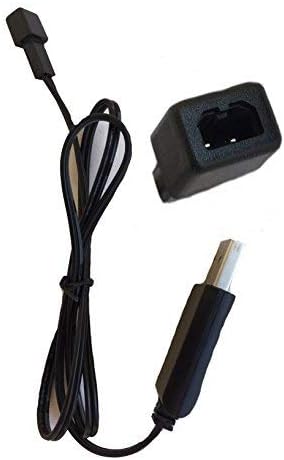
Image: A single black USB charger shown from the side, highlighting the USB-A connector and the small drone battery connector.
Video: This video demonstrates the Sky Viper USB charger, showing its components and how it can be handled. It highlights the USB-A connector and the drone battery connector.
പ്രവർത്തന നിർദ്ദേശങ്ങൾ
To charge your Sky Viper drone battery:
- ബാറ്ററി ബന്ധിപ്പിക്കുക: Carefully align the two-pin connector of the charger with the corresponding port on your Sky Viper drone battery. Gently push to ensure a secure connection. Do not force the connection.
- ചാർജിംഗ് സൂചകം: The charger's indicator light will typically change color or state to indicate that charging is in progress. Refer to your specific drone battery's manual for details on its charging status indicators.
- ചാർജിംഗ് സമയം: Charging times may vary depending on the battery's capacity and its current charge level. Avoid overcharging. Disconnect the battery once fully charged.
- വിച്ഛേദിക്കുക: Once charging is complete, carefully disconnect the battery from the charger, then disconnect the charger from the USB power source.
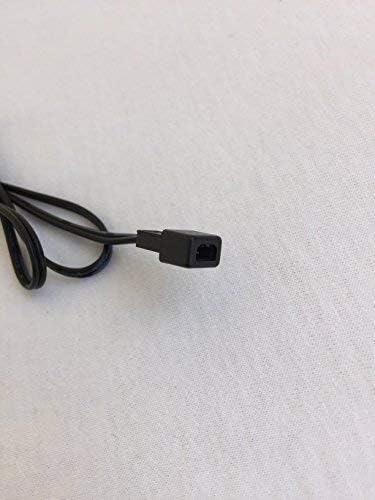
ചിത്രം: ഒരു ക്ലോസ്-അപ്പ് view of the small two-pin connector on the charger cable, which connects to the drone battery.

Image: The USB charger is displayed alongside a Sky Viper drone, illustrating the product's intended use and compatibility.
മെയിൻ്റനൻസ്
To ensure the longevity and proper function of your charger:
- വൃത്തിയാക്കൽ: Wipe the charger with a dry, soft cloth. Do not use liquid cleaners or solvents.
- സംഭരണം: നേരിട്ടുള്ള സൂര്യപ്രകാശത്തിൽ നിന്നും തീവ്രമായ താപനിലയിൽ നിന്നും മാറി തണുത്തതും വരണ്ടതുമായ സ്ഥലത്ത് ചാർജർ സൂക്ഷിക്കുക.
- കൈകാര്യം ചെയ്യൽ: Avoid bending or twisting the cable excessively. Do not pull on the cable to disconnect it; always grasp the plug.
- പരിശോധന: Periodically inspect the cable and connectors for any signs of wear or damage.
ട്രബിൾഷൂട്ടിംഗ്
| പ്രശ്നം | സാധ്യമായ കാരണം | പരിഹാരം |
|---|---|---|
| ചാർജർ ഇൻഡിക്കേറ്റർ ലൈറ്റ് ഓണാകുന്നില്ല. | No power from USB source, faulty USB port, or damaged charger. | Try a different USB power source or port. Ensure the USB plug is fully inserted. If the issue persists, the charger may be faulty. |
| ബാറ്ററി ചാർജ് ചെയ്യുന്നില്ല. | Loose battery connection, incompatible battery, or battery fault. | Ensure the battery connector is securely attached to the charger. Verify the battery is compatible with this charger. Test with a different battery if available. |
| സ്ലോ ചാർജിംഗ്. | Low power USB source. | Use a USB power source with higher output (e.g., a wall adapter instead of a computer port). |
സ്പെസിഫിക്കേഷനുകൾ
- ബ്രാൻഡ്: സ്കൈ വൈപ്പർ
- മോഡൽ നമ്പർ: 00
- ഇൻപുട്ട് വോളിയംtage: 240 വോൾട്ട്
- Putട്ട്പുട്ട് വോളിയംtage: 3.7 വോൾട്ട്
- നിറം: കറുപ്പ്
- ഇനത്തിൻ്റെ ഭാരം: 0.352 ഔൺസ്
- പാക്കേജ് അളവുകൾ: 3.74 x 2.28 x 0.51 ഇഞ്ച്
- UPC: 798896225866
- ആദ്യം ലഭ്യമായ തീയതി: സെപ്റ്റംബർ 16, 2017
Note: The "Input Voltage: 240 Volts" specification likely refers to the AC input for a compatible wall adapter, as USB power sources typically provide 5V DC. The charger itself is designed to accept 5V DC from a USB port.
വാറൻ്റിയും പിന്തുണയും
For warranty information and customer support, please refer to the official Sky Viper website or contact the retailer where the product was purchased. Specific warranty terms and support contact details are not provided in this manual.


