1. ആമുഖം
The Walfront KG316T Microcomputer Control Power Timer Switch is a versatile digital programmable timer relay designed to automatically control various electrical equipment. It allows users to set specific ON/OFF times for appliances, street lamps, neon lamps, production equipment, radio and television systems, and other industrial or home devices. This manual provides detailed instructions for installation, operation, and maintenance of your timer switch.
2 സുരക്ഷാ വിവരങ്ങൾ
WARNING: Risk of Electric Shock. Disconnect power before installation or servicing.
- Always ensure the power supply is disconnected before attempting any wiring or installation.
- Installation should be performed by a qualified electrician or knowledgeable individual to prevent electric shock or damage to the device.
- Do not operate the timer switch in wet or damp വ്യവസ്ഥകൾ.
- എല്ലാ കണക്ഷനുകളും സുരക്ഷിതവും ശരിയായി ഇൻസുലേറ്റ് ചെയ്തതുമാണെന്ന് ഉറപ്പാക്കുക.
- Do not exceed the specified load capacity of the switch.
3. ഉൽപ്പന്നം കഴിഞ്ഞുview
The KG316T timer switch features an LCD display for easy programming and monitoring, along with several control buttons and indicator lights.
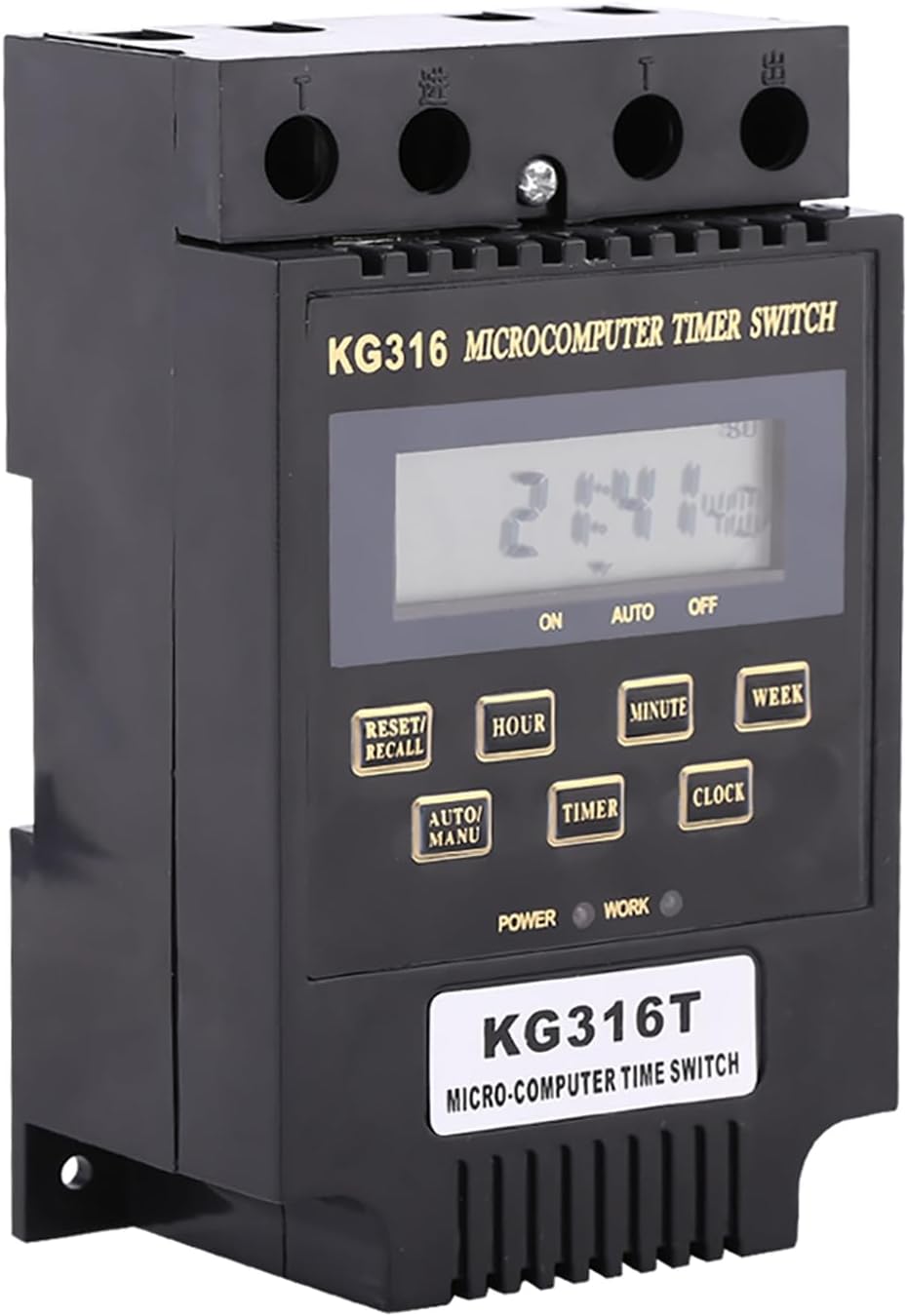
ചിത്രം 3.1: മുൻഭാഗം view of the KG316T Timer Switch, showing the LCD display and control buttons.

ചിത്രം 3.2: കോണാകൃതിയിലുള്ളത് view of the KG316T Timer Switch, illustrating its physical dimensions (120mm length, 74mm width, 51mm height).
3.1 ഘടകങ്ങളും ഡിസ്പ്ലേയും
- LCD ഡിസ്പ്ലേ: Shows current time, program status (ON/AUTO/OFF), and programming parameters.
- ബട്ടണുകൾ:
- RESET/RECALL: Resets settings or recalls programs.
- മണിക്കൂർ: Adjusts hour during time setting or programming.
- മിനിറ്റ്: Adjusts minute during time setting or programming.
- ആഴ്ച: Selects day(s) of the week for programs.
- AUTO/MANU: Toggles between Automatic and Manual modes.
- ടൈമർ: Enters programming mode for ON/OFF settings.
- ക്ലോക്ക്: Used to set the current time and exit programming mode.
- ഇൻഡിക്കേറ്റർ ലൈറ്റുകൾ:
- പവർ (ചുവപ്പ്): Indicates that the circuit is powered.
- WORK (Green): Indicates that the switch is closed (output is active).

Figure 3.3: Comparison of the 'New Type' and 'Old Type' KG316T models. Functionality remains consistent.
4 സ്പെസിഫിക്കേഷനുകൾ
| ഫീച്ചർ | സ്പെസിഫിക്കേഷൻ |
|---|---|
| ഇൻപുട്ട് വോളിയംtage | AC110V, AC220V (model dependent) |
| വാല്യംtagഇ വർഗ്ഗീകരണം | 180V മുതൽ 240V വരെ |
| Switch Load Capacity | 10A (resistive), 10A (inductive) |
| പ്രോഗ്രാം ചെയ്യാവുന്ന ക്രമീകരണങ്ങൾ | 10 ON and 10 OFF (manual/automatic) |
| സമയ പരിധി | 1 മിനിറ്റ് മുതൽ 168 മണിക്കൂർ വരെ |
| പ്രവർത്തന താപനില | -25℃ മുതൽ 60℃ വരെ |
| ഈർപ്പം | 45-85% RH |
| പിശക് | ≤ 1s/24h |
| അളവുകൾ (L x W x H) | 4.72"D x 2.91"W x 2"H (120mm x 74mm x 51mm) |
| മെറ്റീരിയൽ | പ്ലാസ്റ്റിക് |
| ഇനത്തിൻ്റെ ഭാരം | 3.98 ഔൺസ് (ഏകദേശം 113 ഗ്രാം) |
5. സജ്ജീകരണം
5.1 Battery Installation (for 220V models)
The 110V version of this timer switch has an inbuilt battery for data storage. For the 220V version, an external AA battery (not included) is required to retain settings during power outages. Locate the battery compartment, insert one AA battery, ensuring correct polarity.
5.2 പ്രാരംഭ പവർ-അപ്പ്
Once wired correctly and power is supplied, the LCD display will illuminate. If the display is blank, check the power connection and battery (if applicable).
6. വയറിംഗ് നിർദ്ദേശങ്ങൾ
Proper wiring is crucial for the safe and correct operation of the timer switch. Refer to the diagrams and descriptions below. If you are unsure, consult a qualified electrician.

ചിത്രം 6.1: View of the KG316T timer switch terminals for wiring connections.
6.1 Direct Control Wiring (Single-Phase, Low Power)
This wiring method is suitable for single-phase powered electrical appliances with lower power consumption that falls within the switch's direct load capacity (10A resistive/inductive).
6.2 Single-Phase Expansion Wiring
For single-phase powered electrical appliances with higher power consumption than the direct load capacity of this switch, you will need an external alternating current contactor. The timer switch will control the coil voltage of this external contactor, which in turn handles the higher load.
6.3 Three-Phase Wiring (AC220V Control Coil)
For three-phase electrical appliances, with an AC220V control coil voltage, you will need an external three-phase AC contactor. The timer switch will activate or deactivate the coil of this contactor to control the three-phase load.
6.4 Three-Phase Wiring (AC380V Control Coil)
Similarly, for three-phase electrical appliances with an AC380V control coil voltage, you will need an external three-phase AC contactor. The timer switch will manage the operation of this contactor to control the three-phase power.
7. പ്രവർത്തന നിർദ്ദേശങ്ങൾ
7.1 Setting Clock (Present Time)
- Press and hold the "CLOCK" button.
- While holding "CLOCK", press "WEEK" to set the current day of the week.
- While holding "CLOCK", press "HOUR" to set the current hour.
- While holding "CLOCK", press "MINUTE" to set the current minute.
7.2 Setting Programs (ON/OFF Times)
The timer supports up to 10 ON and 10 OFF settings.
- Set "1 on": Press the "TIMER" button. The LCD will display "1 on" at the bottom left. Then press "HOUR" and "MINUTE" buttons to set the desired ON time for the first program.
- Set "1 off": Continue to press the "TIMER" button. The LCD will display "1 off" at the bottom left. Then press "HOUR" and "MINUTE" buttons to set the desired OFF time for the first program.
- Set Additional Programs: Continue to press the "TIMER" button. The LCD will successively display "2 on", "2 off", "3 on", "3 off" ... up to "10 on", "10 off". Repeat the process of setting HOUR and MINUTE for each desired ON/OFF program.
- Clearing Unused Programs: If you only need a few programs (e.g., "1 on", "1 off") and wish to clear the remaining ones, press the "TIMER" button until the desired program number is displayed (e.g., "2 on"). Then press the "RESET/RECALL" button. This will set the time for that program to "--:--" instead of "00:00" (shown on the LCD), effectively disabling it.
- സേവിംഗ് ക്രമീകരണങ്ങൾ: After completing all program settings, press the "CLOCK" button. The LCD will display the present time. If no button is pressed for 30 seconds, it will automatically display the present time and save the settings.
7.3 ഇൻഡിക്കേറ്റർ ലൈറ്റുകൾ മനസ്സിലാക്കൽ
- When connected to a circuit, the red light (POWER) indicates if the circuit is powered.
- ദി green light (WORK) indicates if the switch is closed (i.e., the output is active and power is being supplied to the connected appliance).
7.4 Using the AUTO/MANU Button
Press the "AUTO/MANU" button to cycle through different operating modes:
- ഓൺ: The switch is manually forced ON, overriding programmed settings.
- സ്വയമേവ: The switch operates according to the programmed ON/OFF times.
- ഓഫാണ്: The switch is manually forced OFF, overriding programmed settings.
To return to automatic operation, press the "AUTO/MANU" button until the LCD displays "AUTO".
7.5 Setting Days of the Week for Programs
After setting an ON/OFF program, you can specify which day or days of the week it should be active:
- Press the "TIMER" button to navigate to the desired program (e.g., "1 on").
- Then press the "WEEK" button repeatedly to cycle through various day combinations:
- Mon, Tue, Wed, Thu, Fri, Sat, Sun (All days)
- മോൺ
- ചൊവ്വ
- ... (Individual days)
- Mon, Tue, Wed, Thu, Fri (Weekdays)
- Sat, Sun (Weekends)
- Mon, Wed, Fri
- Tue, Thu, Sat
- Mon, Tue, Wed
- Thu, Fri, Sat
- And other combinations.
- Select the desired day combination for that specific program.
8. പരിപാലനം
- Keep the timer switch clean and free from dust. Use a soft, dry cloth for cleaning. Do not use abrasive cleaners or solvents.
- പ്രവർത്തന അന്തരീക്ഷം നിശ്ചിത താപനിലയിലും ഈർപ്പത്തിലും ഉള്ളതാണെന്ന് ഉറപ്പാക്കുക.
- If the 220V model uses an external AA battery, replace it periodically (e.g., annually) to ensure data retention during power outages.
- Regularly check wiring connections for tightness and signs of wear or damage.
9. പ്രശ്നപരിഹാരം
| പ്രശ്നം | സാധ്യമായ കാരണം | പരിഹാരം |
|---|---|---|
| LCD ഡിസ്പ്ലേ ശൂന്യമാണ് | No power supply; Battery drained (220V model); Loose connection. | Check power input; Replace AA battery (220V model); Verify all wiring connections are secure. |
| പ്രോഗ്രാം ചെയ്ത സമയങ്ങളിൽ ടൈമർ ഓൺ/ഓഫ് ആകുന്നില്ല. | Incorrect program settings; Timer is in MANU (manual) mode; Incorrect day of week setting. | Review and correct program times; Ensure timer is in "AUTO" mode using the AUTO/MANU button; Verify correct days are selected for programs. |
| Buttons are unresponsive or stuck | Physical defect; Debris under button. | Gently press the button multiple times; If persistent, contact customer support. |
| Red POWER light is off | ഇൻപുട്ട് പവർ ഇല്ല. | Check the main power supply to the timer switch. |
| Green WORK light is off when it should be on | Timer is in OFF or AUTO mode but not at an ON time; Overload protection activated. | Check program settings and current time; Ensure timer is in ON or AUTO mode at an active ON time; Verify load does not exceed 10A. |
10. വാറൻ്റിയും പിന്തുണയും
Walfront products are manufactured to high quality standards. For specific warranty details, please refer to the warranty card included with your purchase or visit the official Walfront website. If you encounter any issues not covered in this manual or require further assistance, please contact Walfront customer support through their official channels.


