ആമുഖം
ഗെയിമർമാർക്ക് അസാധാരണമായ പ്രകടനവും വിശ്വാസ്യതയും നൽകുന്നതിനാണ് ലോജിടെക് G603 ലൈറ്റ്സ്പീഡ് വയർലെസ് ഗെയിമിംഗ് മൗസ് രൂപകൽപ്പന ചെയ്തിരിക്കുന്നത്. വിപ്ലവകരമായ ഹീറോ ഒപ്റ്റിക്കൽ സെൻസറും ലൈറ്റ്സ്പീഡ് വയർലെസ് സാങ്കേതികവിദ്യയും ഉൾക്കൊള്ളുന്ന ഇത് കൃത്യമായ ട്രാക്കിംഗും അൾട്രാ-ഫാസ്റ്റ് പ്രതികരണ സമയവും നൽകുന്നു. ലോജിടെക് ജി ഹബ് സോഫ്റ്റ്വെയർ വഴി ഇരട്ട കണക്റ്റിവിറ്റി ഓപ്ഷനുകളും (ലൈറ്റ്സ്പീഡ്, ബ്ലൂടൂത്ത്) ഇഷ്ടാനുസൃതമാക്കാവുന്ന ക്രമീകരണങ്ങളും ഉപയോഗിച്ച് വഴക്കം വാഗ്ദാനം ചെയ്യുന്ന G603 മികച്ച ബാറ്ററി ലൈഫും വാഗ്ദാനം ചെയ്യുന്നു.
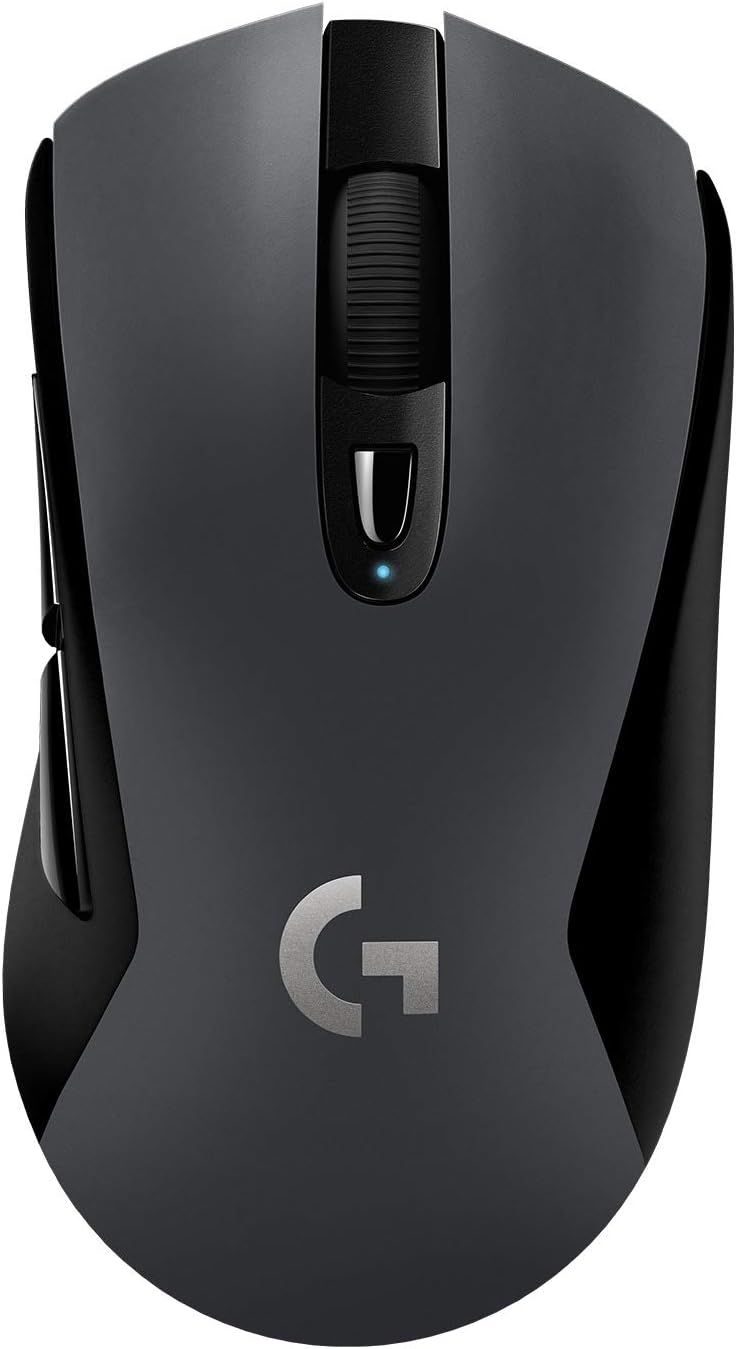
ലോജിടെക് G603 ലൈറ്റ്സ്പീഡ് വയർലെസ് ഗെയിമിംഗ് മൗസ്, ഷോasing അതിന്റെ എർഗണോമിക് ഡിസൈനും സെൻട്രൽ സ്ക്രോൾ വീലും.
സജ്ജമാക്കുക
പാക്കേജ് ഉള്ളടക്കം
ആരംഭിക്കുന്നതിന് മുമ്പ്, പാക്കേജിൽ എല്ലാ ഘടകങ്ങളും ഉണ്ടെന്ന് ഉറപ്പാക്കുക:
- ലോജിടെക് G603 വയർലെസ് ഗെയിമിംഗ് മൗസ്
- ലൈറ്റ്സ്പീഡ് യുഎസ്ബി നാനോ റിസീവർ
- USB റിസീവർ എക്സ്റ്റെൻഡർ കേബിൾ
- 2 AA ബാറ്ററികൾ (മുൻകൂട്ടി ഇൻസ്റ്റാൾ ചെയ്തതോ പ്രത്യേകം ഉൾപ്പെടുത്തിയതോ)

ലോജിടെക് G603 മൗസിന്റെയും അതിൽ ഉൾപ്പെടുത്തിയിരിക്കുന്ന ആക്സസറികളുടെയും ചിത്രീകരണം: രണ്ട് AA ബാറ്ററികൾ, ഒരു ലൈറ്റ്സ്പീഡ് USB നാനോ റിസീവർ, ഒരു റിസീവർ എക്സ്റ്റെൻഡർ കേബിൾ.
ബാറ്ററി ഇൻസ്റ്റാളേഷൻ
G603 മൗസ് രണ്ട് AA ബാറ്ററികളിലാണ് പ്രവർത്തിക്കുന്നത്. മൗസിന്റെ ഭാരവും ബാലൻസും നിങ്ങളുടെ ഇഷ്ടത്തിനനുസരിച്ച് ക്രമീകരിക്കാൻ നിങ്ങൾക്ക് ഒന്നോ രണ്ടോ ബാറ്ററികൾ ഉപയോഗിക്കാം. മൗസ് സാധാരണയായി ഒരു ബാറ്ററിയിൽ പ്രവർത്തിക്കുന്നു.
- ബാറ്ററി കമ്പാർട്ട്മെന്റ് വെളിപ്പെടുത്തുന്നതിന് മൗസിന്റെ മുകളിലെ കവർ പിന്നിൽ നിന്ന് പതുക്കെ ഉയർത്തുക.
- ശരിയായ പോളാരിറ്റി (+/-) ഉറപ്പാക്കിക്കൊണ്ട് ഒന്നോ രണ്ടോ AA ബാറ്ററികൾ ഇടുക.
- മുകളിലെ കവർ മാറ്റി, അത് ശരിയായ സ്ഥാനത്ത് ക്ലിക്കുചെയ്യുന്നതുവരെ ശരിയായി വിന്യസിക്കുക.

G603 മൗസിന്റെ നീക്കം ചെയ്യാവുന്ന മുകളിലെ കവർ, ബാറ്ററിയുടെയും USB റിസീവർ സംഭരണത്തിന്റെയും ആന്തരിക കമ്പാർട്ട്മെന്റ് കാണിക്കുന്നു.
കണക്റ്റിവിറ്റി
ലൈറ്റ്സ്പീഡ് വയർലെസ്, ബ്ലൂടൂത്ത് എന്നീ ഇരട്ട കണക്റ്റിവിറ്റി ഓപ്ഷനുകൾ G603 വാഗ്ദാനം ചെയ്യുന്നു.
- ലൈറ്റ്സ്പീഡ് വയർലെസ്: മികച്ച ഗെയിമിംഗ് പ്രകടനത്തിന്, ലൈറ്റ്സ്പീഡ് യുഎസ്ബി നാനോ റിസീവർ വഴി കണക്റ്റുചെയ്യുക. നിങ്ങളുടെ കമ്പ്യൂട്ടറിൽ ലഭ്യമായ ഒരു യുഎസ്ബി പോർട്ടിലേക്ക് റിസീവർ പ്ലഗ് ചെയ്യുക. മികച്ച സിഗ്നലിനായി, റിസീവർ മൗസിനോട് അടുത്ത് സ്ഥാപിക്കാൻ ഉൾപ്പെടുത്തിയിരിക്കുന്ന എക്സ്റ്റെൻഡർ കേബിൾ ഉപയോഗിക്കുക.
- ബ്ലൂടൂത്ത്: പൊതുവായ ഉപയോഗത്തിനോ ഒന്നിലധികം ഉപകരണങ്ങളിലേക്ക് കണക്റ്റുചെയ്യുന്നതിനോ, മൗസിന്റെ അടിയിലുള്ള സ്വിച്ച് ഉപയോഗിച്ച് മൗസ് ബ്ലൂടൂത്ത് മോഡിലേക്ക് മാറ്റുക. നിങ്ങളുടെ ഉപകരണത്തിന്റെ ബ്ലൂടൂത്ത് ക്രമീകരണങ്ങൾ വഴി നിങ്ങളുടെ ബ്ലൂടൂത്ത് പ്രവർത്തനക്ഷമമാക്കിയ ഉപകരണവുമായി ഇത് ജോടിയാക്കുക.

ലൈറ്റ്സ്പീഡ്, ബ്ലൂടൂത്ത് കണക്റ്റിവിറ്റി സൂചകങ്ങളും മോഡ് സ്വിച്ചും എടുത്തുകാണിക്കുന്ന G603 മൗസിന്റെ അടിഭാഗം.
മൗസ് പ്രവർത്തിപ്പിക്കൽ
പവർ മോഡുകൾ (HI/LO)
G603 ന്റെ അടിവശത്ത് ഒരു പവർ മോഡ് സ്വിച്ച് ഉണ്ട്, ഇത് നിങ്ങളെ HI (ഉയർന്ന) , LO (താഴ്ന്ന) മോഡുകൾക്കിടയിൽ ടോഗിൾ ചെയ്യാൻ അനുവദിക്കുന്നു, അല്ലെങ്കിൽ മൗസ് ഓഫ് ചെയ്യുന്നു.
- HI മോഡ്: ഗെയിമിംഗിന് അനുയോജ്യമായ 1ms റിപ്പോർട്ട് നിരക്കോടെ പീക്ക് പ്രകടനം നൽകുന്നു. രണ്ട് AA ബാറ്ററികളിൽ 500 മണിക്കൂർ വരെ തുടർച്ചയായ ഗെയിമിംഗ് വാഗ്ദാനം ചെയ്യുന്നു.
- LO മോഡ്: പൊതുവായ ഡെസ്ക്ടോപ്പ് ഉപയോഗത്തിന് അനുയോജ്യമായ, 8ms റിപ്പോർട്ട് നിരക്കോടെ ബാറ്ററി ലൈഫ് വർദ്ധിപ്പിക്കുന്നു. രണ്ട് AA ബാറ്ററികളിൽ 18 മാസം വരെ നിലനിൽക്കും.

G603 ന്റെ പവർ മോഡ് സ്വിച്ചിന്റെ ക്ലോസ്-അപ്പ്, HI (1ms), LO (8ms), OFF ക്രമീകരണങ്ങൾ എന്നിവ സൂചിപ്പിക്കുന്നു.
പ്രോഗ്രാം ചെയ്യാവുന്ന ബട്ടണുകളും DPI ഷിഫ്റ്റിംഗും
G603-ൽ 6 പ്രോഗ്രാമബിൾ ബട്ടണുകളുണ്ട്, അവയിൽ ഓൺ-ദി-ഫ്ലൈ DPI ഷിഫ്റ്റിംഗ് ഉൾപ്പെടുന്നു. ലോജിടെക് G HUB സോഫ്റ്റ്വെയർ ഉപയോഗിച്ച് നിങ്ങൾക്ക് ഈ ബട്ടണുകളും 5 സെൻസിറ്റിവിറ്റി ക്രമീകരണങ്ങളും ഇഷ്ടാനുസൃതമാക്കാൻ കഴിയും.
- DPI ബട്ടൺ: സ്ക്രോൾ വീലിന് താഴെയായി സ്ഥിതി ചെയ്യുന്ന ഈ ബട്ടൺ, നിങ്ങളുടെ മുൻകൂട്ടി ക്രമീകരിച്ച DPI ക്രമീകരണങ്ങളിലൂടെ സൈക്കിൾ ചെയ്യാൻ നിങ്ങളെ അനുവദിക്കുന്നു.
- ലോജിടെക് ജി ഹബ്: ഔദ്യോഗിക ലോജിടെക്കിൽ നിന്ന് ലോജിടെക് ജി ഹബ് ഡൗൺലോഡ് ചെയ്ത് ഇൻസ്റ്റാൾ ചെയ്യുക. webപൂർണ്ണ കസ്റ്റമൈസേഷൻ അൺലോക്ക് ചെയ്യാനുള്ള സൈറ്റ്. നിങ്ങൾക്ക് ഇഷ്ടാനുസൃത കമാൻഡുകൾ നൽകാനും മാക്രോകൾ കോൺഫിഗർ ചെയ്യാനും കോൺഫിഗറേഷൻ പ്രോ സംഭരിക്കാനും കഴിയും.fileമൗസിന്റെ ഓൺബോർഡ് മെമ്മറിയിലേക്ക് നേരിട്ട്.

എ വിശദമായി view G603 ന്റെ സ്ക്രോൾ വീലും അതിന് തൊട്ടുതാഴെയായി സ്ഥിതിചെയ്യുന്ന DPI സൈക്കിൾ ബട്ടണും.
ബാറ്ററി സ്റ്റാറ്റസ് ഇൻഡിക്കേറ്റർ
ബാറ്ററി ലെവൽ 15% എത്തുമ്പോൾ മൗസിലെ LED സ്റ്റാറ്റസ് ഇൻഡിക്കേറ്ററും ലോജിടെക് ജി ഹബ് സോഫ്റ്റ്വെയറും നിങ്ങളെ അറിയിക്കും, നിർണായക നിമിഷങ്ങളിൽ ബാറ്ററികൾ തീർന്നുപോകുന്നതിനുമുമ്പ് അവ മാറ്റിസ്ഥാപിക്കാൻ ഇത് നിങ്ങളെ അനുവദിക്കുന്നു.

രണ്ട് AA ബാറ്ററികൾ ഉപയോഗിച്ച് 500 മണിക്കൂർ വരെ ഉപയോഗത്തെ സൂചിപ്പിക്കുന്ന G603 ന്റെ വിപുലീകൃത ബാറ്ററി ലൈഫിന്റെ ദൃശ്യ പ്രാതിനിധ്യം.
മെയിൻ്റനൻസ്
വൃത്തിയാക്കൽ
മികച്ച പ്രകടനവും രൂപഭംഗിയും നിലനിർത്താൻ, നിങ്ങളുടെ G603 മൗസ് പതിവായി വൃത്തിയാക്കുക:
- മൗസിന്റെ പുറംഭാഗം തുടയ്ക്കാൻ മൃദുവായ, ലിന്റ് രഹിത തുണി ഉപയോഗിക്കുക.
- കഠിനമായ അഴുക്കിന്, ചെറുതായി dampതുണിയിൽ വെള്ളം അല്ലെങ്കിൽ നേരിയ ക്ലീനിംഗ് ലായനി ഉപയോഗിക്കുക. കഠിനമായ രാസവസ്തുക്കൾ ഒഴിവാക്കുക.
- സ്ക്രോൾ വീലിനും ബട്ടണുകൾക്കും ചുറ്റുമുള്ള പൊടിയും അവശിഷ്ടങ്ങളും നീക്കം ചെയ്യാൻ ഒരു കംപ്രസ് ചെയ്ത വായുവിന്റെ ക്യാൻ ഉപയോഗിക്കുക.
- അടിയിലുള്ള ഒപ്റ്റിക്കൽ സെൻസർ വൃത്തിയുള്ളതും തടസ്സങ്ങളില്ലാത്തതുമാണെന്ന് ഉറപ്പാക്കുക.
ബാറ്ററി കെയർ
ബാറ്ററി ലൈഫ് പരമാവധിയാക്കാനും പ്രശ്നങ്ങൾ തടയാനും:
- മൗസ് കൂടുതൽ നേരം ഉപയോഗിക്കുന്നില്ലെങ്കിൽ ബാറ്ററികൾ നീക്കം ചെയ്യുക.
- ഉയർന്ന നിലവാരമുള്ള ആൽക്കലൈൻ അല്ലെങ്കിൽ റീചാർജ് ചെയ്യാവുന്ന AA ബാറ്ററികൾ ഉപയോഗിക്കുക.
- തണുത്തതും വരണ്ടതുമായ സ്ഥലത്ത് ബാറ്ററികൾ സൂക്ഷിക്കുക.
ട്രബിൾഷൂട്ടിംഗ്
നിങ്ങളുടെ ലോജിടെക് G603 മൗസിൽ പ്രശ്നങ്ങൾ നേരിടുകയാണെങ്കിൽ, ഇനിപ്പറയുന്ന പരിഹാരങ്ങൾ പരീക്ഷിക്കുക:
- മൗസ് പ്രതികരിക്കുന്നില്ല:
- മൗസിന്റെ അടിയിലുള്ള പവർ മോഡ് സ്വിച്ച് പരിശോധിച്ച് അത് ഓഫ് അല്ല, HI അല്ലെങ്കിൽ LO ആയി സജ്ജീകരിച്ചിട്ടുണ്ടെന്ന് ഉറപ്പാക്കുക.
- ബാറ്ററികൾ ശരിയായി ഇൻസ്റ്റാൾ ചെയ്തിട്ടുണ്ടെന്നും ആവശ്യത്തിന് ചാർജ് ഉണ്ടെന്നും ഉറപ്പാക്കുക. ആവശ്യമെങ്കിൽ മാറ്റിസ്ഥാപിക്കുക.
- ലൈറ്റ്സ്പീഡ് ഉപയോഗിക്കുകയാണെങ്കിൽ, യുഎസ്ബി നാനോ റിസീവർ പ്രവർത്തിക്കുന്ന ഒരു യുഎസ്ബി പോർട്ടിലേക്ക് സുരക്ഷിതമായി പ്ലഗ് ചെയ്തിട്ടുണ്ടെന്ന് ഉറപ്പാക്കുക. മറ്റൊരു യുഎസ്ബി പോർട്ട് പരീക്ഷിക്കുക.
- നിങ്ങൾ ബ്ലൂടൂത്ത് ഉപയോഗിക്കുകയാണെങ്കിൽ, നിങ്ങളുടെ ഉപകരണത്തിൽ ബ്ലൂടൂത്ത് പ്രവർത്തനക്ഷമമാക്കിയിട്ടുണ്ടെന്നും മൗസ് ശരിയായി ജോടിയാക്കിയിട്ടുണ്ടെന്നും ഉറപ്പാക്കുക.
- കാലതാമസം അല്ലെങ്കിൽ ഇടവിട്ടുള്ള കണക്ഷൻ:
- മൗസും റിസീവറും/ഉപകരണവും തമ്മിലുള്ള ദൂരം കുറയ്ക്കുക.
- ലൈറ്റ്സ്പീഡ് റിസീവർ മൗസിന് അടുത്തേക്ക് കൊണ്ടുവരാൻ USB എക്സ്റ്റെൻഡർ കേബിൾ ഉപയോഗിക്കുക.
- തടസ്സമുണ്ടാക്കാൻ സാധ്യതയുള്ള മറ്റ് വയർലെസ് ഉപകരണങ്ങളിൽ നിന്ന് (ഉദാ: വൈ-ഫൈ റൂട്ടറുകൾ, കോർഡ്ലെസ് ഫോണുകൾ) മൗസ് നീക്കി അകറ്റി നിർത്തുക.
- DPI അല്ലെങ്കിൽ ബട്ടൺ കസ്റ്റമൈസേഷൻ പ്രവർത്തിക്കുന്നില്ല:
- ലോജിടെക് ജി ഹബ് സോഫ്റ്റ്വെയർ ഇൻസ്റ്റാൾ ചെയ്തിട്ടുണ്ടെന്നും കാലികമാണെന്നും ഉറപ്പാക്കുക.
- G HUB-ൽ മൗസ് തിരിച്ചറിയപ്പെടുന്നുണ്ടോ എന്നും നിങ്ങളുടെ പ്രോ ആണോ എന്നും പരിശോധിക്കുക.fileകൾ സജീവമാണ്.
- മൗസ് കഴ്സർ ക്രമരഹിതമോ ട്രാക്ക് ചെയ്യുന്നില്ലയോ:
- മൗസിന്റെ അടിയിലുള്ള ഒപ്റ്റിക്കൽ സെൻസർ വൃത്തിയാക്കുക.
- മൗസ് അനുയോജ്യമായ ഒരു പ്രതലത്തിലാണ് ഉപയോഗിക്കുന്നതെന്ന് ഉറപ്പാക്കുക (ഉദാ. ഒരു മൗസ് പാഡ്). ഉയർന്ന പ്രതിഫലനമുള്ളതോ സുതാര്യമായതോ ആയ പ്രതലങ്ങൾ ഒഴിവാക്കുക.
സ്പെസിഫിക്കേഷനുകൾ
| ഫീച്ചർ | വിശദാംശങ്ങൾ |
|---|---|
| ബ്രാൻഡ് | ലോജിടെക് |
| മോഡലിൻ്റെ പേര് | ലോജിടെക് G603 |
| ഇനം മോഡൽ നമ്പർ | 910-005103 |
| കണക്റ്റിവിറ്റി ടെക്നോളജി | ബ്ലൂടൂത്ത്, യുഎസ്ബി (ലൈറ്റ്സ്പീഡ് വയർലെസ്) |
| മൂവ്മെന്റ് ഡിറ്റക്ഷൻ ടെക്നോളജി | ഒപ്റ്റിക്കൽ (ഹീറോ സെൻസർ) |
| ഡിപിഐ ശ്രേണി | 200 മുതൽ 12,000 വരെ ഡിപിഐ |
| റിപ്പോർട്ട് നിരക്ക് (ലൈറ്റ്സ്പീഡ്) | 1 മി.സെ (HI മോഡ്) |
| റിപ്പോർട്ട് നിരക്ക് (LO മോഡ്) | 8 എം.എസ് |
| ബട്ടണുകളുടെ എണ്ണം | 6 (പ്രോഗ്രാം ചെയ്യാവുന്നത്) |
| പവർ ഉറവിടം | ബാറ്ററി പവർ (2 AA ബാറ്ററികൾ) |
| ബാറ്ററി ലൈഫ് (HI മോഡ്) | 500 മണിക്കൂർ വരെ |
| ബാറ്ററി ലൈഫ് (LO മോഡ്) | 18 മാസം വരെ |
| അളവുകൾ (L x W x H) | 12.4 x 6.8 x 4.3 സെ.മീ |
| ഇനത്തിൻ്റെ ഭാരം | 88 ഗ്രാം (മൗസിന് മാത്രം, ബാറ്ററികൾ ഇല്ലാതെ) |
| നിറം | കറുപ്പ് |
| ഹാർഡ്വെയർ പ്ലാറ്റ്ഫോം | PC |
| ഓപ്പറേറ്റിംഗ് സിസ്റ്റം | Windows 7 ഉം അതിനുശേഷമുള്ളതും |

ലോജിടെക് G603 മൗസിന്റെ ഏകദേശ അളവുകൾ ചിത്രീകരിക്കുന്ന ഡയഗ്രം.
വാറൻ്റിയും പിന്തുണയും
ലോജിടെക് ഉൽപ്പന്നങ്ങൾ ഉയർന്ന നിലവാരമുള്ള നിലവാരത്തിലാണ് നിർമ്മിക്കുന്നത്. വിശദമായ വാറന്റി വിവരങ്ങൾക്ക്, നിങ്ങളുടെ ഉൽപ്പന്നത്തിനൊപ്പം ഉൾപ്പെടുത്തിയിരിക്കുന്ന വാറന്റി കാർഡ് പരിശോധിക്കുക അല്ലെങ്കിൽ ഔദ്യോഗിക ലോജിടെക് പിന്തുണ സന്ദർശിക്കുക. webസൈറ്റ്.
കൂടുതൽ സഹായം, ട്രബിൾഷൂട്ടിംഗ് ഗൈഡുകൾ, ഡ്രൈവർ ഡൗൺലോഡുകൾ (ലോജിടെക് ജി ഹബ് ഉൾപ്പെടെ) എന്നിവയ്ക്കായി, ദയവായി ഔദ്യോഗിക ലോജിടെക് പിന്തുണ പേജ് സന്ദർശിക്കുക: