1. ആമുഖം
The Flashpoint R2 TTL Wireless Flash Receiver for Sony (model R2, also known as Godox X1R-S) is designed to provide reliable wireless triggering and control for Flashpoint R2 system flashes with Sony mirrorless cameras. This receiver enables advanced flash functions such as TTL (Through-The-Lens) automatic exposure and HSS (High-Speed Sync) up to 1/8000s, offering photographers greater flexibility and creative control over their lighting setups. This manual provides detailed instructions for setup, operation, maintenance, and troubleshooting to ensure optimal performance of your R2 receiver.
2. ഉൽപ്പന്നം കഴിഞ്ഞുview
2.1. ഉൾപ്പെടുത്തിയിരിക്കുന്ന ഘടകങ്ങൾ
- Flashpoint R2 TTL Receiver for Sony
- 2 Sony camera cables
- 2.5mm Sync cord
2.2 പ്രധാന സവിശേഷതകൾ
- Reliable Triggering: Utilizes a stable 2.4 GHz radio frequency for consistent flash firing.
- വിപുലീകരിച്ച ശ്രേണി: Operates effectively within a 100-200 foot range.
- ബഹുമുഖ അനുയോജ്യത: Specifically designed for Sony cameras, integrating with Sony's TTL system.
- ഹൈ-സ്പീഡ് സിങ്ക് (HSS): Supports sync speeds up to 1/8000s.
- മൾട്ടി-ചാനൽ നിയന്ത്രണം: Offers 32 channels and 5 groups for precise flash management.
- മോടിയുള്ള ബിൽഡ്: Compact and lightweight (4.0 oz, 2.75 x 2.5 x 1.75 inches).
- ഊർജ്ജ സ്രോതസ്സ്: Requires 2xAA batteries.
- ഫേംവെയർ അപ്ഗ്രേഡുകൾ: Equipped with a Micro USB port for future firmware updates.
2.3. നിയന്ത്രണങ്ങളും സൂചകങ്ങളും
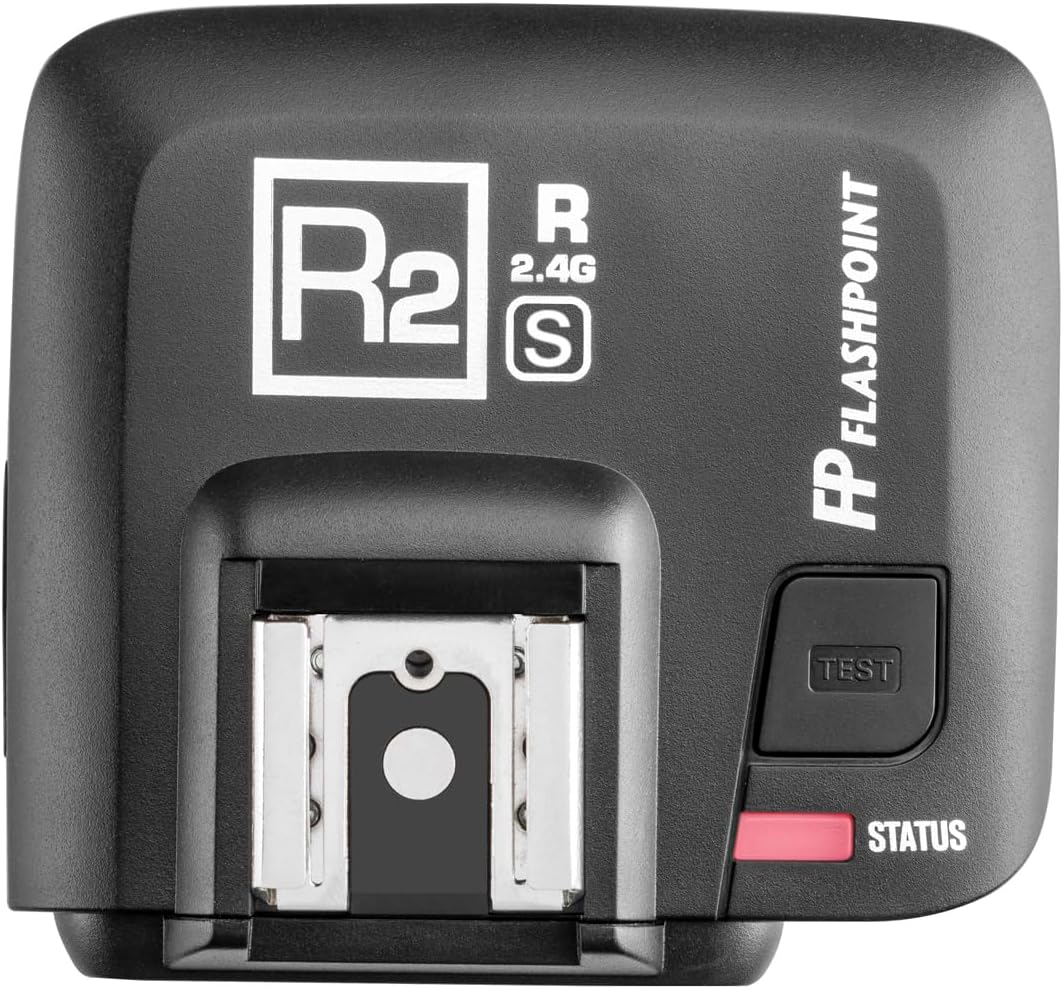


- LCD ഡിസ്പ്ലേ: Shows current Channel (CH) and Group (GR) settings.
- സിഎച്ച് ബട്ടൺ: Used to select and adjust the operating channel.
- GR Button: Used to select and adjust the operating group.
- ടെസ്റ്റ് ബട്ടൺ: Manually fires the connected flash for testing purposes.
- STATUS Light: Indicates the receiver's operational status (e.g., ready, firing).
- ഹോട്ട് ഷൂ മൗണ്ട്: For mounting the receiver onto a camera's hot shoe.
- മൈക്രോ യുഎസ്ബി പോർട്ട്: For connecting to a computer to perform firmware updates.
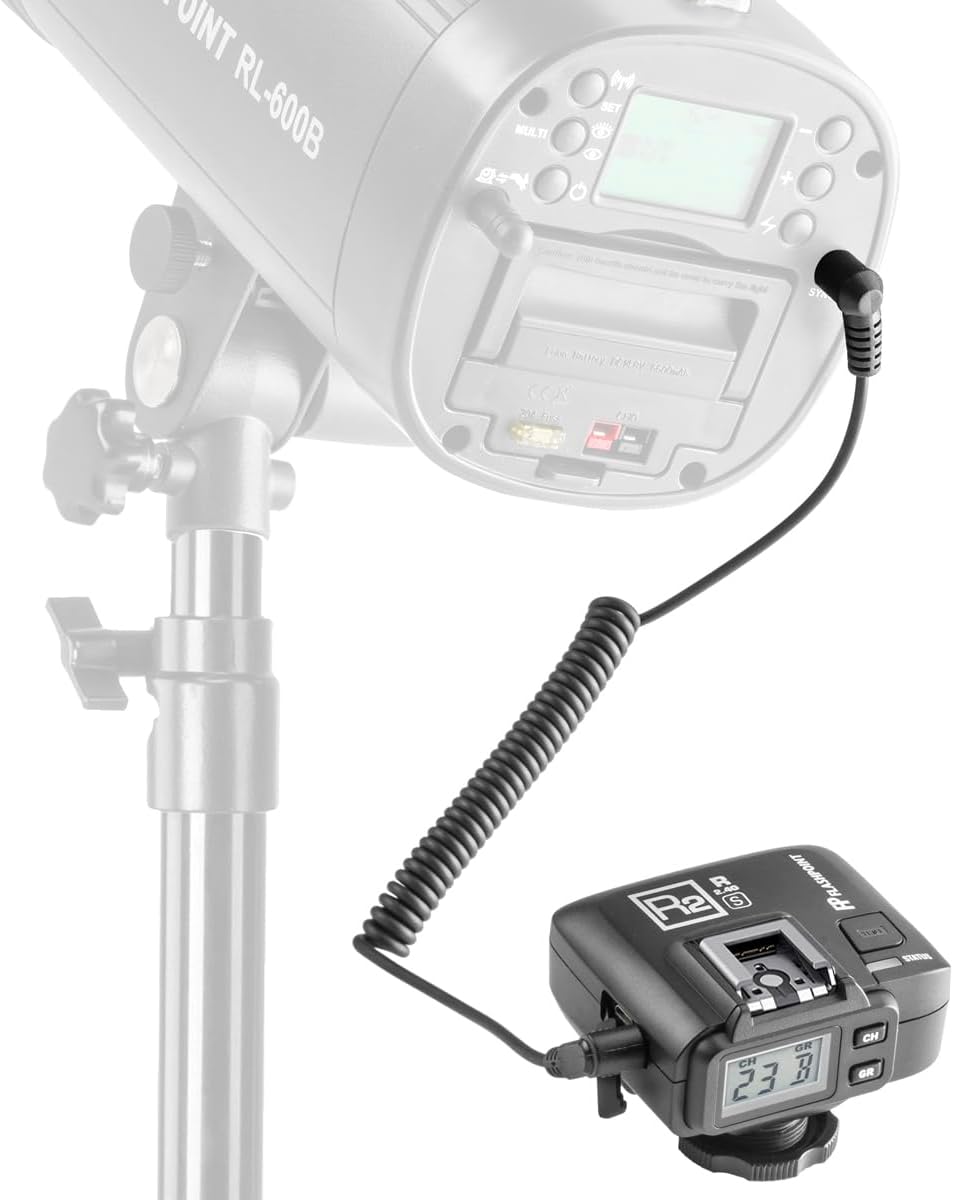
- 2.5mm Sync Port: For wired connection to flashes or strobes that do not have a built-in R2 radio receiver.
- ബാറ്ററി കമ്പാർട്ട്മെൻ്റ്: Located on the underside, for two AA batteries.
- വൈദ്യുതി സ്വിച്ച്: Typically integrated with the backlight control or a dedicated switch.
3. സജ്ജീകരണം
3.1. ബാറ്ററി ഇൻസ്റ്റാളേഷൻ
- Locate the battery compartment cover on the underside of the R2 receiver.
- കവർ തുറക്കുക.
- കമ്പാർട്ടുമെന്റിനുള്ളിൽ സൂചിപ്പിച്ചിരിക്കുന്നതുപോലെ ശരിയായ പോളാരിറ്റി (+/-) ഉറപ്പാക്കിക്കൊണ്ട് രണ്ട് AA ബാറ്ററികൾ ഇടുക.
- ബാറ്ററി കമ്പാർട്ട്മെൻ്റ് കവർ സുരക്ഷിതമായി അടയ്ക്കുക.
3.2. Mounting on Camera
- Ensure your Sony camera is powered off.
- Slide the R2 receiver's hot shoe mount into your camera's hot shoe.
- Tighten the locking ring or lever on the receiver to secure it firmly to the camera.
3.3. Connecting to External Flashes (Wired)
For strobes or flashes without a built-in R2 radio receiver, use the provided 2.5mm sync cord to connect the R2 receiver to the flash's sync port.
3.4. ഫേംവെയർ അപ്ഡേറ്റുകൾ
The R2 receiver features a Micro USB port for firmware updates. It is recommended to periodically check the Flashpoint website for the latest firmware versions to ensure optimal compatibility and performance, especially for use with manual flashes and sync cord connections (Firmware Version 04 or later may be required).
4. പ്രവർത്തന നിർദ്ദേശങ്ങൾ
4.1. പവർ ഓൺ/ഓഫ്
Locate the power switch (often combined with the backlight control) and slide it to the 'ON' position to power on the receiver. The LCD display will illuminate. To power off, slide the switch to 'OFF'.
4.2. Channel (CH) Selection
Press the 'CH' button to cycle through the available 32 channels. Ensure the channel on your R2 receiver matches the channel set on your Flashpoint R2 transmitter (e.g., XPro-S, X2T-S) and any other R2 system flashes you intend to trigger.
4.3. Group (GR) Selection
Press the 'GR' button to cycle through the available 5 groups (A, B, C, D, E). Assign your flashes to different groups to control them independently from your transmitter.
4.4. Test Fire
Press the 'TEST' button on the receiver to manually fire the connected flash. The STATUS light will illuminate briefly to confirm the flash has fired.
4.5. TTL and HSS Operation
When mounted on a compatible Sony camera and paired with an R2 system transmitter, the R2 receiver will automatically support TTL and HSS functions. Ensure your camera and flash settings are configured for these modes. The receiver acts as a bridge, translating the camera's signals to the R2 system flashes.
4.6. Compatibility with Flashpoint R2 System
The R2 receiver is fully compatible with the Flashpoint R2 Speedlights, Monolights, and Strobe lights that have built-in R2 TTL radio transceivers. For older Flashpoint Streaklights and speedlights without an R2 radio, they can be fired and controlled off-camera when attached to an R2 Bridge Radio Remote Receiver (sold separately), providing a remote link to earlier models.
5. പരിപാലനം
- വൃത്തിയാക്കൽ: Use a soft, dry cloth to clean the exterior of the receiver. Avoid using harsh chemicals or abrasive materials.
- ബാറ്ററി കെയർ: Remove batteries if the receiver will not be used for an extended period to prevent leakage and damage.
- സംഭരണം: Store the receiver in a cool, dry place, away from direct sunlight and extreme temperatures.
6. പ്രശ്നപരിഹാരം
- Receiver Not Powering On: Check if the batteries are inserted correctly and are not depleted. Replace with fresh AA batteries if necessary.
- Flashes Not Firing:
- Ensure the receiver is powered on and securely mounted on the camera.
- Verify that the channel (CH) and group (GR) settings on the receiver match those on your transmitter and flashes.
- Check the battery level of both the receiver and the flashes.
- If using a wired connection, ensure the sync cord is properly connected to both the receiver and the flash.
- Inconsistent Firing or TTL Issues:
- Ensure there are no obstructions between the receiver and the flashes.
- Check for potential radio interference from other 2.4 GHz devices. Try changing the channel.
- Verify that the receiver's firmware is up to date. Some users have reported issues with TTL reliability with Sony flashes, which may be addressed by firmware updates.
- Confirm that your camera and flash settings are correctly configured for TTL or HSS.
- ബാക്ക്ലൈറ്റ് പ്രവർത്തിക്കുന്നില്ല: Check the power switch, as it may also control the backlight function.
7 സ്പെസിഫിക്കേഷനുകൾ
| ഫീച്ചർ | വിശദാംശങ്ങൾ |
|---|---|
| മോഡൽ നമ്പർ | R2 (Godox X1R-S) |
| ഉൽപ്പന്ന അളവുകൾ | 4.9 x 4.8 x 2.8 ഇഞ്ച് |
| ഇനത്തിൻ്റെ ഭാരം | 8 ഔൺസ് |
| ബാറ്ററികൾ ആവശ്യമാണ് | 2x AA ബാറ്ററികൾ |
| നിർമ്മാതാവ് | ഫ്ലാഷ് പോയിന്റ് |
| അനുയോജ്യമായ മൗണ്ടിംഗുകൾ | Sony Alpha hot shoe |
| കണക്റ്റിവിറ്റി ടെക്നോളജി | 2.4 GHz Wireless, Wired (2.5mm Sync Port) |
| വയർലെസ് ഫ്രീക്വൻസി | 2.4 GHz |
| വയർലെസ് ശ്രേണി | 100-200 feet (approx. 30-60 meters) |
| ചാനലുകൾ | 32 |
| ഗ്രൂപ്പുകൾ | 5 (എ, ബി, സി, ഡി, ഇ) |
| ഹൈ-സ്പീഡ് സമന്വയം | 1/8000സെ വരെ |
| Firmware Port | മൈക്രോ യുഎസ്ബി |
8. വാറൻ്റിയും പിന്തുണയും
For warranty information, technical support, or service inquiries, please contact Flashpoint customer service or refer to the official Flashpoint webസൈറ്റ്. ഏതെങ്കിലും വാറന്റി ക്ലെയിമുകൾക്ക് വാങ്ങിയതിന്റെ തെളിവായി നിങ്ങളുടെ വാങ്ങൽ രസീത് സൂക്ഷിക്കുക.


