1. ആമുഖം
Thank you for choosing the Einhell TC-MS 2513 L Miter Saw. This precision tool is designed for cutting wood and coated panels with accuracy and efficiency. This manual provides essential information for the safe and effective operation, assembly, maintenance, and troubleshooting of your miter saw. Please read these instructions carefully before using the product for the first time and keep them for future reference.
1.1 പൊതു സുരക്ഷാ നിർദ്ദേശങ്ങൾ
- സുരക്ഷാ ഗ്ലാസുകൾ, ശ്രവണ സംരക്ഷണം, പൊടി മാസ്ക് എന്നിവയുൾപ്പെടെ ഉചിതമായ വ്യക്തിഗത സംരക്ഷണ ഉപകരണങ്ങൾ (പിപിഇ) എല്ലായ്പ്പോഴും ധരിക്കുക.
- വർക്ക്പീസ് സുരക്ഷിതമാണെന്ന് ഉറപ്പാക്കുകampമുറിക്കുന്നതിന് മുമ്പ്.
- Keep hands clear of the cutting area and rotating blade.
- Disconnect the power supply before making any adjustments, changing blades, or performing maintenance.
- Operate the saw in a well-lit and well-ventilated area.
- ഡിയിൽ സോ പ്രവർത്തിപ്പിക്കരുത്amp അല്ലെങ്കിൽ ആർദ്ര സാഹചര്യങ്ങൾ.
- കുട്ടികളെയും കാഴ്ചക്കാരെയും ഓപ്പറേഷൻ ഏരിയയിൽ നിന്ന് അകറ്റി നിർത്തുക.
- Use only sharp, undamaged saw blades suitable for the material being cut.
2. ഉൽപ്പന്നം കഴിഞ്ഞുview
The Einhell TC-MS 2513 L Miter Saw features a high-quality turntable for precise angle adjustments, a durable carbide-tipped saw blade for excellent cutting results, and a laser guide for accurate cuts. It also includes a dust collector for a cleaner workspace and auxiliary clamps for securing long workpieces.
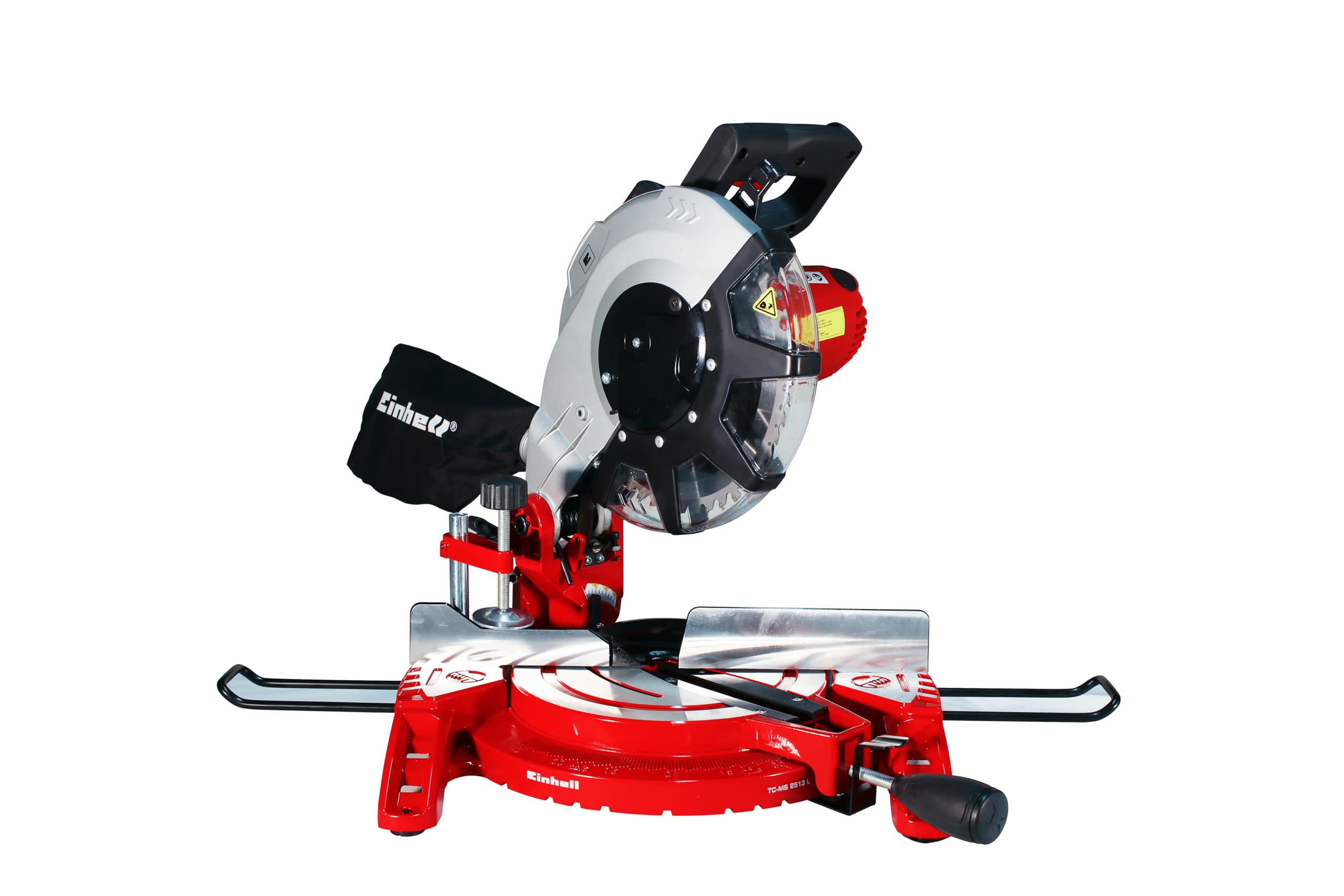
ചിത്രം 1: മുൻഭാഗം view of the Einhell TC-MS 2513 L Miter Saw, showing the main components including the saw head, blade guard, turntable, and base.
2.1 ഘടകങ്ങൾ
- Saw Head with Motor and Blade Guard
- Handle with Power Switch
- ലേസർ ഗൈഡ്
- Turntable with Angle Scale
- അടിസ്ഥാന പ്ലേറ്റ്
- വർക്ക്പീസ് Clamps (Auxiliary Grips)
- പൊടി ശേഖരണ ബാഗ്
- Blade Locking Button
- ബെവൽ അഡ്ജസ്റ്റ്മെന്റ് ലിവർ
- വർക്ക്പീസ് പിന്തുണയ്ക്കുന്നു

Figure 2: Included accessories: workpiece supports, clamp, and dust collection bag.
3. സജ്ജീകരണം
3.1 അൺപാക്കിംഗും അസംബ്ലിയും
- പാക്കേജിംഗിൽ നിന്ന് എല്ലാ ഘടകങ്ങളും ശ്രദ്ധാപൂർവ്വം നീക്കം ചെയ്യുക.
- മാനുവലിൽ ലിസ്റ്റ് ചെയ്തിരിക്കുന്ന എല്ലാ ഭാഗങ്ങളും ഉണ്ടെന്നും കേടുപാടുകൾ സംഭവിച്ചിട്ടില്ലെന്നും ഉറപ്പാക്കുക.
- Attach the workpiece supports to the base plate if not already installed.
- Mount the dust collection bag to the designated port.
3.2 Blade Installation (if not pre-installed)
- മുന്നറിയിപ്പ്: Disconnect the saw from the power supply before installing or changing the blade.
- Press and hold the blade locking button to prevent the blade from rotating.
- ബ്ലേഡ് റിറ്റൈനിംഗ് സ്ക്രൂ അഴിക്കാൻ നൽകിയിരിക്കുന്ന റെഞ്ച് ഉപയോഗിക്കുക.
- Carefully remove the outer flange and the old blade.
- Place the new carbide-tipped saw blade onto the spindle, ensuring the rotation direction arrow on the blade matches the arrow on the blade guard.
- Reattach the outer flange and tighten the retaining screw securely.
- Release the blade locking button.
3.3 പ്രാരംഭ ക്രമീകരണങ്ങൾ
- Turntable Angle: Loosen the locking knob for the turntable. Rotate the turntable to the desired angle using the scale. Tighten the locking knob to secure the position. Pre-defined angles can be quickly selected.
- ബെവൽ ആംഗിൾ: Loosen the bevel adjustment lever. Tilt the saw head to the desired bevel angle. Secure the lever.
- ലേസർ ഗൈഡ്: The integrated laser guide assists in precise cutting. Ensure it is clean and functional before use.
4. പ്രവർത്തന നിർദ്ദേശങ്ങൾ
4.1 അടിസ്ഥാന പ്രവർത്തനം
- Place the workpiece firmly against the fence and secure it with the workpiece clamp. For long workpieces, use the auxiliary supports.
- Adjust the miter and/or bevel angle as required for your cut.
- Lower the saw head slightly to align the laser line with your cut mark.
- Ensure the blade is not touching the workpiece before starting the motor.
- Press the power switch on the handle to start the motor. Allow the blade to reach full speed.
- Slowly and steadily lower the saw head through the workpiece. Do not force the cut.
- Once the cut is complete, release the power switch and allow the blade to stop completely before raising the saw head.
- Remove the cut workpiece.
4.2 ലേസർ ഗൈഡ് ഉപയോഗിക്കുന്നു
The laser guide projects a line onto the workpiece, indicating the exact cutting path. Activate the laser by pressing its dedicated switch (if available, or it may activate with the main power). Align this line with your pencil mark for highly accurate cuts.
4.3 പൊടി ശേഖരണം
The included dust collection bag helps to keep your workspace clean by collecting sawdust during operation. Regularly empty the dust bag to maintain optimal collection efficiency. For enhanced dust extraction, the saw can be connected to an external dust extractor system (adapter may be required).
5. പരിപാലനം
5.1 വൃത്തിയാക്കൽ
- വൃത്തിയാക്കുന്നതിന് മുമ്പ് എല്ലായ്പ്പോഴും പവർ പ്ലഗ് വിച്ഛേദിക്കുക.
- Clean the saw regularly to remove sawdust and debris. Use a brush or compressed air.
- ആക്രമണാത്മക ക്ലീനിംഗ് ഏജന്റുകളോ ലായകങ്ങളോ ഉപയോഗിക്കരുത്.
- Empty the dust collection bag frequently.
- Keep the ventilation slots on the motor housing clear to prevent overheating.
5.2 ബ്ലേഡ് മാറ്റിസ്ഥാപിക്കൽ
Refer to section 3.2 "Blade Installation" for detailed instructions on how to safely replace the saw blade. Always use sharp, undamaged blades of the correct size and type for your saw.
5.3 ലൂബ്രിക്കേഷൻ
Periodically apply a small amount of machine oil to moving parts, such as the pivot points of the saw head and turntable, to ensure smooth operation. Avoid lubricating the blade or motor components.
6. പ്രശ്നപരിഹാരം
| പ്രശ്നം | സാധ്യമായ കാരണം | പരിഹാരം |
|---|---|---|
| സോ ആരംഭിക്കുന്നില്ല | വൈദ്യുതി ഇല്ല; സ്വിച്ച് തകരാറ്; മോട്ടോർ ഓവർലോഡ്. | Check power connection; ensure switch is fully engaged; allow motor to cool down. |
| കൃത്യമല്ലാത്ത മുറിവുകൾ | ബ്ലേഡ് മങ്ങിയതോ കേടുവന്നതോ ആണ്; തെറ്റായ ആംഗിൾ ക്രമീകരണം; വർക്ക്പീസ് ഉറപ്പിച്ചിട്ടില്ല. | Replace blade; re-adjust angles; secure workpiece firmly. |
| അമിതമായ വൈബ്രേഷൻ | Loose blade; damaged blade; loose mounting bolts. | Check blade tightness; replace damaged blade; tighten all mounting bolts. |
| മോശം പൊടി ശേഖരണം | Dust bag full; dust port clogged; improper connection. | Empty dust bag; clear dust port; ensure secure connection. |
If you encounter problems not listed here or if the suggested solutions do not resolve the issue, please contact Einhell customer support.
7 സ്പെസിഫിക്കേഷനുകൾ
| ഫീച്ചർ | മൂല്യം |
|---|---|
| മോഡൽ | TC-MS 2513 L |
| വാല്യംtage | 220 വോൾട്ട് |
| പവർ ഇൻപുട്ട് | 1600 വാട്ട്സ് |
| നോ-ലോഡ് സ്പീഡ് | 4000 ആർപിഎം |
| ബ്ലേഡ് മെറ്റീരിയൽ | Carbide-tipped |
| ഉൽപ്പന്ന അളവുകൾ (L x W x H) | 54 x 39 x 40 സെ.മീ |
| ഭാരം | 10 കിലോഗ്രാം |
| പ്രത്യേക സവിശേഷതകൾ | Laser guide for cutting, Dust collector, Auxiliary grips |
| GTIN | 4006825609271 |
8. വാറൻ്റിയും പിന്തുണയും
Einhell products are manufactured to high-quality standards and undergo strict quality controls. This product is covered by a manufacturer's warranty. Please refer to the warranty card included with your purchase or visit the official Einhell webനിങ്ങളുടെ പ്രദേശത്തിന് പ്രത്യേകമായുള്ള വിശദമായ വാറന്റി നിബന്ധനകൾക്കും വ്യവസ്ഥകൾക്കും സൈറ്റ് സന്ദർശിക്കുക.
For technical support, spare parts, or service inquiries, please contact your local Einhell service center or the retailer where you purchased the product.
ഐൻഹെൽ ജർമ്മനി എജി
www.einhell.com


