ട്രോൺസ്മാർട്ട് മാർസ് G02 വയർലെസ് ഗെയിം കൺട്രോളർ യൂസർ മാനുവൽ
മോഡൽ: G02
ആമുഖം
Thank you for choosing the Tronsmart Mars G02 Wireless Game Controller. This manual provides detailed instructions for setting up, operating, and maintaining your controller to ensure optimal performance across various compatible devices, including smartphones, tablets, PCs, and smart TVs.
പാക്കേജ് ഉള്ളടക്കം
നിങ്ങളുടെ പാക്കേജിൽ എല്ലാ ഇനങ്ങളും ഉണ്ടെന്ന് ദയവായി പരിശോധിക്കുക:
- Tronsmart Mars G02 Wireless Game Controller
- യുഎസ്ബി ചാർജിംഗ് കേബിൾ
- 2.4GHz യുഎസ്ബി റിസീവർ
- ഉപയോക്തൃ മാനുവൽ (ഈ പ്രമാണം)

Image: Contents of the Tronsmart Mars G02 Wireless Game Controller package, showing the controller, USB receiver, charging cable, and user manual.
ഉൽപ്പന്നം കഴിഞ്ഞുview
Familiarize yourself with the various components and controls of your Tronsmart Mars G02 controller.

ചിത്രം: മുൻഭാഗം view of the Tronsmart Mars G02 controller, highlighting the D-pad, left and right joysticks, A/B/X/Y buttons, Start, Select, Home, and Turbo buttons.

Image: The Tronsmart Mars G02 controller with its integrated smartphone holder extended, ready to secure a mobile device for gaming.
പ്രധാന സവിശേഷതകൾ:
- Dual Connectivity: Supports both Bluetooth and 2.4GHz wireless connections.
- Integrated Phone Holder: Adjustable holder for smartphones (3.5 to 6 inches).
- Multi-Platform Compatibility: Works with Android devices, PCs, and smart TVs.
- Ergonomic Design: Comfortable grip for extended gaming sessions.
- Turbo Function: Programmable turbo button for rapid fire.
സജ്ജമാക്കുക
1. കൺട്രോളർ ചാർജ് ചെയ്യുന്നു
Before initial use, fully charge the controller. Connect the supplied USB charging cable to the controller's charging port and the other end to a USB power source (e.g., computer USB port, USB wall adapter). The charging indicator light will show the charging status and turn off when fully charged.
2. ഉപകരണങ്ങളിലേക്ക് ബന്ധിപ്പിക്കുന്നു
The Tronsmart Mars G02 offers two primary connection methods:
2.1. Bluetooth Connection (for Android Smartphones/Tablets)
- കൺട്രോളർ ഓഫാണെന്ന് ഉറപ്പാക്കുക.
- അമർത്തിപ്പിടിക്കുക ഹോം ബട്ടൺ ഒപ്പം ഒരു ബട്ടൺ simultaneously for 3 seconds until the indicator light flashes rapidly, indicating pairing mode.
- നിങ്ങളുടെ Android ഉപകരണത്തിൽ, ഇതിലേക്ക് പോകുക ക്രമീകരണങ്ങൾ > ബ്ലൂടൂത്ത് ബ്ലൂടൂത്ത് ഓണാക്കുക.
- Scan for available devices and select "Tronsmart Mars G02" from the list.
- കണക്ട് ചെയ്തുകഴിഞ്ഞാൽ, കൺട്രോളറിലെ ഇൻഡിക്കേറ്റർ ലൈറ്റ് സോളിഡ് ആകും.
2.2. 2.4GHz Wireless Connection (for PC/Smart TV/TV Box)
- Insert the 2.4GHz USB receiver into an available USB port on your PC, Smart TV, or TV Box.
- കൺട്രോളർ ഓഫാണെന്ന് ഉറപ്പാക്കുക.
- അമർത്തിപ്പിടിക്കുക ഹോം ബട്ടൺ ഒപ്പം X ബട്ടൺ simultaneously for 3 seconds until the indicator light flashes rapidly.
- The controller will automatically connect to the USB receiver. Once connected, the indicator light will become solid.
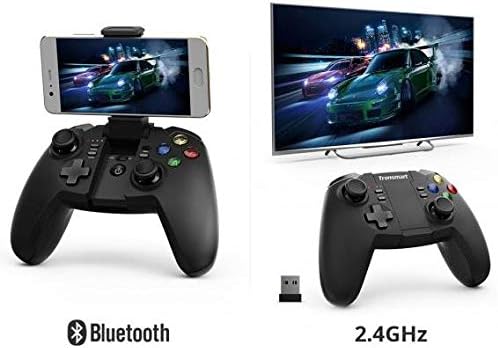
Image: Illustration showing the Tronsmart Mars G02 controller connecting to a smartphone via Bluetooth and to a television via its 2.4GHz USB receiver.
3. Attaching a Smartphone (Optional)
The integrated phone holder can accommodate smartphones between 3.5 and 6 inches.
- Gently pull up the phone holder from the center of the controller.
- Adjust the angle to your preference (up to 135 degrees).
- നിങ്ങളുടെ സ്മാർട്ട്ഫോൺ ശ്രദ്ധാപൂർവ്വം ഹോൾഡറിൽ വയ്ക്കുക, അത് സുരക്ഷിതമായി പിടിച്ചിട്ടുണ്ടെന്ന് ഉറപ്പാക്കുക.

ചിത്രം: വശം view of the Tronsmart Mars G02 controller demonstrating the adjustable angles (90 and 135 degrees) of the integrated phone holder, designed for phones between 3.5 and 6 inches.
പ്രവർത്തന നിർദ്ദേശങ്ങൾ
പവർ ഓൺ/ഓഫ്
- പവർ ഓൺ: അമർത്തുക ഹോം ബട്ടൺ once. The controller will attempt to reconnect to the last paired device.
- പവർ ഓഫ്: അമർത്തിപ്പിടിക്കുക ഹോം ബട്ടൺ for 5 seconds until the indicator lights turn off. The controller will also automatically power off after 5 minutes of inactivity.
ബട്ടൺ പ്രവർത്തനങ്ങൾ
The Tronsmart Mars G02 features standard gaming controller buttons:
- Left/Right Analog Joysticks: കൃത്യമായ 360-ഡിഗ്രി ചലനത്തിന്.
- ഡി-പാഡ് (ഡയറക്ഷണൽ പാഡ്): ദിശാ ഇൻപുട്ടിനായി.
- A/B/X/Y ബട്ടണുകൾ: Action buttons, typically color-coded.
- L1/R1 (ബമ്പറുകൾ): തോളിലെ ബട്ടണുകൾ.
- L2/R2 (ട്രിഗറുകൾ): Analog triggers for variable input.
- ആരംഭ ബട്ടൺ: Typically used to pause or confirm actions.
- ബട്ടൺ തിരഞ്ഞെടുക്കുക: Often used for menu navigation or secondary functions.
- ഹോം ബട്ടണ്: Powers the controller on/off, and returns to the home screen on some devices.
- ടർബോ ബട്ടൺ: Activates rapid-fire for assigned buttons.
ടർബോ പ്രവർത്തനം
To enable the Turbo function for a specific button:
- അമർത്തിപ്പിടിക്കുക ടർബോ ബട്ടൺ.
- While holding Turbo, press the desired action button (e.g., A, B, X, Y, L1, R1, L2, R2) once. The Turbo function is now active for that button.
- To disable Turbo for that button, repeat the process: hold ടർബോ and press the action button again.

Image: The Tronsmart Mars G02 controller positioned in front of a range of compatible devices, including a smartphone, tablet, laptop, and television, illustrating its multi-platform support.
മെയിൻ്റനൻസ്
- Keep the controller dry. Avoid exposure to moisture or liquids.
- മൃദുവായതും ഉണങ്ങിയതുമായ തുണി ഉപയോഗിച്ച് കൺട്രോളർ വൃത്തിയാക്കുക. കഠിനമായ രാസവസ്തുക്കളോ ഉരച്ചിലുകളുള്ള ക്ലീനറുകളോ ഉപയോഗിക്കരുത്.
- കൺട്രോളർ നേരിട്ട് സൂര്യപ്രകാശം ഏൽക്കാത്തതും തീവ്രമായ താപനില ഏൽക്കാത്തതുമായ ഒരു തണുത്ത വരണ്ട സ്ഥലത്ത് സൂക്ഷിക്കുക.
- കൺട്രോളർ താഴെയിടുകയോ ശക്തമായ ആഘാതങ്ങൾക്ക് വിധേയമാക്കുകയോ ചെയ്യുന്നത് ഒഴിവാക്കുക.
- When not in use for extended periods, charge the controller periodically to maintain battery health.
ട്രബിൾഷൂട്ടിംഗ്
| പ്രശ്നം | പരിഹാരം |
|---|---|
| കൺട്രോളർ പവർ ഓണാക്കുന്നില്ല. | Ensure the controller is charged. Connect it to a power source using the USB cable. |
| ബ്ലൂടൂത്ത് വഴി ബന്ധിപ്പിക്കാൻ കഴിയില്ല. |
|
| Cannot connect via 2.4GHz receiver. |
|
| Buttons are unresponsive or laggy. |
|
സ്പെസിഫിക്കേഷനുകൾ
- ഉൽപ്പന്ന അളവുകൾ: 7.4 x 18 x 13.8 സെ.മീ
- ഭാരം: 400 ഗ്രാം
- കണക്റ്റിവിറ്റി: ബ്ലൂടൂത്ത്, 2.4GHz വയർലെസ്
- അനുയോജ്യത: Multi (Android, PC, Smart TV, TV Box)
- നിർമ്മാതാവിൻ്റെ റഫറൻസ്: 2724572970803
- ASIN: B0777SKFX6


